OBubba says the next nap window is approaching. Your baby is still rolling happily across the floor, examining a wooden spoon as if it contains the secrets of the universe. This has happened for three days: the app looks early and your baby looks nowhere near sleep.
Or perhaps the opposite keeps happening. By the time the window arrives, your baby is rubbing their eyes, becoming frantic and finding it hard to settle. The prediction seems late for the child in front of you.
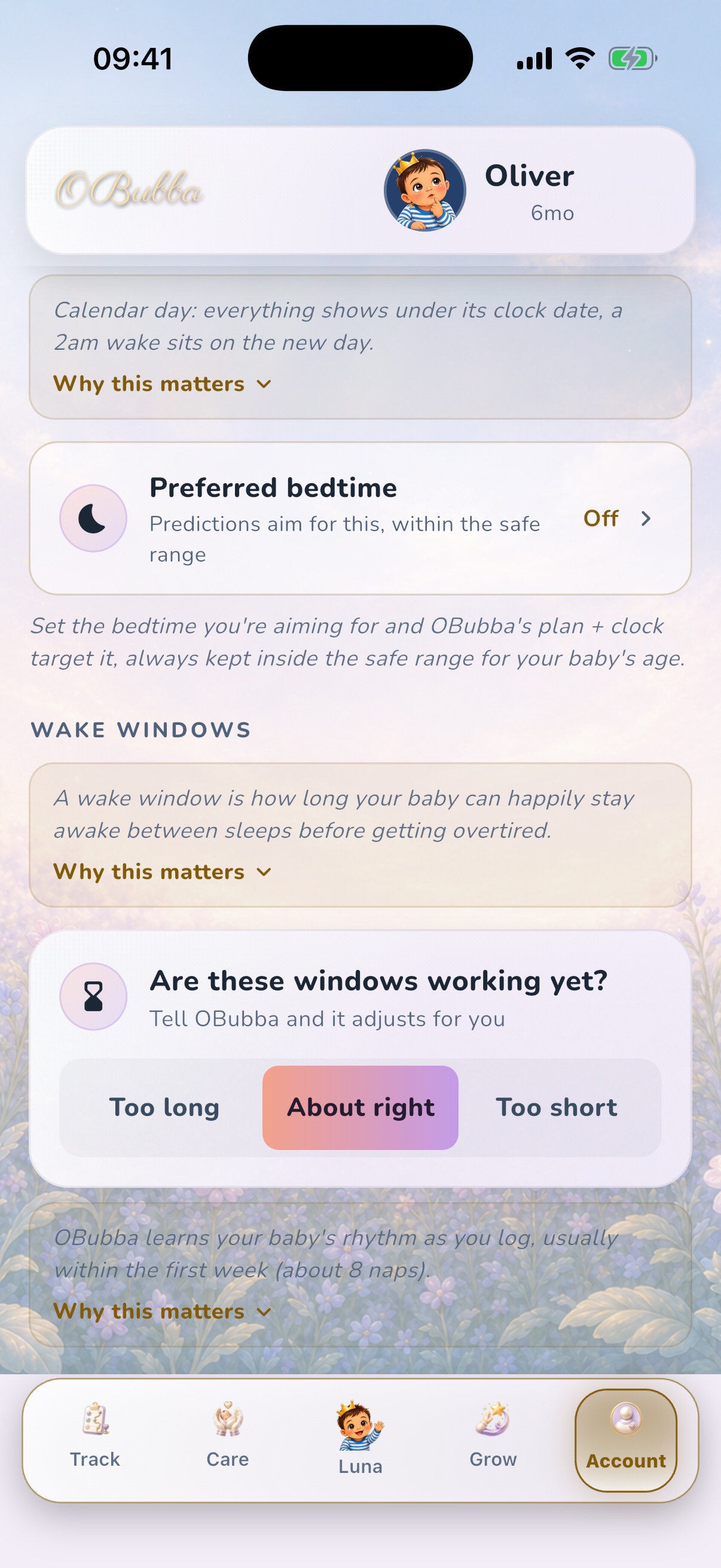
You do not need to wait a week, override every nap manually or prove that the app is “wrong”. In the current OBubba app, go to Account → Preferences → Wake windows and choose:
- Too long when the suggested awake stretches repeatedly seem later than your baby can comfortably manage
- About right when the starting point feels broadly useful, or when you are not sure
- Too short when your baby repeatedly seems ready later than the suggested window
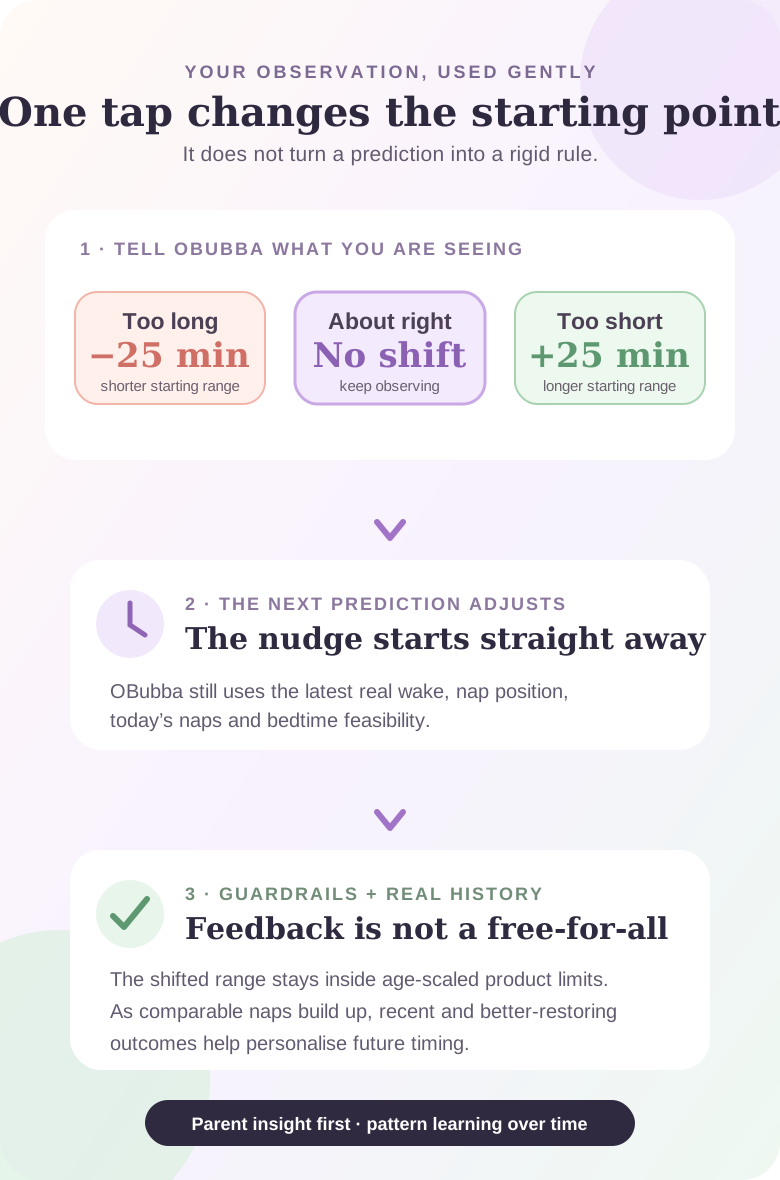
That one choice nudges the age-based starting range by 25 minutes from the next prediction. It does not create an appointment, diagnose why a nap was difficult or tell you to ignore your baby.
The useful answer is not “trust the app”
It is use the app as a calculator, then give it the context only you can see.
A timestamp can tell OBubba when the last nap ended. It cannot see the bright-eyed baby trying to crawl under the sofa. It does not feel how quickly fussiness escalates near the end of the day. It cannot know that today's yawns followed a warm car journey, a busy baby class or a poor feed.
That is why the preference exists. The app begins with an age-aware range because a new account has no personal history. The parent can then say, in effect, “for this baby, that starting point has been landing early” or “we are usually struggling before we get there”.
The aim is not to replace observation with an algorithm. It is to stop parents doing the same mental recalculation after every wake.
What each choice actually changes
The implementation maps the three labels to a signed timing bias:
| What you choose | What OBubba does to the starting range | A reasonable reason to try it | |---|---:|---| | Too long | shifts both ends 25 minutes earlier | baby is repeatedly struggling before the displayed window | | About right | applies no parent-set shift | timing is broadly useful, the pattern is mixed or you are unsure | | Too short | shifts both ends 25 minutes later | baby is repeatedly content at the window and settles better later |
The wording describes the window, not the baby. “Too short” means “the suggested awake stretch seems too short”; it does not mean the nap was too short.
That distinction matters. A parent whose baby takes 30-minute naps might instinctively tap Too short, but the cause may be an awake stretch that was already too long. Use the control only when the timing before sleep looks consistently early or late, not as a verdict on nap duration alone.
A worked example: when the app seems early
Imagine the current starting range is 2 hours 30 minutes to 3 hours after waking. Across several ordinary mornings, your baby remains cheerful at 3 hours, resists the wind-down and settles more comfortably later.
Choosing Too short adds 25 minutes to the age-based range, making the adjusted starting point roughly 2 hours 55 minutes to 3 hours 25 minutes before the other live calculations are applied.
OBubba still uses the actual wake time. If the baby woke at 6:40am today rather than 7:10am yesterday, the clock target changes. It also still checks the nap's position in the day, recent sleep, completed naps and whether another sleep remains workable before bedtime.
The preference is one input, not a frozen schedule pasted over the day.
A worked example: when the app seems late
Now imagine the displayed range often arrives after your baby's mood has tipped. Wind-downs have become rushed, settling is frantic and the same pattern repeats on otherwise ordinary days.
Choosing Too long subtracts 25 minutes from both ends of the starting range. That makes the next planning window earlier, so the parent has more time to notice cues and begin a calm transition.
It does not prove overtiredness. Hunger, discomfort, illness, stimulation, the sleep environment and an unlogged doze can all make a baby hard to settle. The setting simply says that the current timing baseline has not been practically useful.
Why OBubba does not offer a minute-by-minute slider
A slider from “minus 90” to “plus 90” would look precise. It would also encourage exhausted parents to tune one difficult nap as if it were a thermostat.
The production preference deliberately offers three plain-language choices and a moderate 25-minute step. Internally, the saved setting is constrained, and the wake-window engine applies age-scaled product limits. It will not turn a newborn baseline into a toddler-length awake stretch because someone tapped a button.
Those are software guardrails, not a clinical guarantee. Wake windows are planning shorthand rather than medical rules, and there is no universal NHS table prescribing an exact awake interval for every baby. The NHS emphasises that babies have their own waking and sleeping patterns and that those patterns change as they grow, teethe or become unwell.
What happens from the very next nap
The preference is stored with the family's app settings and mirrored into OBubba's timing engine. When the next nap prediction is calculated, the adjusted age range is available immediately.
That does not mean the next target will move by exactly 25 clock minutes in every situation. The final displayed prediction can also respond to:
- the real morning wake or latest completed nap end
- which nap is next
- whether the previous nap was very short or unusually long
- recent, comparable wake-window history
- optional nap-review details such as settling and wake mood
- a logged off-day, illness, teething, travel or daycare context
- the remaining day-sleep budget and the distance to bedtime
The cleanest way to judge the preference is therefore not to compare two isolated clock times. Compare several ordinary, similarly structured days and ask whether the suggested wind-down is becoming more usable.
How the app learns after your first tap
The setting helps most when OBubba has little history. The comments describe it as the parent's read of their baby's awake tolerance, applied from the first nap rather than making a family endure several days of obviously unhelpful suggestions.
As logs accumulate, OBubba can use actual outcomes. For a future first nap, for example, it looks for comparable first-nap wake windows in recent baseline days. More recent examples carry more weight. A wake window followed by a longer, more restorative nap carries more influence than one followed by a tiny catnap. Obvious outliers can be trimmed.
Key personal layers require repeated usable samples before they affect a target. The Preferences screen describes the first week, or about eight naps, as a common learning period—not a promise that the eighth nap unlocks a perfect answer. A specific pattern can become informative sooner, while disrupted or inconsistent days may take longer.
The parent preference and learned evidence are not competing votes where one suddenly deletes the other. The preference changes the age-based engine range and its boundaries; repeated history can increasingly drive the personal target within that live context.
When to leave “About right” selected
Leaving the neutral choice is not failing to personalise the app. It is often the best option when:
- you have logged only one or two naps
- some days look early and others late
- childcare or travel has made the week unusual
- your baby is moving between nap counts
- sleepy behaviour is unclear
- you simply do not want another decision today
Keep logging the real wake and nap end when convenient. The app can learn without the parent grading every sleep.
A five-day way to test the setting without obsessing
If the current windows consistently feel unhelpful, use a small experiment.
- Choose one direction. Tap Too long or Too short, not both on alternating naps.
- Use ordinary days. Do not judge the result from a fever day, long car journey or one-off family event.
- Watch the baby at wind-down. Note whether they are calm and receptive, bright and resistant, or already distressed.
- Log the true sleep start and end. A forgotten running timer gives the learning engine the wrong awake anchor.
- Review the pattern, not the best nap. After several comparable opportunities, decide whether the window is more useful.
If it is worse, return to About right or try the other direction. Changing the preference is reversible; there is no penalty for admitting the first interpretation was not right.
Do not use “Too short” to keep a tired baby awake
This setting is not permission to stretch every wake window until a baby matches a chart or produces a longer nap.
Pause the experiment when your baby is unusually sleepy, difficult to wake, feeding poorly or seems unwell. Follow clinical advice for premature babies, babies with health conditions and newborns who need waking for feeds. Contact your health visitor, GP, NHS 111 or emergency services as appropriate when alertness, breathing, colour, temperature, hydration or feeding concerns you.
Similarly, do not use Too long to force sleep when a content baby is clearly not ready. A calm wind-down opportunity can be offered; sleep itself cannot be scheduled by tapping a preference.
Wake windows are clues, not a test your baby passes
“Wake window” is convenient language for the time between sleeps. It can help a parent prepare, especially when the day has moved after a short nap. It cannot explain every settle or predict an exact biological moment.
The NHS notes that some babies sleep much more than others, some in long periods and others in short bursts. Growth, teething and illness can change the pattern. That is a healthier frame than treating a generic chart as a mark scheme.
OBubba's best role is to remember the arithmetic and surface the pattern. The parent's role is to decide whether the suggestion makes sense today.
Safer sleep stays the same whichever option you choose
Moving a predicted time never changes safer-sleep guidance. The NHS says the safest place for a baby to sleep for the first six months is in a cot or Moses basket, on their back, in the same room as you. Use a firm, flat mattress and keep the sleep space clear of pillows, cot bumpers, toys and loose bedding.
A convenient predicted nap does not make an unsafe sleep position, product or unattended setting safe.
Frequently asked questions
Where is the wake-window setting?
Open Account → Preferences, then scroll to Wake windows. The card asks, “Are these windows working yet?” and offers Too long, About right and Too short.
Does “Too short” mean my baby's naps are too short?
No. It means the suggested awake stretch seems too short, so OBubba should start from a later range. Nap duration alone does not tell you which option to choose.
How big is the change?
The current app uses 25 minutes: Too long applies −25 minutes, About right applies zero, and Too short applies +25 minutes to the age-based starting range.
Will every displayed nap time move by exactly 25 minutes?
Not necessarily. The preference changes one layer. The latest wake, completed naps, personal history, disruption context and bedtime feasibility can also change the final window.
Does the setting affect the next nap or only future learning?
It is available to the engine from the next prediction. Continued logging then gives the personal layers evidence about which wake windows preceded better outcomes.
How many naps does OBubba need to learn my baby?
The screen says the first week or about eight naps is common. Some engine layers need at least three comparable samples before using a personal pattern. Neither number is a guarantee; data quality and day-to-day consistency matter.
Can I change it back?
Yes. Choose About right at any time to remove the parent-set 25-minute shift.
Is a wake-window prediction medical advice?
No. It is a planning aid built from logged times, product rules and patterns. Health, feeding and safer-sleep guidance take priority.
The app should adapt before the parent gives up
Parents do not download a tracker because they want another authority telling them their baby is late.
They want help remembering what happened, spotting what repeats and making the next decision with less mental load. A useful sleep app therefore needs two kinds of humility: it must begin somewhere when the history is empty, and it must let the family say when that starting point does not fit.
Try OBubba free → and choose the wake-window starting point that sounds most like your baby. If you are unsure, leave it on About right—the app can keep learning while you keep watching the person who matters.
Sources and further reading
OBubba is a tracking and education tool, not medical advice. Seek qualified help for concerns about unusual sleepiness, breathing, illness, feeding, growth, hydration or development, and follow your baby's individual clinical plan.
Ready to try OBubba?
Use OBubba to track feeds, sleep, naps, nappies, growth, milestones and family handovers in one calm baby tracker app.