The health visitor asks, “How has feeding been?”
You remember two tiny bottles yesterday, three excellent feeds on Monday and a difficult night somewhere in the middle. Your baby is wriggling, the Red Book is at the bottom of the changing bag, and the useful answer is buried beneath 70 individual logs.
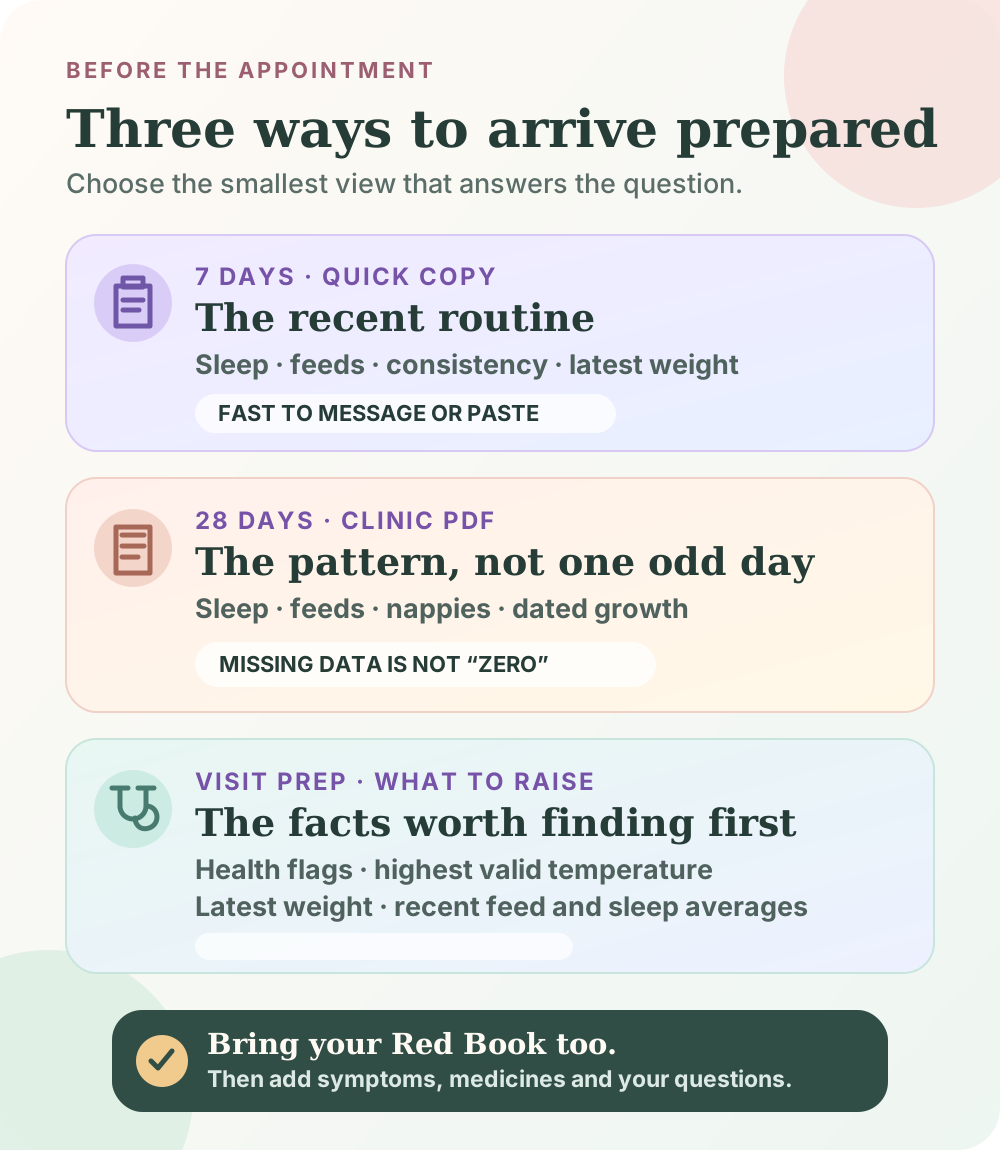
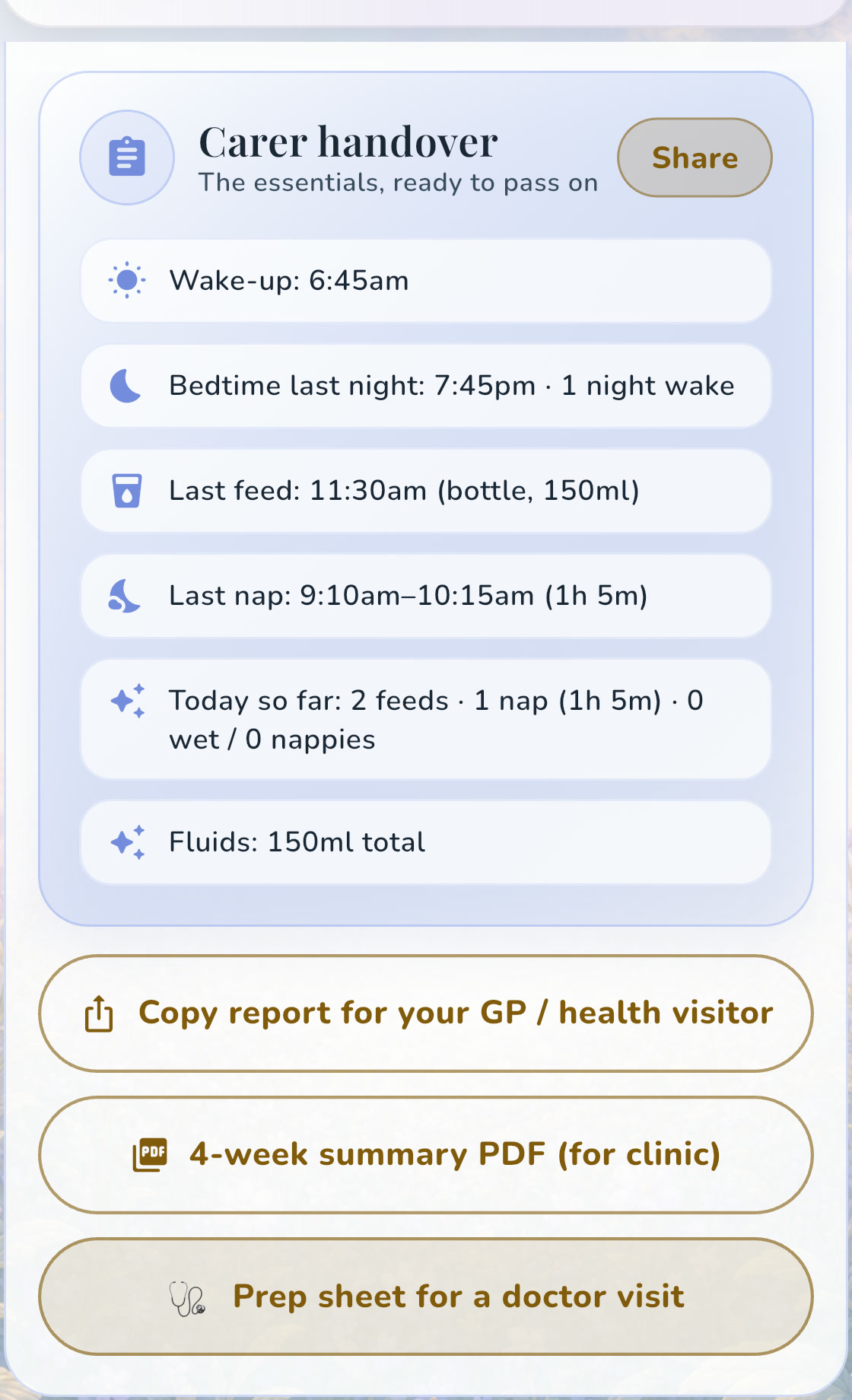
OBubba’s Reports screen is built for this moment. The current app can turn recent sleep, feeds, nappies, temperatures and growth entries into three different appointment views: a quick seven-day copy, a printable four-week clinic summary and a doctor-visit prep sheet that puts possible health flags first.
It does not create a medical record or decide whether your baby is well. It gives parent observations a calmer shape, so the appointment can begin with a pattern instead of a memory test.
The appointment bag in 30 seconds
Take:
- your baby’s Personal Child Health Record—the Red Book;
- the appointment letter and any questionnaire you were asked to complete;
- a short list of your questions and the change you have noticed;
- medicines, doses, allergies and relevant illness details written accurately;
- any requested samples, photographs or paperwork; and
- one concise OBubba summary if recent routine data will help the conversation.
The NHS recommends taking the Red Book whenever you visit a baby clinic or GP. It holds official weights, heights, vaccinations and other important information. An OBubba export sits beside that record; it does not replace it.
What the current OBubba app actually offers
We traced the production Reports screen, clinical PDF builder and visit-prep engine. The three clinic actions look similar, but they have different jobs.
1. Copy report for your GP or health visitor
This is the quickest option. It creates a plain-text summary of the latest seven days that can be pasted into a message or note.
Where the relevant data exists, it can include:
- days logged out of seven;
- average night wakes;
- average day sleep and naps;
- average feeds;
- bedtime consistency; and
- the latest recorded weight.
It is useful when a professional has asked for a short update or when you want readable facts on your own screen. It is not a complete history, and it does not include everything stored in the app.
2. Four-week summary PDF for clinic
This is the longer pattern view. OBubba looks back across 28 calendar days and creates a shareable A4 PDF.
The PDF can contain:
| Section | What may appear | |---|---| | Sleep | 24-hour sleep, night sleep, day sleep, naps and night wakes—with rows shown only when supporting sleep data exists | | Feeding | Average feeds per logged day | | Nappies | Average wet and dirty nappies on the same daily basis as the other averages | | Growth | Most recently logged weight, length and head circumference, each with its measurement date and a centile where the required details exist | | Summary | A short plain-English description of the recorded pattern |
It also prints the date range and number of logged days. That denominator matters. “4.8 feeds per day across 18 logged days” is much more honest than making a month with ten blank days look complete.
3. Prep sheet for a doctor visit
This is the “what might I need to raise?” view. It scans the latest seven days and can place up to four health-category insights at the top, followed by:
- the number of plausible temperature readings and the highest one;
- the latest logged weight and its date;
- recent feed averages; and
- day-sleep, nap and night-wake figures where those categories were actually tracked.
The temperature check filters implausible values, so an entry such as `380` is not printed as 380°C. That protects the sheet from an obvious typing error; it does not verify that a real-looking reading was taken correctly.
The most important feature is what OBubba refuses to invent
An average of zero naps can mean two very different things:
- your child genuinely had no naps; or
- nobody tracked sleep.
The current report code treats that distinction seriously. If no nap data exists, it omits the nap rows. If no night data exists, it omits night wakes. A feeds-only family should not hand a GP a polished sheet claiming “0 naps” and “0 night wakes”.
The same care appears in the daily-average basis. Where earlier logged days exist, an unfinished today is left out of the averages so breakfast-time activity does not make the whole pattern look artificially low. Wet and dirty nappy totals use the same basis rather than quietly switching denominators.
This is the right kind of intelligence for a family tracker: not filling every box, but showing the boundary of what was actually observed.
How OBubba handles growth—and where the Red Book wins
The clinic PDF uses the most recent growth entries stored for the child. These are not necessarily measurements taken within the 28-day report window, so the original date is printed beside each one.
When sex and age information are available, OBubba can add a centile based on WHO growth standards. For a baby born prematurely, the current implementation works from corrected age at the date of each measurement rather than comparing an older measurement with today’s chronological age. If the information needed for a centile is missing, the app leaves the centile out.
That calculation is useful context, not an official plot. The NHS explains that growth is assessed as a pattern on the UK-WHO charts in the Red Book, and that babies do not have to follow a centile line exactly. Measurement technique, the equipment used, the baby’s age and the direction over time all matter.
Use OBubba’s line to locate the dated measurement quickly. Let the health visitor or clinician confirm the measurement and interpret the official chart.
What the report still cannot know
OBubba cannot see:
- how your baby looked, sounded or behaved during a symptom;
- whether a feed entry represents milk offered or milk actually taken;
- whether a temperature was measured correctly or with an appropriate thermometer;
- why a nappy was missed from the log;
- the colour, spread, texture or timing of a rash unless you explain it;
- medicine names, exact doses and administration history unless separately recorded and brought to the appointment;
- family history, examination findings, vaccinations or professional notes in the Red Book; or
- the question you are most afraid of forgetting.
The doctor-visit sheet also is not a complete export of every event. Its job is triage-friendly brevity. Add a separate note for the actual concern:
> Change noticed: Since Tuesday, feeds take longer and baby stops after about half the usual bottle. Three wet nappies yesterday compared with our usual six. Temperature 37.6°C at 8:10pm with a digital thermometer under the arm. More sleepy than usual this morning. No vomiting noticed. Question: does baby need to be seen today?
That note is useful because it separates observation from diagnosis and gives dates, quantities and context.
Do not save urgent symptoms for a scheduled appointment
A beautifully prepared PDF is irrelevant if your baby needs help now.
Current NHS guidance says to call 999 or go to A&E for serious signs including severe breathing difficulty, blue/grey/pale or blotchy skin, a non-fading rash, a seizure, being difficult to wake, or certain very high or low temperatures in young babies. Call NHS 111 if you are worried and do not know what to do. Trust your instincts and keep checking for changing symptoms.
Do not wait for OBubba to produce a flag. The app can only analyse what was entered, and no automated insight covers every illness.
A five-minute preparation routine
The night before
- Open Care → Reports → More reports & handovers.
- Check that recent wake times, feeds, nappies and temperatures were saved correctly.
- Correct duplicates, wrong units and accidental future times before generating anything.
- Choose the smallest useful view: seven days for a quick update, four weeks for a pattern, or visit prep when a specific health concern is being discussed.
- Write your top three questions separately.
Before leaving
- Pack the Red Book.
- Bring the appointment letter or requested questionnaire.
- Note every medicine with name, concentration, dose and time last given.
- Keep useful photos ready without relying on your camera roll search in the room.
- Bring feeding equipment or products only if the clinic asked for them.
In the appointment
Lead with the concern, not the spreadsheet:
> “I’m worried because feeding changed three days ago. This four-week view shows what normal looked like beforehand.”
Then let the professional decide which figures matter. A summary should make room for a clinical conversation, not take it over.
Share with the same care you would use for any health information
The PDF is generated by the app and passed to the phone’s sharing sheet only when the parent taps the action. It contains a child’s name and potentially sensitive routine and growth information.
Check the recipient before sending. If a clinic offers a secure patient channel, follow its instructions. Avoid posting the report to a group chat or public link simply because the share sheet makes that technically possible. Once a file is sent to another app or person, their storage and privacy rules apply.
If you only need the report during a face-to-face visit, showing it on your phone may be enough.
The real download reason: less reconstruction, better questions
Most baby trackers are good at storing events. The harder problem is turning those events into something useful at the moment another person needs to understand the child.
OBubba’s appointment tools connect the same records already used for sleep patterns, feeds, nappies and growth. You do not have to retype a month into a spreadsheet the night before a clinic visit. You choose the right lens, check it against your memory, add the human details and bring it beside the Red Book.
That is what parents should want from a thoughtful app: not more data to manage, but a clearer way to use the care they have already recorded.
Try OBubba free → — track the day as it happens, then turn the pattern into a calmer carer handover, clinic summary or appointment prep sheet.
Frequently asked questions
Does the OBubba PDF replace my baby’s Red Book?
No. The Red Book is the Personal Child Health Record used for official measurements, vaccinations and other important information. OBubba’s PDF is a parent-logged companion summary.
How far back does the clinic PDF look?
The current implementation examines the latest 28 calendar days. It prints how many days actually contain logs and the report date range.
Why is a row missing from my report?
OBubba omits some rows when the supporting category was not tracked. This prevents “not recorded” from being misrepresented as zero.
Are OBubba growth centiles official?
No. They are a convenience calculation from entered measurements using WHO standards where the required child details exist. Ask a health professional to confirm measurements and interpret the UK-WHO chart in the Red Book.
Will the doctor-visit sheet include every medicine and symptom?
No. It focuses on selected health insights, recent plausible temperatures, latest weight and available feed/sleep averages. Bring a separate accurate medicines list, symptom timeline and your questions.
What if my baby seems seriously unwell?
Do not wait for a routine appointment or an app report. Follow current NHS urgent-care advice, call NHS 111 if you are worried and unsure what to do, and call 999 or go to A&E for emergency signs.
Sources and further reading
- NHS: Your baby’s health and development reviews
- NHS: Your baby’s weight and height
- Royal College of Paediatrics and Child Health: UK-WHO growth charts, 0–4 years
- NHS: When to get urgent medical help for babies and children under 5
OBubba is a parent tracking and education tool, not a medical record, diagnostic device or emergency service. Discuss concerns with a qualified health professional and seek urgent help when needed.
Ready to try OBubba?
Use OBubba to track feeds, sleep, naps, nappies, growth, milestones and family handovers in one calm baby tracker app.