Your phone contains hundreds of baby photos. Somewhere in the camera roll is the first proper smile, the afternoon your baby sat without help and the week a tiny tooth appeared. But six months later, can you remember the dates — or which photo was the real first?
A baby memory book should preserve family life, not create homework. The easiest way to keep one is to make it deliberately small: save one meaningful moment at a time, add a date and write one sentence. Let the detailed photos stay in your photo library and the clinical information stay in the Red Book. Your memory book only needs the story worth finding again.
If you already feel behind, start today. You do not have to reconstruct every missing week before the next memory is allowed to count.
Why baby memory books so often stall
Traditional baby books can quietly ask for a lot: exact dates, polished paragraphs, printed photos, neat handwriting and an answer for every pre-labelled page. That is a difficult standard during a year already full of feeds, broken nights, appointments, washing and change.
Four traps make the blank pages feel worse:
- Perfection: waiting for the right photo, wording or quiet afternoon
- Duplication: recording the same event in an app, calendar, notes file and paper book
- Backlog: believing March must be complete before you can add something from August
- Too much detail: treating every sleep, feed or nappy as a future keepsake
The solution is not to try harder. It is to give each record one clear job and lower the cost of saving a memory.
Decide what deserves a place
Your everyday tracking data can be useful now without needing to become the whole story later. A memory book works best as an edited timeline — a handful of moments that help you picture this particular child and this particular season.
Useful entries might include:
- a first or achieved milestone, such as smiling, rolling, sitting or a first word
- the first tooth you spotted
- an occasional growth check
- a family day you want to remember
- one wonderfully ordinary detail, such as the song that always caused a grin
- a letter for your child to read in the future
You do not need every first. You also do not need to convert routine care into prose. “Fed at 02:10” may help with tonight's handover; it is unlikely to need a chapter in the family story.
Before saving something, ask: will this help us remember who our baby was at this time? If the answer is yes, a date and one honest line are enough.
The five-minute weekly memory habit
Choose one repeatable moment each week — perhaps Sunday evening, after the weekly shop or while your baby plays beside you. Set a five-minute limit rather than waiting for a free hour.
1. Look back, briefly
Scan the week's photos and the baby information you already logged. You are looking for one moment, not producing a complete report.
2. Choose one memory
Pick the moment that makes you pause. It may be a visible first, but it could be an ordinary scene: your baby laughing at the washing machine or settling when a grandparent sang.
3. Add the date
Use the date you know. If you are not certain, either label an estimated date honestly in your own notes or leave it undated until you know more. A truthful gap is better than invented precision.
4. Write one sentence
Include one concrete detail that a photo alone cannot explain. Try:
14 April — You smiled back at Dad during the same silly song three times in a row.
Or:
2 June — We spotted your first tooth while you were chewing the corner of your bib at breakfast.
Facts can be short too:
18 July — Growth check: 7.4 kg and 67 cm. You tried to steal the paper from the health visitor.
The number preserves the event; the second sentence makes it yours.
5. Stop
Do not use the remaining evening to redesign the book. Closing it after one entry is what keeps the habit repeatable.
If nothing feels important that week, skip it. A useful memory book is not an attendance register.
How to catch up when you are months behind
Do not begin at birth and march forward day by day. Start with three anchors:
- A beginning: a birth-day detail or early family moment you clearly remember
- A change: one milestone, tooth or growth appointment
- Today: something true about your baby now
Add those three entries and the book is no longer empty. On later weeks, fill an older gap only if the date and memory are easy to verify from photos, messages, calendar appointments or existing baby logs.
You can also use a simple catch-up filter:
- Know the date and the moment? Add it.
- Know the moment but not the exact date? Mark it as approximate in a format that supports that, or leave the date blank.
- Only know that it happened eventually? Let it remain part of family knowledge rather than forcing a formal entry.
- Cannot remember it? Skip it without guilt.
Your child's story is not made less real by an incomplete index.
Give every kind of memory one home
A memory system becomes easier when it does not ask one tool to hold everything.
- Everyday photos and videos: your photo library, with a reliable backup
- Official health and development information: the Red Book and records from your healthcare team
- Dated family story: a simple memory book or timeline
- Physical keepsakes: a labelled box, kept safely out of children's reach
- Private words for the future: a sealed letter or another intentionally private place
This division prevents duplication. A memory-book entry can refer to a photo without containing it. A growth chapter can preserve the family context while the Red Book remains the official record. A first curl or hospital tag can live in a box rather than being taped into something you need to update weekly.
If you keep digital records, retain the originals and use the backup options available to you. A keepsake app can organise your story, but it should not be the only copy of an irreplaceable photo or official document.
How OBubba's current Memory Book works
OBubba's Memory Book is designed around information a parent has already chosen to record. Open Grow → Memory Book and the app builds a chronological story from eligible dated moments — without asking you to recreate the first year in a separate scrapbook.
The current app can gather:
- achieved milestones that have a recorded date
- the earliest dated tooth, which becomes the First tooth chapter
- dated growth checks containing a weight, length or both
- a dated teaser for a sealed letter, while keeping the letter's words hidden until its reveal
The Memory Book shows source counts and places its chapters in date order. Undated milestones do not silently acquire a date, unachieved milestones are not presented as memories, and sealed-letter contents are not exposed early. Those boundaries matter: the book is assembled from moments you really logged, not guesses made on your behalf.
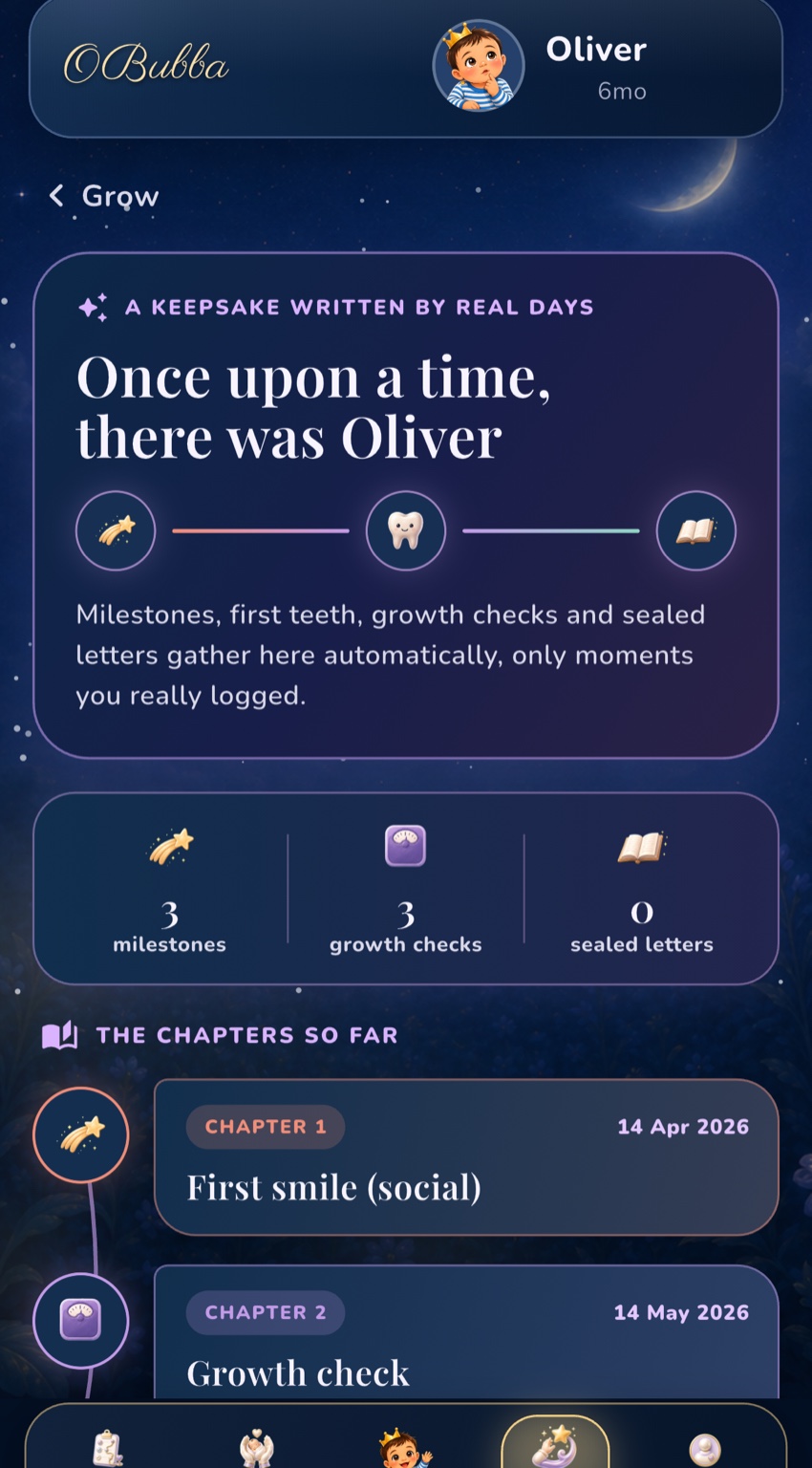
The screen does not ask you to upload photos or decorate pages. It is the story layer that connects parts of OBubba you may already use. If you correct a supported milestone, tooth or growth record at its source, the Memory Book is rebuilt from that source data rather than maintained as a second conflicting diary.
When you choose Share your story, OBubba prepares a plain-text version with the dated chapters and source totals for the phone's share sheet. Review the text and recipient before sending it: names, dates and measurements may feel more private once they leave your own device or family account.
If there are no eligible dated moments yet, the book starts empty. That is not a failure state. It is an invitation to log the next memory when it actually happens.
Try OBubba free → — keep everyday care, growth, milestones, teeth and future letters connected, then let the moments worth remembering form their own calm timeline.
A memory-book prompt list for ordinary days
Firsts are easy to label; daily personality is easier to lose. When no obvious milestone comes to mind, finish one of these sentences:
- Right now, you always laugh when…
- The sound you make most is…
- Your favourite part of the day seems to be…
- The thing we never expected you to love is…
- This week, you worked very hard at…
- The tiny habit we hope we never forget is…
- Someone in the family made you smile by…
One answer a month would create twelve vivid snapshots without becoming another tracker.
Quick answers
What if I have not started a baby book and my baby is already one?
Start with today and three earlier anchor memories you can verify easily. You do not need to complete every month. A short honest timeline is more valuable than a comprehensive book you avoid opening.
Do baby memory-book dates have to be exact?
No. Use an exact date when you know it; otherwise label an estimate clearly in a format that allows it, or leave the event undated. In OBubba, only eligible entries with dates appear in the automatic Memory Book, so leaving an uncertain event out is preferable to pretending certainty.
Does OBubba's Memory Book include photos?
Not currently. Keep photos in your photo library and backed up separately. OBubba's current Memory Book is a chronological text-based keepsake assembled from eligible milestones, first-tooth, growth and sealed-letter activity.
Is a memory book a replacement for the Red Book?
No. Treat it as a family keepsake, not an official health or development record. Keep the Red Book and information from your healthcare team for their intended purpose.
Should I record every baby milestone?
You can track the milestones that are useful to you, but the keepsake does not need to include every item. Development varies, and a memory timeline should not become a competition or scorecard. If you have concerns about your child's development, speak to your health visitor, GP or another qualified professional rather than relying on a memory book.
OBubba supports family organisation and keepsakes. Its Memory Book is not an official medical record, permanent archive or developmental assessment. Keep original photos and documents backed up, and seek professional advice about health or development concerns.
Ready to try OBubba?
Use OBubba to track feeds, sleep, naps, nappies, growth, milestones and family handovers in one calm baby tracker app.