The nap prediction says 9:40am. The health-visitor appointment starts at 9:30. Nursery reported a surprise late nap, Grandma needs the evening routine written down, or the baby has simply shown you that today is not going to follow the forecast.
A useful baby app must be able to say “here is the pattern I can see” without pretending the parent has surrendered the steering wheel.
The current OBubba app has an Adjust schedule sheet for exactly this. A parent can choose a preferred wake, bedtime, number of naps and whether the change is for today, phased in over three days or kept every day. There is also an off-day mode for illness, teething, travel or an unusual day.
We traced the control from the real iOS screen through its child-scoped storage, bedtime and nap engines, day plan, reminders, widget bridge and focused tests. The honest answer is: bedtime and nap count genuinely change the shared plan; preferred wake is saved but is not yet connected to it; and “Just today” has one surprising exception.
The short answer
| Control | What the current app actually does | |---|---| | Preferred wake | Saves and displays the chosen time, but does not currently feed the schedule engine, predictions, reminders or widget | | Bedtime | Changes the shared bedtime used by the live clock, plan, reminders and widget, within the engine’s safety clamp | | Number of naps | Auto or 0–6 changes nap prediction and the projected day across the same shared surfaces | | Just today | Wake and bedtime apply only on the start date; a chosen nap count keeps applying until it is reset | | Gradually | Moves wake and bedtime by one third of the total difference on each of three days, then keeps the target | | Every day | Keeps the chosen wake, bedtime and nap count from the start date until changed | | Off day | For three calendar days, shortens the engine’s contextual wake-window range by 20%, then stops |
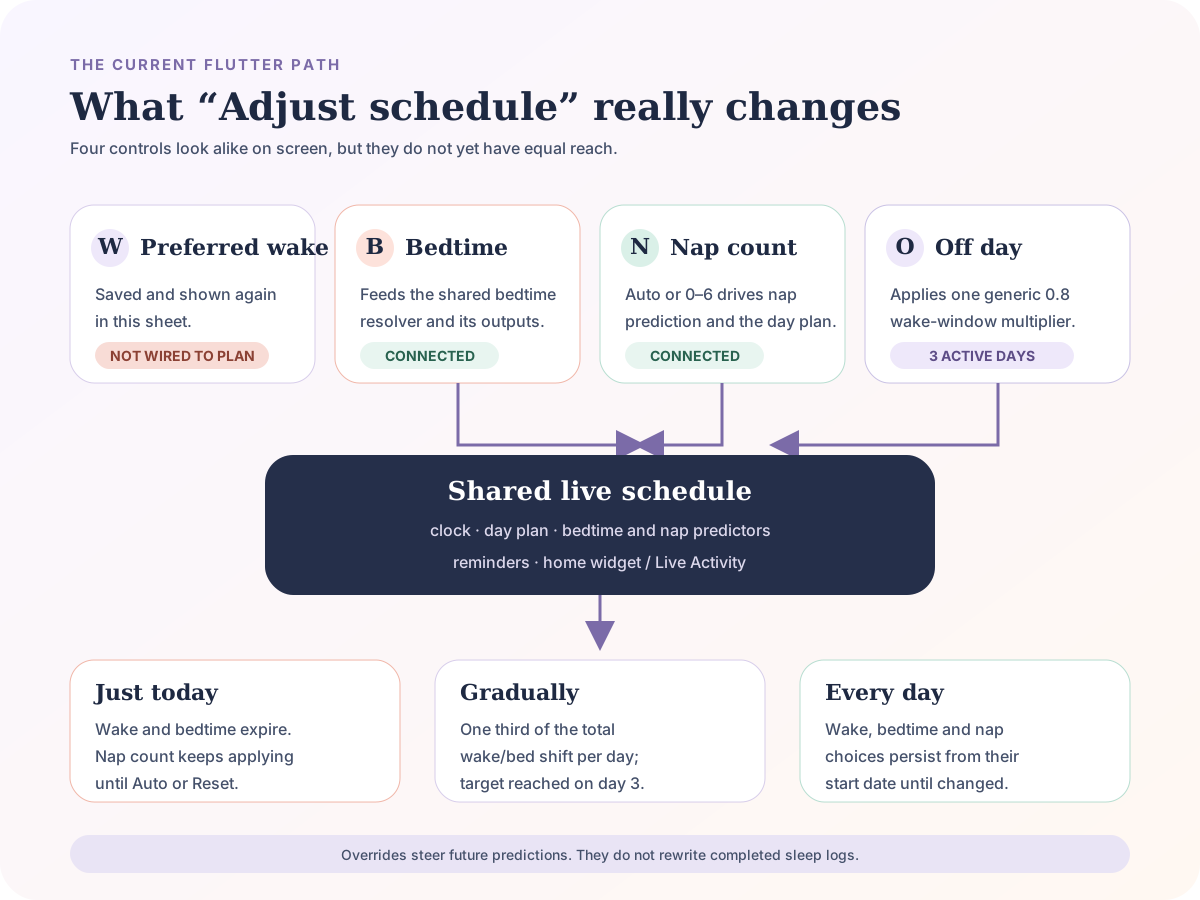
That diagram is deliberately less tidy than a marketing funnel. The four controls sit together, but the current code does not give them identical scope or reach.
Where to find Adjust schedule
On the Track tab, open Plan and find the Schedule row. Tap Adjust. The sheet shows preferred wake, bedtime, nap count and three ways to apply the change.
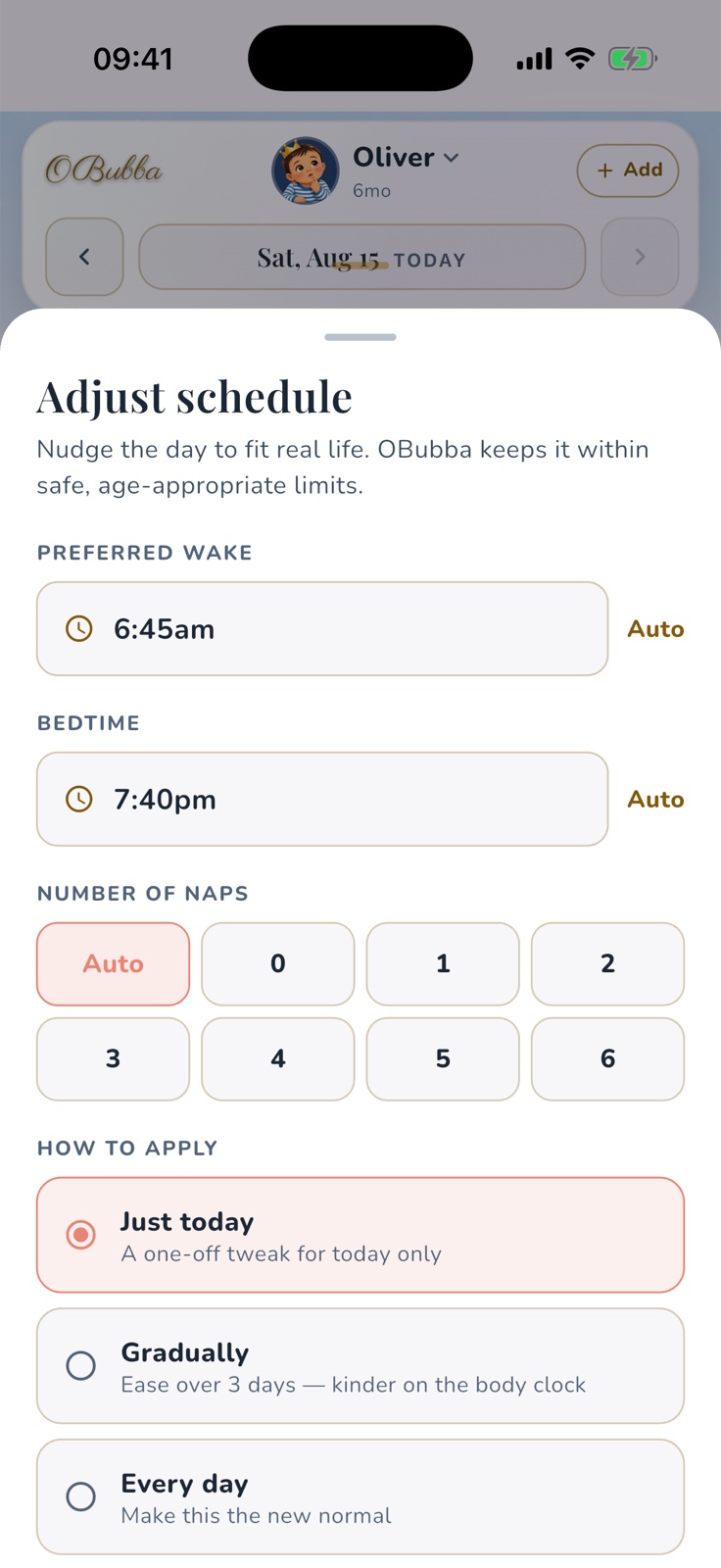
This is the real interface, not a website mock-up. It also shows an important guard: when the morning wake or a nap has already happened, OBubba explains that a same-day adjustment can only steer what is still ahead. A prediction can change; a completed log remains what actually happened.
“Just today” does not mean the same thing for every field
For a bedtime or preferred-wake choice, Just today is genuinely date-scoped. The value is effective only on the day the override starts. Tomorrow, the live system returns to its ordinary calculation.
Nap count is different. The model treats it as a structural choice, so a nap count selected under Just today remains active on later dates until a parent picks Auto or uses Reset schedule. The test suite explicitly protects that behaviour.
That can be valuable during a nap transition: selecting two naps can stop the engine proposing a third or bridge nap tomorrow. But it conflicts with the screen’s description, “A one-off tweak for today only.” A parent who chooses zero naps for a disrupted one-off day could reasonably expect Auto to return in the morning.
Until the interface changes, use this rule:
- choose Just today for a one-night bedtime adjustment
- after a one-day nap-count change, deliberately return Number of naps to Auto
- use Reset schedule to clear wake, bedtime and nap-count overrides together
Reset does not remove an active off-day period; that is stored separately.
What “Gradually” means in the code
Gradually lasts three days by default. It is not a fixed 10- or 15-minute shift each day. OBubba divides the entire difference between the automatic time and the chosen time into three equal steps, rounding to whole minutes.
If the automatic bedtime is 7:30pm and the target is 8:00pm, the effective sequence is approximately:
| Day | Effective bedtime | |---|---| | Start day | 7:40pm | | Day 2 | 7:50pm | | Day 3 onward | 8:00pm |
If the difference is 90 minutes, the steps become roughly 30 minutes, not 15. Day one already applies the first step; it does not wait until tomorrow. Once the third day reaches the target, that target continues until the override changes.
Gradual applies to preferred wake and bedtime. Nap count switches immediately and, like every nap-count override, persists.
The NHS suggests gradual bedtime movement for young children—bringing a wind-down routine forward by 5 to 10 minutes each week, or 15 minutes where bedtime is very late. That is not a prescription for every baby, and it is not the algorithm OBubba currently uses. The app should reveal its exact three-day steps before saving so parents can decide whether the pace suits their child.
A bedtime override reaches the whole live plan
The bedtime control is the best-connected part of the sheet. Once effective, it enters the same shared resolver used by:
- the Track clock
- today’s projected plan
- bedtime reminders
- the native home-screen widget and Live Activity
- other features that ask for the current resolved bedtime
That shared source matters. A parent should not see 7:30pm in the plan, 7:50pm in a reminder and 8:00pm on the widget because three features performed separate maths.
A manual bedtime also takes precedence over an active Sleep Consultation plan. That is the right hierarchy: an old plan should not silently beat a parent’s explicit current choice.
There is one earlier branch. If the parent tells OBubba that a predicted nap is not happening and chooses to skip it, the nap-refusal path can produce an earlier bedtime before the manual override is considered. In that specific recovery situation, the app may temporarily show a bedtime other than the one set in Adjust schedule. It should explain that precedence on screen.
The fixed bedtime is not blended with the best nights in history or with the usual night-diagnosis adjustment. It is treated as authoritative, then constrained by the engine’s age-safety boundary.
Nap count is a real instruction, including zero
Number of naps offers Auto and the integers 0 through 6. A concrete number enters the shared schedule signals used by the nap predictor and projected day plan. The same signal reaches overdue-nap guidance, reminders and the native widget.
Zero is meaningful. It tells the system not to invent a phantom nap or bridge nap simply because an age table would usually expect one. That can be useful on an exceptional day or for an older child who has dropped their final nap.
It is still a planning input, not a command to keep a tired baby awake. A parent should respond to the child in front of them, feed responsively and change the setting when the real day contradicts the plan.
The stronger product design would give nap count its own scope choice: today only, until I change it or Auto tomorrow. Hiding persistence under the overall Just today card makes a powerful control harder to trust.
Preferred wake is saved—but does not currently steer predictions
This is the most important implementation gap.
The sheet can save a preferred wake. It reopens showing that value, and the override model has logic for whether the time is effective today, gradual or permanent. Yet the production schedule signal passed into the bedtime and nap engines has no preferred-wake field. Searches through the current code find no schedule consumer outside the adjustment sheet.
So it would be inaccurate to tell parents that changing preferred wake currently moves the next nap, bedtime, reminders or widget. It does not. The value is stored, but the plan does not use it.
That should be fixed before the control is promoted as functional. The clean route is to add effective preferred wake to the shared schedule signals, define exactly how it anchors the projected day, and protect the cross-surface result with tests. Until then, the interface should label it as a saved preference rather than an active schedule override—or hide it.
Off-day mode is simpler than the four labels imply
The disruption section offers Illness, Teething, Travel and Off day. The selected reason is saved and displayed, but it does not select four different pieces of schedule logic. Downstream, the engine receives a single yes-or-no disruption flag.
While active, that flag multiplies the contextual wake-window range by 0.8: a 20% reduction. The period covers three calendar dates inclusively and uses date-based arithmetic, so a daylight-saving clock change does not shorten or lengthen it by an hour.
On the next day the flag is simply off. The current implementation does not gradually ease the range back, even though the sheet says it “then eases back.” Nor does illness create different maths from travel.
That simplicity may be sensible. A tired or unwell child often needs less algorithmic ambition, and pretending that an app can clinically distinguish teething from illness would be worse. The copy should match the mechanism: “For three days, OBubba uses shorter contextual wake windows; then the normal calculation returns.”
Sleep changes during growth spurts, teething and illness are common, according to the NHS. If a baby is unwell, feeding poorly, unusually drowsy, struggling to breathe, feverish or otherwise concerning, use clinical advice—not a schedule control.
Does changing the schedule confuse OBubba’s learning?
An override is a future scheduling input. It does not alter completed sleep entries, manufacture a nap or rewrite yesterday’s bedtime. That separation is healthy: the plan can bend without corrupting the record.
What the family actually logs after the change remains real history and can contribute to later personal baselines. If a deliberately unusual travel or illness day should not teach the ordinary rhythm, use OBubba’s Today type as well. That is a separate control from the Adjust schedule disruption reason.
This distinction deserves to be visible in the app:
- Adjust schedule changes what OBubba proposes
- Today type describes whether the day should represent the usual baseline
- sleep logs record what genuinely happened
One “Off day” label should not quietly imply all three.
The time limits are product bounds, not personalised medical limits
The current sheet restricts preferred wake to 5:00–9:30am and bedtime to 6:00–8:30pm. Those are fixed interface limits for every age. Although the screen calls them “safe, age-appropriate limits”, they are not calculated from an individual baby’s age, total sleep, feeding needs, health or family circumstances.
The deeper bedtime engine has its own age-based earliest-time protection and a later 10:30pm ceiling, but the sheet never allows a parent to choose later than 8:30pm. That can exclude shift-working families, cultural routines and babies whose day legitimately runs later.
OBubba should call these recommended planning bounds, explain why they exist and allow a wider family-defined window with proportionate warnings. No clock time is proof that a baby is safe or that their needs have been met.
Five practical ways to use the control
- A one-off appointment: leave nap count on Auto and use Just today only if tonight’s bedtime genuinely needs to move.
- A clock change: use Gradually after checking the three previewed steps; do not assume the app uses 15-minute increments.
- A stable family routine: use Every day for a bedtime the household has already found workable, then keep logging what actually happens.
- A nap transition: select the new count, watch mood and total sleep, and remember that it persists until Auto or Reset.
- Illness or disruption: use off-day mode to reduce schedule pressure, but follow the baby and seek medical advice when symptoms concern you.
Every sleep still needs the same safer-sleep foundation. NHS guidance says the safest place for a baby’s sleep during the first six months is in their own cot or Moses basket, on their back, in the same room as a parent, with a firm flat mattress and a clear sleep space. A schedule adjustment never overrides safety or responsive feeding.
How OBubba can make this control best-in-class
The architecture already has a strong idea: one manual bedtime or nap-count choice flows to the clock, plan, reminder and widget. The next trust improvements are concrete:
- Wire preferred wake into the shared schedule. A visible control must do what it says.
- Give nap count its own expiry. Make Auto tomorrow an explicit choice.
- Preview gradual steps. Show the three dates and exact effective times before Apply.
- Make off-day copy literal. Either implement easing and reason-specific behaviour or remove those implications.
- Explain precedence. If skipping a refused nap brings bedtime earlier than the manual target, say why beside the time.
- Separate planning from learning. Let parents see whether an unusual day will count toward the ordinary baseline.
- Widen the usable range carefully. Support real households while keeping clear age and safety context.
- Add a “why this time?” receipt. Every surface should show whether the time came from Auto, a consultation, a manual override or nap-skip recovery.
That is how a parenting app becomes the one families keep: not by making the loudest promise, but by giving a parent useful intelligence, one understandable source of truth and the final say.
Try OBubba’s flexible daily plan → — log what really happened, see what the app predicts next and adjust the future without rewriting the past.
Frequently asked questions
Can I manually change OBubba’s bedtime?
Yes. A manual bedtime feeds the shared resolver used by the Track clock, projected plan, reminders and native widget. A nap-skip recovery can still propose an earlier bedtime in that specific situation.
Can I choose how many naps my baby has?
You can choose Auto or 0–6. The number affects nap prediction and the day plan. It remains active until you return to Auto or reset the schedule—even when selected under Just today.
Does Just today reset tomorrow?
Preferred wake and bedtime do. Nap count currently does not; it persists as a structural choice.
Does Gradually mean 15 minutes per day?
No. The app divides the full time difference into three rounded steps and applies the first step on the start day.
Will changing preferred wake move the first nap?
Not in the current implementation. The preference is saved and displayed but is not passed into the production schedule engine yet.
What does off-day mode change?
For three active calendar days, it applies a generic 20% reduction to contextual wake-window ranges. The selected reason does not currently choose different maths, and the reduction ends rather than gradually easing out.
Will adjustments change old logs?
No. Overrides steer future predictions and plans. Completed sleep logs remain unchanged.
Sources and further reading
- NHS: Helping your baby to sleep
- NHS: Sleep and young children
- NHS Best Start in Life: Safer sleep advice for babies
Ready to try OBubba?
Use OBubba to track feeds, sleep, naps, nappies, growth, milestones and family handovers in one calm baby tracker app.