You have already read the bedtime card. You understand the pattern. Tonight is not the night to change anything—and you do not want the same suggestion waiting tomorrow.
In OBubba, ordinary guidance can be put away for a week. That sounds like a small courtesy. In a baby app, it is a serious design choice: helpful software should remember when a parent has said “not now”.
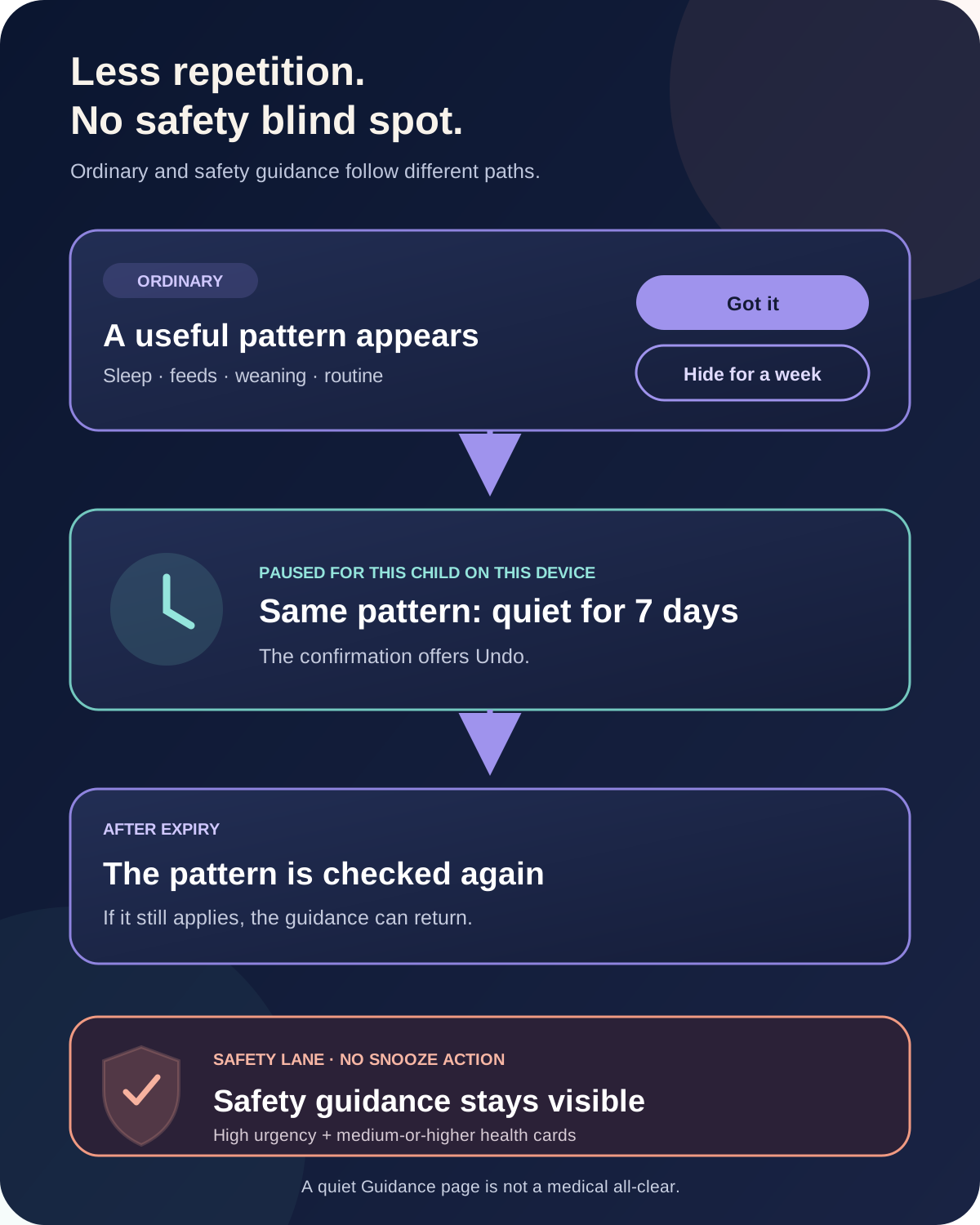
We traced the current Guidance library, Track preview, advice popup, per-child storage and automated snooze tests. The result is more thoughtful than a generic notification mute:
- Got it acknowledges a card.
- Hide this for a week pauses the same recurring pattern for seven days.
- Undo reverses that pause immediately.
- Defined safety guidance does not offer snooze and remains visible.
Snooze does not erase a feed, nap, symptom or tooth entry. It does not tell the engine that its observation was wrong. It changes what the interface asks you to look at for a limited time.
The short answer
| Question | Current behaviour | |---|---| | Can ordinary guidance be hidden? | Yes, for seven days | | Where is the action? | The card close button says “Hide this for a week”; the advice popup says “Don’t show this for a week” | | What exactly is paused? | The same date-less insight pattern for the active child | | Does it delete the underlying logs? | No | | Can I reverse it? | Yes; the confirmation offers Undo | | Can the card return? | Yes, if its snooze expires and the pattern still applies | | Does snooze carry to another child? | No; it is scoped per child | | Does it sync to a co-parent’s phone? | Not currently; this preference is stored on this device | | Can safety guidance be snoozed? | No. High-urgency cards and medium-or-higher health cards bypass the snooze filter |
Why “seen” and “snoozed” are different
The app keeps two separate ideas because they answer different questions.
Seen means you have acknowledged a piece of guidance. Some daily reads deliberately receive a new date-stamped identity tomorrow, because tomorrow’s context is a new day. Longer-lived patterns can use a stable dismissal identity so acknowledgement sticks until the pattern changes.
Snoozed means you do not want the same recurring pattern surfaced for a fixed period, even if the detector still believes it is relevant. Its identity leaves the date out. That is how a bedtime or feeding pattern can stay quiet across several calendar days instead of reappearing each morning with a technically new key.
This distinction matters at 2am. “I read it” and “please stop repeating it this week” are not the same instruction.
What happens when you hide a card for a week
On an ordinary card in the full Guidance library, the close icon has the tooltip “Hide this for a week”. Open the detailed advice popup and the same choice appears as “Don’t show this for a week”.
Choose it and the app:
- builds a stable signature from that insight’s kind, title and any special pattern tag;
- stores an expiry time seven days ahead for the active child;
- removes that pattern from the shared visible-guidance feed;
- shows a confirmation reading “Hidden for a week” followed by the card title;
- offers Undo.
Both the Track preview and the full Guidance library use that same filtered source. A snoozed card should therefore disappear consistently rather than vanishing from one screen and continuing to nag on another.
The pause is attached to the pattern, not the wording in its body. Rolling details can change while the underlying observation remains the same. Conversely, a genuinely different pattern has a different signature and is not suppressed merely because another card was snoozed.
What snooze does not do
Snooze is an attention control, not a data edit.
It does not:
- remove the sleep, feeding, nappy, growth, medicine, teeth or weaning logs behind the insight;
- rewrite a prediction;
- close a running timer;
- tell another connected carer that the advice was hidden;
- permanently opt the child out of that type of help;
- certify that the pattern is harmless;
- replace professional medical advice.
The current preference lives in local app storage and is keyed to the active child. If Maya’s bedtime card is snoozed, Oliver’s guidance is unaffected. A co-parent on another device may still see ordinary guidance unless they make their own choice there.
That local behavior is useful but should be visible in the interface. “Hide on this device for one week” would be even clearer for families using live sharing.
Why the same card can return
When the app reloads, expired snoozes are pruned. If the detector still finds the same pattern after seven days, the guidance can become visible again.
That is not the app forgetting your choice. It is the agreed pause ending.
If you want to revisit the pattern sooner, tap Undo immediately after snoozing. There is not currently a separate “Snoozed guidance” manager in the library, so the confirmation is the direct reversal point.
A different observation can also appear during the seven-day window. Hiding “Bedtime is drifting later” should not suppress a new feeding or health pattern. Even two cards in the same broad topic can remain separate when their identities are different.
Safety guidance takes a different path
The current model has one shared rule for cards that must not be hidden. A card is treated as unhideable when it is either:
- high urgency, in any category; or
- a health card with medium or high urgency.
That second line is important. A medicine-spacing guard, temperature trend or gastrointestinal pattern need not carry the highest urgency to remain protected. Earlier logic at different UI points could drift; the current code centralises the definition so the Guidance library, popup and Track preview use the same decision.
For these cards:
- the library does not show the close-to-snooze button;
- the popup does not show “Don’t show this for a week”;
- the visible-guidance filter lets the card through even if a stale snooze signature exists;
- the Track preview prioritises it above ordinary seen guidance.
This does not mean OBubba has assessed your baby or guaranteed that every important medical situation will create a card. The app can only react to available logs and its implemented rules.
The NHS advises parents to trust their instincts: if a baby or toddler seems seriously ill, seek medical help rather than waiting for an app insight. In England, use your GP during opening hours, NHS 111 when appropriate, and 999 for life-threatening emergencies. Follow the services for your location.
A quiet page needs careful interpretation
When nothing is available, the Guidance library says:
> “A quiet page is good news.”
It follows with: “There is nothing that needs your attention right now. As you log feeds, naps and nights, useful guidance will gather here.”
The warm empty state is welcome, but the precise interpretation is narrower: there is no guidance currently visible to this interface.
That can happen because:
- recent logs do not produce an active insight;
- an ordinary pattern was acknowledged;
- ordinary patterns are temporarily snoozed;
- the app does not yet have enough useful history;
- a pattern no longer applies.
It is not a medical all-clear. If your baby is difficult to wake, struggling to breathe, feeding unusually poorly, has much drier nappies or simply seems seriously wrong to you, use appropriate health advice even when the Guidance page is quiet.
How the library reduces overload before snooze
Snooze is not the only anti-clutter measure in the current app.
The full screen is now called Guidance library. Its opening scene says “Patterns woven together” and “A clearer path through today”. Rather than presenting every detector output as one alarming list, it groups related observations into care paths such as:
- Know first
- Sleep & rhythm
- Feeds & growth
- Comfort & health
- Development
- For you, too
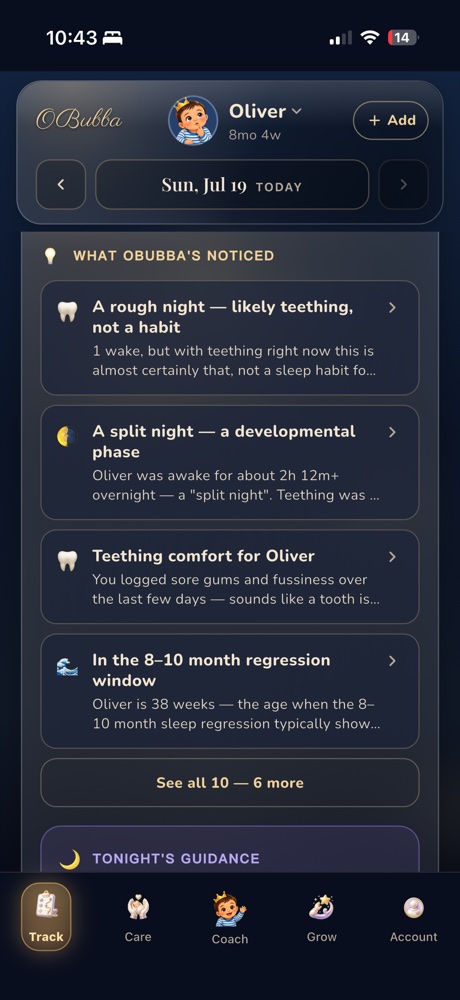
The Track preview similarly curates a maximum number of ordinary care themes while allowing safety items through. Already-seen ordinary guidance moves below unseen guidance, and overlapping topics covered by the richer Tonight’s Guidance briefing can be removed from the daily card stack.
That architecture is the real retention feature. Parents do not need the app to produce more sentences. They need it to reconcile signals, show the newest useful decision and get out of the way.
A practical way to use snooze
Use Got it when the card has done its job and acknowledgement is enough.
Use Hide this for a week when:
- you understand the suggestion but cannot act on it during travel, illness or a disruptive week;
- you are already running the suggested experiment and do not need repeated reminders;
- the pattern is real but not a family priority right now;
- another trusted professional has given you an individual plan;
- seeing the same ordinary advice is adding pressure rather than clarity.
Do not treat a missing snooze action as broken UI. On a protected safety card, it is deliberate. Read the card, check the underlying log for mistakes and use appropriate professional advice when concerned.
A simple rhythm works well:
- Open the Guidance library when the Track banner says something new was noticed.
- Read the evidence and “why”, not only the headline.
- Choose one practical experiment if it fits your baby and family.
- Acknowledge guidance that is complete.
- Snooze a valid but mistimed ordinary pattern.
- Treat safety guidance as a prompt to check the baby and decide what help is needed—not as a diagnosis.
Opening the full feed also acknowledges the current banner set. The banner then clears until a genuinely new pattern appears, reducing the sense of an immortal unread counter.
What the feature should improve next
The underlying behavior is strong. Four interface changes would make it easier to trust:
- Say “on this device”. Families using live sharing should not have to infer that snooze is local.
- Show the return date. “Hidden until 15 February” is clearer than “for a week”.
- Add a snooze manager. Account or Guidance could list paused ordinary patterns and allow early restoration after the snackbar disappears.
- Refine the empty state. “Nothing in Guidance needs attention right now” avoids sounding like a health assessment.
The principle is worth protecting: personalisation includes learning when not to speak.
OBubba is most useful when it turns scattered nights, feeds, solids, teeth and wellbeing notes into a small number of understandable choices. Respecting “not this week” is part of that intelligence—not an escape hatch from it.
Try OBubba’s personalised Guidance → — keep the full baby record in one place, see the patterns worth acting on and quiet ordinary advice when your family needs breathing room.
Frequently asked questions
How long does OBubba hide ordinary guidance?
Seven days by default. The stored pause expires automatically.
Will snoozing advice delete my baby’s logs?
No. Snooze changes visibility of the matching guidance pattern; it does not erase the underlying record.
Why can’t I hide a particular card?
The app removes the snooze action from high-urgency guidance and from medium-or-higher health guidance. Those cards follow the safety lane.
Does “Got it” mean the same thing as “Hide this for a week”?
No. Got it acknowledges the card. Snooze deliberately suppresses the same recurring pattern across dates for a fixed week.
Will the card come back tomorrow?
A snoozed matching pattern should not. A genuinely different pattern can still appear, and the original can return after the seven-day expiry if it remains relevant.
Does my partner’s phone also hide the card?
Not currently. The snooze preference is stored locally and scoped to the child on that installation.
Does an empty Guidance library mean my baby is medically fine?
No. It means no guidance is currently visible there. Trust your instincts and seek professional help when your baby seems unwell.
Where should I get help if my baby seems seriously ill?
Follow local urgent-care guidance. In England, the NHS advises contacting your GP in hours, NHS 111 when appropriate, and 999 for life-threatening emergencies.
Ready to try OBubba?
Use OBubba to track feeds, sleep, naps, nappies, growth, milestones and family handovers in one calm baby tracker app.