You know the action exists. You have a baby on the floor, one free thumb and no interest in opening every tab to find it.
So you ask Luna: “Where do I log tummy time?”
In OBubba’s current app, that kind of question follows a deliberately different route from open-ended baby advice. Luna searches a curated catalogue of app instructions and can return the exact path, the steps and useful follow-up questions without asking a generative model to invent where a button might be.
The short answer: for a live tummy-time stopwatch, Luna should direct you to Grow → Activities → Log activity → Tummy time → Start live timer instead. When you finish, tap Stop & log on the timer pill at the top of Activities.
The surprising part is not the answer. It is the product decision underneath it: OBubba’s assistant knows how to use OBubba.
The exact tummy-time path
Open Luna and ask a location or action question such as:
- “Where do I log tummy time?”
- “How do I start the tummy-time timer?”
- “Where is the live tummy-time stopwatch?”
The dedicated tummy-time card says:
> Open Grow → Activities, tap the gold Log activity button, choose Tummy time, then tap Start live timer instead.
It then expands that into four steps:
- Open Grow and tap Activities.
- Tap the gold Log activity button.
- Choose Tummy time, then Start live timer instead.
- When finished, tap Stop & log on the timer pill.
That route matters because tummy time does not begin from the Track tab in the current interface. Two focused tests explicitly protect Grow → Activities from being replaced with the wrong path.
How Luna decides this is an app question
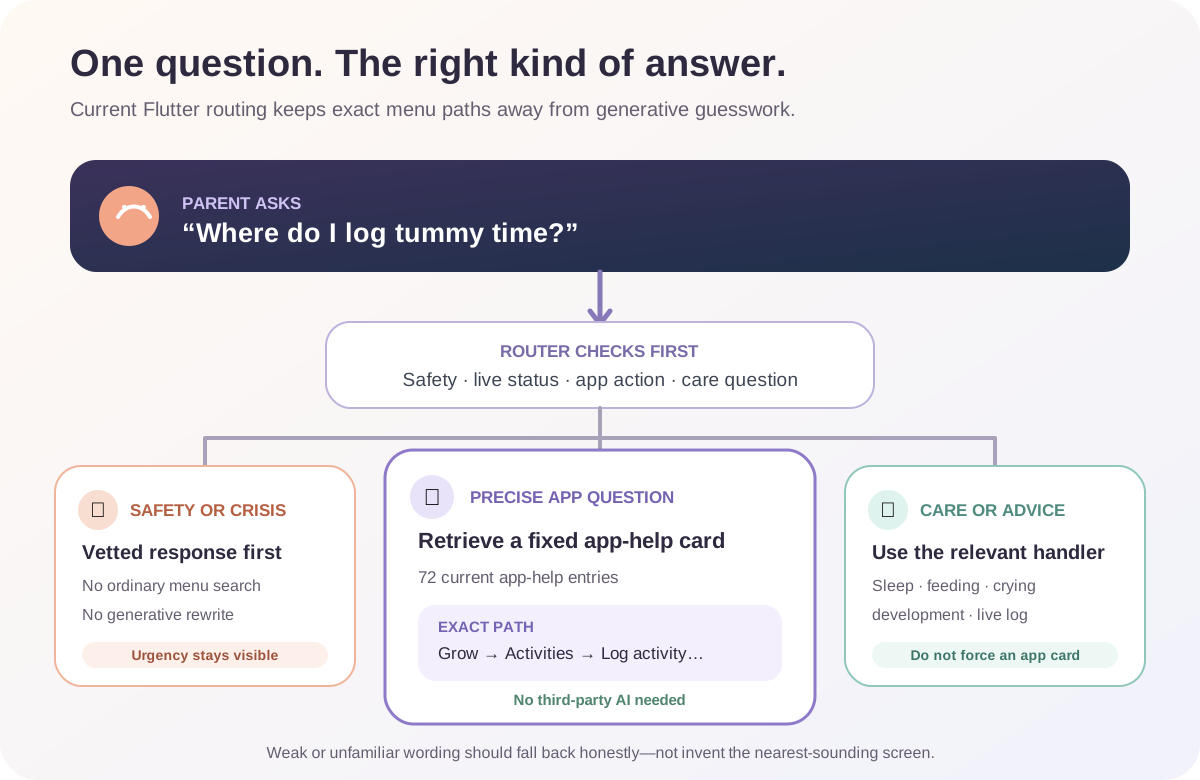
The current code keeps several kinds of question separate.
| What the parent asks | Intended route | |---|---| | “Where do I log tummy time?” | Curated app-help card | | “How do I turn on the sound machine?” | Curated app-help card | | “Where did my 2am wake go?” | Curated day-grouping explanation | | “Is white noise safe?” | Sleep or safety guidance, not sound-machine controls | | “How do I get my baby to sleep?” | Sleep support, not an app tutorial | | “Is my baby asleep right now?” | Live-status read from the family’s current log | | An infant or parent emergency phrase | Vetted safety response before ordinary retrieval |
For app help, Luna looks for common action phrases such as how do I, where is, find, turn on, change and set up, plus specific feature names. It then searches the app-help catalogue using keyword relevance.
The current catalogue contains 72 entries labelled app help. They cover actions across Track, Care, Grow and Account, including:
- starting or correcting sleep, nap and night-wake records
- logging feeds, nappies, medicine, pumping and crying
- finding weaning, first-food and allergen tools
- opening the Sound Machine, Parent Room or Sleep Consultant
- changing units, clock format, haptics and other preferences
- exporting data, restoring purchases and understanding family sync
- finding Activities, milestones, developmental Waves and tummy-time controls
This is retrieval, not screen vision. Luna does not inspect the interface live or watch where the parent taps. It selects the best matching hand-authored instruction from the catalogue shipped with the app.
Why this answer does not need third-party AI
The router deliberately keeps precise app-help cards deterministic. The reason is written plainly in the source: exact in-app paths are the kind of detail a generated model could get wrong.
For the tummy-time question:
- the answer is already stored inside the app
- the route and numbered steps are fixed
- the reply is not marked as an AI response
- the normal “send to Gemini for a richer answer” escalation is disabled for a confident app-help card
- the first-use third-party AI consent dialog is therefore not needed for this answer
That does not mean every Luna conversation is fully offline or never uses optional AI. Open-ended sleep, crying, feeding and development questions can be offered a richer AI path when it is configured and the parent has consented. The app sends nothing to that third-party path after a decline and falls back to its built-in response.
The useful promise here is narrower: a precise menu question should receive a precise product answer, not an imaginative one.
What the answer actually shows
The current conversation renderer can place several layers beneath Luna’s first line:
- a quiet title
- the immediate answer
- numbered steps
- Why Luna thinks this
- Open this in OBubba
- Keep talking follow-up prompts
- a copy action
For tummy time, the Open this in OBubba section contains the complete text path. Follow-up prompts can offer the adjacent decisions, such as logging a fixed number of minutes or finding the completed activity later.
There is one important usability limitation: Open this in OBubba is currently a disclosure, not a deep link. Tapping it reveals text. It does not jump straight to Activities, open the log sheet or preselect Tummy time.
The obvious next product step is a safe Take me there action. It could open Grow → Activities while leaving the parent to make the final logging decision. For destructive, sensitive or ambiguous actions, Luna should still stop before saving anything automatically.
Why “Where did my 2am wake go?” is harder
Not every app question is a simple menu location.
“Where did my 2am wake go?” contains sleep language, so a naïve assistant might start discussing night waking. The current router instead recognises high-precision data-view phrases such as where did, not showing and wakes missing and can return the day-grouping explanation.
The reverse protection matters too. The router deliberately avoids treating every word such as missing, wrong or stuck as an app problem:
- “My baby keeps missing feeds” should remain a feeding concern.
- “She keeps missing her nap” should remain a sleep situation.
- “Is my baby missing milestones?” should remain a development question.
- “The app is stuck on the loading screen” is genuine troubleshooting.
Likewise, white noise can mean either a concept or a control. “How do I turn on white noise?” should find the Sound Machine. “Is white noise safe?” should not be answered with button instructions.
These collision tests are a quiet sign of a mature assistant. Good routing is not only finding the right card; it is refusing the tempting wrong one.
Does Luna start or log tummy time for me?
No. The current app-help reply explains where to go. It does not invoke the timer or create an activity entry from the conversation.
That boundary is sensible. A question can be exploratory: a parent may want to know where something lives without wanting it started now. The real Activities screen remains responsible for:
- choosing Tummy time
- starting the live timer or entering fixed minutes
- stopping the timer
- creating the saved activity record
The assistant also cannot see whether the baby is comfortable, awake or safely supervised. NHS guidance describes tummy time as awake, alert, supervised play and recommends beginning little and often, then building gradually. Stop and reposition the baby when needed; the timer is a memory tool, not a target the baby must endure.
What makes this useful beyond tummy time
Feature discovery is part of product quality. A tracker can contain excellent tools and still feel disappointing if parents cannot find them while tired.
Luna’s route catalogue reduces three kinds of friction:
Remembering where a secondary log lives
Pump, medicine, crying and other less-frequent logs may sit behind More logs. A natural-language path is faster than relearning the information architecture every time.
Distinguishing similar actions
“Log a completed nap” and “start a live nap timer” are not the same workflow. A good answer explains both instead of pointing vaguely at Track.
Recovering from a mismatch
Questions about a missing night wake, purchase restoration or an incorrect unit need explanations, not merely destinations. The catalogue can say why the screen looks different and then name the relevant setting or day model.
This is where an integrated parenting app can become hard to replace. The assistant does not merely answer general baby questions; it reduces the cost of using the family’s own tools.
Where the system can still fail
The current implementation is thoughtful, not infallible.
The catalogue can become stale
Every saved path describes a particular interface. If a button moves but the entry is not updated, Luna can confidently give yesterday’s directions. Route tests cover important cases, but they do not automatically prove every one of the 72 cards matches every current screen.
Natural language is larger than the test set
The router uses normalised phrases, keywords and relevance thresholds. The focused tests cover many collisions, but a novel wording, typo or mixed question can still retrieve a weaker card or fall back.
The route is text, not action
The parent still has to remember the path, close the conversation and navigate. Deep links with safe confirmation would complete the loop.
The whole conversation is premium-gated
The Luna screen currently shows a premium lock to free or expired users, even though deterministic app-help retrieval has no per-question model cost. That protects premium value, but it also withholds basic feature discovery from the people still deciding whether OBubba is easy enough to keep.
A stronger acquisition choice would make a bounded set of app-navigation questions free while keeping personalised analysis and richer coaching premium. Helping someone find the tummy-time timer is an excellent demonstration of product depth.
A fallback is not proof
When Luna cannot find a confident path, the honest result should be “I’m not sure” or human support—not the nearest menu-sounding answer. The existing code already distinguishes a low-confidence fallback; the interface should keep that uncertainty visible.
A five-second way to use it
Ask with one action and one object:
- Where do I log a bottle?
- How do I start a nap timer?
- Where can I see the weaning food journal?
- How do I change milk from ml to oz?
- Where is the Sound Machine?
If Luna returns a route, expand Open this in OBubba and follow it. If the screen does not match, do not force the wrong flow; the app may have changed or the question may have matched the wrong card.
For care advice, ask the care question instead. “Where do I log a bottle?” and “Why is my baby refusing the bottle?” deserve different answers. The best assistant knows that navigation and judgement are different jobs.
Try OBubba and ask Luna where to begin → — find the right sleep, feeding, weaning, care or development tool without memorising the whole app first.
Frequently asked questions
Is the tummy-time timer in Track?
No. The current path is Grow → Activities → Log activity → Tummy time → Start live timer instead.
Does asking this send my baby’s data to Gemini?
A confident app-help card does not escalate to the optional third-party AI route. Other open-ended Luna questions may use that route only when it is configured and the parent has consented.
Can Luna take me directly to the screen?
Not from the current answer renderer. Open this in OBubba reveals the saved text path; it is not a deep link.
Can Luna start the timer from chat?
No. The parent starts and stops the timer in Activities. Luna provides directions but does not silently create the log.
Can Luna explain missing night wakes?
Yes, the app-help catalogue includes the day-grouping explanation. The routing tests specifically protect phrases such as “Where did my 2am wake go?” from becoming generic sleep advice.
Is Luna’s app help free?
The current Bubba Coach/Luna screen is premium-gated, including its deterministic app-help answers.
Sources and product verification
- NHS: Baby moves
- NHS: How to keep your baby or toddler active
- OBubba source reviewed for this article: `coach_kb.dart`, `bubba_coach.dart`, `bubba_coach_screen.dart`, `coach_retrieval.dart` and the Activities/tummy-time route.
- 77 focused tests passed on 9 May 2027 across app-help routing, tummy-time location, knowledge retrieval, collision protection and translated-content behavior.
OBubba provides tracking, navigation help and general educational support. Luna cannot observe a baby, confirm that an activity is safe for an individual child, diagnose a concern or replace advice from a health visitor, GP, physiotherapist or other qualified professional.
Ready to try OBubba?
Use OBubba to track feeds, sleep, naps, nappies, growth, milestones and family handovers in one calm baby tracker app.