At 9am, “bath at 4pm” can sound perfectly sensible. Then Nap 2 starts late, finishes late and turns 4pm into the exact moment your baby wakes hungry. A clock-time reminder has followed the clock. Your day has followed the baby.
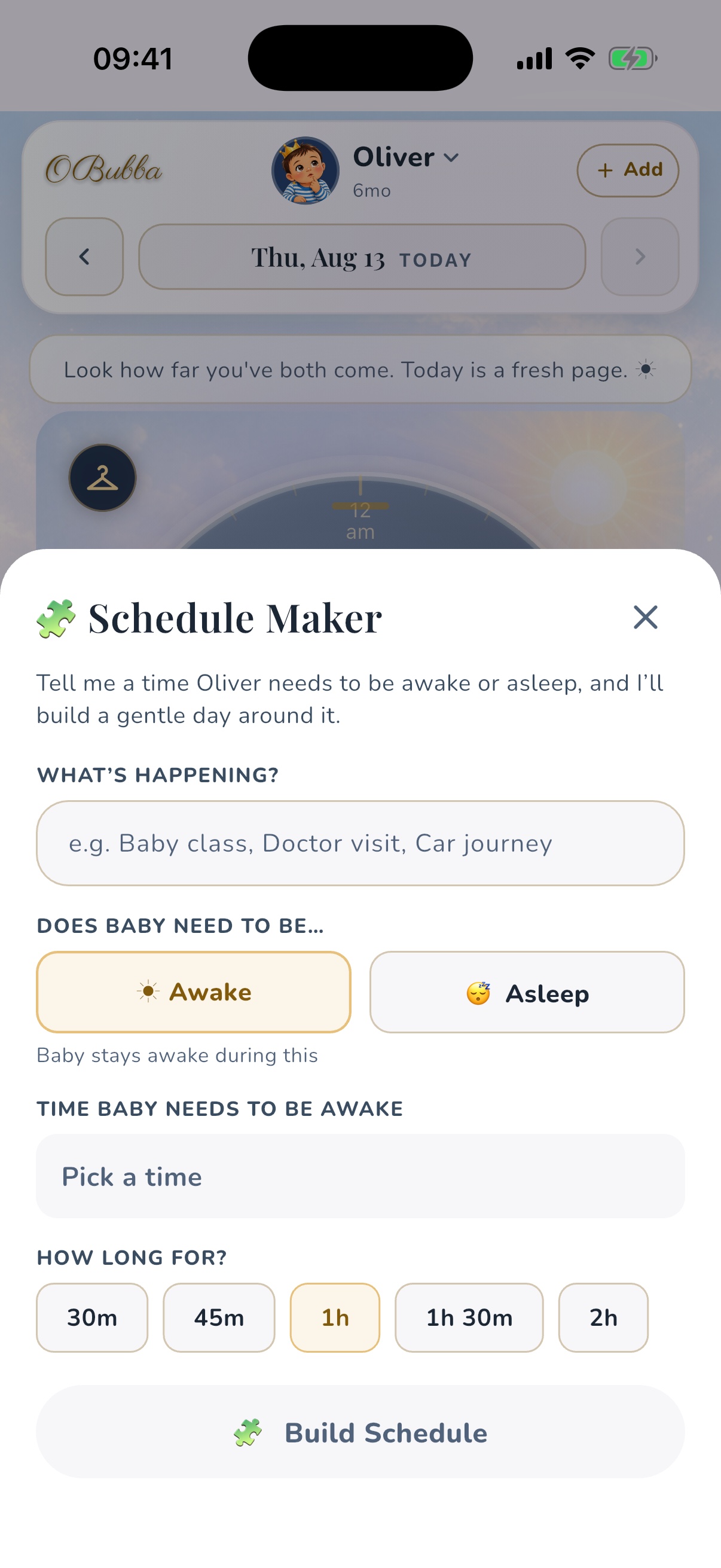
OBubba’s current app offers a more useful choice inside the Track day plan: add a bath, meal, outing, feed, play or care task after Nap 2, before bedtime, after wake-up or around another predicted event. The app then resolves that relationship against today’s plan.
The short answer: if Nap 2 is predicted to end at 2:30pm, After Nap 2 displays at approximately 2:45pm. If the plan later puts Nap 2 at 1:30–3pm, the item moves to approximately 3:15pm when the day plan is rebuilt. It remains “after Nap 2”; it does not quietly become a fixed 2:45pm appointment.
That is a small feature with an unusually practical idea behind it: some family intentions belong to a rhythm, not a clock.
Where to add a rhythm-anchored task
Open Track, find the day plan and tap Add to plan. In the current app, adding a custom plan item is part of the premium Bubba Rhythm experience.
The sheet offers eight task types:
- bath
- play
- meal
- activity
- feed
- outing
- care
- other
Give the item a name, then choose where it belongs. The choices depend on how many naps are in today’s predicted plan:
- an exact clock time
- before wake-up
- after wake-up
- before or after each predicted nap
- before bedtime
- anytime
An anchored item appears in the plan with a tilde before its resolved time—such as ~2:45pm—to signal that it is approximate. An exact-time item has no tilde. That tiny distinction is good interface honesty: the plan is placing an intention relative to a forecast, not promising the baby will wake on cue.
The timing rules the app actually uses
The anchors are not vague labels. applies fixed offsets to the current plan.
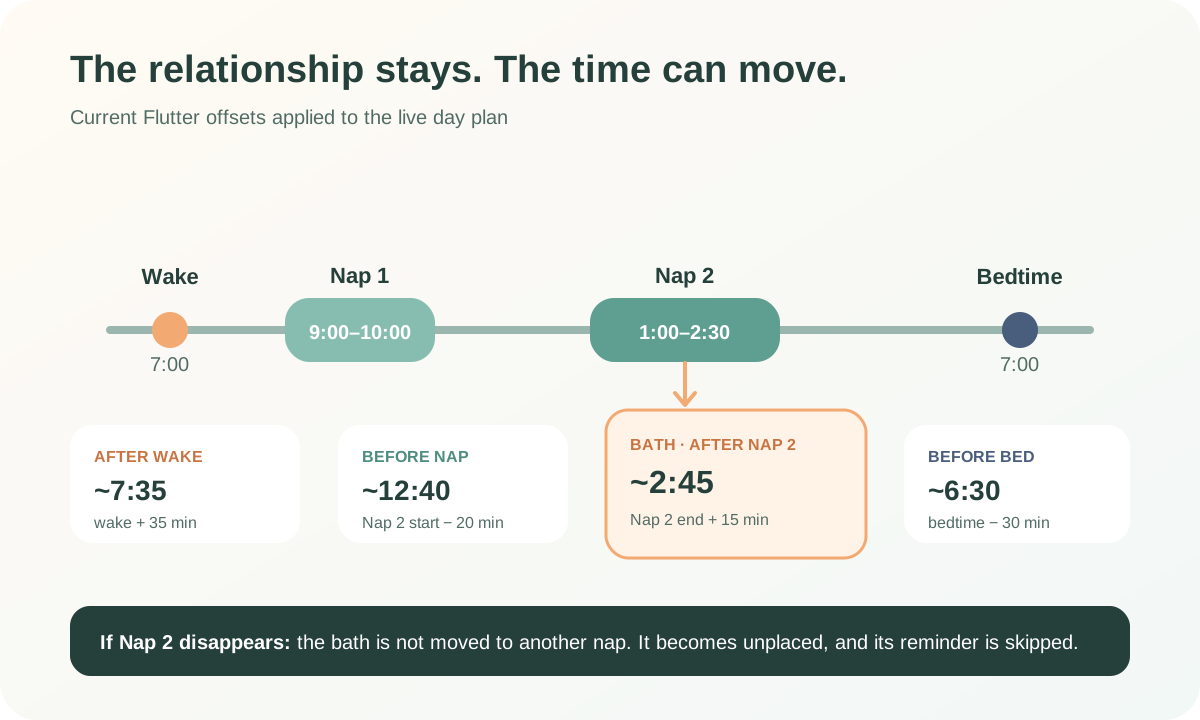
| Choice | Resolved plan position | |---|---:| | Before wake-up | 20 minutes before predicted wake | | After wake-up | 35 minutes after predicted wake | | Before Nap N | 20 minutes before that nap’s predicted start | | After Nap N | 15 minutes after that nap’s predicted end | | Before bedtime | 30 minutes before predicted bedtime | | Exact time | The time the parent enters | | Anytime | No resolved clock time; sorted after timed items |
These offsets are current product rules. The parent cannot change “after nap” from 15 minutes to 30 minutes inside this sheet.
For example, a day plan might show:
- wake-up at 7am
- Nap 1 from 9–10am
- Nap 2 from 1–2:30pm
- bedtime at 7pm
A bath anchored After Nap 2 resolves to ~2:45pm. A meal Before Nap 2 resolves to ~12:40pm. A wind-down task Before bedtime resolves to ~6:30pm.
Those times are derived outputs. The meaningful thing the parent saved is the relationship.
What changes when the predicted nap moves?
On the Track screen, the app resolves each anchor against the live plan it is currently displaying. If its prediction shifts, the displayed approximate task time shifts with it.
Imagine Nap 2 moves from 1–2:30pm to 1:30–3pm:
| Saved intention | Earlier plan | Updated plan | |---|---:|---:| | Bath after Nap 2 | ~2:45pm | ~3:15pm | | Snack before Nap 2 | ~12:40pm | ~1:10pm |
The title, category and anchor stay the same. The calculation changes because the predicted nap changed.
This is more resilient than setting a new alarm every time the schedule drifts. It is not the same as live monitoring, though. OBubba does not watch the room or know the precise instant the baby wakes. The task follows the plan data available to the app.
What if Nap 2 disappears?
This is the important edge case.
If an item remains anchored to Nap 2 but the current plan contains no second nap, cannot resolve that anchor. The item becomes effectively Any time, sorts after timed items and does not receive a custom reminder for that unresolved position.
OBubba does not silently attach it to Nap 1, bedtime or the nearest clock time. That is safer than inventing a new intention, but it leaves the parent with a decision: edit the item, choose another anchor or keep it untimed.
This can happen around a nap transition or after the plan is manually changed. A useful future improvement would be a visible prompt such as “Nap 2 is no longer in today’s plan—choose a new home for bath time.” The current behavior preserves the saved relationship but does not provide that guided repair.
One day or every day?
The sheet can save a task only for the selected day or repeat it as a routine anchor.
A one-off task lives in that day’s plan. Checking it marks that item done.
A repeating task behaves differently. The routine anchor appears on each relevant day, but checking it off creates a completed copy for today. Tomorrow’s recurring task remains available. If the parent unticks today’s completed copy, the app removes that daily copy and reveals the routine anchor again.
That model solves a subtle family-calendar problem: “we did bath time today” should not mean “delete bath time from every future day.” The app also guards the save and completion actions against rapid duplicate taps.
Does “Remind me” follow the anchor too?
Yes, with qualifications.
The reminder switch is opt-in for each custom task. It is separate from the global nap, feed, bedtime and daily reminder switches. When OBubba builds the custom reminder schedule, it resolves the saved anchor against the current day plan.
A reminder is skipped when:
- the task is already done
- the anchor cannot be resolved, such as a missing Nap 2
- the resolved time has already passed
- the resolved time is 11pm or later
The code verifies that the anchor is used when reminders are scheduled. It does not justify claiming that an already-delivered operating-system schedule continuously moves by itself every time a prediction changes. The safe interpretation is: OBubba uses the current resolved time when it next plans notifications.
There is also a product-copy mismatch worth fixing. The custom-task sheet currently says reminders respect quiet hours, while the notification scheduler adds opted-in custom items outside the usual predicted-nudge quiet-hours gate. Parents should be able to trust the wording; the copy or scheduler should be aligned.
Is adding “bath” the same as tracking a bath?
No. A custom plan item is an intention and checklist item. It does not automatically create a bath event in the child timeline when added or completed.
That distinction applies to the other categories too:
- a planned feed is not a recorded feed
- a planned meal is not a weaning food log
- a planned activity is not proof that the activity happened
- a checked care task is not clinical documentation
If the event matters to the family record, track it through the relevant logging flow as well. The custom day plan answers “What are we hoping to do?” The timeline answers “What did we record?”
The separation prevents planned data from contaminating sleep, feed or weaning patterns. It can also create an extra tap, so a future “Mark done and log” option—shown only where the mapping is unambiguous—could connect the two without pretending every checklist tick is a measured event.
Does it work for weaning as well as sleep?
The anchor system is useful precisely because it is not limited to naps.
A parent could add:
- Breakfast practice after wake-up
- Prepare finger food before Nap 2
- Family meal at an exact time
- Offer water with lunch as an anytime task
- Pack bib and spoon before an outing
These are planning prompts, not feeding recommendations. The app does not use a custom meal task to decide which food is appropriate, judge readiness for solids, record allergens or measure intake. Use OBubba’s dedicated weaning and food-log features for that context, and follow current NHS guidance or individual professional advice.
The practical value is mental-load reduction. Sleep prediction provides the day’s scaffold; weaning, care and family life can sit around it without being forced into a brittle timetable.
Shared family planning and recovery
Custom day plans and routine anchors are included in OBubba’s synced child data. When family data is combined, separate days are preserved, newer edits win for the same day and recurring anchors are unioned by their IDs so one carer’s newly added routine is not dropped merely because another device has not seen it yet.
The focused recovery tests also verify that day plans and routine anchors return on a fresh reinstall. Sync still depends on the account and connection working; the add sheet surfaces a failure instead of pretending an unsuccessful save worked.
This makes the feature more than a private to-do list. One carer can add “pack swim bag before Nap 2”; another can see the shared day plan. As always with shared data, check the current screen before relying on it for anything time-sensitive.
A flexible plan, not a command
The NHS notes that babies have their own waking and sleeping patterns. It also suggests a simple, soothing bedtime routine and includes a bath as one possible step—not a compulsory one.
For bathing specifically, the NHS advises having everything ready, avoiding a bath when a baby is hungry or tired, and never leaving a baby alone in the bath, even for a second. A clever anchor does not override those observations or safety rules.
Use the feature like this:
- Save the relationship that reduces your mental load.
- Treat the displayed `~` time as a planning estimate.
- Look at the actual baby before beginning.
- Move, skip or edit the task when today calls for something else.
- Log the real event separately if you want it in the family record.
That is the kind of personalisation parents can trust. The app holds the intention and does the date arithmetic. The parent keeps the judgement.
Try OBubba free → — bring sleep predictions, feeds, weaning, care and shared family planning into one calm view, then organise the day around the rhythm your baby actually has.
Frequently asked questions
Can I choose my own delay after a nap?
Not currently. After Nap N resolves to 15 minutes after that nap’s predicted end. Use an exact time if you need a specific clock time, or edit the task as the day changes.
Why is there a tilde before the task time?
The tilde marks an approximate, derived time. The item is attached to a predicted event rather than saved as that exact clock time.
Will a repeating task stay completed forever?
No. Completing a routine item creates a completed instance for that day. The recurring anchor remains available on future days.
What happens to the reminder if the nap disappears?
An anchor to a nap that is no longer in the plan cannot resolve, so the custom reminder is skipped until the item has a usable position again.
Does checking off a meal record what my baby ate?
No. It completes the plan item only. Use the dedicated weaning or food-log flow to record foods, reactions or intake context.
Can another carer see the plan?
Custom day plans and routine anchors are included in synced child data. Availability depends on the family account and successful sync.
Sources and product verification
- NHS: Washing and bathing your baby
- NHS: Helping your baby to sleep
- OBubba source reviewed for this article: `custom_plan_item.dart`, `custom_plan_sheet.dart`, `custom_plan_providers.dart`, `track_home.dart`, `reminder_schedule.dart` and `child_sync_repository.dart`.
- 101 focused tests passed on 8 May 2027 across custom-plan anchors, reminders, family-field round trips, additive family merging and fresh-reinstall recovery.
OBubba provides tracking, planning and general educational support. It does not observe your baby, guarantee a schedule or replace individual medical, feeding or safety advice.
Ready to try OBubba?
Use OBubba to track feeds, sleep, naps, nappies, growth, milestones and family handovers in one calm baby tracker app.