It is 2am. A saved medicine row shows the last logged time, then a reassuring green line:
“✓ Safe to give now.”
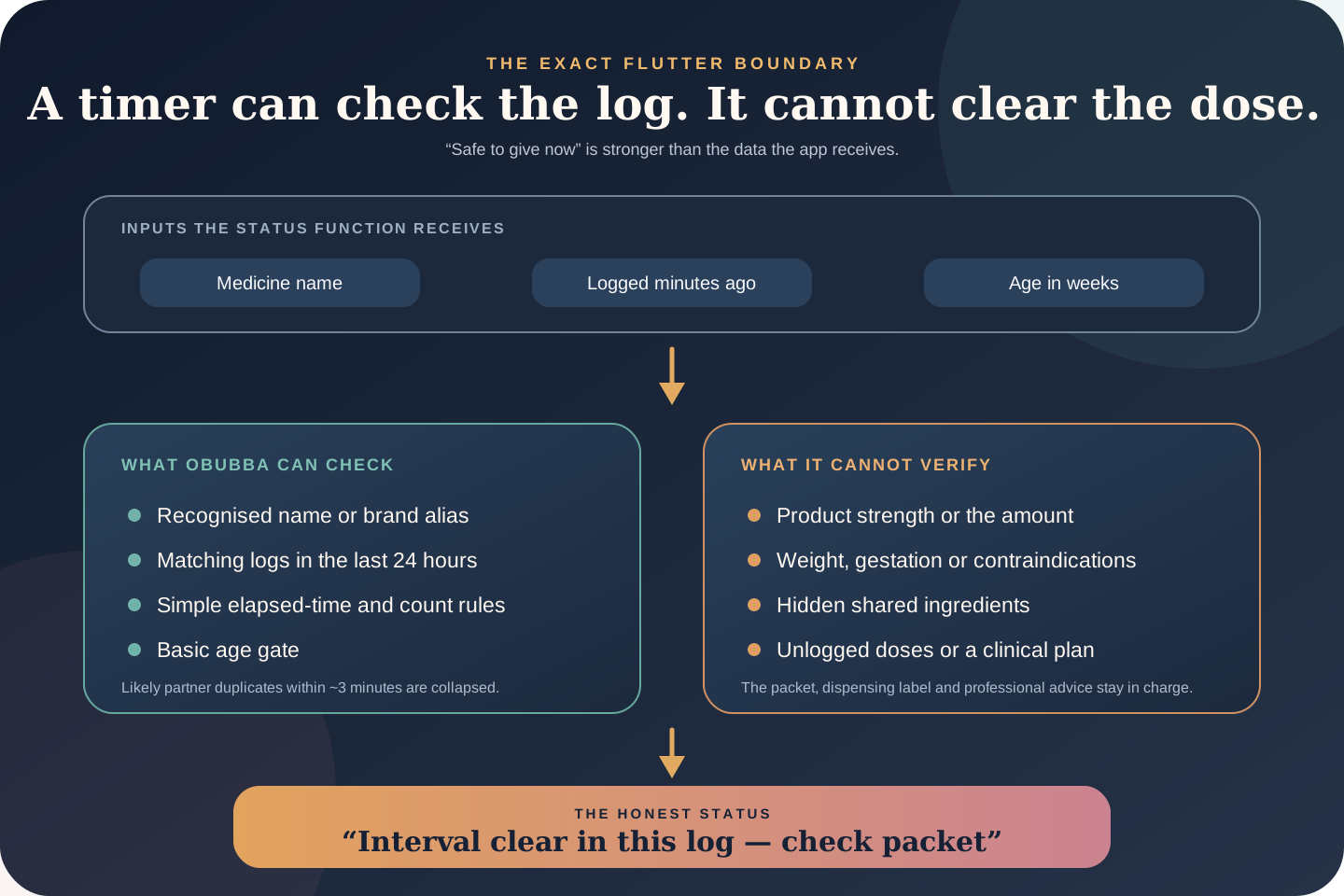
Can OBubba really know that? Has it checked the bottle strength, the amount, your baby’s weight, another product containing the same ingredient and the dose a partner may have forgotten to log?
No. We traced the current medicine rules, saved-medicine row, quick-log confirmation, background insight and tests. The green status means something much narrower:
> “For this recognised medicine name, the simple interval has elapsed in OBubba’s recorded 24-hour history, its conservative count has not been reached, and the basic age gate did not fire.”
That can be a genuinely useful handover check. It is not enough to call a medicine safe.
The better label is “Interval clear in this log—check packet.” It preserves the feature’s value without turning incomplete tracking data into clinical permission.
The short answer
| Question | Current behaviour | |---|---| | Where does the green label appear? | On a saved medicine in the Health sheet’s Quick log section | | Which medicines receive a countdown? | Recognised paracetamol and ibuprofen names and brands | | What history does it scan? | Logged doses of the same normalised medicine in the latest 24 hours | | What interval does it use? | Four hours for paracetamol; six hours for ibuprofen | | What count does it use? | Four paracetamol or three ibuprofen entries in 24 hours | | Does it read the entered dose amount? | No | | Does it know the product strength or leaflet? | No | | Does it know current weight or contraindications? | No | | Does it catch unlogged doses? | No | | Is “Safe to give now” clinical permission? | No; it only reports the state of OBubba’s limited log checks |
What the status actually reads
Saved medicines are stored per child with a parent-entered name and optional usual dose. The quick-log row gathers matching medicine entries from the child timeline, calculates when the most recent one was logged and counts recent use.
For its safety status, the code keeps only entries from the latest 24 hours. It recognises several common names:
| Normalised clock | Examples the current matcher recognises | |---|---| | Paracetamol | paracetamol, Calpol, Panadol, Disprol, acetaminophen, Tylenol | | Ibuprofen | ibuprofen, Nurofen, Calprofen, Brufen, Advil, Motrin |
That normalisation matters when two carers use different names for the same active medicine. “Calpol” and “paracetamol” feed one timing clock rather than two. “Calprofen” correctly maps to ibuprofen and is not confused with the similar-looking Calpol brand name.
Unrecognised medicines receive no calculated countdown. The code deliberately refuses to guess an interval for antibiotics, supplements or arbitrary product names.
The three checks behind the green line
For a recognised medicine, the saved row applies three gates.
1. Basic age suitability
Ibuprofen is marked unsuitable below 13 weeks. Paracetamol is marked for an age check below eight weeks. If the child’s date of birth is missing or still loading, this surface treats their age as zero, so the cautious age message wins instead of a green status.
The app uses chronological age, not corrected age, for this medicine check.
2. Time since the most recent logged dose
The current rules use a four-hour interval for paracetamol and six hours for ibuprofen. If the latest matching record sits inside that interval, the row displays a countdown such as “Next dose in 2h 30m”.
3. Logged count in the latest 24 hours
The current thresholds are four paracetamol entries or three ibuprofen entries. Reaching the threshold produces “Daily max reached” and overrides the ordinary countdown.
If neither the age gate nor count gate fires and the simple interval has elapsed, `safeNow` becomes true and the green text appears.
Why “safe” is too strong
The function receives only:
- a medicine name
- minutes since prior matching entries
- age in weeks
It does not receive:
- the bottle or packet in the parent’s hand
- concentration or formulation
- the amount already given
- the amount the parent is considering
- current weight
- whether a 2-to-3-month-old was born after 37 weeks or weighs over 4kg
- whether an ibuprofen product is suitable for this child’s weight
- dehydration, chickenpox, asthma, kidney or liver concerns
- allergies, prescribed instructions or other medicines
- another product containing the same active ingredient
- a dose given by somebody who did not log it
- whether the medicine is needed now
An elapsed timer answers one question: “Has enough time passed since the latest matching entry in this log, according to this generic rule?” Safety is the conclusion of many more checks.
The young-infant edge case matters
The hard-coded paracetamol rule uses four doses in 24 hours once a baby reaches eight weeks. Current NHS guidance is more specific for babies aged 2 to 3 months: suitability depends on weight and gestation, the usual maximum is lower than the general older-child limit, and a separate MenB-vaccination exception exists.
OBubba’s timer does not know those conditions. A 10-week-old with no recent logged doses can therefore clear the code’s age gate and receive a green “Safe to give now” status even though the app cannot verify weight, gestation, reason or the correct daily limit for that child.
That does not mean the medicine is unsuitable. It means the app lacks enough information to say it is suitable.
The correct product behaviour is to show the log fact and defer the decision:
> “No paracetamol logged in the last 24 hours. Check this product’s packet and your baby’s age/weight instructions.”
The ibuprofen rule is conservative, not universal
The code comment describes six hours and three doses as a universal minimum interval and maximum. NHS guidance is more conditional: ibuprofen may be given three or four times in 24 hours depending on the child’s age and dose. The corresponding minimum gap is six hours for a three-times schedule and four hours for a four-times schedule.
OBubba chooses the more conservative three-dose, six-hour path. That can prevent an early repeat, but it may also warn when a labelled or professionally advised four-times schedule is being followed.
Conservative over-warning is safer than falsely clearing an early dose. It still needs honest copy:
- Good: “OBubba’s conservative six-hour reminder has 1 hour remaining.”
- Misleading: “The next dose is not safe for 1 hour.”
The packet, dispensing label or clinician’s plan—not the app’s generic clock—defines the schedule for the actual product.
It de-duplicates likely shared-log repeats
Family Sharing creates another practical problem. Two carers may record the same real dose under different recognised names within a few minutes.
The current implementation collapses matching entries within approximately three minutes before calculating the count. Because it compares normalised ingredients, “Calpol” and “paracetamol” can be treated as one likely duplicate.
That is thoughtful. Without it, one real dose could appear as two and push the app toward a false daily-maximum warning. A parent might then withhold a legitimately due dose.
The trade-off is important: two genuinely separate entries within three minutes will also look like one. The app cannot know whether the duplicate is clerical or real. If the timeline looks wrong, stop and resolve it with the carers involved; never use deduplication as proof that only one dose was given.
What happens when you press “Log dose”
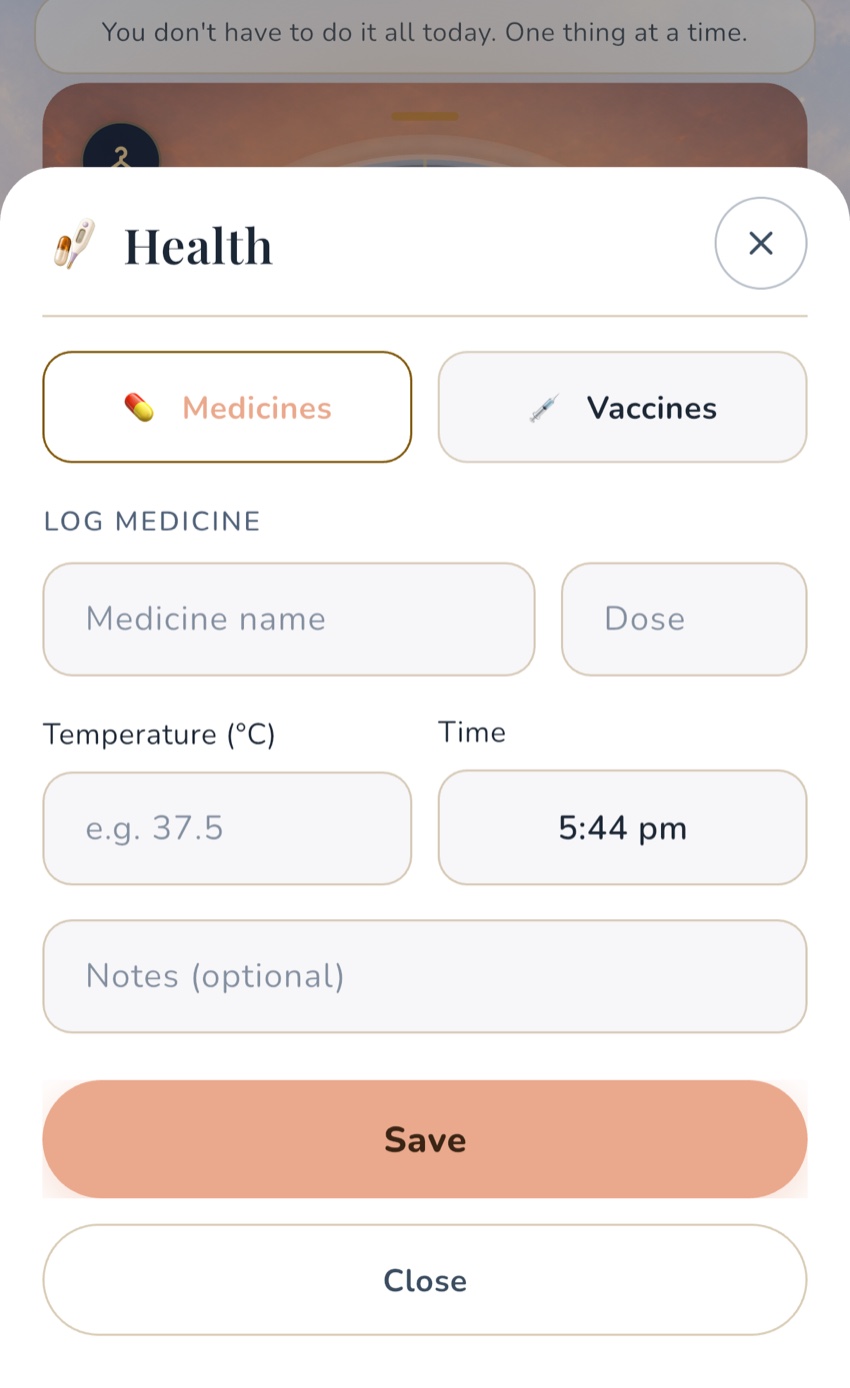
The quick-log button uses the same timing guard as the typed medicine form.
If the guard finds a basic age concern, an interval that has not elapsed or the generic 24-hour maximum, it opens “Log this dose?” with the warning. The parent can cancel or choose “Log anyway”.
That override is necessary because an app may be missing context: a clinician may have given a specific plan, a historical entry may be wrong, or the user may be documenting a dose that was already administered. But the button wording should make clear that it records an event; it does not authorise it.
After a medicine is logged, the background engine can also surface a medium-urgency card:
- “Space the doses” when the most recent matching entry is inside the simple interval
- “Daily maximum reached” when the current generic count is reached
- “Check age suitability” when the basic age gate fires
These cards hide the normal evidence-count row because they are one-off safety prompts, not multi-day statistical findings.
The medicine name is not the whole ingredient check
Normalising common brands is useful, but it does not amount to a complete ingredient scan.
A parent could log a vague nickname, a pharmacy own-brand product or a combination remedy that the matcher does not recognise. Another product in the home may contain paracetamol even when its front label emphasises cold or flu symptoms.
Before every dose, read the active ingredients on the packet or leaflet. Do not rely on colour, flavour, brand family or what the bottle looked like last time. If you are not sure whether two products overlap, ask a pharmacist.
The app should eventually separate the parent-visible product name from a confirmed active ingredient. That would let the parent deliberately verify “this contains paracetamol” rather than relying entirely on substring matching.
A quiet screen does not clear the dose
There are several ways a real dose can be absent from OBubba:
- a partner forgot to log it
- nursery uses its own mandatory administration record
- a grandparent wrote it on paper
- the phone was offline and the entry has not appeared yet
- a medicine was logged under an unrecognised name
- the recorded time or child was wrong
- the baby spat some out and nobody knows how much was swallowed
No warning—or a green label—cannot prove none of those happened.
Use a closed-loop handover: the person who administers the medicine records the actual product, amount and time immediately, then tells the next carer “given and logged”. If human memory and the app disagree, stop and resolve the uncertainty rather than choosing the version that produces a convenient timer.
What parents should check before acting on a timer
Treat the countdown as a prompt to pause, not a green traffic light. Confirm:
- Right child. The medicine and record belong to this baby.
- Right product. Read the original packet, dispensing label and active ingredient.
- Right suitability. Check age, weight and any warnings that apply to the child.
- Right amount. Use the supplied oral syringe or spoon and the instruction for this exact formulation.
- Right history. Ask whether anybody gave the same ingredient without logging it.
- Right reason. Follow the packet, prescription or professional plan rather than dosing solely because a timer reached zero.
Keep medicine in its original packaging, closed and out of sight and reach. Never pre-fill a syringe as a reminder, and never pre-log a planned dose as though it was given.
Paracetamol and ibuprofen keep separate clocks
The app correctly normalises paracetamol brands together and ibuprofen brands together while keeping the two ingredients on separate clocks.
Separate clocks do not mean “alternate automatically”. NHS guidance says not to give paracetamol and ibuprofen at the same time. Advice about trying or alternating them differs according to whether the problem is fever or pain, and suitability still needs checking. Follow the current NHS page, packet and any individual professional plan.
If a clinician advises an alternating schedule, record each ingredient separately with its actual time and amount. Do not save a combined quick-log item called “pain relief”.
The current background insight adds an alternating note for babies aged at least 13 weeks, phrased as something that can happen on a pharmacist’s advice. That age check prevents the app suggesting ibuprofen to a younger baby, but it still cannot evaluate the rest of ibuprofen’s suitability conditions. A direct “follow the professional plan you were given” message would be clearer.
What to do if an extra dose may have been given
Do not wait for the app to change colour.
Current NHS advice says to get medical advice if a child has had more paracetamol than the packet, leaflet or prescription says, and to contact NHS 111 if a child takes an extra dose of ibuprofen. Call 111 for a child under five.
Keep the packet, leaflet, remaining medicine and the timeline of known doses with you. Do not induce vomiting or give another medicine to compensate. Call 999 for a life-threatening emergency.
OBubba can make the timeline easier to explain, but it cannot assess an overdose.
Better product wording
The underlying feature is worth keeping. A last-dose time, week count, conservative countdown and shared log can reduce memory errors. The problem is the semantic leap from “my recorded timing checks passed” to “safe”.
The status set could become:
| Current wording | More accurate wording | |---|---| | Safe to give now | Interval clear in this log—check packet | | Next dose in 2h | OBubba’s conservative interval: 2h remaining | | Daily max reached | Generic logged-count limit reached—check packet/advice | | Check age suitability | Check age, weight and product suitability |
The green tick should become a neutral clock or log icon. Green conventionally signals permission; this surface only has partial evidence.
What the feature should improve next
- Remove “safe”. Describe the recorded interval, not the clinical decision.
- Model young-infant rules explicitly. The 2-to-3-month paracetamol branch needs product, weight, gestation and reason context—or a firm deferral instead of a generic limit.
- Represent ibuprofen schedules honestly. Label the six-hour clock as a conservative default rather than universal.
- Confirm active ingredients. Let parents map a saved product to a verified ingredient instead of relying only on name matching.
- Add suitability reminders. Include weight, hydration, chickenpox, asthma and prescribed-plan caveats where relevant without pretending to adjudicate them.
- Make overrides documentary. Change “Log anyway” to “Record as already given” or require a reason, reducing the chance that an override feels like approval.
- Link uncertainty to help. Put pharmacist/NHS 111 guidance beside the warning, especially when the history is incomplete or an extra dose is possible.
That would make OBubba more desirable for the right reason. Parents do not need an app that sounds certain. They need one that keeps the record straight, catches obvious conflicts and tells them exactly when to look beyond the screen.
Try OBubba’s shared medicine timeline → — record the product, amount and actual time beside temperature, sleep and feeds, while keeping the packet and professional advice in charge.
Frequently asked questions
What does “Safe to give now” currently mean?
It means the saved medicine is recognised as paracetamol or ibuprofen, the app’s basic age gate did not fire, its generic interval has elapsed in the recorded history and its generic 24-hour count has not been reached. It does not prove the real dose is safe or appropriate.
Does OBubba calculate the amount to give?
No. The dose field is parent-entered text. The safety functions do not use it to calculate or approve an amount.
Can OBubba detect another product containing paracetamol?
Only if the logged name matches one of its recognised terms. It does not scan packaging or verify active ingredients.
Why does OBubba use six hours for ibuprofen?
The current code chooses a conservative three-times-in-24-hours rule. NHS instructions can vary by age and dose; the actual packet or professional plan is authoritative.
What if a partner logged Calpol and I logged paracetamol?
The app normalises both to the same ingredient clock and collapses entries within about three minutes as a likely duplicate. Check with the other carer if you are uncertain whether one or two real doses were given.
Can I override a warning?
The current quick-log dialog offers “Log anyway”. Use that only to preserve an accurate record of something already given or when following confirmed instructions—not as evidence the app approved a dose.
What if an extra dose may have been given?
Follow NHS advice for the exact medicine and contact NHS 111 when directed. Call 111 for a child under five, and keep the packet and known dose history available.
Reliable UK sources
- NHS: Paracetamol for children
- NHS: How and when to give ibuprofen for children
- NHS: Taking ibuprofen with other medicines
- NHS: Medicines for babies and children
- NHS: When to use 111
This article provides general information for UK families. OBubba does not prescribe, calculate doses, verify a medicine or determine that it is safe or needed. Always follow the packet, dispensing label, prescription and current advice from a pharmacist, GP, NHS 111 or emergency service.
Ready to try OBubba?
Use OBubba to track feeds, sleep, naps, nappies, growth, milestones and family handovers in one calm baby tracker app.