You planned lentil and sweet-potato mash. Your baby tasted two spoonfuls, squeezed one through their fingers and looked deeply suspicious of the broccoli. In OBubba’s weekly plan, you tap the circle beside the meal and it changes to tried.
Has that meal now joined the food journal? Did the app remember its allergens? Will it change the next recipe suggestion?
In the current app, no. A plan tick and a solids log are two separate records. The tick remembers that you checked off a planned idea for this week. Only Log a food creates the dated feeding entry used by the journal, food response, allergen history, weaning analytics and recommendation engine.
That distinction is useful once you know it, but the interface does not explain it well enough. We traced the path through the current `weaning_screen.dart`, `weaning_plan.dart`, feed log sheet, child history and recipe engine to show exactly what parents should tap—and how OBubba can make the handoff much better.
The short answer
| Action | What it saves now | What it does not save | |---|---|---| | Tap a meal in This week’s plan | that plan item’s `tried` tick for the current child and week | no date, time, amount, response, symptoms or solids feed | | Tick an item in Shopping list | whether that ingredient is “in the basket” | no evidence that it was cooked, offered or eaten | | Tap Log a food and choose Solids | a dated feed with the food name, detected allergens and optional Loved/Unsure/Reaction response | it cannot know the quantity swallowed or verify the real ingredients | | Manually mark an allergen introduced | a child-specific introduced-allergen tick on that device | no meal, date, response or clinical detail |
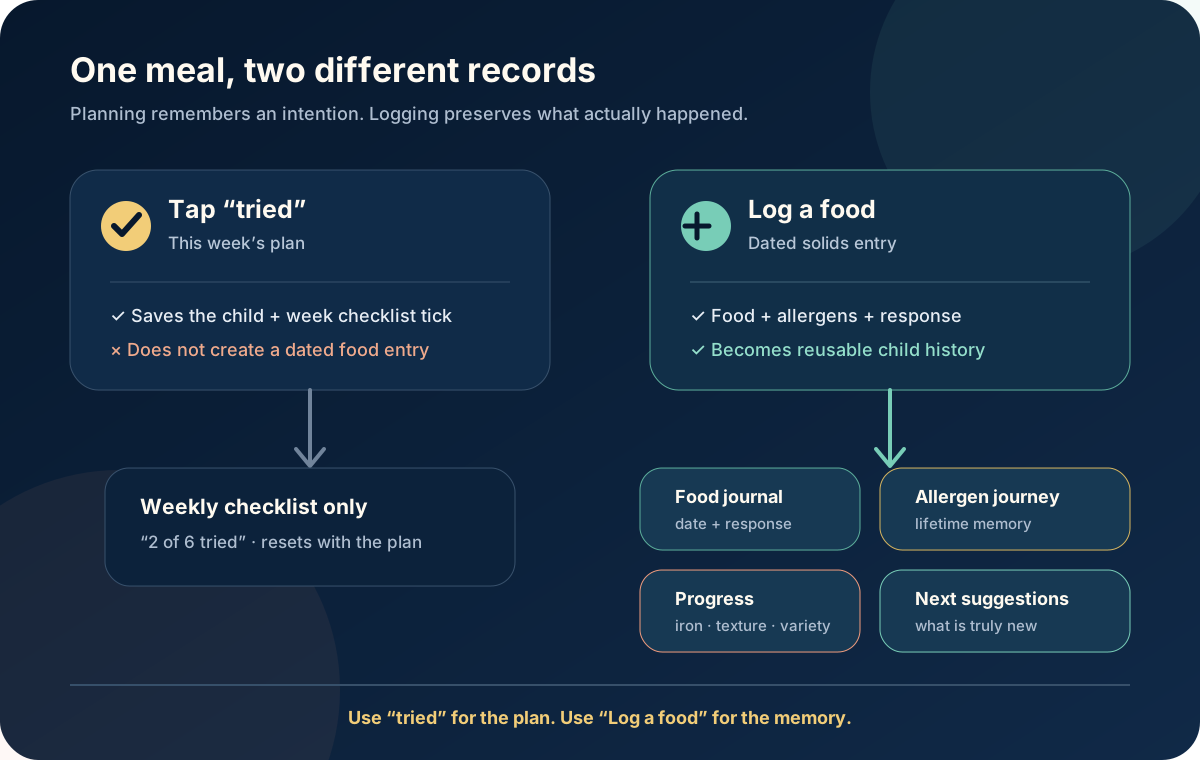
The practical rule is simple:
> Use tried to manage the plan. Use Log a food to remember what actually happened.
What the weekly “tried” tick really does
OBubba’s planner generates six ideas from recipes available for the baby’s corrected-age stage. The recommendation engine gives weight to iron-rich choices, an appropriate single new allergen and foods whose exact recipe name has not already been logged. It filters recipes carrying an allergen in the child’s lifetime reaction record.
When the parent creates a plan, saves three things for each idea:
- recipe name and emoji
- detected allergen labels and an iron-rich flag
- a `tried` Boolean, initially false
Tapping the row flips only that Boolean. The screen can then say 2/6 tried or 6/6 tried. It does not call the feed repository, add an entry to today or send the recipe’s allergen list into the child history.
The plan is stored under a child-scoped key and tied to the Monday that begins the current week. The ticks survive closing and reopening the app during that week. A plan from a previous week is dropped, and regenerating the current plan replaces it after warning that meal and shopping ticks will be cleared.
That makes “tried” a lightweight planning status—not a health record. It can mean “served,” “offered,” “we got around to it” or “baby tasted some.” The app currently does not ask which meaning the parent intended.
What a real solids log adds
At the bottom of Care → Weaning, Log a food opens the same Feed sheet used by Track. Choose Solids, write what was offered and optionally select:
- 😋 Loved it
- 😐 Unsure
- ⚠️ Reaction
Saving creates a dated feed entry. The log sheet also scans the food text for recognised major allergens. A clear description such as “scrambled egg with oat toast” is more useful than “breakfast” because it gives the detector something real to work with.
That one entry can then feed several parts of OBubba:
- Food journal. The meal appears with its relative date, response and recognised allergen tags.
- Allergen journey. Recognised or explicitly saved allergens join the child’s lifetime introduced set.
- Reaction safeguards. An allergen attached to a meal marked Reaction joins the lifetime reacted set and is excluded from later recipe suggestions.
- Weaning progress. Logged names and wording contribute to unique-food, iron-rich-meal, days-weaning and texture summaries.
- First-taste ideas. Recent exact food names can be removed from the next-tastes rotation.
- Recipe ranking. The engine can distinguish previously logged recipes and already introduced allergens from genuinely new ones.
- The wider day. Milk, nappies, sleep, growth and solids stay on the same child timeline for family handovers and summaries.
The app cannot infer any of that from a checklist tick alone. The dated entry is the evidence layer.
Why the current wording is confusing
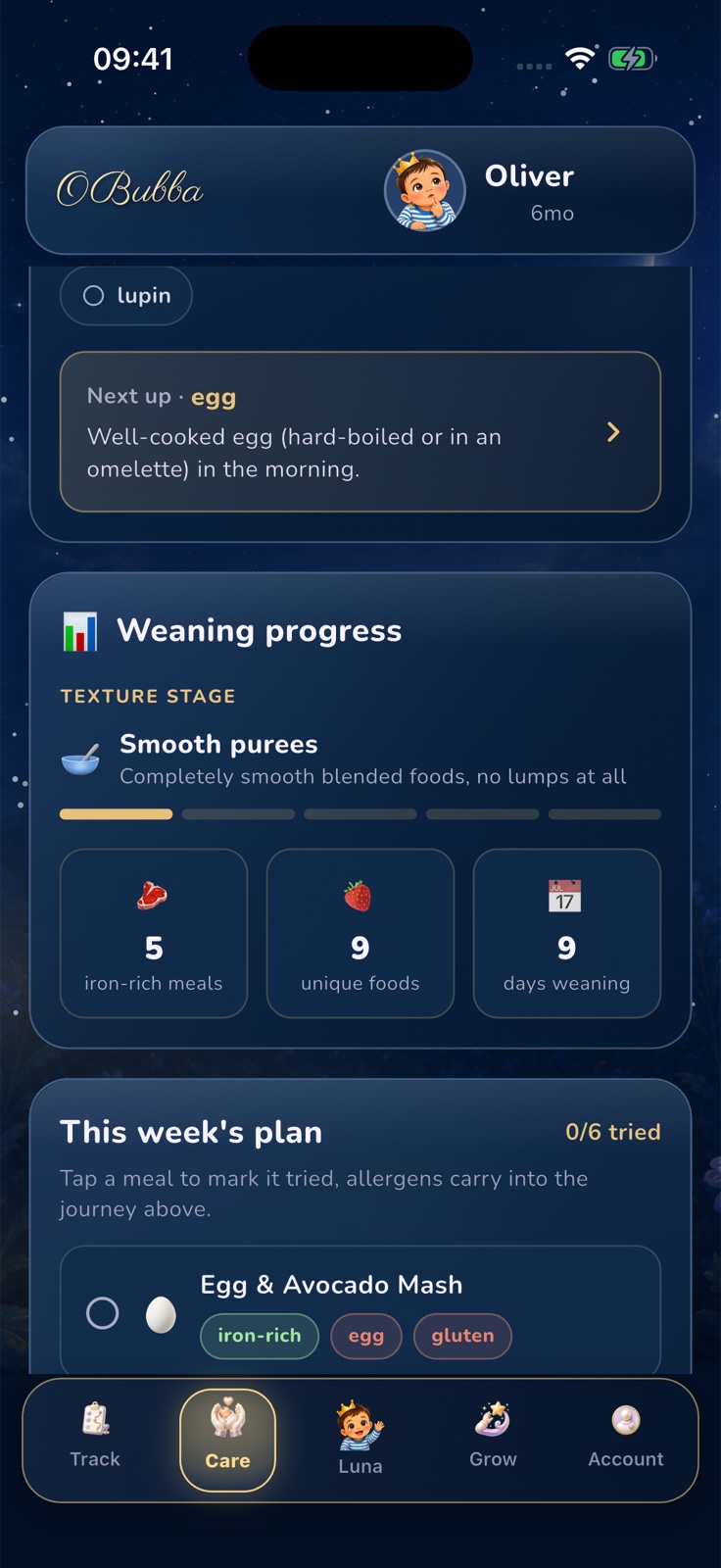
Above the six plan rows, the current screen says:
> “Tap a meal to mark it tried, allergens carry into the journey above.”
The first half is accurate. The second half is not implemented by the tap.
The allergen journey is rebuilt from two sources: allergens in actual solids history and allergens the parent manually marked as introduced. The weekly `PlanMeal.tried` field is not one of those sources.
This matters because the app may display a reassuring checked meal carrying an egg or gluten badge while the allergen journey above remains unchanged. More importantly, future recipe ranking still treats that allergen as new unless it was already present elsewhere in the child’s history.
The safest immediate copy would be:
> Tap to mark this plan idea tried. Log the food below to add it to the journal and allergen journey.
That sentence tells the truth without making the parent understand state.
What should you log after a planned meal?
A useful record can be one line. You do not need a gram-by-gram diary.
Try this format:
food + important ingredients or texture + response
Examples:
- “Lentil and sweet-potato mash — loved it”
- “British Lion egg omelette strip — unsure”
- “Plain yoghurt with mashed pear — loved it”
- “Salmon, potato and pea mash — reaction”
- “Family bean stew, no added salt, fork-mashed — unsure”
For a mixed meal, name the ingredients that would matter if you had to reconstruct it later. “Pasta” does not reveal whether it contained wheat, egg, cheese, pesto or another ingredient. The app’s recogniser is a convenience, not a label reader.
If anything concerning happened, record the food and response promptly, but do not rely on a single app chip as the full medical note. Write the time, amount offered, symptoms and what happened next in the note or another record you can share with a clinician.
“Loved,” “Unsure” and “Reaction” are not taste ratings
Loved and Unsure are lightweight memory aids. A baby can pull a face and still be learning the flavour; they can also enjoy touching a food without swallowing much. One uncertain meal does not prove dislike.
Reaction should be reserved for a possible physical response, not “threw it on the floor” or “refused the spoon.” That choice is used differently by the engine: recognised allergens on a Reaction entry can be removed from future recipe suggestions.
No app can diagnose food allergy from that selection. The NHS advises introducing foods that can trigger allergy from around six months one at a time and in very small amounts, so a reaction is easier to spot. Once introduced and tolerated, keep offering them as part of the usual diet. Families with diagnosed allergy, eczema or a clinician-led plan may need different advice.
Call 999 for a possible severe allergic reaction, including breathing difficulty, marked swelling, collapse or unusual floppiness. Do not wait to finish a log.
Can I just mark an allergen as introduced?
Yes. Tapping an allergen chip opens a sheet with Mark as introduced. That exists for foods offered before OBubba was installed or meals somebody forgot to log.
The manual mark is saved separately for each child and merges with allergens recognised across the child’s lifetime solids history. It is useful for restoring a known fact without inventing a meal.
It is deliberately thinner than a solids entry. It does not say:
- when the food was offered
- which product or recipe contained it
- how much was eaten
- whether it was tolerated
- whether there were symptoms
Use it to repair the journey, not to replace a meaningful reaction record. Also note a current limitation: if an allergen is present in an actual food log, removing its manual tick cannot erase that historical exposure. The history still wins, as it should.
Planning and logging answer different questions
The two-record model is not inherently wrong. In fact, keeping intention separate from reality is good product design.
| Planning asks | Logging asks | |---|---| | What could we offer this week? | What was actually offered? | | Which ingredients do we need? | When did it happen? | | Have we dealt with this idea? | How did baby take it? | | What fits the baby’s stage and known history? | Which allergens and textures were really present? |
A meal can be planned and never served. It can be served but barely explored. The parent can swap the recipe, change an ingredient or use a shop-bought alternative. Automatically converting every plan tick into a precise meal record would create false data.
The problem is not that two states exist. The problem is that the current interface makes one tap look as if it updates both.
The best product fix: a prefilled handoff
OBubba should preserve the distinction while removing the duplicate typing.
When a parent taps a planned meal, the app could offer:
- Log this meal — opens a prefilled solids sheet with the recipe name and detected allergens, lets the parent change the actual ingredients, choose Loved/Unsure/Reaction and save the correct time.
- Mark plan complete only — keeps the lightweight weekly tick without claiming the food was logged.
After a successful food log, the linked plan row can automatically become tried. That direction is defensible: an actual log is evidence that the plan item happened. The reverse direction should still ask for confirmation and details.
Best-in-class details would include:
- show Logged rather than merely Tried when a dated matching entry exists
- preserve the recipe-to-log link even if the parent edits the display name
- never carry an allergen silently after the parent changes ingredients
- show a clear review step for newly detected allergens
- make the result available to other authorised carers immediately
- keep Reaction visually distinct and never auto-confirm it from a plan
- change the misleading line above the plan now, before the deeper flow ships
That is the kind of quiet polish that makes a parenting app hard to replace. The parent chooses a useful idea once; the app carries it forward without turning a plan into a medical claim.
A 15-second workflow for tonight
- Open Care → Weaning and use the six ideas as a flexible shortlist.
- Tap tried if you want the weekly checklist to reflect the meal.
- Tap Log a food.
- Choose Solids and name what was actually served—not merely the planned recipe.
- Add Loved, Unsure or Reaction only when that label is genuinely useful.
- Check that recognised allergen tags match the ingredients.
Then stop. A useful log should return time to the family, not turn dinner into administration.
Keep weaning plans and real food history together with OBubba → — plan stage-aware ideas, remember allergens and reactions, and keep solids beside sleep, milk, nappies and growth.
Frequently asked questions
Does ticking a meal as tried add it to today’s timeline?
No. In the current build it changes only the saved weekly plan item. Use Log a food to create a dated solids entry.
Does the tried tick update the allergen journey?
No. Despite the current nearby copy, the allergen journey reads actual solids logs plus manual introduced-allergen ticks. It does not read the weekly plan’s tried state.
Will a tried meal change future recipe suggestions?
Not by itself. The recipe engine reads solids history and lifetime reacted allergens. A checklist-only tick is not part of that input.
What happens when a new week starts?
The saved plan is tied to its Monday-based week. When the week changes, the old plan is treated as stale and the screen offers to generate a fresh one.
Is the shopping-list tick a food log?
No. It records only that an ingredient is in the basket. It says nothing about whether it was used or eaten.
What if the meal happened before I started using OBubba?
You can manually mark a known allergen as introduced. For useful detail, you can also add a food record on the correct day where the app allows historical logging.
Does OBubba know how much my baby swallowed?
No. The current solids record stores the description and response, not a clinically reliable intake amount. Follow the baby’s cues and use growth, milk feeds, wet nappies, development and professional advice for the wider picture.
Sources and further reading
- NHS Best Start in Life: How to start weaning your baby
- NHS Best Start in Life: Introducing foods that could trigger an allergic reaction
- NHS Best Start in Life: Preparing food safely
This UK-oriented article provides general information, not individual medical or dietetic advice. OBubba cannot diagnose allergy, assess swallowing or verify ingredients. Follow your child’s clinical plan where relevant and seek urgent help for a severe reaction or choking.
Ready to try OBubba?
Use OBubba to track feeds, sleep, naps, nappies, growth, milestones and family handovers in one calm baby tracker app.