You have started solids. Broccoli happened yesterday, banana is now permanently woven into the high-chair straps, and every search result offers another enormous list.
What should your baby actually try next?
OBubba’s current app answers with a small “Try these next” card: four first-taste ideas chosen from the baby’s corrected age, recent food names, allergens already introduced and any recognised allergen linked to a logged reaction.
That sounds simple. Underneath, it is making several useful distinctions—and carrying several limitations every parent deserves to see.
The short answer
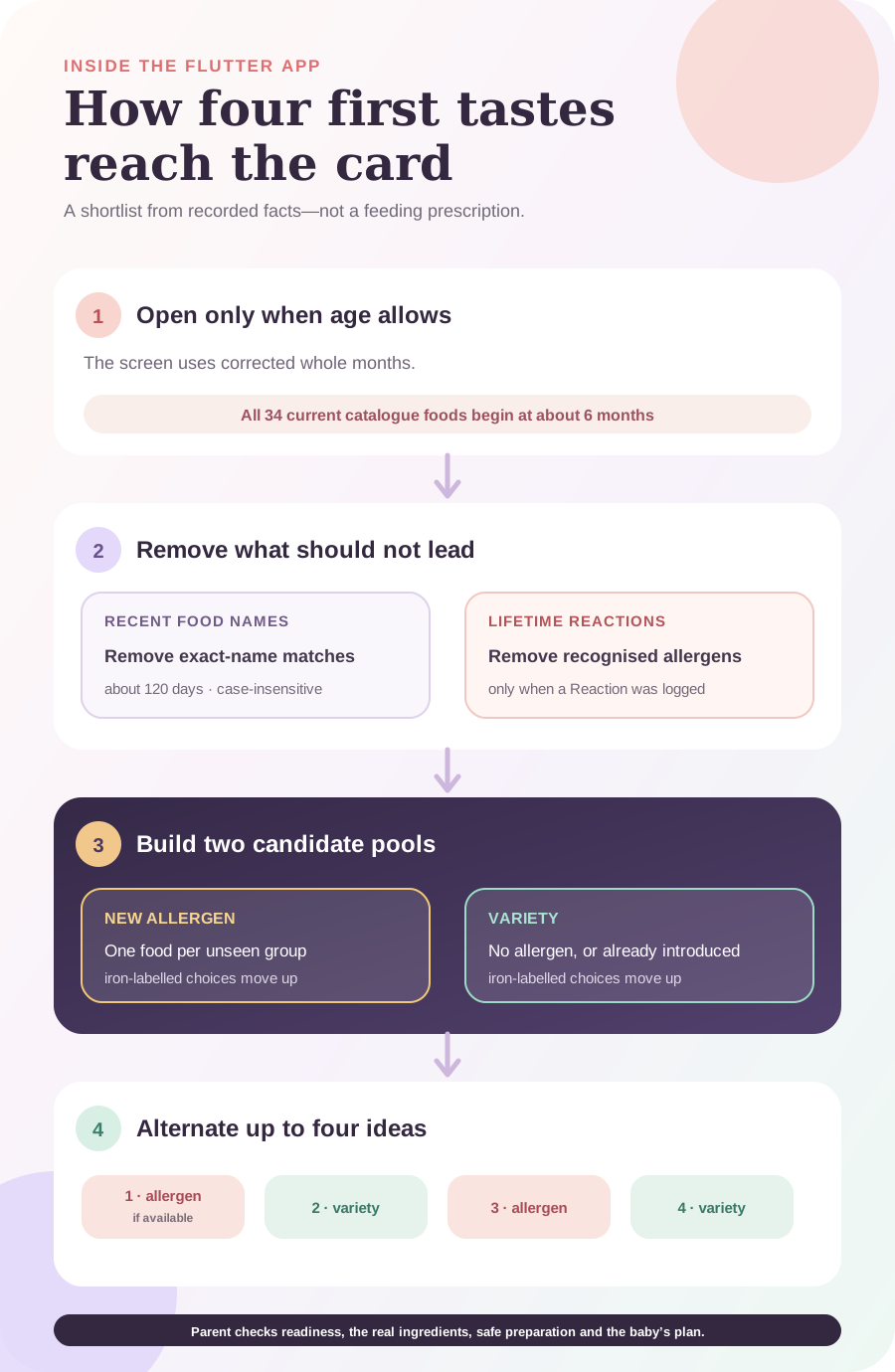
OBubba does not ask an AI to invent a meal. The first-tastes chooser is a deterministic function using a fixed catalogue of 34 foods.
It:
- waits until corrected age reaches the catalogue’s first-food range;
- removes foods whose exact names appear in the recent solids history;
- removes catalogue foods carrying a recognised allergen previously linked to a Reaction log;
- separates the remaining foods into new-allergen ideas and variety ideas;
- gives iron-labelled foods extra priority within those pools; and
- alternates the two pools where possible until the app has four suggestions.
The result is a manageable shortlist, not a prescription, feeding schedule, readiness assessment or allergy plan.
First tastes are not recipes
OBubba has two different food recommendation systems.
| First-tastes chooser | Recipe engine | |---|---| | Suggests individual catalogue foods | Ranks complete recipe ideas | | Appears as Try these next | Appears under recipe ideas and the weekly plan | | Designed for early, traceable tastes | Designed for broader meal planning | | Uses corrected months and a 34-food catalogue | Uses corrected weeks, recipe stage and meal-history gaps | | Shows 4 ideas | Can build a 6-meal weekly plan |
If the first-tastes card suggests Egg, it is not recommending a multi-ingredient omelette recipe. It is pointing to the catalogue entry, where the parent can open preparation, nutrient, allergen and safety information.
Gate 1: corrected age comes first
The Weaning screen passes `correctedMonths()` into the chooser. This matters for a baby born prematurely: the app does not simply use the birthday and quietly move first-food ideas forward.
The pure selection function returns nothing below five months, but every food currently in the catalogue has `fromMonths: 6`. In practice, that means there are no available first-taste suggestions before six corrected months.
If the date of birth is missing or malformed, the screen uses zero rather than guessing six months. The card stays hidden.
That is still only an age gate. The app cannot see the three readiness signs. NHS guidance says they should appear together from around six months:
- staying seated and holding the head steady;
- coordinating eyes, hands and mouth to reach for food; and
- swallowing food rather than pushing it back out.
For a baby born prematurely, ask the health visitor, GP, neonatal dietitian or neonatal team when to begin. A corrected-age number is context, not clearance.
Gate 2: what has already been logged?
The screen reads solids entries from today back through roughly 120 days. Every non-empty food description becomes part of the tried-food set.
The comparison is case-insensitive but otherwise exact:
| Logged food text | Catalogue item | Treated as the same food? | |---|---|---:| | `Egg` | Egg | Yes | | `egg` | Egg | Yes | | `Scrambled egg + toast` | Egg | No | | `Broccoli` | Broccoli | Yes | | `Broccoli and lentil mash` | Broccoli | No |
This protects the app from pretending it understands every ingredient in free text. It also creates a clear limitation: a mixed description can leave an individual catalogue food eligible even though the baby has eaten it.
If “scrambled egg + toast” was logged, the allergen detector may still remember egg and gluten as introduced. The app should not label Egg as a new allergen, but Egg may still appear later as a familiar variety idea because the exact catalogue name was not logged.
Similarly, food-name memory is recent rather than lifetime. A non-allergen eaten more than about 120 days ago may eventually return to the pool. That is not harmful by itself—repeat exposure is part of ordinary eating—but it means “Try these next” does not mean “your baby has definitely never tried these.”
A logging habit that makes suggestions cleaner
For a mixed meal, keep the useful detail but name the components clearly:
> Lentil and broccoli mash — lentils, broccoli; soft fork-mashed; unsure today.
If one component was a deliberately introduced allergen, make that explicit and check that the app’s detected allergen tags match the actual ingredients.
Gate 3: introduced allergens have longer memory
OBubba’s allergen history is deliberately more durable than the recent food-name list.
The Weaning screen combines:
- manually ticked introductions;
- recognised allergens from current solids logs; and
- the lifetime summary preserved when older daily records are archived.
Aliases are canonicalised. For example, a catalogue item labelled wheat can be understood within the app’s gluten group, while milk terms map to dairy.
This lifetime set answers a narrow question: Has this allergen been recorded before? It does not prove how much was eaten, whether the exposure was adequate, whether it was tolerated or whether continued offering has happened.
Gate 4: a recognised reaction removes that allergen
When a solids entry is saved with the response Reaction, the app can add its detected major allergens to a lifetime reacted set. The first-tastes chooser removes every catalogue food carrying one of those allergens.
That protection survives older-day archiving. A fish reaction logged months ago should not be forgotten merely because the original daily entry has moved out of the app’s hot data window.
The boundary is just as important:
- the food must be logged as solids;
- the response must be Reaction;
- the relevant allergen must be recognised from the food name or saved allergen tags; and
- the filter works at recognised allergen level, not as a clinical diagnosis.
A Reaction log for “red breakfast” cannot tell the app whether the meal contained egg, dairy, wheat or none of them. A symptom after strawberry does not automatically create a major-allergen exclusion because strawberry is not one of the recognised major allergen groups.
If a reaction is suspected, stop relying on the suggestion list and follow the baby’s professional allergy plan. Call 999 for severe breathing difficulty, swelling affecting the airway, collapse, marked floppiness or another life-threatening reaction.
How OBubba builds the four suggestions
After filtering, the engine makes two pools.
Pool A: not-yet-recorded allergens
Foods whose catalogue allergen is not in the introduced set go into the new-allergen pool.
Only one representative of each unseen allergen group is claimed for that round. Salmon and cod both carry fish, for example, so the card should not fill two precious slots with two supposedly new fish introductions.
Within the pool, foods whose catalogue nutrient description contains “iron” move upward.
Pool B: variety
Foods without a catalogue allergen—or foods whose allergen has already been introduced—go into the variety pool. Iron-labelled items move upward here too.
This is the app’s ranking rule, not a dietetic verdict. It does not calculate iron intake, portion size, absorption or the rest of the baby’s diet. The word match simply prevents early variety from becoming a fruit-and-sweet-vegetable list with no iron-rich options.
Then the pools alternate
The chooser tries to lead with a new allergen, then a variety food, then an allergen, then variety, until it reaches four items.
If only one pool has food left, it fills from that pool. This prevents the engine from returning nothing simply because the perfect alternating pattern is impossible.
The exact names are less important than the structure:
| Slot | What the engine tries to offer | Why | |---|---|---| | 1 | One not-yet-recorded allergen | Keeps safe introduction from being endlessly postponed | | 2 | A non-new-allergen taste | Adds variety and makes the list less intimidating | | 3 | A different allergen group | Avoids duplicating the same unseen allergen | | 4 | Another variety food | Keeps the round balanced where inventory allows |
NHS guidance says foods that can trigger allergy can be introduced from around six months, one at a time and in very small amounts, so a reaction can be spotted. Once tolerated, they should remain part of the baby’s usual diet. The OBubba shortlist can organise memory, but the parent chooses the day, amount and safe form.
A worked example
Imagine an eight-month-old whose record contains:
- Sweet potato
- Banana
- Broccoli
- Egg
- Lentils
- a recorded introduction of dairy
- a recognised reaction linked to fish
The chooser would:
- remove the exact recent food-name matches;
- treat egg and dairy as already introduced;
- remove catalogue fish foods because fish is in the reacted set;
- choose at most one representative for each other unseen allergen group;
- prioritise iron-labelled candidates inside both pools; and
- return up to four alternating ideas.
It would not know whether the baby ate a teaspoon of egg, merely touched it, or now eats it twice a week. It would not know whether lentils were served in a manageable texture. It would not replace the fish-allergy advice from a clinician.
That is the right mental model: a memory-aware shortlist, not a feeding authority.
Why a suggestion may disappear
The card is absent when:
- corrected age is below the available catalogue range;
- the date of birth cannot produce an age;
- every age-appropriate catalogue food has an exact-name match in recent history;
- recognised reactions filter the remaining foods; or
- the requested suggestion count is zero inside the pure engine.
The app does not show a dramatic “nothing left” state. No eligible suggestions means no card.
The catalogue still needs a parent
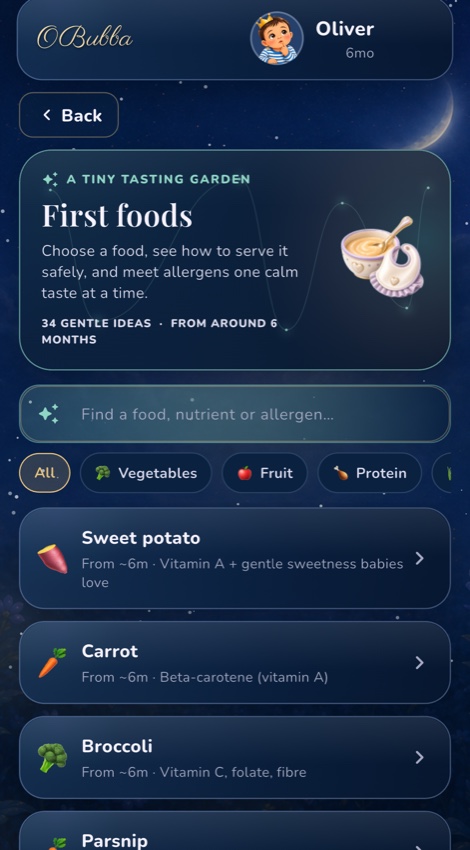
The First foods screen lets parents search by food, nutrient or allergen and open preparation guidance. It covers details such as cooking firm vegetables until soft, squashing round berries and thinning smooth nut butter.
But a catalogue label is not the food in your kitchen.
Before serving, check:
- the baby is alert, seated safely upright and directly supervised;
- size, shape and texture fit their current skills;
- bones, stones, pips and hard pieces are removed;
- thick nut butter is thinned and whole nuts are never offered;
- the product label matches the allergen record;
- salt, sugar, pasteurisation and cooking advice fit current UK guidance; and
- any individual medical or allergy plan takes priority.
“Toast / bread fingers” can contain more than wheat. Yoghurt may have added ingredients. Porridge may be prepared with dairy or another milk. The app’s single catalogue allergen field is not a substitute for reading the packet or knowing the recipe.
A calmer way to use the card
- Check readiness, not just age. If the three signs are not together, wait and ask for advice.
- Choose one suggestion, not all four. The list is a queue of ideas, not today’s menu.
- Pick a calm time. Avoid a first allergen when the baby is ill, exhausted or about to be handed to another carer.
- Prepare it safely. Open the catalogue guidance, then check the real food.
- Offer without pressure. Let the baby decide whether and how much to explore.
- Log what actually happened. Use the real food name, ingredients, response and any symptoms.
- Keep tolerated allergens in ordinary rotation. A first tick is the beginning of the record, not the end.
Try OBubba’s weaning tracker free → — keep first tastes, allergens, reactions, textures, milk and the rest of the baby’s day in one calm family record.
What OBubba cannot decide
OBubba cannot:
- examine developmental readiness or swallowing;
- inspect a food’s softness, shape, temperature or ingredients;
- diagnose allergy, intolerance, choking risk or a feeding disorder;
- calculate dietary adequacy from a four-food shortlist;
- know that free-text meal names describe every ingredient;
- determine how much food was eaten; or
- override advice from a health professional.
If feeding regularly causes coughing, choking, breathing changes, a wet or gurgly voice, recurrent chest infections, distress, poor growth or a shrinking range of accepted foods, ask for professional assessment.
Frequently asked questions
Does OBubba recommend foods before six months?
The current personalised chooser uses corrected age. Although its pure function has an under-five-month guard, all 34 catalogue foods currently begin at six months, so the card has nothing to show before six corrected months. Readiness signs and professional advice still decide when to start.
Why did it suggest something my baby has eaten?
Recent food matching uses the whole lowercased food description. “Egg” matches Egg; “scrambled egg and toast” does not. Older non-allergen food names can also fall outside the roughly 120-day recent scan. Correct the log if useful and treat the card as an idea, not a declaration of novelty.
Why is a familiar allergen shown again?
Once an allergen is in the lifetime introduced set, a food carrying it can enter the variety pool. The card should no longer mark it as a new allergen. Repeated tolerated exposure is different from first introduction.
Will OBubba suggest an allergen after a reaction?
Not when the meal was marked Reaction and the relevant major allergen was recognised or saved. Catalogue foods carrying that allergen are excluded. Ambiguous food names and unrecognised ingredients can weaken the safeguard, so verify the log and follow professional advice.
Are the four foods a meal plan?
No. They are up to four individual first-taste ideas. OBubba’s separate recipe and weekly-plan tools handle meal combinations.
Does the first item have to be served first?
No. The order reflects the engine’s allergen, iron and variety priorities. Choose a day and food that fit the baby’s readiness, health, existing plan and the family’s ability to supervise.
Sources
- NHS Best Start in Life: How to start weaning
- NHS Best Start in Life: From around 6 months
- NHS Best Start in Life: Introducing foods that could trigger an allergic reaction
- NHS Best Start in Life: Preparing food safely
OBubba is a tracking, organisation and education tool. It does not assess readiness, inspect food, diagnose allergy or replace a health visitor, GP, neonatal team, paediatric dietitian, feeding team, NHS 111 or emergency services.
Ready to try OBubba?
Use OBubba to track feeds, sleep, naps, nappies, growth, milestones and family handovers in one calm baby tracker app.