You have five quiet minutes and no spare imagination. OBubba opens Today’s Play and offers two small ideas. Why those two? Is it simply looking up the baby’s age—or has it noticed what the family actually does?
The short answer: the current app first builds a shelf of activities that fit the child’s corrected-age range. It then ranks each idea using five signals: age fit, milestone-linked skills that may be emerging, the family’s recognised activity mix over the last 14 calendar days, related milestones dated in the last 14 days, and a possible active development domain.
That is more personal than a static “things to do with a seven-month-old” list. It is not a test of the baby, proof of what they enjoy or a prescription to accelerate development. The two highest scores are invitations. A parent can try one, adapt it, save it—or ignore both.

Where Today’s Play lives
Open Track → Play to reach Today’s Play. The screen begins with “A small thing for [baby’s name] today”, a Start 5-minute play button and three broad outcomes connected to the leading activity domain.
Tap Today’s one thing and OBubba opens Today’s little play plan with the top two ranked ideas. Each has a short explanation such as:
- Helps with a skill Maya is working on right now.
- Maya has loved this kind of play lately.
- Reinforces a milestone Maya just reached.
- A lovely fit for where Maya is right now.

The screen shows at most two picks, but it is not choosing from only two stored cards. It scores the eligible part of the full activity library, sorts the results and takes the first two.
The exact ranking path
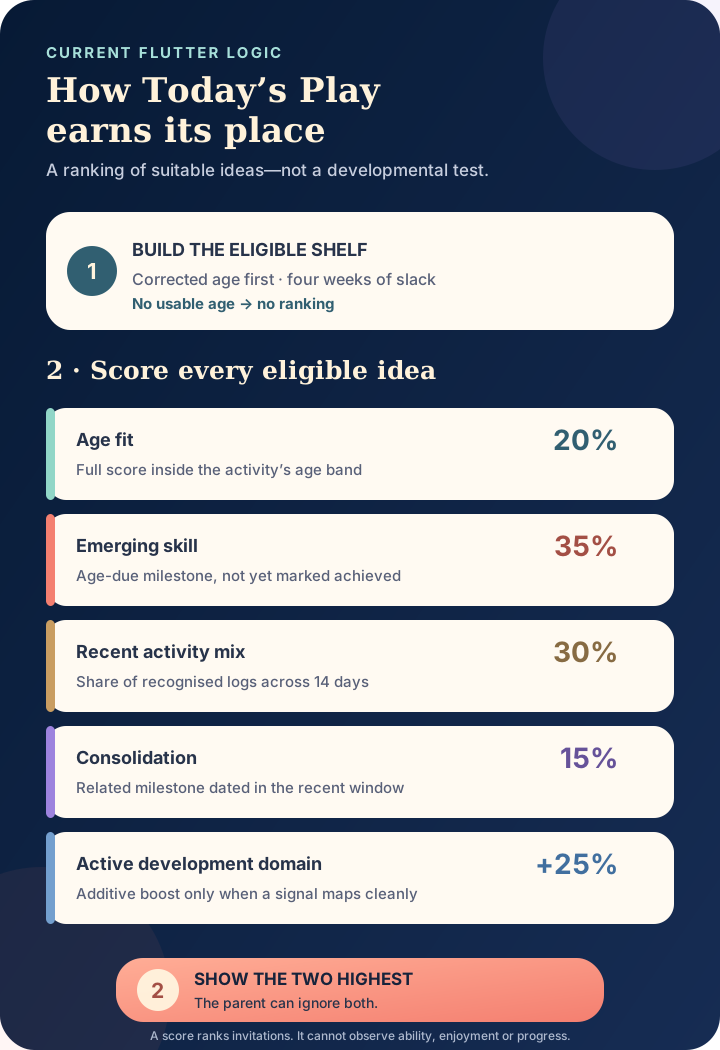
There are two distinct steps:
- Eligibility: decide which activities are broadly suitable for this age.
- Ranking: decide which suitable activities have the strongest logged context today.
That separation matters. A strong interest signal cannot drag a much later activity into the list. OBubba only scores an activity when the child’s corrected age falls between four weeks before its lower age bound and four weeks after its upper bound.
If the profile cannot produce a corrected age—usually because the relevant date information is missing—the recommender returns no ranked activities. The interface then asks the family to add a birthday instead of pretending it can personalise safely.
What the five scores mean
For every eligible activity, calculates this composite:
> 20% age fit + 35% emerging-skill fit + 30% recent-interest fit + 15% consolidation fit + an optional 25% active-domain boost
The active-domain term is additive, so the theoretical total can exceed 1.0. The number is an internal ordering score, not a percentage shown to parents and not a probability that the activity will “work”.
| Signal | Current weight | What earns it | |---|---:|---| | Age fit | 20% | Full fit inside the activity’s stated age band; a gradual fall just outside it | | Emerging skill | 35% | The activity is linked to an age-due milestone not yet marked achieved | | Recent interests | 30% | Recognised activity types linked to this domain make up part of the family’s previous 14 days of activity logs | | Consolidation | 15% | The activity is linked to a milestone dated within the previous 14 days | | Active development domain | +25% | The current top development signal maps clearly to the activity’s domain |
The largest ordinary weight goes to an emerging skill. That does not mean OBubba has observed the baby attempting it. It means the milestone is inside its broad age window, remains unmarked and has a curated bridge to this activity.
How corrected age shapes the shelf
For a baby born prematurely, the app uses corrected age when the child profile supports it. Corrected age is the age the baby would be from their estimated due date rather than their birth date.
That can make a broad developmental activity range fairer. NHS neonatal guidance likewise uses corrected age when considering premature babies’ physical and communication development. It is still only context. Two babies at the same corrected week can have different interests, energy, health needs and ways of moving.
Inside an activity’s age band, its age-fit value is 1.0. Outside the band it falls by 0.12 for each week of distance. Because the eligibility shelf allows only four weeks of slack, the weakest age fit that reaches scoring is still a nearby activity—not one borrowed from a distant stage.
The age bands are product curation, not medical cut-offs. An activity disappearing from Today’s Play does not mean the baby is too old to enjoy it. An idea appearing does not mean the baby should already be able to complete it.
What counts as a “recent interest”
This is the most easily misunderstood part.
OBubba scans today and the previous 13 calendar days. It counts only nine recognised activity types from the child timeline:
- tummy time
- bath
- outdoor or walk
- play
- reading
- massage
- swimming
- skin-to-skin
- music
The recommender then maps those event types to broad play domains.
| Activity domain | Timeline logs that support its interest score | |---|---| | Movement | tummy time, play, swimming, outdoor or walk | | Language | reading, music | | Social | play, music | | Thinking | play, reading | | Sensory | bath, massage, skin-to-skin, swimming | | Visual | play |
The denominator is all recognised activity events in the 14-day scan, not all baby-care logs and not the number of days the app was installed.
Suppose the family logged ten recognised activities:
- 5 tummy-time sessions
- 3 outdoor walks
- 2 reading sessions
A movement activity receives an interest fit of 8 ÷ 10 = 0.8 because tummy time and outdoor activity both map to movement. A language activity receives 2 ÷ 10 = 0.2 from reading.
After weighting, those contributions become 0.24 and 0.06 respectively. Age and milestone links can still change the final order.
Does OBubba really know what my baby likes?
No. It knows what the family logged.
A walk might have been delightful, necessary transport or a rain-soaked disaster. A reading entry does not prove the baby looked at the book. A bath may have been calm one evening and unpopular the next. OBubba does not inspect mood, duration or the note when calculating this particular interest score.
The interface can say “Maya has loved this kind of play lately.” The more technically accurate translation is:
> “Your recent record contains a larger share of activities mapped to this domain.”
The warmer wording is friendly, but parents should not treat it as an emotion detector. Real interest is visible in the child in front of you: looking, reaching, vocalising, relaxing, repeating an action—or turning away and asking for something else.
NHS play guidance emphasises ordinary interaction and says a baby’s favourite playmate is you. NHS speech and communication advice also encourages taking turns and following the child’s attention. Those are useful principles precisely because they leave room for the baby to respond; no ranking score replaces that response.
How emerging and recently achieved milestones differ
The recommender treats these as two separate signals.
Emerging: age-due and not marked done
OBubba checks milestones whose broad early-to-late window contains the current corrected week. If one is not in the achieved set, the app adds its curated activity bridges to the emerging list.
An eligible activity on that list receives the full 0.35 emerging contribution. The app does not need a note saying the baby attempted the skill, so “emerging” here means plausible in the current milestone window, not observed emergence.
Consolidating: achieved and recently dated
When a milestone has a usable date from today through 14 days ago, its linked activities receive the 0.15 consolidation contribution.
This lets play continue after a first. A newly recorded reach, for example, can make a related reaching activity more relevant without implying the skill is finished forever after one success.
An achieved milestone without a date cannot enter this recent-date calculation. A milestone dated in the future or more than 14 days ago does not receive the consolidation boost.
The two paths should not normally boost the same milestone at once: achieved milestones are skipped by the emerging scan. That keeps “not yet” and “just reached” as different kinds of context.
What is the active-domain boost?
Today’s Play also asks the development engine for the first live signal that maps usefully to play.
The current mappings include:
- a motor-rehearsal signal → movement activities
- a language-burst signal → language activities
- a separation or object-permanence phase → social activities
- the “little scientist” phase → thinking activities
A four-month sleep-maturation signal is deliberately skipped because it is not shaped like a play domain. Weaning readiness also does not force a play category.
When a clean mapping exists, every eligible activity in that domain gains an additive 0.25. This can lift several activities together; it does not hard-code a single required exercise.
That connection is one of the app’s more thoughtful loops. A parent’s saved observation can contribute to a transparent development signal, and the signal can make one related everyday activity easier to find. The app still cannot prove the developmental interpretation or the benefit of the activity.
Why the explanation is simpler than the score
The little Why this one? sentence does not expose all five numbers. It chooses one label from age, emerging, recent interest, consolidation or active domain.
There are two current limitations worth knowing:
- The explanation compares the raw fit values rather than each signal’s weighted contribution. A small non-zero interest fraction can therefore win the label even when age contributes more to the final total.
- The display copy has no dedicated active-domain sentence. If the domain boost is the strongest reason, the interface falls back to “A lovely fit for where [name] is right now.”
The ranking itself still includes the boost. The limitation is transparency: the friendly one-line explanation is a summary, not an audit trail.
That is why this guide names the full calculation. Parents deserve to know that “personalised” means a deterministic ranking from saved context—not a hidden developmental judgement.
What happens when you use the play-card buttons?
Opening an activity shows How to play, Why it helps and three actions.
Mark play as done
The app records that particular activity as completed today in a per-child local activity history. It increases the activity’s completion count and adds a generic play event at the current time with the activity title stored as its note.
The same activity cannot be marked done twice on the same calendar day from that card. On a future day it can be completed again.
Because the timeline event type is play, it may contribute to the next 14-day recent-interest mix. In the current category map, generic play supports movement, social, thinking and visual activities. The exact activity title is not used by the recommendation formula.
Save for later
This toggles a bookmark on that activity for the child. It changes the card’s saved state, but the current recommendation engine does not award a scoring boost merely because an idea is saved.
Too hard today
This records today’s date against that activity and can be tapped again to remove the marker. It is a compassionate way to remember the moment without calling it failure.
In the current logic, however, Too hard today does not demote or remove that activity from the recommendation ranking. It also does not alter a milestone. The marker is currently an interface record, not adaptive training feedback.
That distinction prevents a parent from assuming the app learned a permanent developmental limit. It also identifies a future product opportunity: temporary, transparent recommendation suppression could make the button more useful without labelling the child.
A recommendation is not a target
The NHS offers play ideas because shared play can support connection, communication, movement and learning. It does not ask families to optimise a five-factor score.
Use Today’s Play as a mental-load shortcut:
- Open the first idea.
- Check that the setting and objects are safe for this baby today.
- Make the activity smaller if needed.
- Pause and watch the baby’s response.
- Stop when they turn away, tire, fuss or need care.
Five minutes is an inviting button label, not a minimum dose. Thirty seconds of warm back-and-forth can be a complete play moment. A baby does not fail an activity by mouthing the object, crawling away or wanting a cuddle instead.
Do not use the ranking to investigate a developmental concern. The app cannot observe symmetry, muscle tone, hearing, vision, communication across settings or loss of a previously acquired skill. Speak with a health visitor, GP or the child’s neonatal or therapy team when you are worried, regardless of which play card appears.
What makes this useful
Many baby apps personalise by replacing “your baby” with a first name. Today’s Play goes further: it limits ideas by corrected age, connects milestone context, reads a recent family activity mix and can respond to a live development theme.
Its value is not that it knows the perfect game. It is that it turns several scattered parts of the family record into a small, low-stakes answer to a tired-parent question:
> What could we do together for a few minutes right now?
The honest version of personalisation stays modest. It shows a useful idea, explains one reason, leaves the full library available and lets the baby have the final vote.
Try OBubba free → — keep sleep, feeds, weaning, growth, milestones and everyday play in one calm family record, then let the app turn that context into one manageable next idea.
Frequently asked questions
Does OBubba use my baby’s actual age or corrected age for play ideas?
The current recommendation function uses corrected weeks when the child profile supports them. This is particularly relevant for babies born prematurely. Age bands remain broad product guidance rather than developmental deadlines.
How far back does Today’s Play look?
The recent-interest scan covers today and the previous 13 calendar days. Recently achieved milestone dates use an inclusive window from today through 14 days ago.
Will one tummy-time log change the recommendation?
It can change the activity mix slightly, but the effect depends on every recognised activity log in the 14-day denominator and the other four signals. One event does not automatically force a movement activity to number one.
Does marking an activity “Too hard today” teach the recommender?
Not currently. It saves a dated marker for that activity but does not change the ranking score or milestone record.
Does saving an activity make it rank higher?
No. Save for later stores a bookmark state; the current scoring function does not add points for saved activities.
Why did OBubba show no ideas?
The recommender needs a usable corrected age. If the required child date information is unavailable, it returns an empty list and the screen asks for a birthday rather than guessing.
Are the top two activities a developmental programme?
No. They are ranked, age-near play invitations. OBubba does not assess performance, prescribe repetition or replace individual advice from a health professional.
Sources and product verification
- NHS: Baby moves
- NHS: Baby and toddler play ideas
- NHS: Listening and learning, 6 to 12 months
- University Hospital Southampton: corrected age and premature-baby development
- OBubba source reviewed for this article: `activity_recommendation.dart`, `todays_play_screen.dart`, `activities_screen.dart`, `dev_activity.dart`, `milestone_activity_bridge.dart`, `dev_predict.dart` and 13 focused tests, verified 7 May 2027.
OBubba provides tracking, general education and play suggestions. It is not a medical device, developmental assessment or therapy programme. A recommendation score cannot measure ability, interest or progress.
Ready to try OBubba?
Use OBubba to track feeds, sleep, naps, nappies, growth, milestones and family handovers in one calm baby tracker app.