A baby sleep plan rarely announces that it has worked. There is usually no cinematic first night, no clean before-and-after and no single morning when every wake disappears.
Progress can look smaller: bedtime stops swinging across two hours, false starts become occasional, the first stretch grows, or the parent can settle one wake with less effort. The next useful question is not “Did my baby sleep perfectly?” It is “Has the problem we chose to work on stopped being the main problem?”
The current OBubba app tries to answer exactly that. When a family starts a Sleep Consultation plan, it saves the top finding that was actually shown. After the plan has had time to run, OBubba rebuilds the consultation from fresh logs. If the original category no longer appears, the app can show a “YOU DID IT” card, move to the next focus or say everything it flagged has settled.
We traced that full path through the live Sleep Consultant screen, plan storage, 14-day profile builder, win detector, one-tap plan update and seven focused tests. It is a thoughtful idea. It also needs one important translation: “no longer flagged” is evidence of change, not proof that the plan caused it or that all sleep is now sorted.
The short answer
OBubba needs all of these before it can celebrate a consultation-plan win:
| Gate | Current requirement | |---|---| | An active plan | The family must already be following a saved Sleep Consultation plan | | An honest starting point | The plan must contain the top finding category shown on activation day | | Time to try it | At least three whole calendar days must have passed | | Fresh evidence | At least five usable current day profiles must exist | | A category change | The original top category must be absent from today’s fresh consultation |
A lower severity is not enough. If Bedtime remains a finding—even at a gentler level—the app stays quiet. If Bedtime disappears and Day sleep is now top, the card celebrates Bedtime and offers Day sleep as the next focus. If no findings remain, it says everything OBubba flagged has settled.
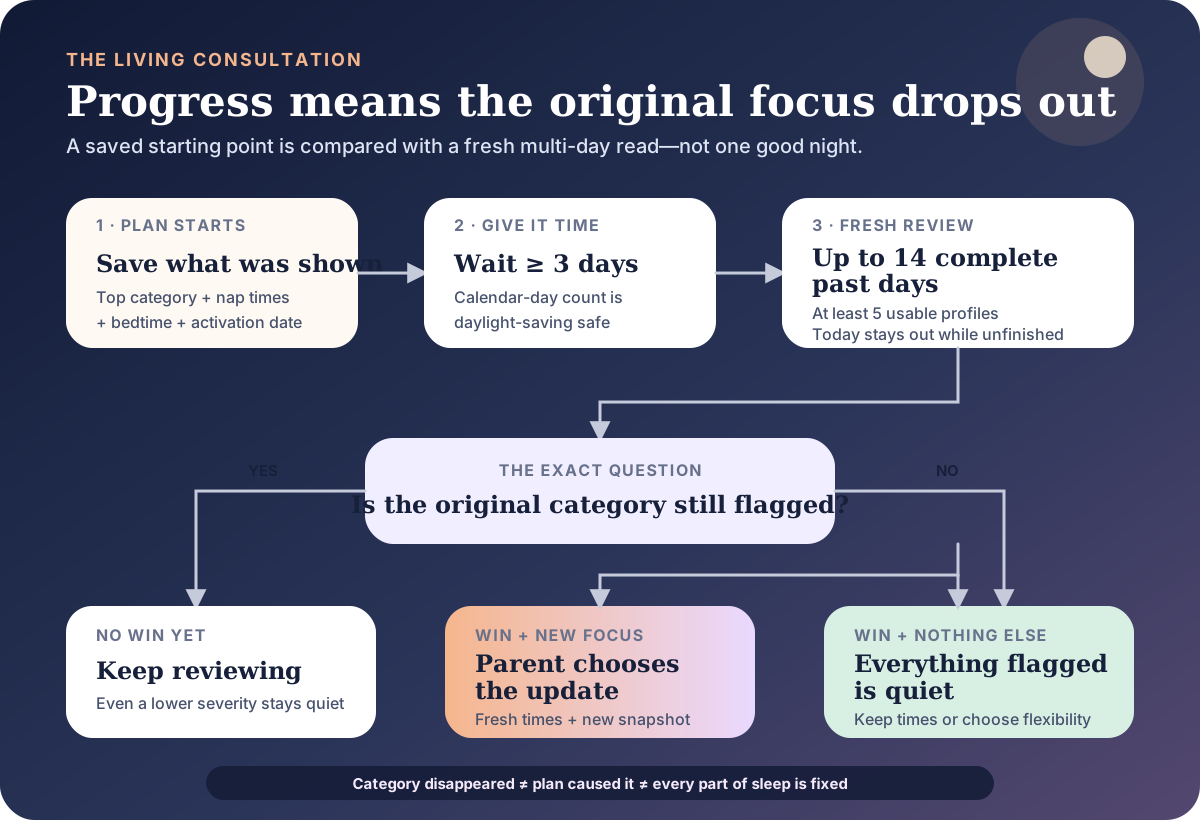
This is a category-level review, not a score-chasing animation. That restraint is useful. The strength of the conclusion still depends on what was logged.
What OBubba saves when the plan starts
When a parent activates a consultation plan, the app persists:
- the planned nap start times
- the target bedtime
- the activation date
- the plan type
- the consultation’s top finding category at that moment
That last field is the key. It might be Bedtime, Day sleep, Wake time, Nap consistency, Nap recovery, Night feeds or Last wake window.
OBubba does not later reconstruct what it thinks the parent must have seen. It keeps the category that was genuinely on top when the button was pressed. That matters because parents can correct, backfill and delete historical logs. Re-creating the old consultation from an edited history could manufacture a starting point that never appeared on screen.
Plans created before this snapshot field existed cannot generate the new celebration. The code deliberately prefers silence to inventing an old baseline.
The real Sleep Consultant surface
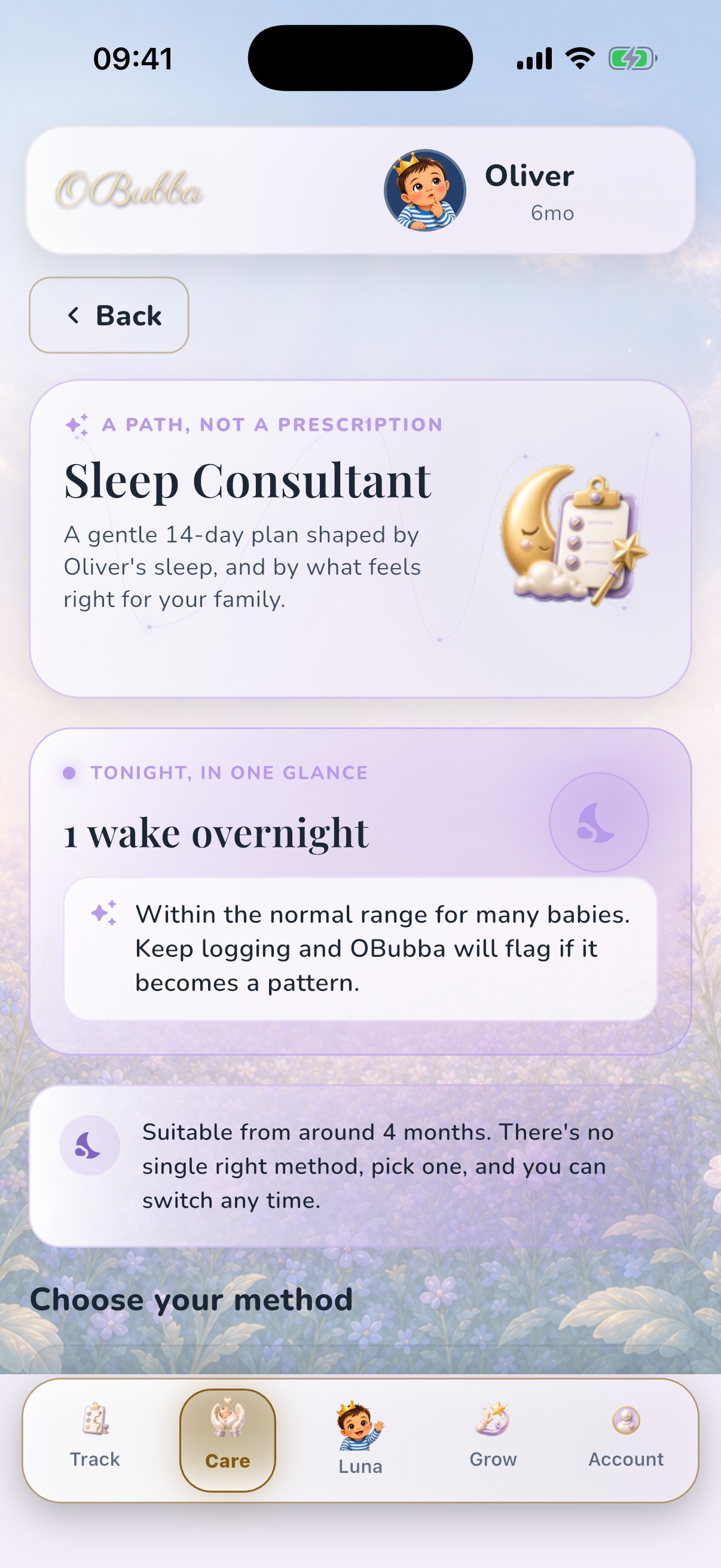
This is the genuine current iOS surface, using a fictional review profile—not a website mock-up. It frames the feature as “A path, not a prescription”, gives the latest night a small place in context and makes clear that there is no single right method.
The progress review belongs here rather than in a disconnected achievements tab. A parent returns to the same place where the original problem, schedule and method were chosen, and the consultation can now say what changed.
Why the app waits at least three days
The pure win detector has a minimum of three whole calendar days after activation. Before that, it returns nothing—even if the category disappears immediately.
This protects against congratulating a family because of one unusually calm night. Baby sleep varies, and the NHS notes that individual sleep patterns differ and can change with growth spurts, teething and illness. A single result can be welcome without being a stable result.
Three days is still a short review period. It is a product floor, not a scientific guarantee that a timing or settling change has taken effect. A family may reasonably want a longer comparison when nights are highly variable. A plan should also be reviewed sooner—not endured for the sake of data—if the baby is distressed, feeding is affected, the approach feels wrong or safety is compromised.
The app counts calendar-day difference using UTC date endpoints so a daylight-saving clock change cannot make the plan appear a day older or younger.
What “fresh evidence” means
For the live review, OBubba gathers up to 14 complete past days. It skips today because an unfinished day would make nap totals and feed counts look artificially low.
A day enters the profile set when it contains at least two entries. Depending on what was logged, a profile can then carry:
- morning wake and bedtime
- completed naps and total nap minutes
- final wake window
- nap quality, settling and wake mood
- the following night’s meaningful wakes and feeds
- day milk-feed count and wet nappies
- false starts in the first two hours after bedtime
At least five profiles must exist for the win detector to speak. If a parent stops logging and the consultation disappears, the app does not call that success. “Gone quiet” is guarded from “all sorted”.
That is one of the strongest design decisions in the feature.
The exact comparison: category present or absent
After the gates pass, the app reruns the full Sleep Consultation and asks one narrow question:
> Is the original top finding category still anywhere in today’s findings?
If yes, there is no win card. It does not matter whether that category has moved from first to third or whether its severity fell. The focused test suite explicitly protects this: a lower-severity Bedtime finding remains Bedtime, so the app must not call it resolved.
If the category is absent, the app creates a win. It carries:
- the category that disappeared
- how many days the plan has been active
- today’s new top category, if one exists
- the new problem and suggested fix
- fresh nap times and target bedtime for a possible update
This is clearer than comparing one opaque overall score. A parent can understand “Bedtime is no longer being flagged” more readily than “Sleep improved by 12%”.
The current on-screen phrase, however, is stronger: “Bedtime is sorted.” The evidence only proves that Bedtime did not meet the current consultation threshold. A more accurate celebration would be “Bedtime is no longer the issue OBubba is flagging.”
What happens when another focus remains
Suppose Bedtime was the original top finding. Five days later, bedtime variation has settled below the consultation threshold, but repeated excessive daytime sleep now makes Day sleep the strongest remaining finding.
The card celebrates the first focus, then shows Day sleep under NEXT FOCUS. The parent can tap “Update my plan to the new focus.”
That action:
- replaces the plan’s nap and bedtime targets with today’s fresh consultation times
- saves Day sleep as the new top category
- resets the activation date to today
- preserves the underlying plan type and any existing end date
The app waits for that save to complete before confirming. It does not silently rewrite the family’s plan in the background.
Resetting the snapshot also prevents the same win from firing on every visit. The next review asks whether the new focus has disappeared after its own fair trial.
This is the living loop that makes the feature more valuable than a static PDF: notice, try, review, acknowledge, then choose what comes next.
What happens when everything is quiet
If the original category has disappeared and today’s consultation produces no findings, the card says everything OBubba flagged has settled and offers “Keep it up.”
Tapping that button re-anchors the plan to today and clears the saved top category so the same celebration cannot repeat. It preserves the existing plan times. A standard consultation plan therefore remains active; the button does not automatically graduate the family out of it.
That may be exactly what a parent wants: hold the workable rhythm and let the app continue watching. It may also leave some families following fixed consultation targets after the reason for them has gone quiet.
A stronger next version would offer two explicit choices:
- Keep these times for now
- Return to flexible live predictions
Success should create more freedom, not an invisible permanent programme.
What the win does—and does not—prove
The most important distinction is between a detector outcome and a family outcome.
When OBubba says a category is sorted, the code has established only this:
> The category saved at activation is not in the fresh consultation’s current findings, after the minimum time and profile gates.
It has not established that:
- the plan caused the change
- the baby now sleeps through
- total sleep increased
- every wake became easier
- the parent is better rested
- feeding remained unaffected
- the improvement will persist
Bedtime could stop being flagged while night wakes remain unchanged. A Day sleep category might disappear because the most recent window contains different kinds of days. Illness, nursery, travel, maturation or a corrected log could contribute. Often several things change at once in real family life.
The right translation is “the evidence no longer supports our original concern”, followed by a human check: does the family also feel the nights are more manageable?
A subtle missing-data limitation
The current five-profile gate is broad, not category-specific. A profile only needs two entries to enter the current set. It does not have to contain the measurement required by the old category.
For example, imagine Bedtime was originally flagged. Later, there are five recent days with two or more entries each, but bedtime was not recorded on enough of them. The profile count passes. The fresh consultation may no longer contain a Bedtime finding because the necessary bedtime evidence is absent—not because bedtime became consistent.
The app can therefore mistake “not measured recently” for “no longer flagged” within a particular category, even though it correctly prevents the broader “stopped logging altogether” case.
The fix is straightforward: every win should require current coverage for the metric it claims has resolved. A Bedtime win needs enough recent bedtimes; a Wake time win needs enough morning wakes; a Night feeds win needs enough relevant nights and feeding context.
Edits, disruptions and changing windows
Persisting the original category protects the starting point, but the fresh side remains live. Editing or deleting recent entries can change whether a category appears. That is appropriate when correcting a mistake; it can also trigger a celebration without several new nights having occurred.
The win detector also does not directly check whether an illness, teething patch, travel or developmental disruption is active. Elsewhere, OBubba sensibly uses disruption context to hold formal sleep changes. The progress card should use the same caution. If a category vanishes during a very unusual week, “pause and review when things settle” may be more honest than “sorted”.
Rolling windows are useful because the plan stays current. They also mean the evidence is not a controlled experiment. OBubba should show the dates and coverage behind every celebration.
Better ways to judge progress at home
Do not make “slept through” the only finish line. Choose the outcome that matches the problem you started with.
| Original focus | A useful family-centred measure | |---|---| | Bedtime variation | Bedtime lands in a workable range on most ordinary nights | | False starts | Fewer meaningful wakes soon after bedtime | | Settling | Less time or less distress, without withdrawing needed comfort | | Night wakes | Fewer wakes needing the most intensive response, or easier returns to sleep | | Nap rhythm | A more predictable day without forcing sleep or restricting a young baby | | Parent load | The plan feels easier to sustain and the adult can get more rest or support |
Keep feeding, comfort and safety outside the success contest. A baby who still needs milk or reassurance has not failed a plan. A parent who stops an unsuitable method has made a sound decision, not lost a streak.
The NHS advises that baby sleep patterns vary and encourages parents who are struggling with tiredness to seek help, share care where possible and prioritise rest. Those outcomes belong beside the baby metrics.
Safety does not become optional when the graph improves
Every sleep still needs the same safer-sleep foundation. NHS guidance says the safest place for a baby during the first six months is in a cot or Moses basket, on their back, in the same room as the parent. The sleep space should be clear, flat and firm.
A longer first stretch is not a reason to add a pillow, wedge, positioner, loose bedding or a product that claims to deepen sleep. If a parent may drift off while feeding or comforting, return the baby to their own cot before the adult sleeps. Never fall asleep with a baby on a sofa or chair.
Pause the plan and seek health advice when sleep changes alongside poor feeding, breathing difficulty, unusual drowsiness, fever, pain or another concerning change. A consultation trend cannot assess an unwell baby.
How OBubba can make this genuinely best-in-class
The current feature already gets several difficult things right:
- it saves the finding the parent truly saw
- it waits instead of celebrating one night
- it requires fresh data
- it refuses to treat a mere severity drop as resolution
- it keeps plan changes parent-controlled
- it prevents the same achievement repeating forever
The next trust improvements are equally clear:
- Change “is sorted” to “is no longer being flagged”. Celebrate without overstating certainty.
- Require category-specific coverage. Missing bedtimes must not resolve Bedtime.
- Show the evidence window. Dates, usable nights and the exact threshold change should sit behind the card.
- Hold wins during major disruption. Review again when illness, travel or another temporary change settles.
- Ask the parent whether life improved. “Are bedtimes easier?” is evidence the log cannot supply.
- Offer a real graduation. Let families keep the schedule or return to flexible predictions when the original need has passed.
That is how OBubba becomes hard to replace: not by promising perfect sleep, but by remembering what mattered, checking whether the evidence still supports it and giving the family a clear choice about what happens next.
Let OBubba review the plan with you → — keep naps, bedtime, wakes, feeds and real-life disruptions in one record, then let the Sleep Consultant turn them into a focused plan that can change when the pattern changes.
Frequently asked questions
How soon can OBubba say a sleep-plan focus is resolved?
The current win detector waits at least three whole calendar days after plan activation. It also requires at least five fresh usable day profiles.
Does one good night trigger the celebration?
No. The original top category must disappear from a newly run multi-day consultation. One isolated night is not enough by itself.
What if the problem is improving but still present?
The app stays quiet. A lower severity does not count as a win while the same category remains anywhere in the current findings.
Will OBubba automatically change my sleep plan?
No. If another focus remains, the card offers an update button. The plan times and new category are saved only after the parent chooses that action.
Does “Bedtime is sorted” mean sleep is fixed?
No. It means Bedtime no longer appears as a current consultation finding. It does not prove causation, better total sleep, fewer wakes or better parent rest.
Can stopping logging look like success?
Stopping almost entirely should not: the app requires at least five current profiles. However, the current gate is not category-specific, so missing recent bedtimes could still make a Bedtime finding disappear despite enough other entries. Check the underlying coverage.
What happens after everything has settled?
Tapping “Keep it up” re-anchors the active plan and prevents the same celebration from repeating. The plan remains active with its existing times; it does not automatically return to flexible live predictions.
Sources and further reading
- NHS: Helping your baby to sleep
- NHS: Sleep and tiredness after having a baby
- NHS Best Start in Life: Safer sleep advice for babies
Ready to try OBubba?
Use OBubba to track feeds, sleep, naps, nappies, growth, milestones and family handovers in one calm baby tracker app.