At 6:12pm, OBubba says bedtime looks like 7:02. At 6:31, the final nap is corrected by ten minutes and bedtime moves. Then a Start wind-down card appears under the clock.
Is that card following a fixed bedtime, a generic 30-minute alarm or the baby’s real day?
The current answer is more interesting: OBubba first resolves tonight’s bedtime from the same engine used by its clock, plan, reminder and widget. It then surfaces that one result through three different nudge windows—a Track button, an in-app message and an operating-system reminder.
We traced the complete path through `track_home.dart`, the shared schedule signals, reminder planner, guided Bedtime ritual, per-child settings and 25 focused tests. The architecture gets the hardest part right: a manual bedtime, consultation plan or skipped nap can move the reminder along with the clock. The experience still has avoidable contradictions: the default routine totals 42 minutes, while the two proactive nudges arrive about 30 minutes before bed; the clearest button is behind the premium readiness gate; and neither reminder opens the ritual directly.
The short answer
| Surface | Current timing | What happens | |---|---|---| | Start wind-down button | From 90 minutes before predicted bedtime until 30 minutes after it | Opens the editable Bedtime ritual from the Track readiness panel | | In-app message | Once per child per day, when bedtime is 22–32 minutes away | Shows a snackbar suggesting bath, dim lights and calm | | OS reminder | Exactly 30 minutes before predicted bedtime | Shows the predicted bedtime, a generic routine suggestion and the engine’s reason | | Widget / Live Activity | Counts down to bedtime itself | Uses the bedtime display time, not the earlier reminder time |
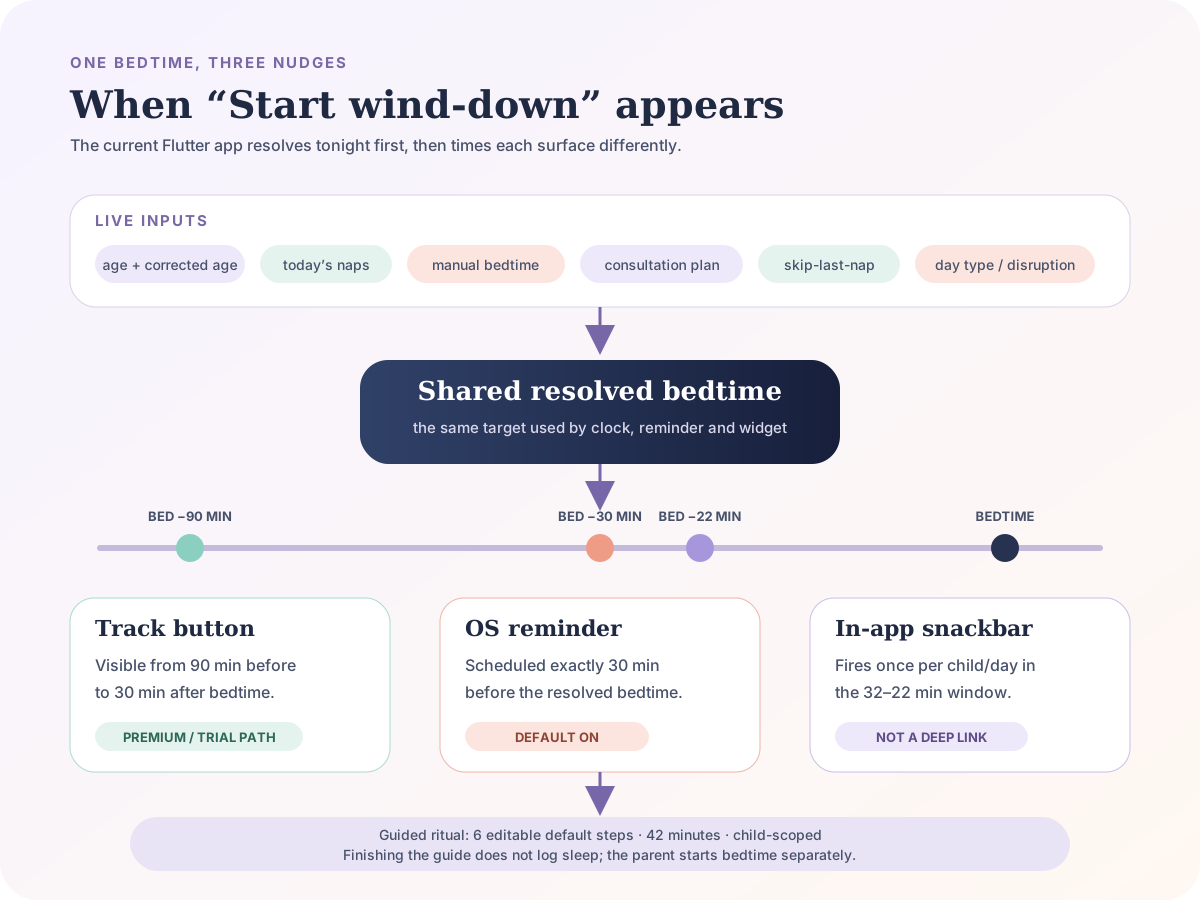
The crucial distinction is prediction versus notification. There is one resolved bedtime target, but the app decides separately when and where to bring it to the parent’s attention.
What moves the predicted bedtime first
The wind-down system does not own another independent bedtime calculator. Its reminder planner can receive the same `ScheduleSignals` used by the Track clock.
Those signals currently include:
- today’s naps and the final awake period
- age, using corrected age where available
- a manual bedtime override
- the active Sleep Consultation bedtime and nap times
- the parent’s Skip this nap and bring bedtime earlier choice
- nap-count overrides
- day-type and disruption context
- a learned latest-nap boundary
The app passes that context into the shared bedtime resolver. That is why changing a manual bedtime can reschedule the 30-minute wind-down reminder, and why skipping a refused final nap can bring both bedtime and the reminder earlier. The focused reminder tests protect both cases.
This is the right foundation. Parents lose trust quickly when the clock says 7:10, the widget says 7:30 and a notification arrives for 8:00. One source allows all of those surfaces to move together.
It also means the wind-down time may change as the day changes. If a late nap is added, corrected or skipped, the previous reminder plan is replaced. OBubba is not declaring that the first estimate was a promise; it is recalculating from a fresher day.
Layer one: the Track button starts early
When the baby is awake and bedtime is the next predicted event, the Track panel calculates a real `DateTime` for tonight. If that time is no more than 90 minutes ahead—and not more than 30 minutes overdue—it can show Start wind-down above the live readiness meter.
That wide window is sensible. The built-in routine is much longer than half an hour, and some families need time for a feed, medicine, siblings or a bath. A button appearing early is an invitation, not a command to begin immediately.
There is a current access mismatch. The code returns the premium/trial readiness lock before adding the Start wind-down button. The old permanent Care tile has been removed, and the app’s own help copy directs parents to this Track button. So although the Bedtime ritual screen itself has no premium check, the advertised route is effectively hidden from a free user.
At the same time, the bedtime reminder remains enabled by default outside that display gate. A free parent can therefore be told to start a routine that the main Track path does not let them open.
The clean product choice is one of these:
- keep the editable ritual free and render Start wind-down above the readiness paywall, or
- label the notification and route as a premium feature before the reminder is enabled
The first option is much more consistent with OBubba’s promise to reduce parental load.
Layer two: the in-app message has a ten-minute catch window
The live app watches the bedtime resolver once per minute. When bedtime is between 22 and 32 minutes away, it shows a snackbar once for that child and date.
The ten-minute band makes the trigger resilient. If the app misses the exact 30-minute tick because the screen rebuilt late, it still has several chances to speak. A SharedPreferences flag prevents the same message repeating all evening.
The message currently says to start the bath, dim the lights and keep things calm. It does not read the family’s customised routine. A parent who removed baths because they excite the baby still receives bath copy.
Nor is the snackbar an action button. It does not open Bedtime ritual when tapped. It is a line of guidance that can disappear, not a handoff into the thing it recommends.
There is another difference from the OS reminder: the in-app provider suppresses itself if any sleep-type entry exists in today’s bucket, while the reminder planner specifically looks for an open evening bedtime. Usually those produce the same outcome; unusual imported or corrected records can make them disagree.
Layer three: the OS reminder is exactly 30 minutes before bed
The notification planner schedules Wind-down time for [name] at bedtime minus 30 minutes. Its body includes:
- the current predicted bedtime
- generic bath, dim-light and story suggestions
- the resolver’s explanation for that bedtime
It will not schedule an evening reminder after the night has already started. A late open nap does not suppress it, because the planner deliberately distinguishes a daytime nap from an open sleep entry beginning at or after 5pm. Tests protect both sides of that boundary.
The reminder is on by default, including for older saved settings that predate the toggle. It is stored separately for each child and can be switched off under Account → Reminders → Bedtime routine (30 min before). Quiet Hours can mute it because it is a predicted nudge rather than an explicit appointment or custom reminder.
OBubba does not immediately request notification permission during onboarding. The current bridge waits until the family has logged something, then asks once. That is a thoughtful value-before-permission design.
The notification’s action field is empty. Tapping it opens the app but does not deep-link into Bedtime ritual. The code already supports canonical actions for feed and sleep-log reminders; wind-down needs its own `open_bedtime_routine` action.
The real guided Bedtime ritual
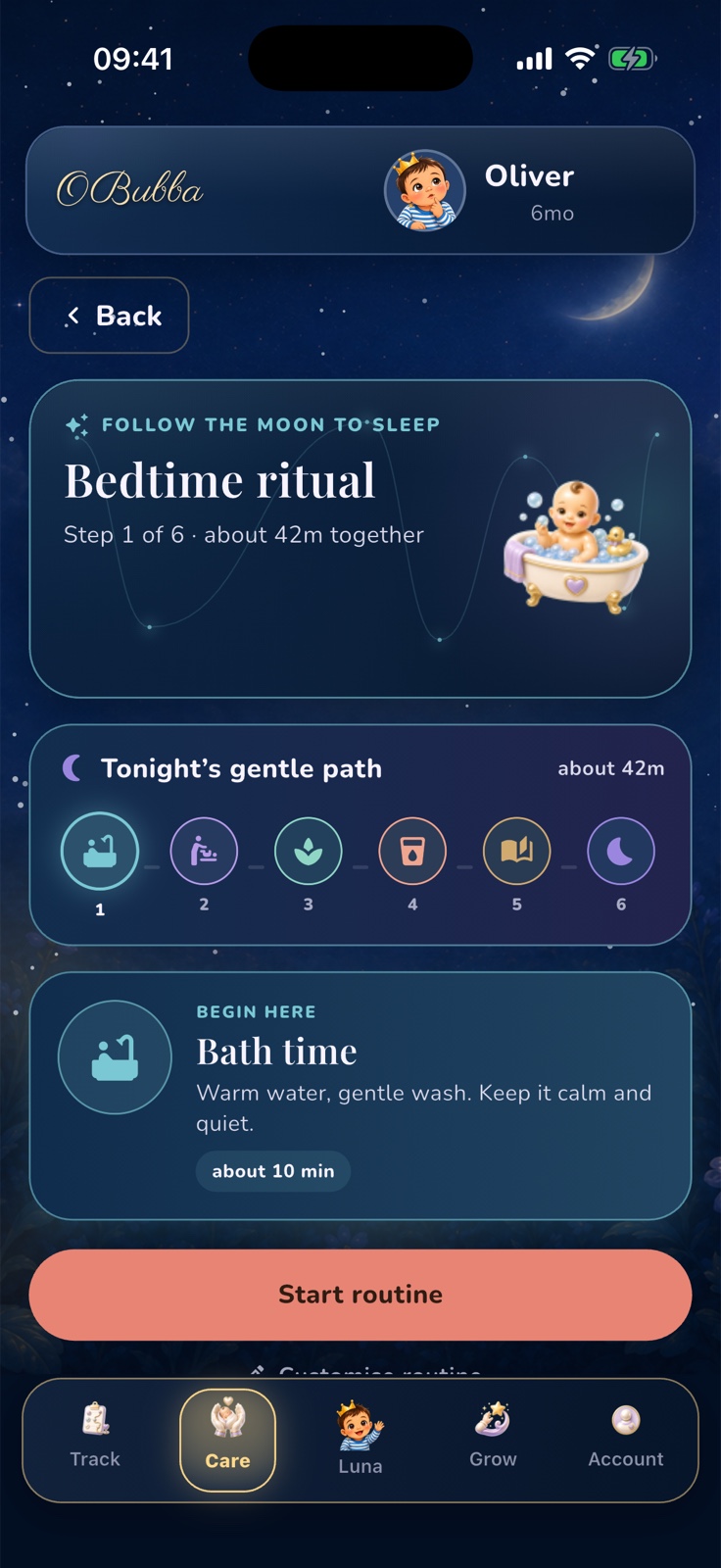
The screen behind Start wind-down is not a timer that marks the baby asleep. It is a step-by-step guide.
The default has six steps:
- Bath time — 10 minutes
- Nappy and pyjamas — 5 minutes
- Optional massage — 5 minutes
- Final feed — 15 minutes
- Story or song — 5 minutes
- Into bed — 2 minutes
That totals 42 minutes. Parents can tap any position, move forwards and back, open the story library from a story step and expand one rotating sleep idea.
Under Customise routine, a family can:
- rename a step
- change its emoji, duration and note
- move it up or down
- remove it, provided at least one step remains
- add a new step between 1 and 120 minutes
- reset the built-in example
The list is saved in SharedPreferences under a child-scoped key, so twins or siblings can have different routines on the same device. Customisation affects the screen’s total and sequence. It does not currently change the reminder time or its bath-story copy.
The 42-minute routine and 30-minute reminder do not fit
This is the clearest timing contradiction.
If a parent starts the six-step default when the proactive reminder arrives, the guide itself ends around 12 minutes after the predicted bedtime. That does not make a 42-minute routine wrong or mean a baby must be asleep at the predicted minute. It does mean the app cannot truthfully present the notification as the start time for its own default path.
The button’s 90-minute window gives enough notice when the parent happens to see it. The in-app snackbar and OS reminder do not.
The reminder should work backwards from the family’s saved total, with a modest cap and a clear preview. For example:
> Bedtime looks like 7:15pm. Your saved routine is about 18 minutes, so start around 6:57pm.
If the routine is 42 minutes, the parent should be able to choose whether to receive a 42-minute alert or keep a simpler 30-minute nudge. Predicted bedtime can still move; the lead should move with it.
Finishing the ritual does not claim the baby is asleep
On the last step, Done · goodnight resets the wizard to step one, closes the screen and shows this instruction: tap start bedtime on the clock when the baby is down.
That separation is excellent. Completing bath, feed and story is not evidence that sleep began. The live bedtime timer creates the actual sleep entry and can start the running notification and Live Activity. A parent may complete the routine, offer another cuddle and begin the sleep record later.
The routine also does not save a completion history, duration actually spent or which steps were skipped. It is a guide, not another source of sleep data. That keeps logging lightweight, although a tiny optional routine began timestamp would make reminder quality measurable without pretending the checklist was followed perfectly.
“Tonight’s one gentle idea” is not personalised
The screen selects one of 30 `SleepTip` objects by day-of-year. Consecutive days rotate through the list; after 30 entries it wraps. The choice does not currently consider age, feeding method, prematurity, medical context, parent preference, the active plan or the baby’s logs.
Several tips are friendly and low-risk, such as dimming lights or using a familiar story. Others are written too absolutely for a generic daily rotation.
The strongest example is feeding. The built-in routine calls the final feed “the biggest feed of the day”, and one tip claims that a bigger full feed means a longer first stretch. NHS responsive-feeding guidance says the opposite: follow hunger and fullness cues, never force a bottle to be finished, and a big feed does not mean a baby will go longer between feeds.
Other universal phrases—“drowsy but awake, the golden rule”, “leave the room”, resist a rescue nap after 4pm, or one parent must always run one exact routine—need age, context and choice. They can turn a flexible guide into a test the family did not agree to take.
These tips should be reviewed as a clinical-content system, not merely a carousel:
- remove unsupported promises
- make feeding copy explicitly responsive
- age-gate advice
- honour the family’s sleep-approach preference
- never imply that comfort, feeding or shared caregiving is a failure
- attach a source and review date to safety-sensitive guidance
Until that happens, treat the rotating idea as optional general copy—not as a personalised recommendation from the sleep engine.
A bedtime reminder is not a deadline
NHS guidance says a simple, soothing bedtime routine may help a baby settle, while also emphasising that babies vary and their patterns change. Start when it is useful, shorten it when the evening is late and feed responsively.
Do not keep a hungry baby waiting because the notification has not arrived. Do not force a large feed to chase a longer stretch. Do not rush through prescribed care or leave a distressed baby because the 42 minutes are “up”. A predicted bedtime is a planning estimate, not a biological appointment.
For every sleep, keep the safer-sleep foundation unchanged. NHS Best Start in Life advises a cot or Moses basket with a firm, flat mattress, baby placed on their back, and the same room as a parent for the first six months. Keep pillows, cot bumpers, nests, toys and loose bedding out of the sleep space.
How OBubba can make Start wind-down best-in-class
The shared bedtime spine is already the difficult engineering win. The next improvements are unusually concrete:
- Calculate lead time from the saved routine. Use the family’s total, not a fixed 30 minutes.
- Put the button above the premium readiness lock. A reminder should always lead somewhere the recipient can open.
- Deep-link both nudges. One tap should open the current routine and correct child.
- Use the customised first steps in copy. Do not tell a bath-free family to start the bath.
- Unify suppression rules. The in-app and OS layers should agree on what counts as “night already started”.
- Audit every rotating tip. Add age, feeding and preference gates plus sources and review dates.
- Show why the time moved. A small receipt—late nap, manual bedtime, plan or skip—would make recalculation feel intelligent instead of erratic.
- Let the parent choose the nudge style. 15, 30, saved-routine length or off, separately for each child.
That combination would be hard to replace: one bedtime that follows the real day, one family-owned routine, one useful alert and no pressure to perform it perfectly.
Let OBubba help close the day calmly → — see tonight’s live bedtime, build a repeatable family ritual and keep the actual sleep record separate from the plan.
Frequently asked questions
When does Start wind-down appear in OBubba?
In the current Track readiness panel, it can appear when predicted bedtime is within 90 minutes and remains eligible until 30 minutes after that time, provided the baby is awake and bedtime is the next event.
Why did the wind-down reminder move?
It uses the shared bedtime resolver. A corrected nap, manual bedtime, active consultation plan, nap-count choice, disruption or skipped final nap can change tonight’s target and therefore the reminder.
Is the bedtime reminder on automatically?
Yes. It defaults on, including when older settings do not contain the newer field. It can be switched off separately for each child in Reminders.
Does tapping the reminder open Bedtime ritual?
Not currently. The reminder has no dedicated action payload, so it opens the app rather than deep-linking straight to the ritual.
Why does OBubba remind me 30 minutes before a 42-minute routine?
The reminder uses a fixed 30-minute lead and does not read the customised routine total. The earlier Track button offers more notice, but the proactive timing should be made consistent.
Does completing the routine start the sleep timer?
No. OBubba closes the guide and asks the parent to start bedtime separately when the baby is actually down.
Are the nightly sleep tips personalised?
No. One of 30 fixed tips is selected by the calendar day. It is not chosen from the baby’s logs, age or feeding context.
Sources and further reading
- NHS: Helping your baby to sleep
- NHS Best Start in Life: Feeding on demand
- NHS Best Start in Life: Safer sleep advice for babies
Ready to try OBubba?
Use OBubba to track feeds, sleep, naps, nappies, growth, milestones and family handovers in one calm baby tracker app.