You downloaded a baby app because life already contains too much remembering. The last thing you need is a second job called “set up the baby app”.
So begin smaller than the feature list.
The short answer: add your baby’s name and date of birth, skip any optional question you do not want to answer, then log the next real thing that happens. A feed. A nappy. A nap. A wake. Do not reconstruct the whole day, build a perfect schedule or open every tool.
If you can add one especially useful anchor tomorrow, log the time your baby wakes for the day. That gives the sleep clock a clearer place to begin reading the day.
The current app is designed around that gentle start. It shows a first-week primer before setup, labels several onboarding choices Skip for now, and keeps six short guides available later under Account → Help & Settings → Guides.
Your first 60 seconds
Use this as the minimum viable setup.
- Tap Start tracking.
- Read the short How OBubba works screen. Its main message is that the first few days are for logging, not performing a plan.
- Add a name and date of birth. Those are the two pieces the current onboarding requires for a baby who has already arrived.
- If baby was born early, add the expected due date when prompted. The app uses that context when calculating corrected age.
- Skip the photo, main-help choice or “how is today going?” question if you are not ready.
- Tap Start softly.
- On Track, record the next feed, nappy, sleep or wake that actually happens.
That is enough for a real first session.
The current setup does not require you to know a typical wake window, choose a sleep-training method or estimate how many ounces your baby “should” drink. It asks for observations the parent can actually know.
What the optional setup answers do
Optional does not mean pointless. It means you can add context without being trapped by it.
| Setup choice | What the current app does with it | Fine to skip? | |---|---|---| | Baby photo | Makes the profile feel more personal | Yes | | What should OBubba help with first? | Stores a primary concern for a more relevant starting experience | Yes | | How is today going? | Can seed one honest first-day event instead of beginning from an empty timeline | Yes | | Reflux, CMPA or other factors | Gives the engines context when reading feeds, naps and wakes | Yes; add later if preferred | | Feeding style | Shapes the first feed controls when setup reaches the feeding branch | Sometimes required by that branch |
The “today” answer is handled more carefully than a marketing demo might suggest.
- Choosing woke adds a morning-wake entry only when setup is happening at a plausible morning time.
- Choosing fed adds a feed, not a made-up wake at the same time.
- Choosing napped adds a completed nap only when both times form a plausible span.
- Choosing bedtime, or skipping the question, does not fabricate an event.
Each seeded event receives a real identifier, so it can be edited or deleted like another timeline entry. The code would rather begin with no anchor than invent the wrong one.
What the first week is actually for
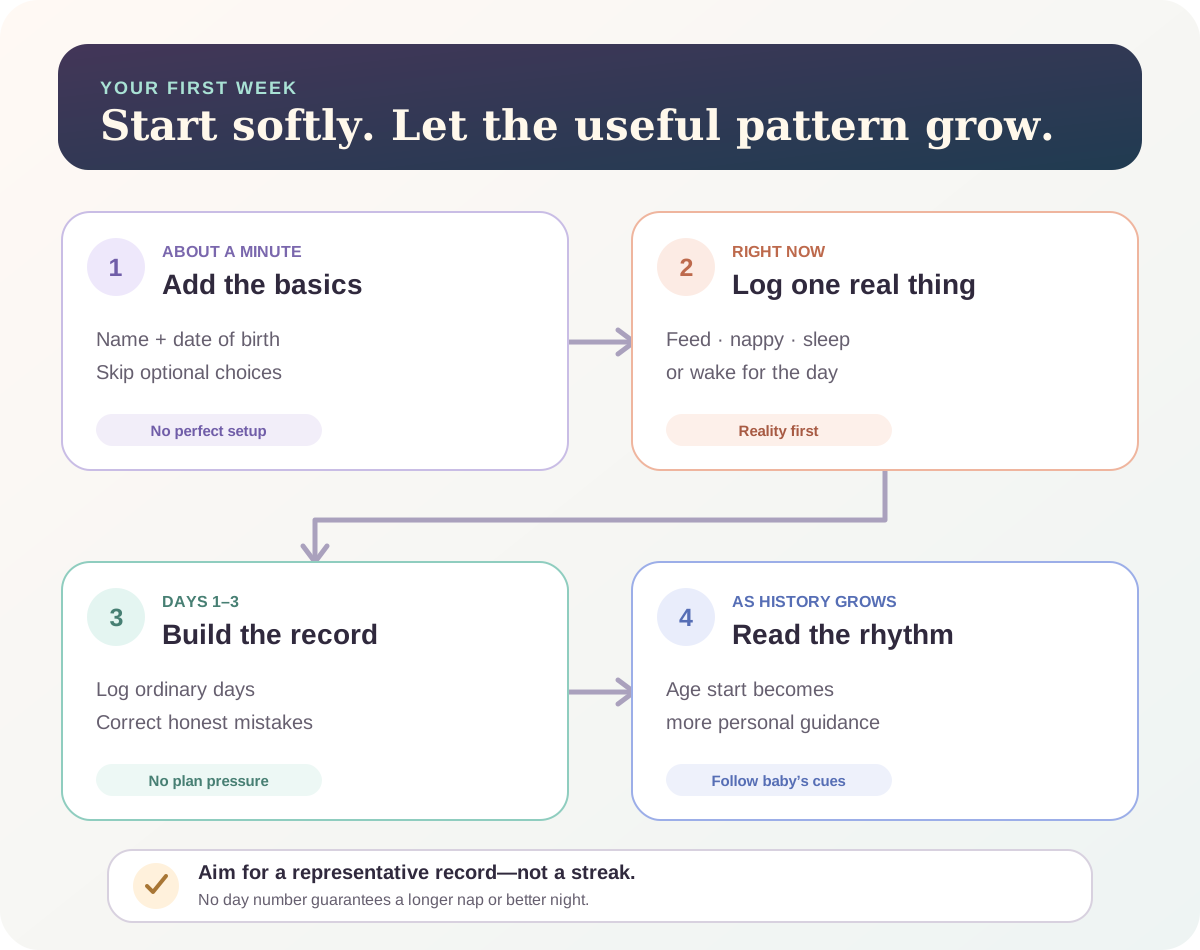
The first-run primer gives parents a simple expectation:
- Days 1–3: log feeds, sleeps and wakes as they happen.
- Around day 4: gentle guidance can begin to feel more grounded in this baby’s recent days.
- As the week develops: predictions can move away from a generic age starting point and towards the pattern in the logs.
Treat those labels as orientation, not a clinical timetable or a product guarantee. Four calendar days do not automatically create four useful days of evidence. If the baby was ill, the family travelled, logs are sparse or the sleep timer was left open, the app should be cautious rather than pretend it knows the rhythm.
The copy says “within a week, it clicks” and mentions longer stretches and easier naps. The honest interpretation is: the interface and predictions should start making more sense as the record becomes representative. No tracker can promise that a baby will sleep longer within seven days.
The four logs that unlock the clearest start
You do not need to record every bodily function. Begin with the events that answer the questions you care about.
1. Morning wake
Record when the baby is genuinely up for the day. This is a stronger daytime anchor than assuming a 3am feed or brief early stir began the morning.
If you are unsure whether 5am was a night wake or the start of the day, choose the label that best reflects what happened and stay consistent. You can correct the entry later.
2. Naps and bedtime sleep
Use the live timer when convenient, or add the times afterwards. A completed sleep with a sensible start and end is more useful than a timer left running for hours.
Do not keep a tired baby awake to match a prediction. The app is reading the baby; the baby is not taking instructions from the app.
3. Milk feeds
Log the feed type and what you genuinely know. Breastfeeding minutes do not equal milk volume, and bottle intake should reflect what was taken rather than what was offered.
Milk remains the main drink during the first year. Starting the app does not require starting solids, changing a feed or following a clock when the baby shows hunger cues.
4. Night wakes you want the pattern to include
If sleep questions brought you to OBubba, record meaningful night wakes and what helped the baby settle. That helps distinguish “the baby was in bed for 11 hours” from “the baby slept for several stretches with two feeds between them”.
Logging should never delay feeding, comfort, safer sleep or medical help. An approximate time entered later is better than using the phone while care is urgent.
Where the six built-in guides live
Open Account, expand Help & Settings, then tap Guides.
The current catalogue contains six tours:
| Guide | What it covers | Pages in the current build | |---|---|---:| | Getting started | Home clock, quick logging, editing and switching babies | 3 | | Tracking & the clock | Live sleep timer and logging now or on a past day | 2 | | Sleep & wake windows | How recent sleep feeds the next-nap and bedtime guidance | 2 | | Care tools | Weaning, breastfeeding, Sleep Consultant, Night Weaning, Safe Sleep and Parent Room | 1 | | Grow | Growth, milestones, teeth and age-relevant activities | 1 | | Sharing & Bubba Care | Partner sync and browser-based carer handover | 2 |
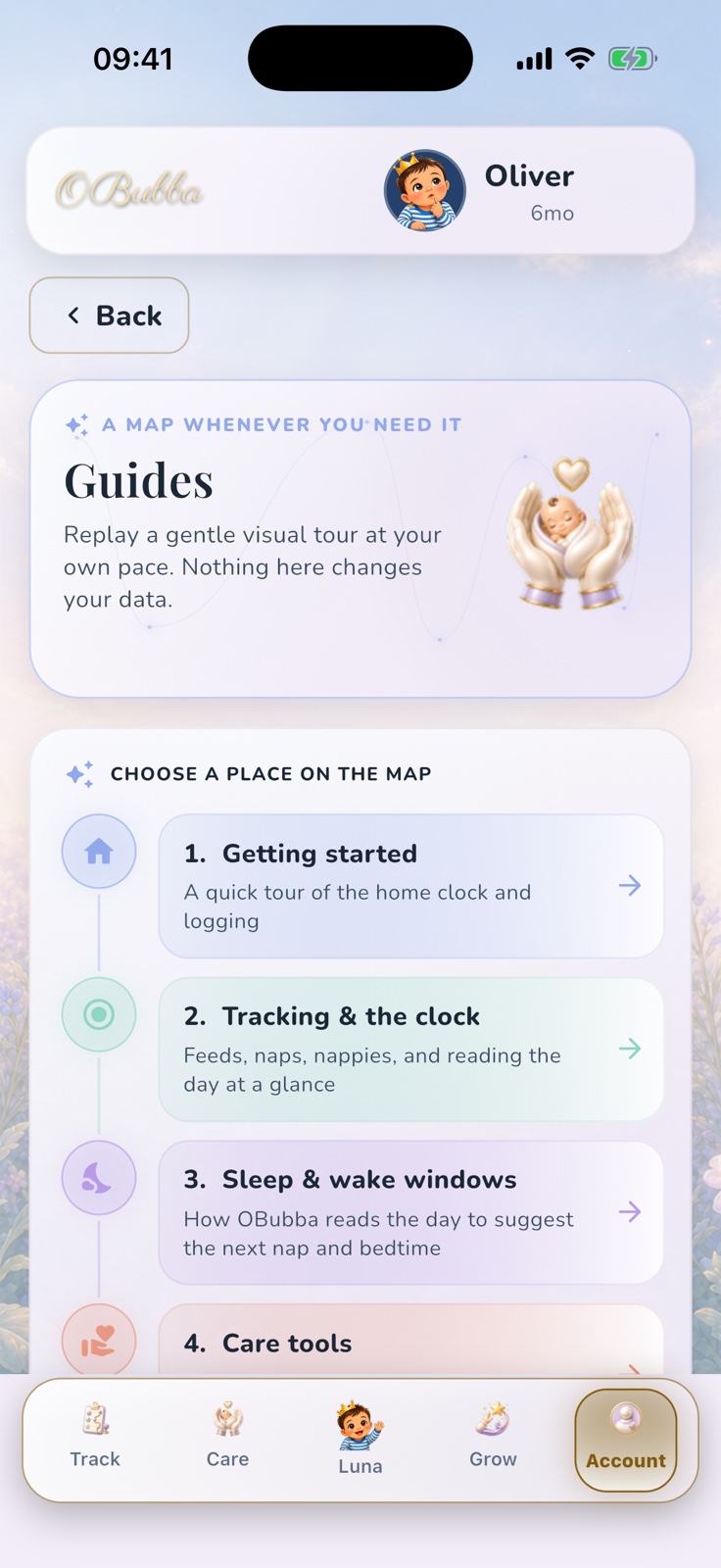
Tap a lane and the app opens a short bottom-sheet lesson. You can use Next little step, go back, or swipe between pages. The compact-iPhone widget test specifically protects the three-page Getting started lesson from becoming unreadable.
These guides are deliberately low-stakes:
- they are not premium-gated
- their text is packaged with the app
- they do not need generative AI
- they do not edit or analyse the baby’s data
- closing a guide changes nothing in the timeline
- you can replay any guide whenever you forget a route
The Guides screen itself says: “Nothing here changes your data.” That is exactly the right promise for a tutorial.
What the guides do not do
The current implementation has useful limitations worth knowing.
They explain; they do not take you there
Finishing “Tracking & the clock” closes the lesson. It does not deep-link to the sleep timer. The parent must return to Track.
A stronger future version could add a safe Show me button for non-destructive destinations while keeping the lesson replayable.
They are a fixed map, not a personalised course
The catalogue is the same six-guide structure for every family. It does not hide breastfeeding from a formula-feeding parent or rearrange itself around the concern selected during onboarding.
That consistency makes the map dependable, but it leaves a product opportunity: highlight the one guide most relevant today without removing the others.
Progress is not a qualification
The guide sheet tracks which page is open during that visit. It does not turn parenting into a completion score, award badges or require all six lessons before the app works.
Some help is still buried
The route is Account → Help & Settings → Guides. That is discoverable when somebody is looking for settings, but less obvious during a difficult 3am log. A persistent help affordance beside the Track clock would reduce that search.
Guides or Luna—which should I use?
Use Guides when you want a calm map of a whole area.
Use Luna when you can name one exact question, such as:
- “How do I log a nap?”
- “Where is the Sound Machine?”
- “How do I back up my data?”
- “Show me how OBubba works.”
The current Luna catalogue includes a deterministic How to get the most out of OBubba card. It emphasises Track as home base, then names Care, Grow and Account. A confident app-help answer stays on the curated route rather than asking a generative model to invent the interface.
There is a commercial difference: Guides are available without the Luna premium conversation. Basic app orientation should remain available to someone who is still deciding whether the product fits their family.
A practical first-day rhythm
Try this, and stop when it is no longer helpful.
Now: log the next real event.
At the next sleep: start a timer only if your hands are free; otherwise add the time later.
Tonight: record bedtime and any meaningful wakes you want included in the pattern.
Tomorrow morning: add the wake-for-the-day time.
After two or three representative days: read the prediction, but compare it with sleepy cues and real life.
When you feel lost: replay one Guide instead of opening every feature.
Before the phone becomes the only copy of a precious history: use the protection and recovery options in Account.
That is a much better introduction than attempting to populate sleep, milk, nappies, growth, milestones, allergens and memories before breakfast.
Frequently asked questions
Do I need to complete every onboarding question?
No. The current setup requires the baby’s name and date of birth. The photo, primary-help choice and today-status question can be skipped. If you choose the feeding branch, feeding style may be needed to finish that route.
What should I log first?
Log the next real event. If sleep is the main concern, make the morning wake, naps, bedtime and meaningful night wakes your early priorities.
Does OBubba know my baby’s schedule on day one?
No. It can begin from age-aware reference information and the facts entered during setup, but personal pattern claims require usable history.
Do I have to follow a suggested nap time?
No. Follow the baby’s cues, feeding and health needs. Record what happened so the prediction can be reviewed and adjusted.
Are the Guides a premium feature?
No premium check appears in the current Guides screen or its Account route.
Do the Guides use AI or send my question anywhere?
No. They are fixed, local tutorial text. Luna is a separate conversational surface.
Can a Guide change or delete my logs?
No. The screen is read-only and explicitly says that nothing there changes the data.
Where can I replay the first-week primer?
The exact pre-onboarding How OBubba works screen is designed as a first-run primer. The later Guides catalogue covers the same practical map, but it is not a byte-for-byte replay of that four-step first-week screen.
Try OBubba and start with one honest log → — sleep, feeds, weaning, growth and family care can grow from the same record without asking you to master the whole app today.
Product verification
- Current surfaces reviewed: `welcome_screen.dart`, `how_it_works_screen.dart`, `onboarding_screen.dart`, `guides_screen.dart`, `coach_kb.dart` and the new-child setup path.
- 54 focused tests passed on 10 May 2027, including the compact-iPhone Guides interaction, first-week explainer, app-help routing and existing-session behavior.
- The app image above was captured from the repository’s debug-only visual harness on an iPhone simulator with fictional profile data. No production family data was used.
OBubba is a tracking, planning and educational tool. It cannot observe your baby, diagnose a feeding or sleep concern, guarantee longer sleep or replace advice from a midwife, health visitor, GP or another qualified professional.
Ready to try OBubba?
Use OBubba to track feeds, sleep, naps, nappies, growth, milestones and family handovers in one calm baby tracker app.