White noise can feel like a small mercy when the doorbell rings just as your baby settles. It can soften the contrast between a quiet bedroom and sudden household sounds. But “it helps them sleep” and “it is safe at any volume, distance or duration” are not the same claim.
The short answer: a sound machine is optional. If you use one, remember farther, lower, shorter: put the sound source as far from your baby as practical, use the lowest effective volume and limit how long it plays. A phone's 30%, 50% or 70% volume setting is not a measurement of what reaches your baby's ears.

What white noise can—and cannot—do
White noise spreads energy across a broad range of frequencies. In everyday terms, it creates a steady “shhh” that may make an abrupt sound—floorboards, traffic or an older sibling—feel less noticeable by comparison. Some families also use the same sound as one cue in a familiar wind-down routine.
It is not necessary for healthy sleep. NHS guidance says there is no need to keep the home silent while a baby sleeps; getting used to a certain amount of everyday noise can be helpful. A sound machine also does not:
- prevent sudden infant death syndrome (SIDS)
- treat colic, reflux, hearing problems or a sleep disorder
- guarantee longer stretches of sleep
- replace feeding, comfort or checking why a baby is crying
- make an unsafe sleep space safe
Think of it as an optional background layer, not a treatment and not the foundation of sleep.
Why “farther, lower, shorter” matters
The American Academy of Pediatrics (AAP) recommends placing infant sleep machines as far away from a baby as possible, setting the volume as low as possible and limiting the duration of use.
That advice follows research showing how much output can vary. In one study discussed in the AAP technical report, all 14 tested infant sleep machines exceeded 50 dBA when measured 30 cm away at maximum volume, and three exceeded 85 dBA. That does not mean every machine at every setting is dangerous. It shows why maximum volume close to a baby's head is the wrong default—and why a generic slider percentage cannot settle the safety question.
Farther
Place the speaker across the room rather than on the cot, cot rail, mattress, bedside sleeper or a shelf directly above the baby's head. Keep the device stable, keep every cable completely out of reach and follow the manufacturer's instructions.
There is no universal “safe number of metres” that covers every phone, speaker and room. More distance generally reduces the level reaching the baby, so use the greatest practical separation while the sound can still do its modest job.
Lower
Start at the lowest setting and increase only if the background sound is not useful. Avoid turning it up to overpower loud conversation, a television or repeated crying.
A phone slider controls the signal sent to its own speaker or a connected device. It does not know the sound level at the cot. Output changes with the phone model, Bluetooth speaker, case, room surfaces, distance and the recording itself. Even two sounds played at the same slider position can be perceived differently.
If you choose to check the level, measure where the baby's head normally rests—not beside the speaker. Consumer sound-level apps can be a useful sense-check, but a phone is not automatically a calibrated meter. When in doubt, move the source farther away and turn it down.
Shorter
Use a timer or switch the sound off once the settling period has passed. The AAP advises limiting duration, and its technical report suggests timers or automatic shut-off as useful product features.
Some babies may wake when any familiar condition changes, while others will not notice. That is not a reason to default to maximum volume or all-night use. Try a short timer, observe what actually happens over several comparable nights and use no more sound than your family needs.
A five-step sound-machine setup
- Set up the sleep space first. Put your baby on their back in a clear, flat, separate sleep space and follow current safer-sleep guidance. Sound is never the safety step.
- Put the device well away. Choose a stable surface across the room. Keep the device and its cable out of reach now and as your baby becomes mobile.
- Begin very low. Stand or sit near the cot while adjusting. The aim is a soft background, not a wall of sound.
- Set an end point. Choose a short timer before you leave the room so “temporary” does not quietly become all night.
- Recheck after any change. A different speaker, phone, sound, room or furniture position changes the setup. Treat Bluetooth reconnection and app updates as reasons to check again.
Never rely on white noise to cover a smoke alarm, carbon-monoxide alarm, monitor alert, breathing concern or a baby's cry. You should still be able to hear the signals that require you to respond.
White, pink and brown noise: is one safest?
The names describe how energy is distributed across frequencies:
- White noise has equal energy per frequency and often sounds bright or hissy.
- Pink noise reduces energy as frequency rises and often sounds softer or more balanced.
- Brown noise falls more steeply toward the higher frequencies and can sound deeper or rumbly.
Those sound colours are preferences, not safety ratings. Pink or brown noise is not automatically safe simply because it sounds gentler to an adult. The level reaching the baby, the distance and the duration still matter.
Nature-style sounds such as rain or ocean noise need the same care. Avoid tracks with sudden peaks, dramatic thunder, advertising or large jumps in level. Listen through the whole loop yourself before using it near sleep.
What if Bluetooth disconnects?
Test the route before relying on a phone and wireless speaker. Some audio can jump back to the phone speaker when headphones or Bluetooth disconnect. If that phone is close to the cot—or the handset speaker has a very different output—the sound at the baby can change without anyone moving the slider.
Know what your app does when the route is lost. Keep the phone itself away from the sleep space and do not charge it in or on the cot. After pairing a new speaker, begin at low volume and check the result from the baby's position.
Do you need white noise for every nap?
No. You might use it only during a noisy part of the evening, for a nap that overlaps with an older child's return from school or while travelling in an unfamiliar room. You might decide that normal household sound works better.
If the machine begins to feel compulsory, experiment gradually. Lower it slightly for a few days, shorten the timer or keep the familiar bedtime phrase while dropping the sound at one easier nap. There is no prize for removing it, and no reason to preserve it forever if it no longer helps.
Also check whether the sound is masking the real problem. A baby who is hungry, unwell, too hot or cold, in pain or struggling to breathe needs assessment and care—not louder noise. Seek urgent medical help for breathing difficulty, blue or grey skin, unusual floppiness, a baby who is hard to wake or any symptom that seriously worries you. Ask a GP, health visitor or audiology professional about hearing concerns or repeated reactions to sound.
How OBubba's current Sound Machine works
Open Care → Sound Machine in the current OBubba app. It contains nine sounds generated in the app: white noise, pink noise, brown noise, ocean, womb, heartbeat, rain, fan and shush. You can tap a tile to start or pause a sound, then use playback controls and a volume slider.
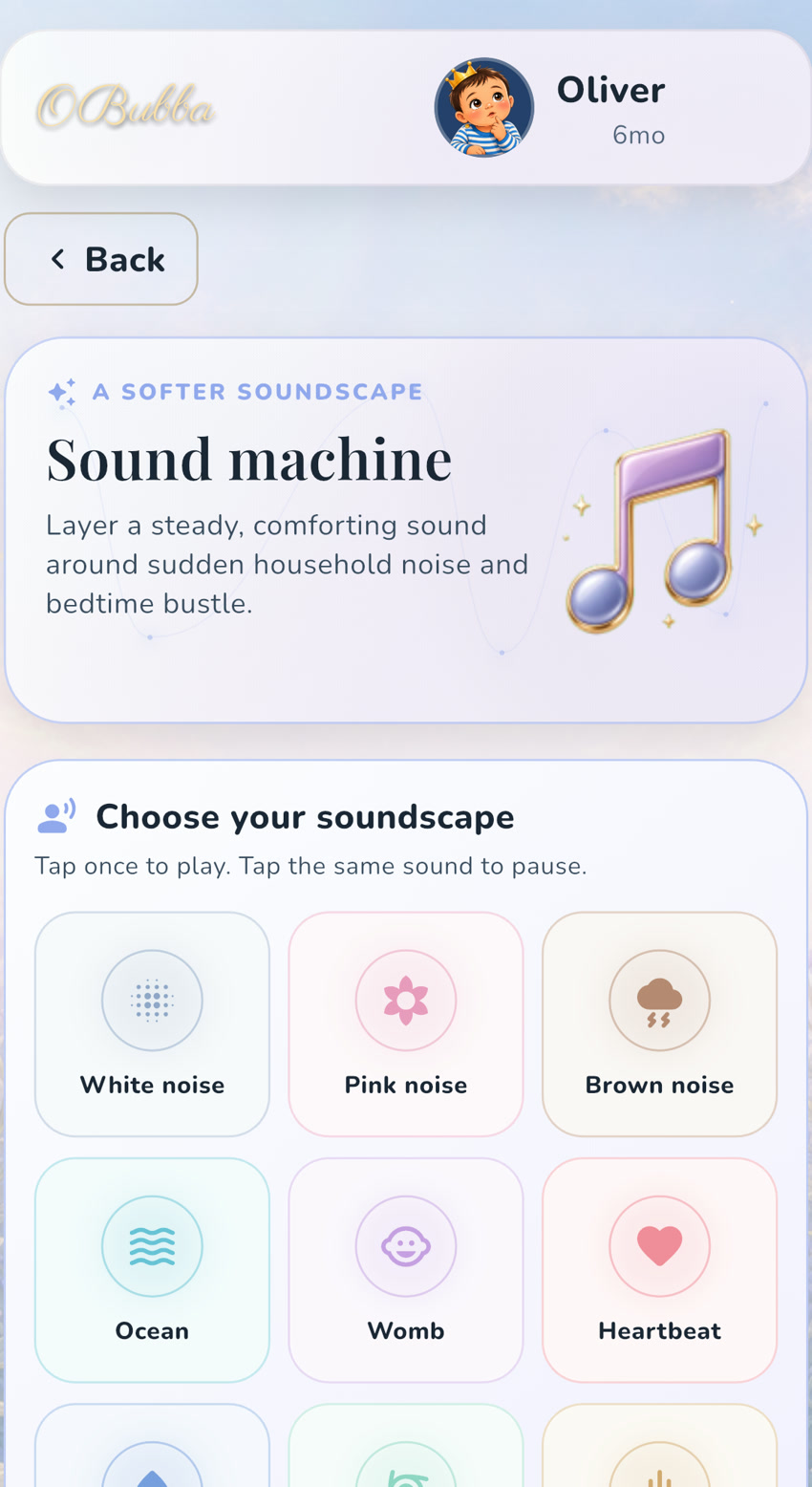
The sound can continue when you leave the screen or lock the phone, so OBubba also provides a true auto-stop timer: 15, 30, 45 or 60 minutes. A playing indicator appears on the Track tab, making it easier to notice that audio is still running and return to the controls.
There is another practical safeguard in the current implementation: when headphones or a Bluetooth audio route is lost, OBubba pauses instead of deliberately carrying on through the phone speaker. Still check the device after any connection change; software behaviour does not replace listening from the cot position.
The sounds are generated as seamless loops rather than bundled recordings, so they contain no spoken adverts or surprise track changes. OBubba's volume control remains just that—a playback control. It is not a decibel reading, hearing test, baby monitor or medical safety device.
Use the timer as the default, keep the device far away and set only enough volume to soften an occasional disturbance. If ordinary household noise is fine, leave the Sound Machine off. The feature is there when it helps, not because your baby needs another product running every night.
Try OBubba free → — baby sleep tracking, adaptable routines and an honest sound-machine tool in one calm place for tired parents.
Sources and further reading
- American Academy of Pediatrics: Preventing Excessive Noise Exposure in Infants, Children, and Adolescents
- American Academy of Pediatrics technical report: Preventing Excessive Noise Exposure
- HealthyChildren.org: How Noise Affects Children
- NHS: Helping your baby to sleep
- NHS Best Start in Life: Safer sleep advice for babies
OBubba supports tracking, routines and parent education. It does not diagnose or treat sleep or hearing problems, measure sound exposure, replace professional medical advice, or make an unsafe sleep environment safe.
Ready to try OBubba?
Use OBubba to track feeds, sleep, naps, nappies, growth, milestones and family handovers in one calm baby tracker app.