You meant to log a 2:10am feed and tapped 2:10pm. You chose the right bottle amount but the wrong baby. Your partner had already logged the wake. Or one exhausted thumb turned a short nap into an all-day sleep.
The useful response is not to defend the data. It is to make the correction easy.
> In OBubba, fix the event that is wrong. Do not add a second invented event to “balance” it.
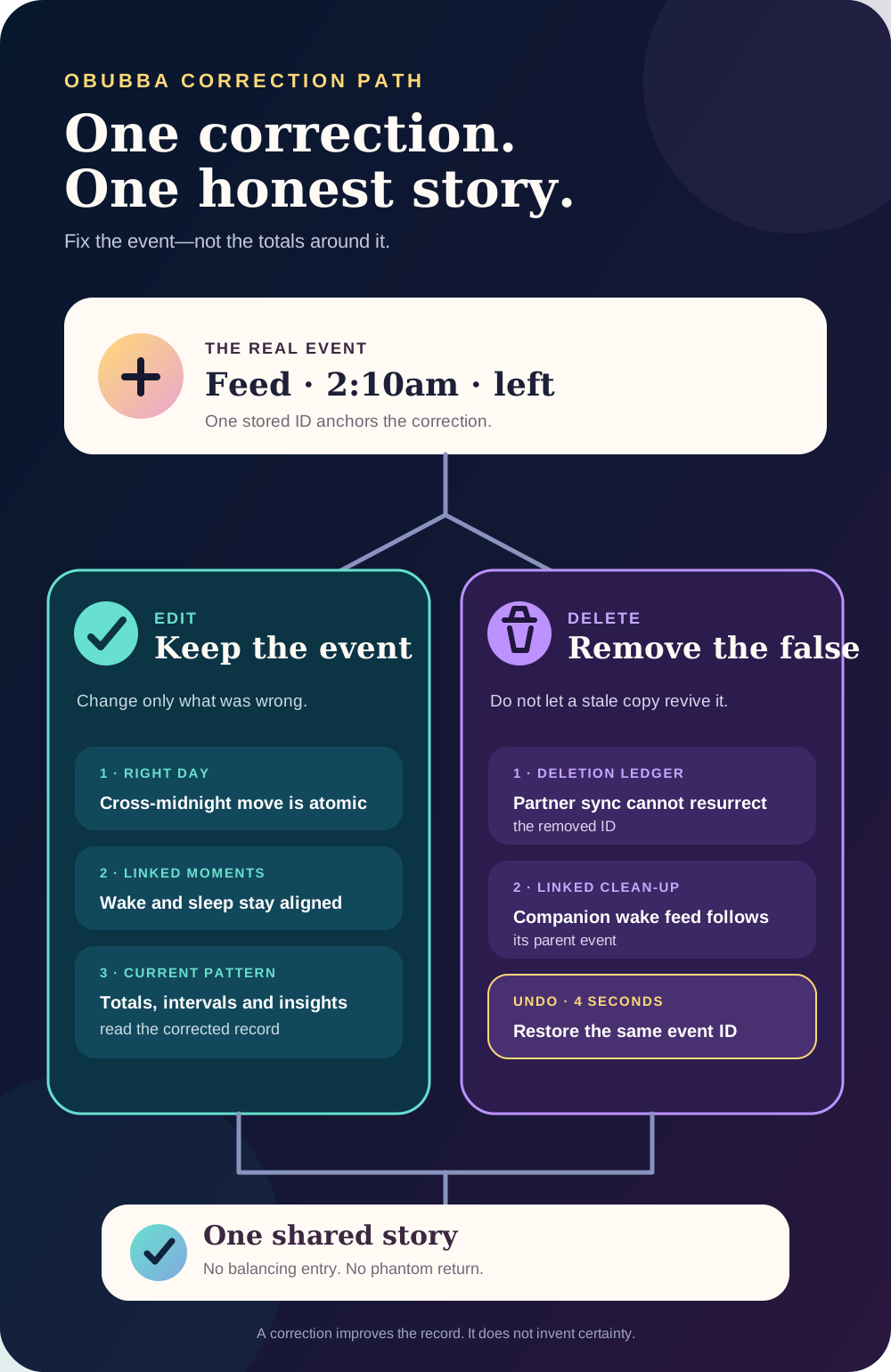
The current app lets a parent tap a real timeline entry, reopen the appropriate form, update or delete it, and undo a deletion for four seconds. Behind that simple interaction are protections for overnight day boundaries, linked wake-and-feed records, twins, shared care and stale partner copies.
This guide explains what the app actually does—and what to do when the mistake involves medicine rather than merely a record.
The 30-second answer
| Mistake | Best correction | |---|---| | Wrong time, amount, side, note or sleep detail | Tap the existing entry and update it | | Wrong baby | Delete it from the wrong baby, then log it once for the correct baby | | Duplicate entry | Keep the most complete version and delete the other | | Accidental new entry | Tap Undo on the “saved” message within four seconds | | Accidental deletion | Tap Undo on the “deleted” message within four seconds | | Whole day is test data or clearly wrong | Use Clear this day, confirm, then use Undo if needed | | Very old archived day | OBubba currently explains that the day cannot be edited there | | Medicine was actually given incorrectly | Correcting the log is not enough—follow the medicine leaflet and seek clinical advice |
Do not create a negative bottle, a zero-minute nap or a note saying “ignore the previous one” when the original row can be corrected. The app’s patterns should read one honest version of the event.
Where to edit a log
On Track, open the relevant day and tap the event in the day’s timeline. Entries found through log search open against their own date, not whichever day happened to be visible before the search.
The clock itself also exposes editable sleep information. When a nap or night sleep is running, Edit start changes when that existing sleep began without ending it.
OBubba reopens the same detailed form used to create:
- bottle and solids feeds;
- breastfeeding and pumping;
- nappies;
- naps, night sleep, night wakes and mid-nap stirs; and
- their optional notes and outcome details.
Medicine, temperature and general notes use a smaller editor with the relevant time and fields. A real stored entry has an ID and is editable; sample or seed content without an ID is not presented as a real record to change.
What happens when you change the time
A timestamp is not just text on a card. It can decide which day and which night the event belongs to.
Imagine a bedtime entered at 1:05am and later corrected to 10:15pm. Leaving it in the morning’s calendar bucket would separate the bedtime from the night it started. OBubba’s repository therefore has a dedicated edit-and-move operation:
- apply the corrected fields;
- move the entry to the correct day when required;
- preserve the same entry ID; and
- write the patch and move atomically.
“Atomically” matters here. It means the app does not delete the old row first and hope a second network call successfully creates the new one. A connection failure between those two actions could otherwise lose the event.
The overnight rule also works in the other direction. Correcting a retrospective night wake from 11:30pm to 2:10am files it with the morning-after side of that night without rolling an already-correct early-hours event forward a second day.
One morning wake can represent two things
OBubba can show a morning wake as its own event while the overnight sleep stores that same moment as its end. Those are two views of one real transition.
The edit flow tries to keep them in lockstep:
- edit the morning wake, and the matching night sleep end is aligned;
- edit the night sleep end, and the matching morning wake is aligned;
- reopen a night sleep by clearing its end, and the now-contradictory morning wake is removed.
Without that linkage, a corrected chart could claim that the baby was awake and still in an open sleep at the same time.
A night wake may also own a companion feed—“settled with a feed.” Deleting the wake attempts to remove that linked feed too. If deletion succeeds, Undo restores the wake and any companion records that were removed with it.
Does a correction change OBubba’s predictions?
Yes, in the sensible sense: calculations that read the current log now receive the corrected event rather than the old one.
That can change:
- recorded nap and night totals;
- the previous wake time used for an awake interval;
- which side was last used for breastfeeding;
- feed spacing and logged daily intake;
- the night-wake and night-feed story;
- comparisons between recent days; and
- personalised nap or bedtime context.
It does not mean one edit instantly creates a perfect new schedule. OBubba’s useful insights depend on repeated, comparable evidence. A correction improves the input; it does not turn uncertain memory into certainty.
If you only know that a wake happened “around 3,” using 3:00 and adding an approximate note is more honest than inventing 3:07. Tracking exists to support memory, not test it.
Delete is protected from stale family sync
Shared baby data creates a subtle problem. Suppose one phone deletes a duplicate feed while another phone still holds an older copy. A naive merge could bring the deleted feed back.
OBubba records a deletion marker—often called a tombstone—alongside the removal. When family copies merge, that marker tells the repository not to resurrect the old entry merely because another device still has it.
If the parent taps Undo, OBubba re-adds the same entry ID and removes the relevant deletion marker. The restored event is then allowed to survive future recovery and family merge.
That is a technical detail parents should never have to think about, but it is a trust feature: delete should mean delete, and undo should mean restore.
What if two parents log at the same time?
A shared tracker should not make one caregiver afraid to correct anything.
The current paths include several safeguards:
- a corrected entry keeps its ID, so it remains one shared event rather than becoming a duplicate;
- newer edits carry a modification time for merge decisions;
- explicit field clearing is recorded, so a stale copy cannot silently refill a field the parent intentionally removed;
- deleting a known entry writes its deletion marker;
- clearing a day removes only the entries visible to the person who confirmed the action; and
- a partner entry added concurrently but absent from that person’s snapshot is preserved.
When Log for all babies creates sibling copies, the “saved” Undo removes every copy created by that action, not just the active child’s row.
These rules cannot prevent two humans from describing the same real event differently. They do make repair safer when devices are briefly out of step.
Wrong baby: delete, switch, re-log
An entry belongs to one baby’s history. Editing its time or amount does not transfer it to another child.
If a feed was saved under Maya but belonged to Noah:
- open Maya’s entry and delete it;
- use Undo immediately if you notice you selected the wrong row;
- switch to Noah; and
- add the real feed once with its original time and details.
Do not leave the event under Maya and add a second copy under Noah. That would distort both babies’ stories in opposite directions.
For twins receiving the same care at the same moment, Log for all babies is different: it intentionally creates one separately identified entry for each child. Each baby can still have different night context, so OBubba recomputes that context per sibling rather than blindly copying every derived flag.
Undo is deliberately short
The confirmation message keeps Undo available for four seconds after a new entry, a deletion or a cleared day.
That is designed for the immediate “wrong button” moment. It is not a long-term recycle bin.
If the message has gone:
- edit an inaccurate surviving entry;
- re-log a real event that was mistakenly deleted; or
- remove a newly created mistake through its edit sheet.
Use the original time and the best details you genuinely remember. Re-logging a deleted event later creates a new identity, so it is better to use the immediate Undo when available.
Clearing a day is not the same as deleting a baby
Clear this day is useful for demo data, an accidental import or a day filled with obvious test taps. It affects that day’s event timeline only.
It does not clear growth measurements, teeth or milestones, because those are stored outside the daily event list. The confirmation names the day and entry count, and the resulting message offers Undo for four seconds.
Use it sparingly. When only one event is wrong, correct that one event. Wiping a day removes useful context as well as the mistake.
Why an old day may be read-only
OBubba keeps recent days in its active data and can archive older days into colder storage. The current edit and delete operations work against the active record, not those archived shards.
Rather than showing a false “updated” message for a change that did not persist, the UI says:
> “This day is archived and can’t be edited here.”
That is a present limitation. A trustworthy product should expose it plainly. If an old record matters for a clinical conversation, describe the correction separately rather than assuming the archived row changed.
Medicine logs need a different safety rule
Editing a medicine entry only corrects OBubba’s record. It cannot reverse a dose, decide whether another dose is safe or replace the packet, prescription, pharmacist or clinician.
If the app says a dose was logged twice but only one was actually given, remove the duplicate record. If two doses were actually given, do not simply delete one and move on.
For example, the NHS says to get medical advice if a child has had more paracetamol than the packet, leaflet or prescription states; help is available from NHS 111, and parents seeking advice for a child under five should call rather than use 111 online. NHS: paracetamol for children.
If a child may have swallowed too much medicine and you are unsure what help is needed, the NHS advises calling 111; call 999 for a life-threatening emergency. NHS: what to do if your child has an accident.
Correct the record after taking the appropriate safety action—not instead of it.
A calmer accuracy standard
Good baby data is not flawless baby data. It is data that can be corrected without blame.
Use this hierarchy:
- Known: enter the time or amount you genuinely know.
- Close estimate: round sensibly and note that it is approximate when that matters.
- Useful partial record: keep what is reliable and clear the wrong optional field.
- Unknown or false event: delete it rather than manufacture precision.
One corrected log is more useful than two rows arguing with each other. One missing feed is more honest than a confident time nobody remembers.
Quick answers
Can I edit a bottle amount or breastfeeding side?
Yes. Tap the existing feed and use the detailed feed form. Correct the same entry rather than adding a compensating feed.
Can I change a nap from the wrong time?
Yes. OBubba can update the existing sleep and move it to the right day when an overnight correction crosses the day boundary.
Will deleting a shared entry make it come back from my partner’s phone?
The repository records a deletion marker specifically to prevent a stale family copy from resurrecting that entry during merge.
Can I undo a deletion?
Yes, for four seconds from the deletion message. It restores the removed event with the same ID and clears the deletion marker.
Can I move a log to another baby?
Not by editing. Delete it from the wrong baby, switch babies and log the real event under the correct child.
Why can’t I edit a very old day?
The current editor blocks archived-day changes because its live update path does not write to cold archived storage. It tells the parent instead of pretending the edit succeeded.
Does fixing one bad nap immediately fix every prediction?
It gives the engines better current input. Personalised patterns still need repeated evidence and should remain guides, not promises.
Try OBubba free → — track the real day, correct tired-parent taps without shame, and keep one shared story the whole family can trust.
This article gives general information for UK families and describes the current OBubba implementation reviewed on 6 March 2027. OBubba is a record and guidance tool, not a medical dosing system. For medicine mistakes, follow the medicine information and seek professional advice; call 999 in an emergency.
Ready to try OBubba?
Use OBubba to track feeds, sleep, naps, nappies, growth, milestones and family handovers in one calm baby tracker app.