Most baby apps begin with the same question: What did the baby do?
When did they feed? How long did they sleep? Was the nappy wet or dirty? Those details matter—but at the end of a broken night, another question matters too:
How are you doing?
OBubba’s Parent Room is the part of the Care tab built for the person holding the phone. It offers a kind word, a quick mood pause, a guided 4–4–6 breath, three short grounding tools, postpartum recovery guidance, an optional two-minute wellbeing questionnaire and routes to real support.
It is not therapy, diagnosis or live monitoring. It is a quiet place to notice what you need and, when an app is no longer enough, make the next human step easier.
The short answer
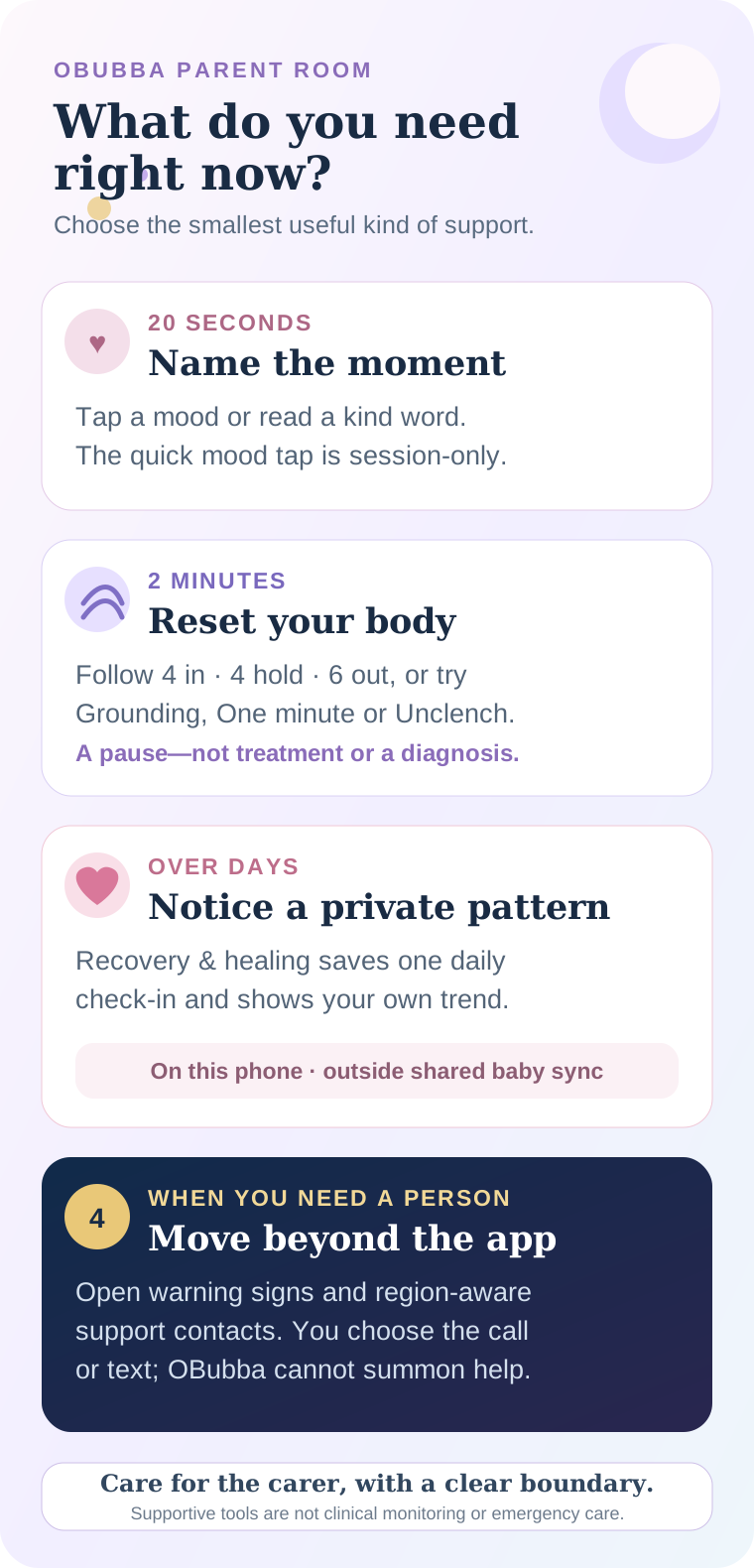
Open Care → Parent Room. The current screen gives you four useful lanes:
- Name the moment: tap a mood or read a rotating kind word.
- Reset for two minutes: use the animated breath, Grounding, One minute or Unclench.
- Notice a pattern: open Recovery & healing for a private daily check-in and your own mood trend.
- Move to human support: read warning signs and use region-aware support contacts when the situation needs more than a calming tool.
Parent Room is not Premium-gated in the reviewed app. A free user can open it from Care without going through the sleep-coaching paywall.
What the real Parent Room looks like
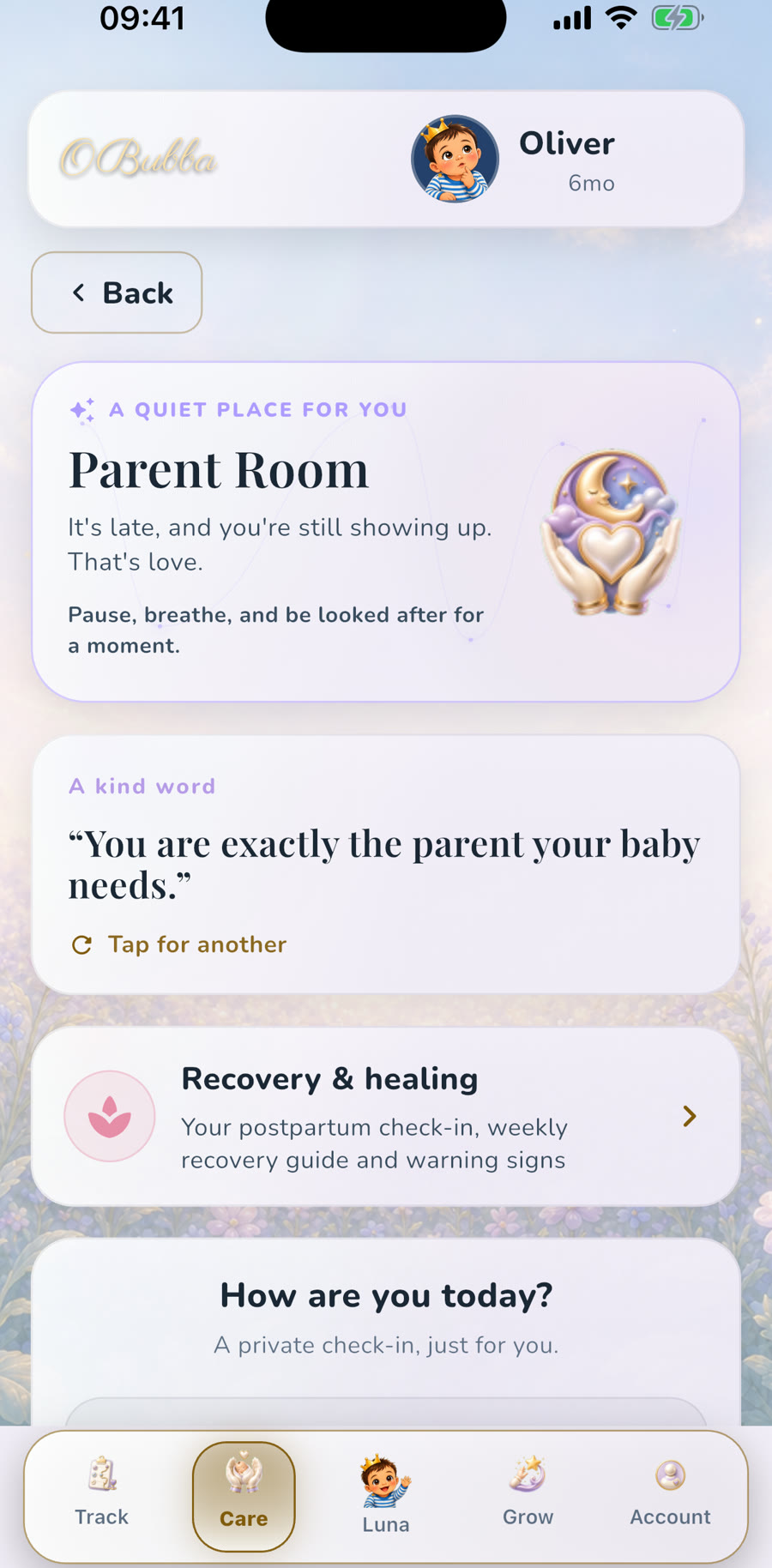
The first screen is intentionally softer than a clinical questionnaire. It begins with a time-aware message—for example, acknowledging that you are still showing up late at night—then offers a rotating affirmation such as “You are exactly the parent your baby needs.”
Tap the card and it cycles through eight plain, non-performative reminders. Some good days are joyful. Some are simply survived. The language does not require gratitude, perfect routines or a beautifully documented newborn phase.
Below that are two different kinds of check-in, and they should not be confused.
The quick mood tap
The How are you today? card has six choices, from Great to I need help. Selecting one changes the response shown on that screen. A lower choice points towards the breathing tool and the support section.
This quick tap is deliberately lightweight. In the current code, it lives only in the screen’s local state. It is not added to the baby timeline, not sent to a partner and not used to create a permanent mood record. Leave the screen and the selection is gone.
Use it when naming the feeling is enough for now.
The saved recovery check-in
Recovery & healing is the longer fourth-trimester companion. After a one-time setup, it can tailor weekly recovery information using the birth date and self-entered details such as delivery type, whether there was a tear, breastfeeding and multiples.
Its daily check-in offers five faces from Really struggling to Thriving, with optional tags including exhausted, anxious, tearful, overwhelmed, lonely, irritable and unable to sleep even when the baby does. It saves one entry per day; updating today replaces today rather than creating duplicates.
After at least two entries, the app draws a simple trend for your own awareness. The visible chart uses up to the most recent 21 entries, while the local store caps the history at 400. There is no public score and no comparison with other parents.
What to use when you have almost no time
If you have 20 seconds
Read one kind word or tap the closest mood. Do not turn it into a journalling task. The benefit is the interruption: I exist in this story too.
If your jaw and shoulders are braced
The animated breathing circle uses a 14-second cycle:
- breathe in for four seconds;
- hold for four; and
- breathe out for six.
That longer exhale is a recognised style of controlled breathing, but it is still an optional comfort tool. Breathe normally if holding feels uncomfortable or you become dizzy. The NHS breathing guidance likewise advises breathing only as deeply as feels comfortable and without forcing it.
You can also choose one of three small sheets:
- Grounding: bring attention back to what is around you;
- One minute: pause without solving the whole day; or
- Unclench: notice and release held tension.
None requires a streak, badge or completed course.
If the days are blurring together
Use the saved Recovery & healing check-in. One entry will not explain your mental health. Several honest entries may make it easier to recognise that “a bad day” has become a run of hard days worth telling somebody about.
The code surfaces a gentle support sheet after at least three low check-ins in the recent window. A self-harm tag takes the urgent route immediately, regardless of the selected mood face. That is signposting, not an automated diagnosis.
If you need a person
Skip the reset tools and open the support or warning-sign route. The app builds contacts for the selected region rather than assuming every family can use a UK number. In the clinical check-in and warning-sign screens, available contact cards can open a call or text action.
OBubba cannot call on your behalf, alert a family member or confirm that anybody has received a message. If you or somebody else may be in immediate danger, use your local emergency service now.
How baby logs can prompt a parent check-in
Parent Room is not isolated from the rest of OBubba. The app can notice that the baby’s recorded nights have been repeatedly rough and ask how the adult is coping.
The current wellbeing engine has two conservative gates:
- for a rough-night prompt, the baby must be older than 21 days, at least three of the last five nights must contain three or more recorded wakes, and no wellbeing check-in can have been completed in the previous five days;
- for the stronger “running on empty” card, at least three of the last five completed nights must show no four-hour stretch, and the latest completed night must also meet that condition.
The stronger rule refuses to use a half-recorded night. It requires both a bedtime and a morning wake before treating the longest stretch as measured. Otherwise a missing morning entry could be mistaken for no sleep at all.
That is good product restraint. OBubba is not measuring the parent’s sleep and cannot know who handled each wake. It is using the baby record to ask a humane question, not inferring a mental-health condition.
What stays private—and what “private” means here
The Parent Room has three different storage behaviours:
| Parent Room action | What the current build does | |---|---| | Quick six-face mood tap | Session-only screen state; not saved after leaving | | Recovery & healing profile/check-ins | Stored locally on this phone in a dedicated maternal store | | Two-minute EPDS check-in | Completion time and score history are stored locally, scoped to the active baby, with the latest 24 retained |
The dedicated maternal store is deliberately excluded from OBubba’s shared `child_syncs` record. That means delivery details, recovery tags and daily mood entries do not travel to the partner or carer baby timeline.
“On this phone” has a trade-off. These records are not a cloud backup or a clinician record. Changing or losing the device may mean losing them. They should support a conversation, not be the only place important information exists.
The app also does not silently transmit a low mood to a health professional. Privacy is not the same as supervision: you still need to contact a human when you want or need human help.
Baby blues, postnatal depression and the app’s boundary
The Parent Room includes a short explanation of baby blues and postnatal depression. The NHS says the baby blues commonly settle within two weeks; continuing, worsening or hard-to-cope-with symptoms deserve support. The same NHS page also notes that fathers and partners can experience depression after a baby arrives.
The optional ten-question wellbeing screen identifies itself as the EPDS and says clearly that it is not a diagnosis. It does not replace an assessment by a GP, midwife, health visitor or perinatal mental-health team. Its safest purpose is to help a parent describe the week and lower the friction of asking for help.
Thoughts of suicide, harming yourself or the baby need urgent help. Feeling disconnected from reality, hallucinations, delusions or sudden extreme changes after birth can also be a medical emergency; the NHS postpartum psychosis guidance advises an urgent same-day assessment and emergency action when there is imminent danger.
Do not wait for a trend line or another app question when the situation already feels unsafe.
A practical Parent Room routine after a rough night
Try this without making self-care another job:
- Make the baby safe first. Use a clear, flat sleep space if you need both hands or feel too tired to hold them safely.
- Name the need. Is this tension, a run of low days, a physical recovery concern or an immediate safety issue?
- Choose one lane. One breath cycle, one quick mood tap, one saved check-in or one call.
- Do not over-interpret the baby data. Three rough logged nights explain why the app asked; they do not explain everything you feel.
- Tell somebody in ordinary words. “I am not coping today” is enough information to begin.
If the baby has settled and you are still wired, the Parent Room can be a better destination than reopening the sleep chart. Sometimes the most useful insight is not another prediction. It is noticing that the grown-up needs care before the next decision.
The honest bottom line
OBubba’s Parent Room makes the app more than a baby ledger. It gives emotional care a visible home without pretending an animation or questionnaire can replace another person.
Its strongest design choices are the boundaries:
- the lightest mood tap is not turned into data;
- saved recovery entries stay outside the shared baby record;
- repeated rough baby nights can prompt a question without claiming to measure the parent; and
- urgent signals move towards region-aware human support rather than more content.
A baby tracker should help families remember feeds and sleep. A better one should also remember there is a person doing all that care.
Open OBubba’s Care tools → — core tracking and Parent Room are available without asking you to upgrade before you can look after yourself.
Quick answers
Is OBubba’s Parent Room free?
Yes in the reviewed build. The Care route opens Parent Room directly without the Premium gate used by Sleep Consultant.
Can my partner or carer see my mood entries?
Not through the shared baby record. Recovery & healing data stays in a dedicated local store and is deliberately excluded from `child_syncs`.
Does tapping “I need help” contact anybody?
No. The quick mood tap changes the support shown on screen. It does not send a message or summon help. Use the support contacts or your local emergency route yourself.
Does the breathing exercise treat anxiety or postnatal depression?
No. It is a brief calming tool. Persistent or severe symptoms need a conversation with a qualified professional.
Why did OBubba ask how I am after rough nights?
The app can use repeated completed baby-night logs to surface a wellbeing prompt. It does not observe the parent or know who handled each wake.
Will my recovery history move to a new phone?
The current maternal store is on-device and outside shared sync, so do not rely on it as a transferable clinical record or cloud backup.
Product verification
- Current surfaces reviewed: Care routing, Parent Room, Recovery & healing, the maternal local store, mood-trend logic, the EPDS screen, warning signs, regional contacts and proactive wellbeing prompts from completed nights.
- 92 focused tests passed on 14 May 2027, covering maternal warning signs, regional crisis contacts, self-harm escalation, low-day nudges, recovery rules, wellbeing scoring, Coach safety routing and compact iPhone rendering.
- The app image above is a genuine repository simulator capture using a fictional baby profile. No production family or maternal data appears in it.
This article describes the reviewed app build and links to UK guidance; support routes differ by country. OBubba offers tracking, education and signposting. It does not diagnose, monitor safety, provide emergency care or replace a GP, midwife, health visitor, perinatal mental-health team or local emergency service.
Ready to try OBubba?
Use OBubba to track feeds, sleep, naps, nappies, growth, milestones and family handovers in one calm baby tracker app.