Your baby rolls from tummy to back. You cheer, scoop them up, message the family—and later open OBubba to mark Rolls front to back.
What does that tap actually do? Does it simply tick a box? Does OBubba decide the baby is ahead? Will your partner see it? And why might the celebration mention tummy-time sessions?
The short answer: marking a milestone done saves the achieved skill and an optional date together, opens a one-off celebration, and can connect the moment with relevant play sessions recorded in the preceding 120 calendar days. The milestone can join the child’s wider memory story and sync with family data. It does not verify the skill, calculate an “advanced” score or prove that any logged activity caused it.
The path starts with a date—not a test
Open Grow → Milestones, choose a chapter and tap an unfinished skill. The current app asks:
> When did [baby’s name] first do this?
You can choose:
- Today
- Pick a date
- Not sure yet, just mark it
The date picker is bounded to the child’s life so it cannot deliberately choose a future date or a day before the recorded birth date. Choosing Not sure yet still records the achievement, but it does not fabricate a date.
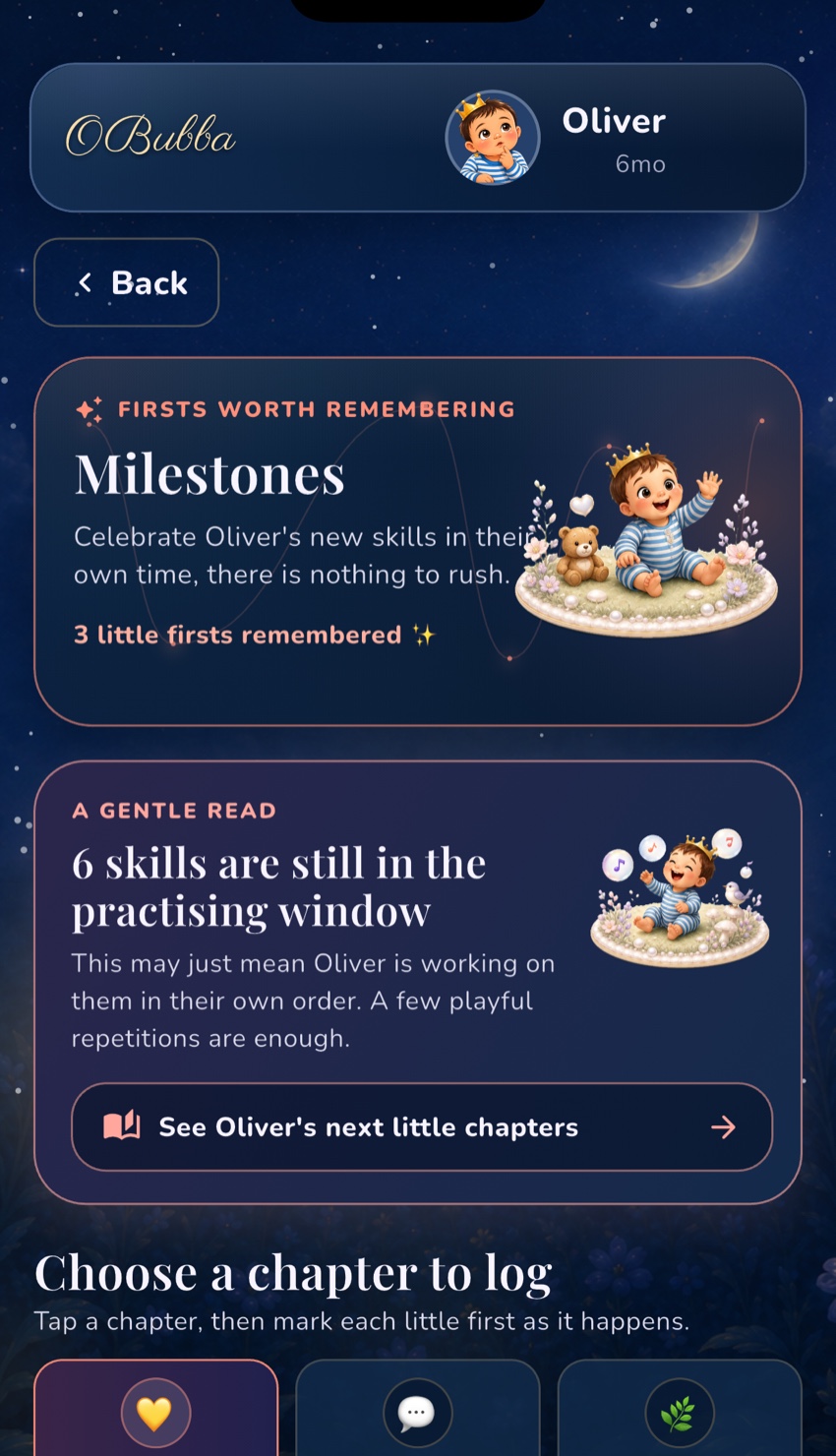
That date boundary becomes useful later. A genuinely dated first can be placed in chronological memories, inform a separate gentle Skill Forecast and provide context when the family looks back at a disrupted week. An undated tick remains a valid family record without pretending the app knows when it happened.
What the app saves
The milestone identifier and its optional date move together in one save operation. That is a technical detail with a parent-facing benefit: the app avoids a race where one write saves the tick and another write accidentally drops its date—or vice versa.
In a shared family record, milestone sets are merged additively. If one parent records rolling while another records sitting from a different device, a later stale screen should not erase the other person’s new first. The repository re-reads the fresh family data and unions genuine achievements.
Corrections are first-class too. Tap a completed milestone and the sheet offers:
- Share this milestone
- Change the date or Add a date
- Not done yet, unmark
An explicit unmark carries a small deletion marker so an older copy on another device does not resurrect the mistake during reconciliation. If the parent later marks the skill again, the app clears that marker.
How the 120-day “effort story” works
Immediately after a newly completed milestone is saved, OBubba scans up to 120 calendar days ending on the milestone date. If no date was chosen, the scan ends today.
It counts only activity types the Track timeline can genuinely contain, then filters them by the milestone’s broad developmental area.
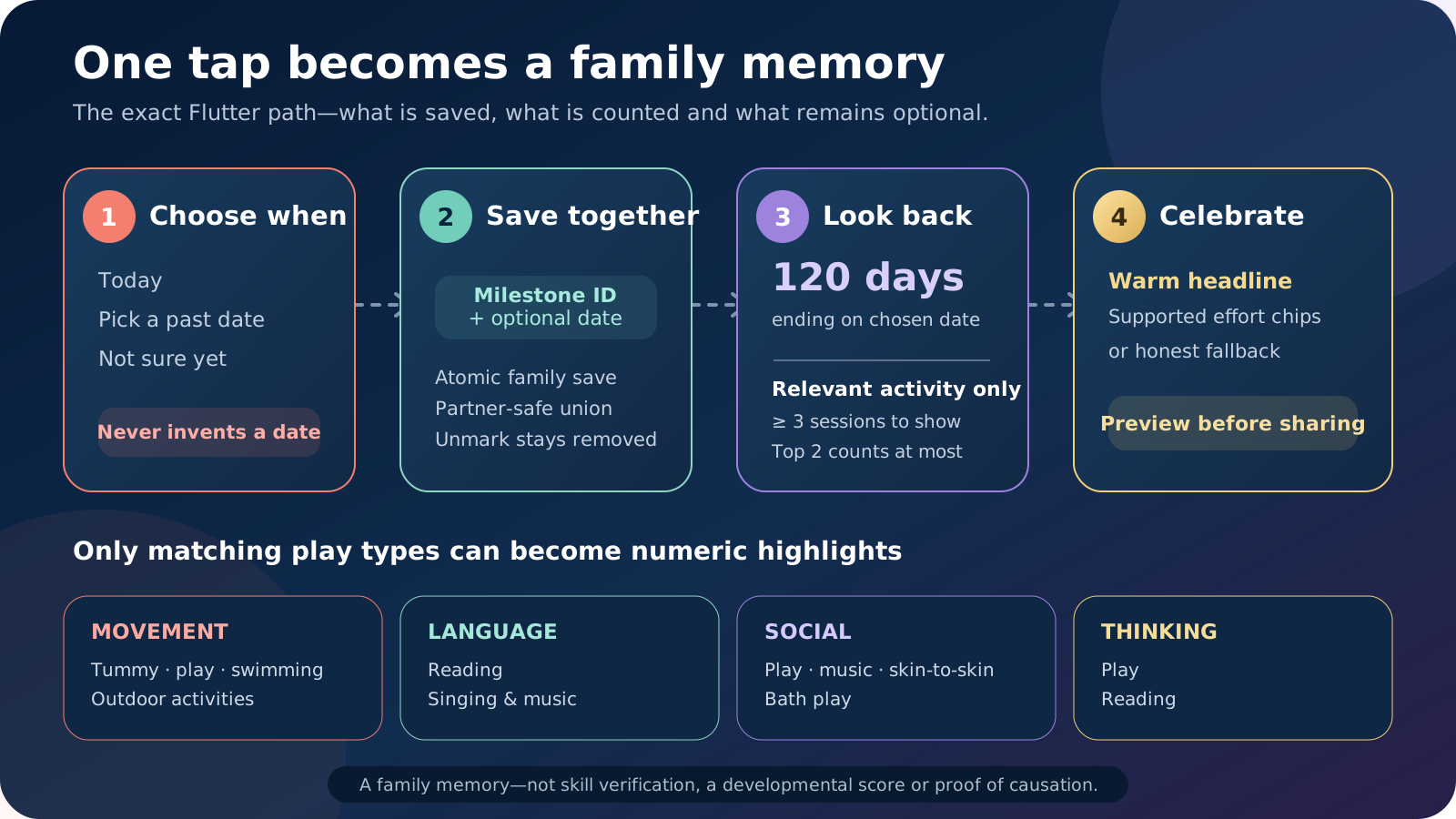
| Milestone area | Activity types eligible for the effort story | |---|---| | Movement | tummy time, play, swimming, outdoor activities | | Language | reading, singing and music | | Social | play, singing and music, skin-to-skin, bath play | | Thinking | play, reading |
The categories are intentionally broad. A reading session is not used as the leading evidence for a rolling milestone, even if the family logged it many times. Tummy time may appear for a movement milestone but not for a first-word milestone.
Why two tummy-time logs stay invisible
A relevant activity needs at least three logged sessions inside the scan window before OBubba will show a numeric highlight. Eligible activities are sorted by count, and the celebration displays at most the top two.
For example, a movement milestone with:
- 23 tummy-time sessions
- 5 play sessions
- 9 reading sessions
can display 23 tummy-time sessions and 5 play sessions. Reading is excluded because it is not in the movement effort map.
If the record contains only two tummy-time sessions, or only unrelated activities, OBubba shows a warm non-numeric celebration instead. It does not turn “not logged” into a session count and does not claim the parent skipped play.
Does OBubba really know those sessions caused the milestone?
No. The app knows that relevant activity types were logged in the chosen look-back window. It cannot know precisely what happened during every session, measure the baby’s movement quality or prove cause and effect.
The current celebration copy describes those sessions as part of the family’s effort story. The safest way to interpret it is:
> “These are some relevant moments your family recorded before this first.”
It should not be read as:
> “Twenty-three tummy-time sessions caused the roll.”
Development unfolds through maturation, health, opportunity, relationships, temperament and countless everyday experiences that a tracker cannot see. The NHS encourages ordinary play and interaction, and notes that playing supports social, language, thinking and movement skills. That makes the remembered activity meaningful—but still not a controlled experiment.
What appears in the celebration
The new-milestone dialog contains:
- the baby’s first name
- a natural-language headline such as “Mia just rolled front to back”
- a warm effort story
- zero, one or two supported activity-count chips
- Share the news
- Lovely, which simply closes the moment
The celebration happens only for a newly marked milestone. Changing an existing date does not need to replay the whole first-time moment.
Haptic feedback follows the app’s feedback setting, and the animation is decorative. The saved milestone—not the confetti—is the durable part.
Does the milestone become part of Memory Book?
A completed milestone with a usable date can become a dated chapter in OBubba’s chronological Memory Book, alongside eligible growth moments, a first tooth and sealed-letter activity.
The Memory Book checks both sides of the record: a stray date without an achieved milestone does not create a fake chapter. An achieved milestone without a date remains saved in Milestones but cannot be placed honestly on a calendar timeline.
This is one reason Not sure yet is useful. It lets the family remember that the skill happened without forcing a false date. A date can be added later if somebody finds the message, photo or calendar clue that pins it down.
What happens when you tap Share the news?
Sharing is optional and preview-first.
OBubba opens a keepsake-card preview with the milestone headline, the baby’s first name and the date when one exists. The parent can then:
- open the phone’s system share sheet with an image and accompanying text
- save the card to Photos
- close without sharing
The app does not silently post to social media or message relatives. Choosing the celebration’s Lovely button also does not share anything.
Before sending, check the preview and recipient. A first name and date may feel harmless inside the family but still count as personal information when posted publicly. The share text may also include an OBubba download or referral line, so read it before choosing a destination.
Will a co-parent see the milestone?
If the child is using OBubba’s shared family record and syncing is available, the achieved set and dates are part of that child data rather than a private screen-only note. That is how two devices can preserve different newly logged firsts instead of overwriting one another.
The animated celebration is a local interaction shown when the first is freshly marked on that device. A partner receiving the synced milestone should not be treated as if they personally tapped the original celebration at the same instant.
Does logging a milestone change other parts of OBubba?
Potentially, but each feature has its own boundary:
- Milestones remembers the achieved skill and optional date.
- Memory Book can place credible dated firsts into the child’s story.
- Skill Forecast may use credible dated milestones only after it has enough usable examples; one tick does not teach a personal pace.
- Development guidance can treat a recent motor or thinking milestone as possible context, not a diagnosis of disrupted sleep.
- Today’s Play can use newly achieved skills as consolidation context for activity ranking.
These links are why an accurate date can be helpful, but they are also why correcting a mistaken tick matters.
A milestone tracker is not developmental screening
OBubba’s milestone map is a family record and planning aid. It cannot observe whether a skill is consistent, symmetrical, comfortable or used across settings. It does not examine hearing, vision, muscle tone, communication or the wider developmental picture.
The NHS offers health and development reviews where parents can discuss movement, speech, social skills, behaviour, hearing and vision. Keep those appointments and bring concerns to a health visitor or GP rather than waiting for an app badge.
Seek advice when you are worried even if another skill is already ticked. Equally, do not rush a baby through an activity solely to fill a milestone row. The useful action is ordinary responsive play: follow the baby’s cues, keep the environment safe, stop when they have had enough and enjoy what they are practising today.
A better way to log a first
When something new happens:
- Enjoy it before reaching for the phone. The memory is the baby, not the data entry.
- Choose the most honest date option. Today, a known earlier date or no date yet.
- Add only the milestone you actually observed. Do not tick neighbouring skills because they seem close.
- Treat the effort story as recognition, not attribution. Logged play is context, not proof.
- Preview before sharing. Check the name, date, audience and accompanying text.
- Correct mistakes freely. Changing or unmarking a record is good data hygiene, not losing progress.
That turns milestone tracking into what parents usually wanted in the first place: a gentle place to remember how this particular child unfolded.
Try OBubba free → — track sleep, feeds, nappies, weaning, play and little firsts in one family story, with useful connections that stay clear about what the app can and cannot know.
Frequently asked questions
Can I mark a milestone without knowing the date?
Yes. Choose Not sure yet, just mark it. The achievement is saved without a fabricated date, and you can add one later.
Why did my celebration not show activity counts?
No relevant activity type may have reached three logged sessions in the 120-day look-back window. The app falls back to a warm general line instead of inventing effort.
Does OBubba count every activity I ever logged?
No. The celebration scans 120 calendar days ending on the milestone date—or today when the milestone is undated—and then keeps only activity types mapped to that milestone area.
Can I change a milestone date?
Yes. Tap the completed milestone and choose Change the date. The date remains bounded to the recorded child’s life and today.
What if I ticked the wrong milestone?
Choose Not done yet, unmark. The app records the explicit removal so an older synced copy does not simply bring the mistake back.
Does sharing happen automatically?
No. OBubba first shows a preview. You must then choose the system share action or save the card to Photos.
Will ticking one milestone make OBubba call my baby advanced?
No. There is no overall advanced score. Milestone windows, forecasts and parent-entered achievements have separate jobs and are not a clinical assessment.
Sources and product verification
- NHS: Baby moves
- NHS: Your baby’s health and development reviews
- OBubba source reviewed for this article: `milestones_screen.dart`, `milestone_celebration.dart`, `milestone_celebration_dialog.dart`, `child_sync_repository.dart`, `child_merge.dart`, `memory_book.dart` and focused tests, verified 6 May 2027.
OBubba is a tracking, memory and education tool, not a medical device or developmental assessment. A saved milestone or activity count cannot verify development, diagnose delay or prove what caused a skill.
Ready to try OBubba?
Use OBubba to track feeds, sleep, naps, nappies, growth, milestones and family handovers in one calm baby tracker app.