Two naps can both last 32 minutes and tell a parent very different stories.
After the first, your baby opens their eyes smiling, looks around and wants to play. After the second, they wake crying, rub their face and seem ready to go straight back to sleep. The clock says 32 minutes both times. Your observation adds the missing context.
That is why OBubba asks How they woke: Happy, Sleepy or Fussy when you review a nap. The answer is optional. It is not a diagnosis, a test of whether the nap was “good”, or a judgement on how the baby fell asleep. It is one small clue the app can use alongside duration, settling time and recent patterns.
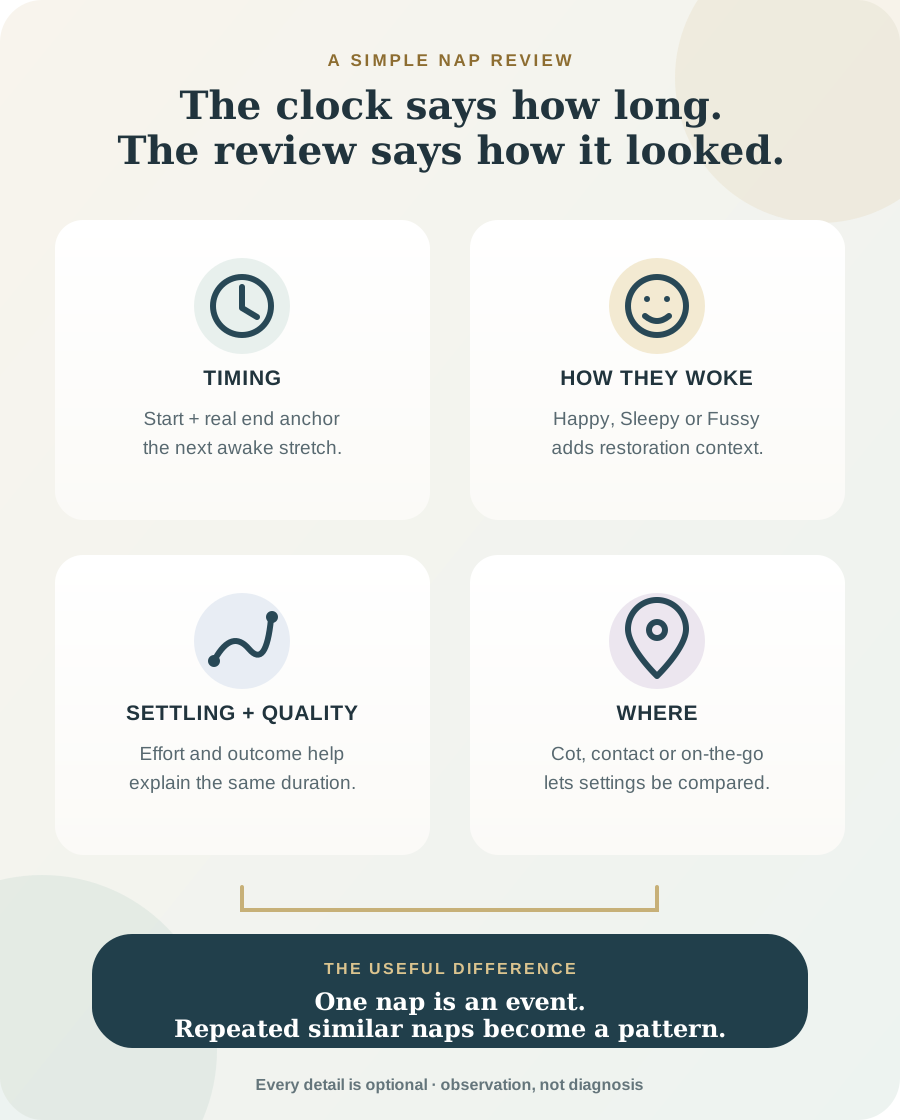
The short answer: the clock records the event; the review describes the outcome
For a completed nap, the most important facts are still the start and real end time. They tell OBubba how long the sleep lasted and when the next awake stretch began.
The review can then add four different kinds of context:
| Optional detail | Choices in the current app | What it can help distinguish | |---|---|---| | How they woke | Happy, Sleepy, Fussy | two naps of the same length that appeared to leave baby differently restored | | Nap quality | Good, OK, Rough | the parent’s quick overall read of a smooth or disrupted nap | | Time to fall asleep | Under 5m, 5–15m, 15–30m, 30m+ | a nap that began easily from one that needed a long settling attempt | | Where | Cot, Contact, Pram, Carrier, Car, Other | whether repeated naps tend to run differently in different settings |
There is also How they settled—self-settled, fed, rocked, held, patted or dummy—and a Moved to option when a nap begins in one place and is rescued in another.
You do not need to complete every field. Log the detail that answers a real question; leave the rest blank.
What Happy, Sleepy and Fussy mean—and what they do not
Happy
Choose Happy when baby wakes content, bright or ready to interact. It does not prove that the nap was long enough, that the wake window was perfect or that the same timing will work tomorrow.
A cheerful wake after a short nap may simply mean that this particular nap did what baby needed. If the same combination repeats, it becomes more informative than one isolated smile.
Sleepy
Choose Sleepy when baby is awake but still drowsy, heavy-lidded or slow to engage. The NHS describes a drowsy or dozing state as a normal pre-waking state in which a baby may fall asleep again, so it can be reasonable to pause briefly before deciding the nap is definitely over.
Sleepy here means your ordinary observation after this nap. It is not a medical label and it should not be used for a baby who is unusually difficult to wake or seems unwell.
Fussy
Choose Fussy when baby wakes upset, grumbly or hard to soothe compared with their usual wake-up. This can happen after a short or interrupted nap, but it can also reflect hunger, discomfort, teething, illness, noise or simply a difficult transition from sleep.
Fussy does not automatically mean “overtired”. OBubba reads it with the duration and settling details rather than treating the mood as a verdict.
What the actual app does with a nap review
We inspected the current OBubba prediction and insight code for this guide. The review is used in two deliberately different ways: a small response to the latest nap, and pattern learning from repeated naps.
It can gently nudge the next sleep opportunity
For the latest completed nap, OBubba combines age-aware duration with any settling time, wake mood and quality that were logged.
Examples from the current engine include:
- a sleepy or fussy wake can bring the next nap window a little earlier
- a happy wake after a good nap that reached the age-aware target can move it a little later
- a very quick settle followed by a short, non-happy nap can pull it earlier
- a longer settle after a substantial nap can nudge it later
- a rough, non-happy nap can add a small earlier adjustment
These signals are combined and capped. For a next-nap target, the complete review-based adjustment cannot exceed 25 minutes earlier or 12 minutes later. Bedtime uses gentler caps. One rough nap cannot send the schedule racing hours away from the baby's normal range.
If none of the optional outcome details are logged, the app makes no review-based shift. It can still use the real nap end, duration and the rest of the day’s sleep history.
It learns only after comparable examples accumulate
The longer-term learner pairs the wake window before a nap with the way that nap went. It ignores naps without an optional outcome signal and excludes unusual baseline days such as those tagged sick or travel.
The current learner needs at least six usable nap examples overall. It groups wake windows into 15-minute bands, requires at least three naps in a band, and will not choose a personal best until at least two bands can be compared.
That matters because one “Happy” tap is an observation. A cluster of similar wake windows repeatedly followed by easier settling and happier, better-quality naps is a pattern.
It can compare nap settings without pretending location caused the result
With enough located naps, OBubba can surface patterns such as cot naps tending to run longer, or baby tending to wake happier from one setting. The current location insight needs at least three valid naps in each of two settings and a meaningful duration difference. The mood version also requires at least three wake-mood logs in each setting and a clear gap in happy-wake rates.
That is a correlation, not proof. Cot naps may happen on quieter mornings; pram naps may happen during busy afternoons. Use the insight as a question worth testing, not an instruction to remove a contact nap that works for your family.
Why settling time is often more useful than another note
“Nap was bad” is difficult to compare. “Took 30 minutes to fall asleep” is a specific observation.
A long settle can suggest that the attempt began before enough sleep pressure had built—but not always. A new skill, a stimulating room, discomfort or a parent changing the settling method can also lengthen it. An instant settle can look reassuring, but repeated near-instant settling followed by a short, upset nap may point in a different direction.
The app therefore reads settling time with duration and wake mood. Parents should do the same.
What to log when you are tired
Use a three-level approach rather than completing a form by force.
Minimum: end the nap accurately
If today is a survival day, record the real end time. That creates the next awake anchor and prevents a forgotten running timer from moving the whole afternoon.
Helpful: add the one detail behind today’s question
- Wondering whether the short nap was enough? Add How they woke.
- Wondering why getting to sleep is difficult? Add Time to fall asleep.
- Comparing cot and pram naps? Add Where.
- Rescued a short cot nap in your arms? Add Moved to and keep it as one nap.
Learning mode: log the same detail for several comparable naps
Consistency beats completeness. Seven first naps with wake mood are more useful for a specific question than one nap with every box filled.
Try OBubba free → — time the nap once, add only the context that matters, and let the next decision respond to the day that actually happened.
A rescued nap should stay one nap
Suppose baby sleeps 24 minutes in the cot, stirs, then sleeps another 35 minutes while held with no meaningful awake stretch between.
Splitting that into two naps can make the app think there was an impossibly short wake window between them. In the current nap review, choose Cot under Where and Contact under Moved to. That preserves one continuous nap while recording the change of setting.
If baby was clearly awake for a substantial period before sleeping again, record what actually happened rather than using Moved to as a shortcut.
Do not score your parenting with the nap-quality buttons
“Good”, “OK” and “Rough” describe the nap, not the caregiver.
A contact nap can be good. A cot nap can be rough. Feeding to sleep is not a failed data point. A pram nap on a necessary journey is still sleep. The labels are useful only when they help the family notice what tends to work.
The NHS notes that babies have individual sleep patterns and that those patterns can change with growth, teething and illness. That is exactly why a flexible pattern tracker should not grade a parent against one ideal day.
When Sleepy is a safety concern rather than an app choice
The Sleepy button is for a familiar, ordinary post-nap state. Trust your instincts if your baby seems unlike themselves.
The NHS lists a child who is hard to wake, disoriented or confused among signs that need medical help as soon as possible, and says to call 999 if a child will not wake. Feeding much less than usual, breathing difficulty, unusual colour, a concerning cry or drier nappies are other reasons to seek prompt advice.
Do not keep changing wake windows to solve unusual lethargy or illness. Contact your GP, NHS 111 or emergency services as appropriate.
Safer sleep applies to every location
Location trends never override safer-sleep guidance.
The NHS advises that for the first six months the safest place is a cot or Moses basket in the same room as you. Place baby on their back on a firm, flat mattress and keep the space clear of pillows, loose bedding, bumpers, toys, nests and anything that could cover the face or cause overheating.
If the app notices longer naps somewhere else, that is not a safety endorsement. Follow current guidance for prams, carriers, car seats and contact naps, and move baby to an appropriate clear, flat sleep space when needed.
Frequently asked questions
Do I have to choose how baby woke after every nap?
No. All nap-review details are optional. The real nap end remains the key anchor, and the app applies no wake-mood or quality shift when those signals are blank.
What if baby woke crying but became happy one minute later?
Use your best overall read. If the cry looked like a brief transition and baby was quickly content, Happy or no selection may be more representative than Fussy. Consistency matters more than finding a perfect label.
Is Sleepy the same as overtired?
No. Sleepy describes what you observed. Duration, the preceding awake stretch, settling, health and repeated patterns all matter. Unusual difficulty waking is a health concern, not a sleep-schedule clue.
Can Happy mean a 20-minute nap was enough?
It can mean baby woke content from that nap. It cannot prove why the nap was short or predict the rest of the day. Watch what happens next and look for repetition.
Should I choose Rough whenever the nap was short?
Not automatically. Duration is already recorded. Use Rough when the nap itself seemed disrupted or difficult; a short but peaceful nap can be OK or Good in your own consistent shorthand.
Does Where tell the app where my baby should sleep?
No. It lets the app compare observed duration and wake mood by setting after enough examples. Safety guidance and your family’s needs come first.
What if I forget to stop the timer?
Edit the nap to its real end time. An inflated nap duration gives the app the wrong awake anchor and is more consequential than skipping every optional review field.
One useful observation is enough
The best baby tracker is not the one that asks for the most data. It is the one that knows which details can answer the question a tired parent is already asking.
The timer answers When did the nap end? The review can answer How did that nap appear to leave my baby? Together, repeated gently—not completed obsessively—they help OBubba make the next suggestion more personal and more explainable.
Sources and further reading
- NHS: Helping your baby to sleep
- NHS Best Start in Life: Understanding your baby
- NHS Best Start in Life: Safer sleep advice for babies
- NHS: Is your baby or toddler seriously ill?
OBubba is a tracking and education tool, not medical advice. Seek qualified help for concerns about unusual sleepiness, breathing, illness, feeding, growth, wet nappies or development, and follow your baby's individual clinical plan.
Ready to try OBubba?
Use OBubba to track feeds, sleep, naps, nappies, growth, milestones and family handovers in one calm baby tracker app.