The baby is finally asleep. You have put the phone face down. Then, at 10:43pm, a parenting app announces that a nap window is approaching.
That is not helpful personalisation. It is a product failing to understand the cost of interruption.
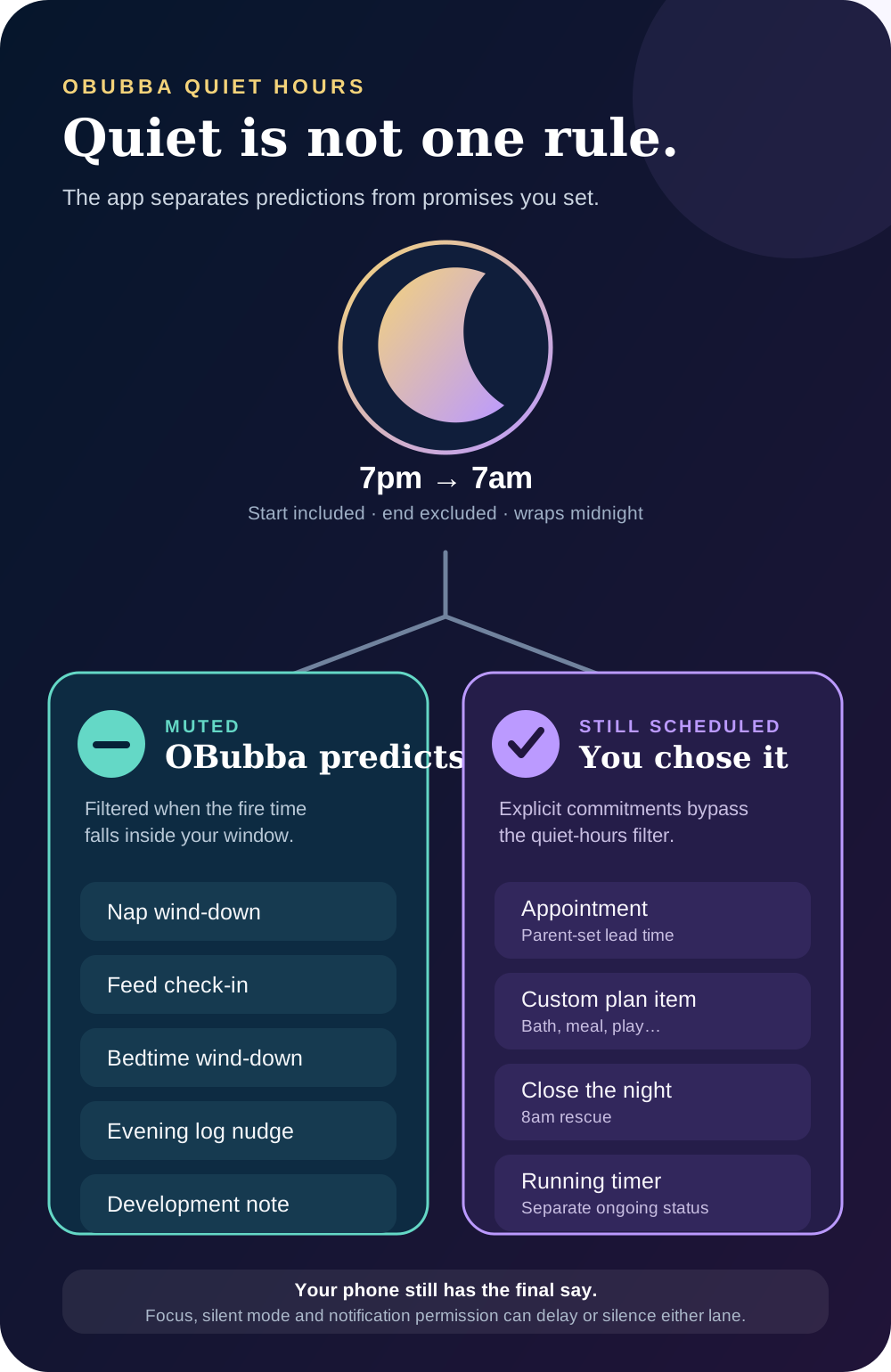
OBubba’s current app has a more deliberate answer: quiet hours mute its predicted nudges, while reminders the parent explicitly scheduled are allowed through. The distinction matters because “silence everything” can hide an appointment reminder, while “send everything” turns useful guidance into noise.
The short version:
> Quiet hours protect you from OBubba’s guesses. They do not automatically cancel commitments you deliberately asked it to remember.
There are exceptions, device settings still have the final say, and OBubba should never be treated as a baby monitor or a guaranteed medical alarm. Here is the exact behaviour behind the switch.
Where quiet hours live
Open Account → the settings gear (or Preferences) → Reminders. The reminder controls sit alongside the preferences for what OBubba tracks.
The current reminder panel contains:
- a master Reminders switch;
- Bedtime routine (30 min before);
- Nap windows;
- Feed check-ins;
- Evening log nudge;
- Development notes (1/day); and
- Quiet hours.
Quiet hours are off until the parent sets them. The first picker suggests 7pm to 7am, but those times are not forced. A parent can choose a daytime window for shift work, a protected contact nap or a partner’s recovery block.
The app rejects identical start and end times because “7pm to 7pm” could mean either zero quiet minutes or a full quiet day. It asks for an unambiguous span instead.
Quiet hours are a filter, not a phone mode
OBubba stores the start and end as minutes of the local day. The rule works in two shapes:
- Same-day window: 1pm–3pm mutes from 1:00pm up to, but not including, 3:00pm.
- Overnight window: 7pm–7am mutes from 7:00pm through midnight and up to, but not including, 7:00am.
The start is included; the end is not. A 7am nudge is therefore outside a window that ends at 7am.
This filter is applied before OBubba hands its planned nudges to the operating system. It is not the same as iPhone Focus, Android Do Not Disturb, silent mode or notification-summary settings. Those phone-level controls can still delay or silence a notification that OBubba decided to schedule.
What quiet hours mute
Quiet hours suppress five kinds of predicted or app-initiated reminder when their planned firing time falls inside the window.
Nap-window nudges
When nap reminders are enabled, OBubba uses the same corrected-age and personalised nap engine that drives its in-app clock. The notification is planned for the opening of the wind-down window, while the clock and home surfaces can display the predicted nap onset.
If that wind-down time falls inside quiet hours, the nudge is filtered out.
The app also avoids a nap nudge when a nap is already running. It drops a reminder whose fire time has passed rather than sending a late “start winding down” message after the moment has gone.
Feed check-ins
Feed reminders begin from the most recent daytime milk feed and an age-banded typical interval. The copy explicitly says it is a guide, not a clock.
The current planner also refuses to schedule that check-in after the predicted bedtime, while the baby is expected to be asleep or at 10pm and later. Quiet hours provide another parent-chosen boundary on top.
This is not feeding advice. Hunger cues, the baby’s age, growth, clinician guidance and responsive feeding outrank an app interval.
Bedtime-routine nudges
The default bedtime reminder is planned 30 minutes before the resolved bedtime. It uses the same bedtime engine as the in-app clock, including relevant sick-day, override, skipped-nap and plan signals.
If bedtime has already started, the nudge is removed. If its firing time sits inside quiet hours, it is muted.
Evening log nudges
When enabled, the evening nudge is planned for 8pm only when the day still looks lightly logged. Its wording respects categories the parent has chosen to track; it should not ask for feeds when feed tracking has been switched off.
An 8pm quiet window suppresses it. The day’s data remains available; the app simply does not interrupt to request more.
Development notes
OBubba can offer one gentle development note at 10am: a recent milestone celebration, a current development signal or a nearby developmental wave. The engine returns nothing when it has nothing worth saying.
Quiet hours can mute that note too. This makes daytime protection useful for parents sleeping after a night shift or recovering while another caregiver is on duty.
What quiet hours deliberately do not mute
Three reminder paths are exempt in the current provider.
Appointments the parent scheduled
An appointment or one-off reminder under Reminders & Appointments is an explicit commitment. If a parent asks for a reminder one hour before an 8am vaccination appointment, a 10pm–7:30am quiet window does not silently swallow the 7am lead time.
This does not guarantee an audible or exact alarm. The phone may withhold permission, apply Focus/Do Not Disturb, delay background delivery or fall back to inexact scheduling. Use the phone’s clock or the care team’s instructions for anything where a missed minute could be unsafe.
Custom plan-item reminders
A parent can attach “remind me” to a chosen plan item such as a bath, meal or play activity, including items anchored after a projected nap. Those reminders remain eligible even when the global nap, feed and bedtime switches are off.
They also bypass quiet hours because the parent deliberately requested the item. If that is not the desired behaviour, turn off the individual reminder rather than relying on the quiet-hours window.
The close-the-night rescue
When an evening sleep timer is still open and there is no morning wake, OBubba can schedule “Did [name] wake up?” at 8am. Tapping it opens the one-step close-the-night route.
That reminder is exempt from quiet hours. The implementation calls it a backstop for incomplete nights, because an unclosed timer can make the sleep engine discard the whole night.
For a late-rising family whose quiet hours end after 8am, this means the rescue can still appear during the protected window. Parents who do not want it should turn off the bedtime-routine reminder category; quiet hours alone will not remove it.
What about a timer that is already running?
An active nap, sleep or feed timer can use a separate ongoing notification on Android and a list-only presentation on iOS. It is not one of the planned predictive nudges filtered by quiet hours.
That status exists so a timer can be found and stopped. It does not necessarily make a sound, and its exact presentation depends on the phone. Ending the timer clears the ongoing notification.
Again, this is an app state—not a safety monitor. OBubba cannot tell whether a sleeping baby is breathing, whether a feed is medically overdue or whether a caregiver needs waking.
What is on by default?
In the current settings model:
- bedtime-routine reminders begin enabled;
- development notes begin enabled;
- nap, feed and evening-log nudges begin disabled; and
- quiet hours begin off.
The phone still needs to grant notification permission. OBubba’s messaging service checks existing permission quietly and asks at a high-intent moment rather than showing a system prompt on every launch.
Turning the master Reminders switch on enables all five reminder categories. Turning it off disables all five. After that, each category can be adjusted separately.
Existing installations may carry earlier saved choices, so the screen—not a generic default list—is the authority for what your phone is currently set to receive.
Will reminders follow me when I travel?
Before synchronising reminders, OBubba refreshes the device timezone and includes that zone in the schedule signature. A timezone change therefore forces the reminder set to be rebuilt in local time.
The scheduler also uses stable IDs for each reminder type. Replanning replaces the old nap, feed, log, bedtime and development reminder instead of stacking duplicates. Deleted or edited appointments and plan items have their previous slots cancelled during the same sync.
That reduces stale notifications, but operating-system scheduling is not perfect. After a flight or clock change, open OBubba once, check the displayed times and confirm that the phone has not disabled notification permission or background delivery.
A better night-notification setup in five minutes
1. Decide which interruptions are actually useful
Start with the parent, not the feature list. A nap nudge may be useful during the day and pointless after bedtime. An appointment reminder may be essential. A development note can wait.
2. Set quiet hours wider than the hoped-for sleep block
If you aim to sleep from 9:30pm to 6am, consider starting quiet hours before the wind-down begins. The NHS recommends creating a calm sleep environment and notes that putting a phone on silent can reduce interruptions. NHS: fall asleep faster and sleep better.
3. Audit the exemptions
Check appointments, one-off reminders and custom plan items separately. Quiet hours will not filter those routes. Also decide whether the 8am close-the-night rescue is useful enough to keep the bedtime category on.
4. Check the phone’s own controls
Use Focus or Do Not Disturb to decide what may make sound. Review whether a partner, baby monitor or emergency contact is allowed through. OBubba quiet hours cannot configure those systems.
5. Test before relying on a reminder
Create a harmless one-off reminder a few minutes ahead. Lock the phone and see what actually happens. If something is medically time-critical, use a dedicated alarm and follow professional instructions rather than depending on an app notification test.
Quiet technology is part of baby care
The NHS recognises that looking after a baby can be exhausting, especially when nights contain repeated wakes, and suggests prioritising rest and sharing nights where possible. It also advises seeking support when tiredness is making it hard to cope or enjoy things. NHS: sleep and tiredness after having a baby.
An app cannot create sleep when the baby wakes. It can avoid taking away the sleep that was available.
That is why quiet hours are more than a preferences checkbox. They are a boundary between:
- information that may help tomorrow; and
- an interruption that claims it must be heard now.
OBubba’s current rule is sensible precisely because it does not treat those as the same thing.
Quick answers
Will OBubba send a nap reminder during quiet hours?
No, not when the predicted nap nudge’s firing time falls inside the saved window.
Will an appointment reminder still arrive?
OBubba still schedules it because the parent explicitly created it. Phone-level Focus, notification permission and operating-system delivery can still silence or delay it.
Why did I see “Did my baby wake up?” during quiet hours?
The 8am close-the-night rescue is intentionally exempt. Turn off the bedtime-routine reminder category if you do not want that backstop.
Are quiet hours 7pm–7am by default?
Quiet hours start off. The first picker suggests 7pm and 7am, but the parent chooses the saved window.
Does the end time count as quiet?
No. The start is inclusive and the end is exclusive. A 7am reminder is outside a window ending at 7am.
Will quiet hours stop an active timer notification?
Not necessarily. The running-timer status uses a separate ongoing-notification path and is not one of the planned nudges filtered by quiet hours.
Can OBubba replace a medicine alarm or baby monitor?
No. Notifications can be delayed, muted or denied by the operating system. Use dedicated safety tools and individual clinical instructions.
Try OBubba free → — keep the reminders that earn their place, quiet the predictions that do not, and let available sleep stay available.
This article gives general information for UK families and describes the current OBubba implementation reviewed on 5 March 2027. Notification behaviour varies by device, permissions and operating-system settings. OBubba is not a baby monitor, emergency alert system or guaranteed medical alarm.
Ready to try OBubba?
Use OBubba to track feeds, sleep, naps, nappies, growth, milestones and family handovers in one calm baby tracker app.