It is 3:08am in a holiday cottage. The baby has finished a bottle, the rain is loud, and the Wi-Fi router has quietly given up. Do you keep the feed in your head until morning—or can you log it now?
If this phone has already loaded your active baby in OBubba, you can keep recording care offline. The entry is kept on the phone and queued to sync when a connection returns.
That sentence has an important boundary. A previously used phone with a cached baby is different from a fresh install or a new phone. First setup, recovery, joining a family and sharing all need a connection. Other caregivers will not see this phone’s queued changes until it reconnects.
Here is the honest offline map of the current OBubba app.
The 20-second answer
| Situation | What happens | |---|---| | Same phone, active baby already loaded | Keep viewing cached history and adding, editing or deleting logs | | Connection disappears while logging | The change is applied locally and queued for later sync | | Partner is using another phone | They see the change after this phone reconnects and sync completes | | Brand-new install or uncached baby | Reconnect before OBubba will create or change that baby’s record | | First baby setup | Your typed setup is retained, but the secure account and baby record finish online | | Stories and sound machine | Built into the app and available without Wi-Fi | | Live weather or richer Luna AI answer | Needs a connection; local guidance or fallback may remain available |
No baby app should turn “offline” into a vague promise. In OBubba, the safe rule is: same phone plus a baby that has already loaded.
What you can do offline on a prepared phone
Once the active baby has loaded and is held in the device cache, the everyday record can continue through a train tunnel, a rural stay or a home broadband wobble.
You can:
- see the cached baby and recent history;
- log feeds, breastfeeding, pumping, nappies, sleep, wakes, medicine, temperature and notes;
- start and stop a sleep or feeding timer;
- edit a tired-parent typo;
- delete a duplicate or wrong entry;
- read totals and pattern guidance calculated from the data already on the phone;
- play OBubba’s built-in sound machine;
- read the included bedtime stories; and
- open cached care and warning-sign guidance.
The sound machine uses locally generated white, pink and brown noise plus ocean, womb, heartbeat, rain, fan and shushing loops. It does not need a music stream. Bedtime stories are packaged for offline reading too; finishing one can add a reading event to the baby’s story.
Cached warning-sign content can still be opened without data. It is educational routing, not a diagnosis. Calling a number still depends on phone service, and an app is never the right thing to wait for in an emergency.
What “saved offline” actually means
When the connection is healthy, OBubba uses a transaction: it rereads the latest family record before writing, which helps avoid one caregiver overwriting another caregiver’s newer work.
When that transaction is unavailable, the app switches to a queued merge write. It updates the phone’s local copy promptly, remembers the change, and lets the underlying sync layer send it when the connection returns.
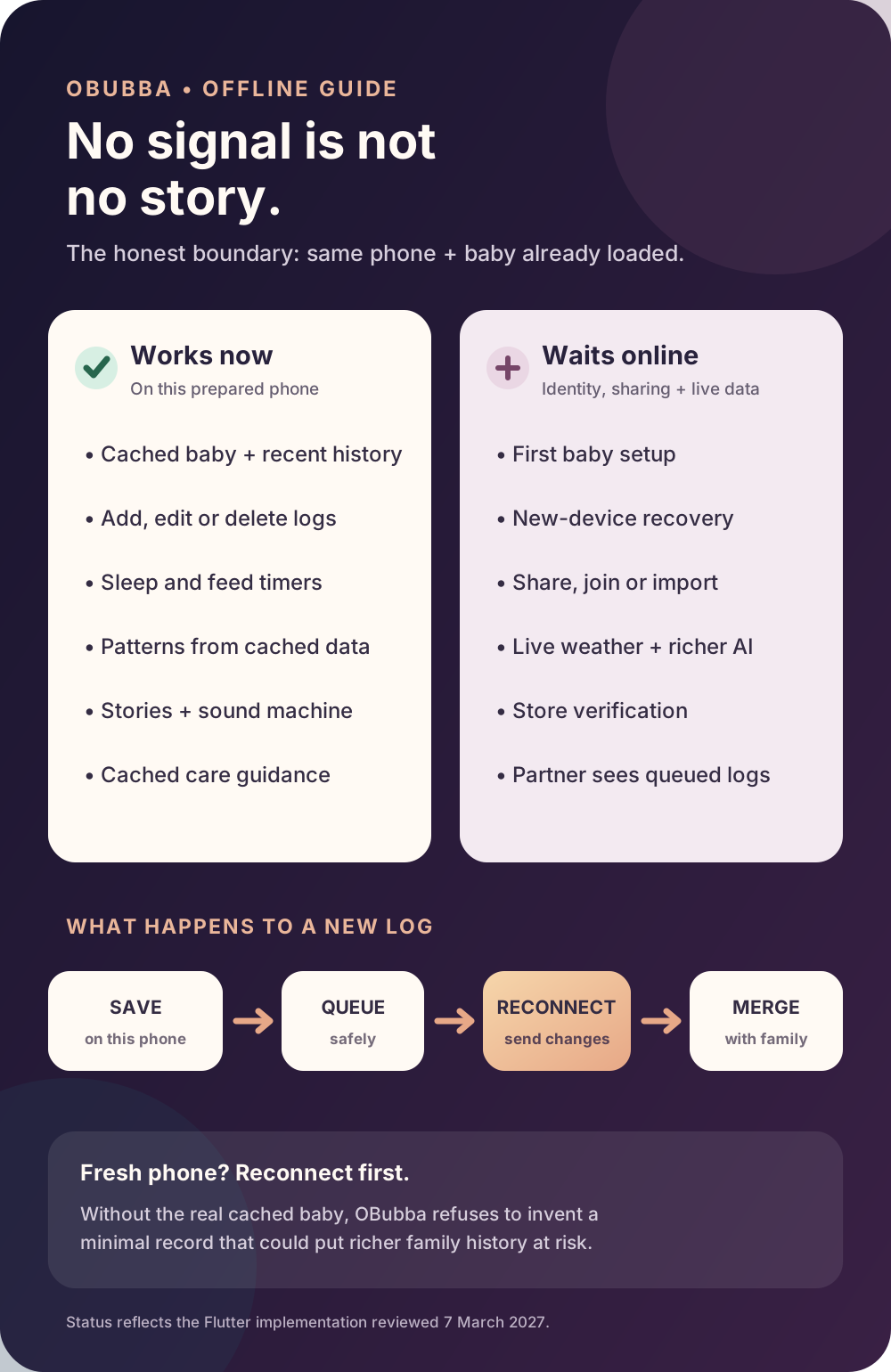
OBubba deliberately does not create a bare, nearly empty baby record when a real cached record cannot be found. That shortcut could overwrite richer family history. On a fresh or uncached device, the app asks you to reconnect instead.
The device cache is not merely a screenshot of the last page. OBubba stores the child record locally in compressed form so a returning parent can see it promptly. The app also keeps the last valid child on screen through a brief connection wobble rather than dropping back to an empty welcome state.
Why the offline banner may not appear instantly
A Wi-Fi icon can look connected even when the internet behind it is not. OBubba probes the service it actually needs, rather than trusting the phone’s network label alone.
It waits for two consecutive failed checks before declaring the app offline. That avoids a dramatic red flag for one momentary miss. A successful check clears the offline state immediately.
The current messages are intentionally reassuring and specific:
> “Offline for now, your entries are safe and will sync later”
If the phone has connectivity but repeated write-back attempts still fail, the app can instead explain that sync is resting and that entries remain safe on the phone. The banner is a status message, not a reason to stop logging.
What must wait for a connection
Some actions establish identity, permission or a new shared relationship. They cannot honestly be completed using one phone’s private cache.
Wait until you are online to:
- finish first-time setup and create the first baby;
- recover a family on a new or reinstalled phone;
- join with a family code;
- invite or share with another caregiver;
- rotate recovery or sharing credentials;
- import a family record;
- make connection-dependent account changes;
- fetch live weather context;
- receive a richer network-generated Luna response; or
- restore a store purchase when the store needs to verify it.
During first setup, OBubba keeps the details you entered and retries when the app resumes or the connection returns. It also remembers a partially created family code so retrying does not create a second baby.
Luna has a local, deterministic fallback for moments when the online coach cannot answer. That keeps the response calm and useful, but it is not the same as a fresh AI-generated reply. OBubba should tell the difference through behaviour, not pretend every feature is equally live.
When will another caregiver see my offline entry?
Not until your phone reconnects and its queued write reaches the shared record.
Suppose one parent logs a 2:40am bottle in an offline cottage while the other is already home. The cottage phone can show its new bottle immediately. The home phone cannot know about it yet. After the cottage phone comes online and OBubba syncs, the family record can merge the addition.
The merge is designed to be additive: an entry created on one phone should not erase a different entry created elsewhere. Deletions carry markers so an older family copy does not casually resurrect a log that was intentionally removed.
There is still one unavoidable edge case: if two caregivers edit the same existing entry while both are offline, the most recently modified version may win. For a shared correction, it is better for one person to make the edit, reconnect, and let it sync before the other changes that exact row.
Same phone versus a new phone
This distinction is the easiest one to remember:
Same phone you normally use
Open OBubba while connected before the trip. Select the baby you expect to track. Once that record has loaded, routine logging can continue through a loss of internet.
New phone, reinstall or cleared app data
The local cache is not there. The phone must reconnect, establish access and retrieve the real family record before offline writing is allowed.
This refusal is protective. “Let me type something at any cost” sounds convenient, but writing a minimal record without the family history could be far more damaging than waiting to authenticate and load the truth.
A two-minute travel check
Before a flight, ferry, camping stay or rural holiday:
- Open OBubba while online. Do not rely on having installed it months ago.
- Select the right baby. Let the Track screen and recent history appear.
- Open anything you expect to use. Check the sound machine, stories and care guidance before leaving.
- Keep family edits simple. If possible, agree which caregiver will correct an existing shared row while disconnected.
- Log at the real time. There is no benefit in saving every memory for later when the prepared phone can queue it now.
- Reconnect and reopen the app. Give the queued changes a moment to reach the family record.
- Check the timeline. Confirm that the important feed, medicine or sleep entry appears as expected before assuming another caregiver has seen it.
For medicine, keep the original packaging and written dosing instructions with you. OBubba records what you enter; it is not a guaranteed reminder, a dosing authority or an emergency system.
What about sleep predictions and patterns offline?
The app can continue calculating from information already present on the phone. That may include recorded sleep totals, awake time and pattern-based guidance.
Offline does not make the evidence newer than it is. If another caregiver has added a nap on a different device, this phone cannot include that event until the family copies sync. Treat any prediction as a guide based on the logs currently visible, especially when care has been divided across disconnected phones.
The same principle applies to weather-aware comfort guidance: OBubba can use existing local context and manual inputs, but live weather needs the network.
Quick answers
Can I track a feed without Wi-Fi?
Yes, on the same phone after your active baby has already loaded. The feed is saved locally and queued to sync.
Can I use OBubba in airplane mode?
Routine logging can continue for a cached baby. Connection-dependent setup, recovery, sharing, live weather and online AI enhancements wait.
Will my partner see the entry immediately?
Only if your phone can sync it. While your phone is offline, the new entry exists on that phone but has not reached your partner’s device.
Is the sound machine offline?
Yes. Its sound loops are generated locally rather than streamed.
Are bedtime stories offline?
Yes. The included stories can be read without Wi-Fi.
Can I set up OBubba for the first time without internet?
You can enter setup details, but secure account creation and the first baby record need a connection. OBubba retains the setup and retries when you are back online.
What if the app has never loaded this baby on this phone?
Reconnect first. OBubba refuses to invent a minimal offline record because that could put real family history at risk.
Does offline mode make OBubba a baby monitor?
No. OBubba is a care record and guidance app. It does not monitor a baby, guarantee alerts or replace direct supervision and urgent medical help.
Try OBubba free → — keep the family’s care story moving through patchy Wi-Fi, rural nights and everyday connection wobbles.
This article describes the current OBubba implementation reviewed on 7 March 2027. Device storage, operating-system behaviour and later app updates can affect availability. OBubba is not a baby monitor, medical device or emergency service.
Ready to try OBubba?
Use OBubba to track feeds, sleep, naps, nappies, growth, milestones and family handovers in one calm baby tracker app.