Your parent has agreed to watch the baby. They know the bedtime song, where the bottles are and exactly which cuddle usually works. The awkward part is technology: do they now need to download your baby tracker, create another password and learn an entire app before you can leave the house?
No. A grandparent, babysitter or nanny can use OBubba’s Bubba Care link in an ordinary phone browser. They do not need to install OBubba or create a carer account.
The parent prepares the care guide in the app, then shares a private link or shows a QR code. The carer opens a calm page with the baby’s current essentials and large, simple controls for feeds, nappies and naps. Those entries flow back to the parent’s OBubba timeline during the active session.
This is deliberately different from permanent Family Sharing. Bubba Care is the lighter handoff for somebody who needs today’s care context, not the family’s whole app.
The short answer
| Question | What Bubba Care does | |---|---| | Must the carer download OBubba? | No. The care page opens in a browser | | Must they make an account or remember a password? | No. The private link is the access credential | | How can the parent share it? | QR code, share sheet, copied link or a saved PDF guide | | What can the parent include? | Contacts, comfort and routine notes, feeding details and current care context | | Can the carer add updates? | Yes: simple feed, nappy and nap logging during the live session | | Do those updates reach the parent? | Yes. The app listens for carer activity and merges it into the baby’s timeline | | Is it the same as Family Sharing? | No. Family Sharing is for trusted, ongoing co-care inside the full app | | What happens afterwards? | End care session saves the session’s logs, clears the carer page and stops the session |
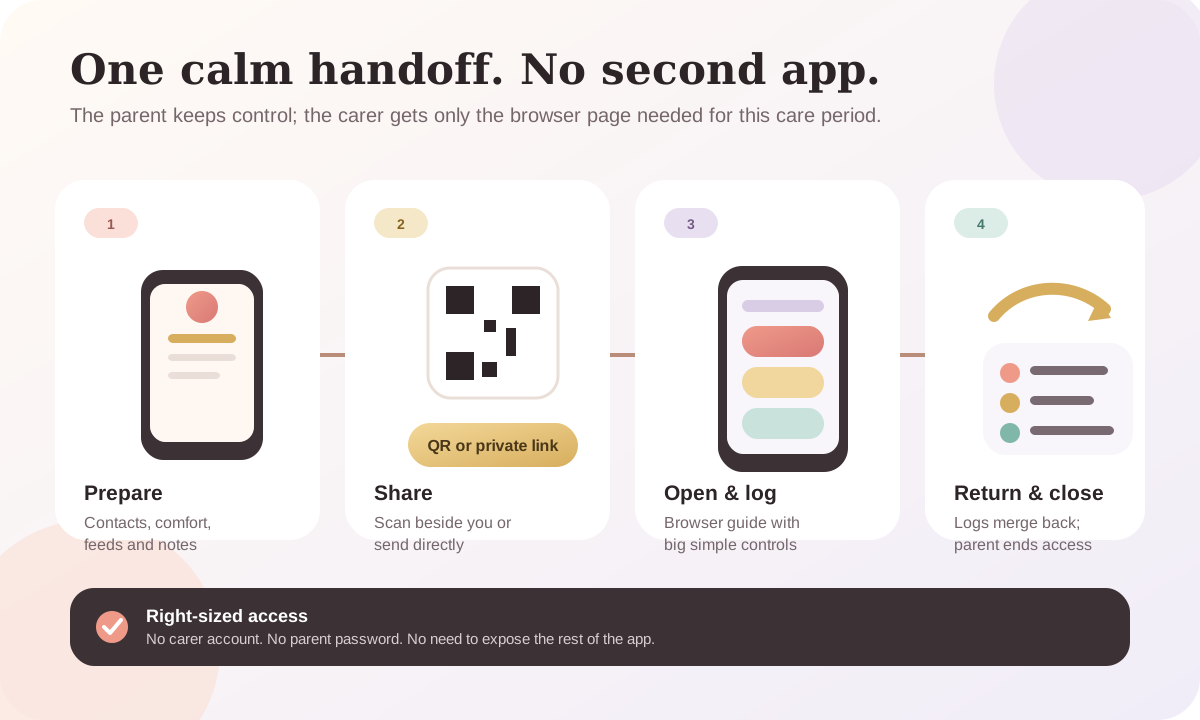
What the parent does in the OBubba app
We traced the current implementation before writing this guide. The path is Care → Bubba Care → Start a session.
Before creating the link, the parent can add the information a carer is most likely to need:
- emergency contacts and their relationship to the baby
- comfort and routine notes
- feeding details, including a parent-entered amount or instruction when the normal log is not enough
- other practical notes for this particular care period
The app saves those details as they are typed and syncs them with the child record. Starting a session is then a deliberate commit point: OBubba refreshes the browser guide before it produces the shareable link. If that preparation cannot complete, the screen shows an error rather than presenting a link that looks ready but is not.
Once care is live, the parent sees a scannable QR code, the private link and clear Share link, Copy link and Save as PDF actions.
That gives a family four useful handoff styles:
- Let the grandparent scan the QR code while standing beside you.
- Send the link privately in the messaging app you normally use.
- Copy it into an existing care conversation.
- Save the guide as a PDF when a static or printable backup is more appropriate.
The parent remains the session manager. The carer does not need to navigate the rest of OBubba or change account settings.
What the grandparent or babysitter sees
The shared page is a care surface, not a mini version of the entire app.
The screen describes it plainly: the link “opens in any browser, with big, simple buttons.” The handoff is designed for a person who may be perfectly confident with a baby but less confident installing unfamiliar software.
The page can bring together the immediate context the parent has prepared, while simple logging lets the carer record ordinary events without starting a second diary. The parent’s app shows a live carer feed so they can see what has been logged as it happens.
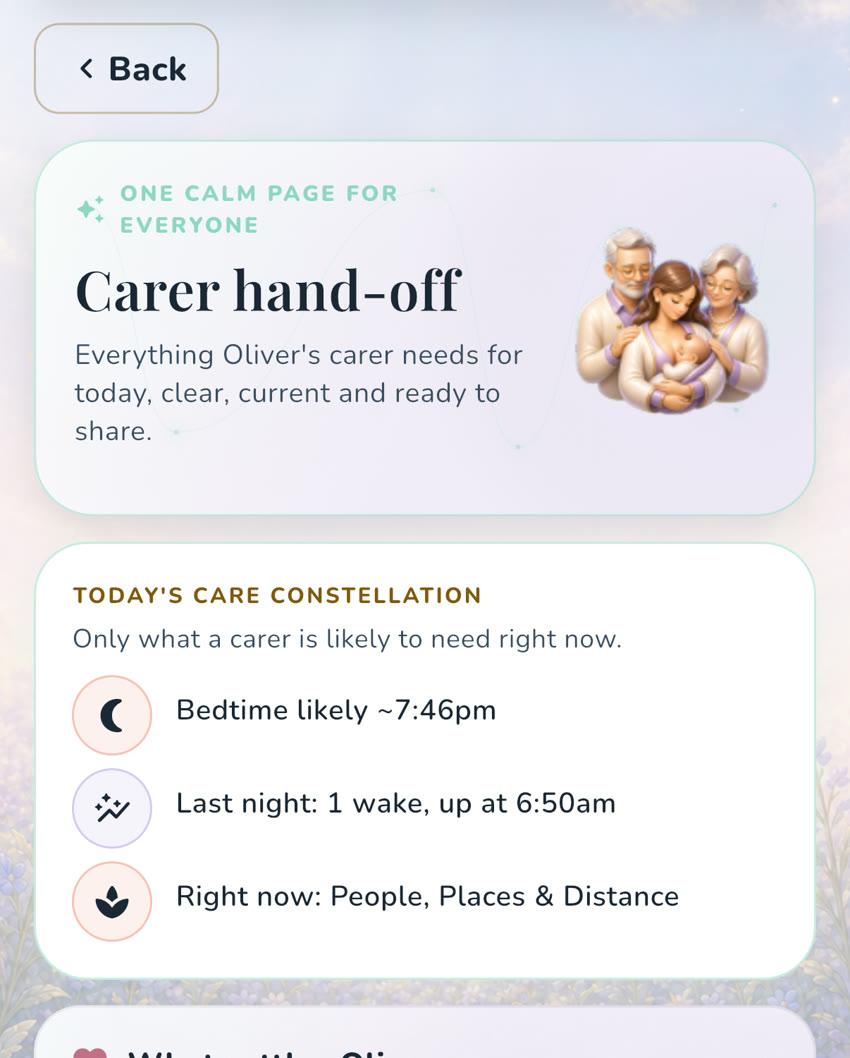
This reduced interface is a feature, not a limitation. A one-evening babysitter generally does not need growth charts, subscription settings, pregnancy content, long-term reports or the parent’s wellbeing tools. They need a clear answer to “what matters for this baby right now?” and a quick way to record what happened.
A five-minute setup before you leave
Do not send the link for the first time as you close the front door. A short rehearsal is kinder to everybody.
1. Prepare the guide
Check the contacts, feeding note and comfort instructions. Write concrete directions such as “dim lights, sing the same song, then cuddle” rather than “usual routine.”
2. Create the care link while online
The live guide needs a connection to be prepared and shared. If the app says it could not create the link, reconnect and try again; do not assume the unfinished link will become valid later.
3. Open it on the carer’s phone
Ask them to scan the QR code or tap the message. Confirm the care page loads before you leave.
4. Practise one harmless action
Show where a feed, nappy or nap would be logged. The goal is not a complete tutorial. It is simply to remove the first-use hesitation.
5. Agree the non-app plan
Say when you expect to return, when you want a message and what should trigger an immediate phone call. Keep the home address, emergency contacts, allergies, prescribed plans and safety-critical instructions visible outside the app too.
A care link supports a handoff. It does not replace the carer’s judgement, an official nursery record, a clinician’s plan or emergency action.
Why not just share the parent’s login?
Because the parent’s account is much larger than the job.
Sharing a personal login can expose settings and information the carer does not need, creates confusion about who changed what and leaves the family with a password they may later need to replace. It also asks the carer to learn the whole product for a narrow task.
Bubba Care follows a more proportionate pattern:
| Need | Better OBubba route | |---|---| | One evening with a sitter | Private Bubba Care link | | Occasional grandparent day | Bubba Care link or PDF guide | | A new person taking over from the previous carer | New carer (fresh link) | | Regular co-parent using the same ongoing record | Family Sharing | | Nursery with its own mandatory system | Use the nursery’s official process; OBubba can remain the parent’s record |
The smallest access surface that completes the job is usually the easiest to explain and the easiest to end.
What “New carer” and “End care session” actually do
These two buttons solve different handoff moments.
Choose New carer (fresh link) when one person’s care period is over and a different person needs access. The current flow first pulls unmerged carer entries into the baby’s record, clears the old portal entries and creates a brand-new session link for the next person. The parent shares that new link rather than casually forwarding the previous one.
Choose End care session when the handoff is finished and nobody else needs a new link. The app:
- reads the remaining carer entries;
- merges entries that have not already reached the parent timeline;
- preserves a still-running carer nap as a finished timeline event;
- clears the session page’s entries;
- marks the session ended and revokes its token.
The browser page listens for that ended state. If it is still open, it changes to a locked “Session ended” screen instead of continuing to show the baby’s care guide.
There is also a backstop: current sessions are minted for 29 days, within the backend’s 30-day maximum. That is an expiry ceiling, not a recommendation to leave a babysitter link open for four weeks. End the session when the care period ends.
What happens to a nap that is still running?
This is the kind of edge case that separates a real handoff system from a pretty share card.
Suppose Grandma taps to start a nap, then the parent returns before she records the wake. Ending the care session asks the merge layer to finalise that open carer nap rather than silently dropping it. The resulting timeline still needs the parent’s normal review—especially if the recorded time is wrong—but the event is not abandoned merely because the browser session ended.
The merge is also designed to be idempotent: repeated snapshots use the carer entry ID to avoid creating the same feed, nappy or nap twice. If a carer immediately undoes an entry, the rejection can remove the matching pulled-back copy rather than leaving a known mistake in the main timeline.
That engineering is invisible to the grandparent. It should be. Their job is to tap the obvious button; OBubba’s job is to keep the handoff coherent.
Privacy habits for any private care link
A no-login page is easy for the intended carer because possession of the link is what grants access. Treat it accordingly.
- Send it directly to the person providing care, not to a broad family group.
- Do not include the QR code or URL in a public photo or social post.
- Ask the recipient not to forward it.
- Use New carer instead of reusing one person’s link for somebody else.
- Use End care session when the handoff is over.
- If a message went to the wrong person, end the session and create a fresh one.
Convenience and privacy are not opposites here. The good version of convenience makes access obvious, narrow and simple to close.
When Family Sharing is the better choice
Bubba Care is not intended to keep a co-parent permanently at arm’s length.
If two trusted adults repeatedly log nights, feeds and nappies, OBubba’s Family Sharing is the better fit. It gives the other person the full ongoing child timeline in the app, so both phones work from the same record instead of starting a new handoff session each day.
The distinction is practical:
- Bubba Care: “You are looking after the baby for this care period.”
- Family Sharing: “You help maintain this baby’s ongoing record.”
For more detail, read how OBubba shares baby nights with another trusted adult. If this is the first evening away, use the complete babysitter handover guide.
The real benefit: less setup, not less trust
Grandparents do not need to become “app people” to give attentive care. Babysitters should not need a new account for every family. Parents should not have to choose between fifteen screenshots and handing over their own password.
OBubba’s answer is one prepared page for the temporary job: scan or tap, see what matters, log the ordinary events, then close the session cleanly.
That is the kind of feature parents notice after downloading. The sleep predictions and trackers help one person understand a baby; Bubba Care helps that understanding survive a change of hands.
Try OBubba free to keep sleep, feeds, nappies, weaning and shared care in one calm timeline—and give a trusted carer exactly the part they need.
Frequently asked questions
Does Grandma need an iPhone or Android app?
No. The Bubba Care page opens in a normal modern phone browser. The parent uses the OBubba app to prepare and control the session.
Does the carer need an OBubba account?
No. There is no separate carer signup or password. The private link is the credential, so it should be shared and stored carefully.
Can a babysitter log naps and feeds without the app?
Yes. During an active Bubba Care session, the browser page provides simple controls for feeds, nappies and naps. Those entries can flow back into the parent’s OBubba timeline.
Can I print the care information instead?
Yes. The active-session screen includes Save as PDF. A printed guide is useful as a backup, but it is static and cannot send live updates back to the parent.
Should I send the same link to the next babysitter?
Use New carer (fresh link). It saves the current carer’s remaining entries, clears their session page and creates a new link for the next person.
How long does a Bubba Care link last?
The current app mints a session token for 29 days, inside a 30-day backend limit. Parents should still end the session as soon as the care period is finished rather than relying on automatic expiry.
What if the carer has no internet connection?
Treat Bubba Care as an online handoff. Prepare and open the link while connected, and keep essential contacts and safety instructions available offline. The PDF guide can be a useful static backup.
Is Bubba Care a medical record?
No. It is for day-to-day care context and simple logging. It does not replace prescribed plans, medicine labels, professional records, clinical advice or emergency services.
Ready to try OBubba?
Use OBubba to track feeds, sleep, naps, nappies, growth, milestones and family handovers in one calm baby tracker app.