You open the baby tracker at lunchtime and discover the nap timer has been running for four hours. Or morning arrives, baby is cheerfully awake, and last night's bedtime timer still says sleeping.
This is not a parenting failure, and it does not mean the whole sleep history is ruined.
> Correct the existing sleep with the best honest wake time you have. Do not stop it at the current time merely because that is when you noticed.
If you remember baby calling at about 6:40am, enter 6:40, not 10:12 when you reopened the app. If the time is uncertain, use a reasonable estimate and add a short note rather than manufacturing minute-perfect data.
The quick fix by mistake
| What happened? | Best repair | |---|---| | Nap timer is still running, but baby woke earlier | End the existing nap at the real or best-estimate wake time | | Bedtime timer ran through the morning | Close the same overnight sleep at baby's morning wake time | | Timer started late | Edit the start time; keep the end if it is already correct | | You stopped the timer accidentally and baby is still asleep | Resume the same sleep if the tracker offers it | | You logged the sleep twice | Keep the most complete entry and remove the duplicate | | You cannot remember the time at all | Add the uncertainty to a note or omit the unusable entry. Do not pretend “now” was the wake | | Nap appears to cross midnight | Check whether it was really bedtime; ordinary naps should not wrap into the next day |
The principle is simple: repair the event that happened rather than adding a second event to cancel out the mistake.
Why stopping it “now” creates a worse record
A running sleep timer normally represents an open interval: it has a start but no end yet. The app cannot know whether baby is still asleep or whether the adult forgot to tap.
If a 1:05pm nap really ended near 2:00pm but you stop it at 5:30pm, the log now describes a four-hour twenty-five-minute nap. That false duration can affect:
- total daytime sleep
- the next awake interval
- nap-count and nap-length patterns
- bedtime interpretation
- comparisons between home, nursery and travel days
- any personalised predictions that learn from completed sleep
One inaccurate nap will not permanently break a responsible tracker, but correcting it is better than asking the system to infer around a time you know is wrong.
Fixing a forgotten nap timer
Start with the most reliable anchor you have. Perhaps you sent a message when baby woke, made a bottle, started a walk, took a photograph or remember the programme that was on. These are memory cues, not evidence that you need to investigate your own day like a detective.
Choose the closest honest level of precision:
- Known: “I picked baby up at 2:07pm.” Enter 2:07.
- Approximate: “They woke around 2pm.” Enter 2:00 and, if useful, note that it is approximate.
- Range only: “Sometime between 1:45 and 2:15.” Use the midpoint or omit the entry if the difference would materially change a decision.
- Unknown: Do not use 5:30pm just because that is the current time.
Edit or end the existing nap. Avoid adding a second completed nap on top of the open one unless the tracker cannot repair open entries. Two overlapping records are harder to interpret than one approximate record.
What if baby really did take a very long nap?
Record what happened. The aim is truth, not making the chart look age-typical.
Consider the wider context: illness, recovery, travel, vaccination, a poor previous night or a developmental change. If baby is unusually difficult to wake, has difficulty breathing, is not feeding or has not had a wet nappy for 12 hours, use current NHS urgent-help guidance and seek urgent help. Trust your instincts and get immediate medical help if you think something is seriously wrong. A timer cannot distinguish restorative sleep from reduced responsiveness.
Fixing a bedtime timer left running overnight
Bedtime is different from a nap because it normally crosses midnight. Keep it as one continuous night sleep, then enter the real morning wake time.
Example:
- bedtime started: 7:38pm Tuesday
- baby woke for the day: about 6:42am Wednesday
- timer noticed: 9:15am Wednesday
The correct end is about 6:42am. Do not split the night at midnight, end it at 9:15am or create a second Wednesday “sleep” to compensate.
If night wakes or feeds were logged separately, keep them. A night can have one main sleep arc plus wake events. The main arc describes the span from bedtime to morning; the wake entries explain interruptions within it.
If you are unsure whether baby briefly woke at 5:50am and resettled, use the time they were genuinely up for the day as the morning end. A brief stir is not necessarily the morning wake.
What if you forgot to start the timer?
Backdating is legitimate when it describes a real event. If baby fell asleep at roughly 12:35pm and you remembered at 12:55pm, edit the start to 12:35 while leaving the sleep open.
If the whole sleep is already over, add one completed interval with the best start and end you remember. There is no benefit in starting a live timer after baby wakes and waiting for it to “catch up.”
Use the same precision rule: a truthful estimate is useful; invented exactness is not.
Accidental stop: resume instead of making a second nap
It is easy to tap Wake now when you meant to pause, particularly during a night stir. If baby is still asleep and the tracker offers Still asleep? Resume, reopen the same entry.
Resuming should continue from the original start. It should not begin a fresh nap at the accidental-stop time, because that divides one real sleep into two artificial sessions.
If resume is no longer available, edit the completed sleep and clear or extend its end if the app supports that. Otherwise, keep one explanatory note rather than creating several tiny correction entries.
Pause, wake or end: which one do you mean?
These actions describe different things:
- Pause: baby woke or stirred temporarily and you are resettling them; the main sleep may continue.
- Resume: baby is asleep again after that stir.
- Wake now / End: the nap or night sleep has finished.
- Edit start: the timer began at the wrong clock time, but the sleep itself is still open.
Do not pause a timer merely because the parent left the room, opened the app or forgot to look at it. The timer follows the baby's sleep event, not the adult's attention.
For night wakes, the amount of awake time can be approximate. Avoid watching the seconds if that makes everyone more alert. A short, calm note after resettling is usually enough.
Duplicates and overlapping sleep entries
Duplicates commonly happen when two carers log the same wake, a slow connection makes a save feel unsuccessful, or a parent adds a manual nap without noticing the original timer is still open.
To clean up:
- Identify the entry with the correct start, end and notes.
- Copy any useful detail from the duplicate.
- Remove the extra entry rather than keeping both.
- Check that the day now has one continuous version of the real sleep.
Do not create a negative-duration note or an artificial wake to “balance” totals. Sleep history should remain a sequence of events, not accounting adjustments.
When family members share care, agree that the person who ends the sleep normally closes the timer. If someone else already logged it, edit the shared record instead of adding another. See our guide to sharing a baby tracker without duplicate logs.
When an inaccurate log should simply be removed
Repair is worthwhile when the entry still carries useful information. Removal can be clearer when:
- neither start nor end is credible
- the entry belongs to the wrong baby
- it duplicates another complete record
- a pocket tap started a sleep that never happened
- an abandoned timer is so old that nobody can reconstruct it responsibly
Keep a note only if it will help a handover or professional conversation. “Sleep unknown during car journey” may be more truthful than a guessed two-hour nap.
Tracking should reduce cognitive load. It should not make a tired parent produce certainty they do not have.
How the actual OBubba timer repairs mistakes
OBubba's current sleep timer stores a live nap or bedtime as a start with no end. That open entry drives the on-screen count-up clock and the native running-timer surfaces. It is not considered a completed sleep until a real end is supplied.
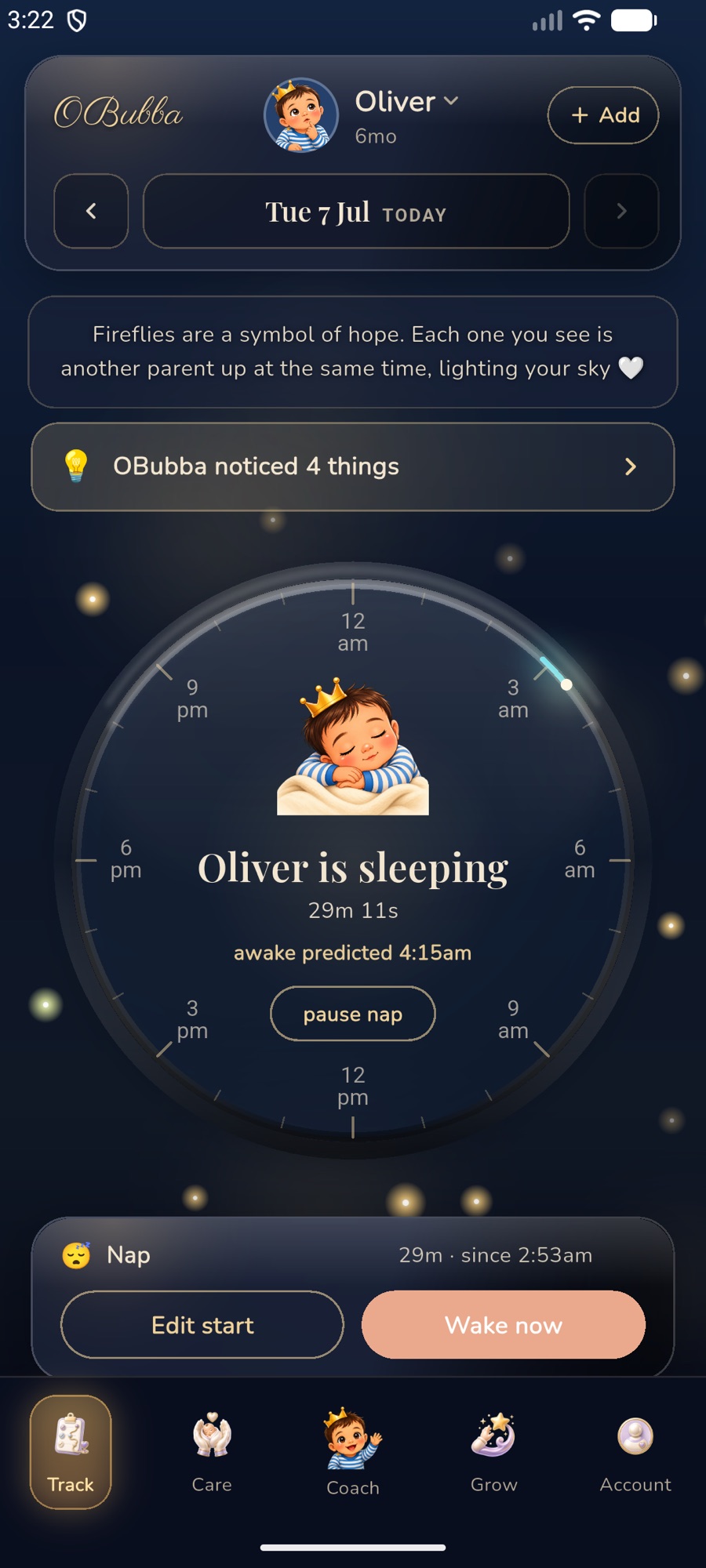
The implementation includes several recovery paths built around tired-parent mistakes:
1. Edit the start while the timer is running
Edit start changes the stored start time and updates the visible count-up. Leaving the end empty keeps baby marked as still asleep; changing a note or start does not silently kill the live timer.
2. Close an overnight timer at the real wake time
Between 6am and 4pm, OBubba can recognise an evening bedtime that is still open and has no morning wake. It asks “Still asleep, or up for the day?” and lets the parent choose the actual wake time.
If bedtime reminders are enabled, an 8am notification provides another route: “Did [baby] wake up?” Tapping it opens the same close flow. The app never fabricates the wake time.
3. Rescue an overdue open nap
An open nap becomes eligible for a once-per-nap repair prompt after four hours, while it is still recent enough to act on. OBubba asks “Still napping, or did they wake?” and lets the parent enter the real wake.
The prompt stops treating very old abandoned naps as actionable after twelve hours. That avoids inviting confident reconstruction when memory is unlikely to support it.
4. Undo an accidental stop
A recently ended nap can be reopened for up to three hours; a bedtime sleep has a longer window of up to ten hours because it naturally spans the night. The original start remains intact.
When a bedtime is reopened, the app also tries to remove the matching morning-wake record so the history does not claim baby is awake and asleep at the same time.
5. Reject impossible completed durations in the manual editor
When a parent enters or edits a completed sleep manually, OBubba blocks a nap whose end is not after its start, a nap longer than six hours and a bedtime sleep longer than eighteen hours. Bedtime is allowed to cross midnight; an ordinary nap is not.
These limits do not say a baby “should” nap for a particular duration. They protect against AM/PM mistakes and data shapes the rest of the sleep engine cannot interpret safely.
6. Keep the timer and the right baby together
The live sleep entry carries child identity, and native timer surfaces reconcile against that entry. A morning wake or partner-synced end stops the live state rather than allowing a lock-screen timer to contradict the app.
The live sleep timer and logging controls are free to use. The exact countdown target is a Premium feature, but correcting the record is not.
Fix the sleep record without starting again. Use OBubba's free nap or bedtime timer, correct the start and repair forgotten endings without being punished for one missed tap.
What a sleep timer can and cannot tell you
| It can help with | It cannot establish | |---|---| | Remembering approximate start and end times | Whether baby was safely positioned | | Showing total recorded duration | Sleep stages or sleep quality from timing alone | | Separating naps from overnight sleep | Why baby woke | | Supporting a carer handover | Whether a baby is medically well | | Revealing repeated patterns over several comparable days | A diagnosis or guaranteed schedule |
The timer is a memory tool. It is not a baby monitor and should never replace checking the baby.
Follow safer-sleep guidance regardless of whether the timer is running. The Lullaby Trust's clear-cot guidance recommends placing baby on their back in their own clear, flat, separate sleep space with a firm, flat mattress and keeping the cot free of pillows, duvets, bumpers, toys and sleep positioners.
A low-pressure accuracy rule
Use the smallest unit of accuracy that changes a decision:
- Exact minute when you genuinely know it
- Nearest five or ten minutes when you roughly remember
- “About” or a note when the estimate matters
- No entry when the event is unknowable and would mislead
A baby's sleep history does not become useful because every cell is filled. It becomes useful when the entries are honest enough to compare.
Frequently asked questions
Will one four-hour fake nap ruin the sleep predictions?
It may distort totals temporarily, so edit it when you notice. One error should not define a responsible system forever, but a corrected completed nap gives better input than an open or obviously false one.
Should I stop the timer at the current time and edit it later?
If the app lets you enter the real wake time directly, do that. Otherwise, stop the open timer so it does not continue growing, then immediately edit the end. Do not leave the false current time in place when you remember a better one.
Can a bedtime entry cross midnight?
Yes. Overnight sleep commonly starts on one date and ends the next morning. Keep it as one continuous bedtime-to-morning entry.
Can a nap cross midnight?
An ordinary nap should not. If sleep began in the evening and continued through midnight, check whether it was actually bedtime. Correct the type rather than forcing a daytime nap across dates.
What if I stopped a timer during a brief stir?
Resume the same sleep if baby resettled and the option remains available. If they were genuinely awake for a meaningful period, keep the wake or pause detail rather than pretending the night was uninterrupted.
Does the timer prove baby was asleep for every recorded minute?
No. It records the interval the adult supplied. Babies stir, make sounds and have sleep-state changes that a manual timer cannot assess.
Sources and support
- Lullaby Trust: Keeping a clear cot
- Lullaby Trust: Advice for other carers and babysitters
- NHS: When to get urgent medical help for babies and children under 5
This UK-oriented article provides general information, not medical advice or a sleep prescription. A timer does not monitor breathing, safe positioning or health. Follow current safer-sleep guidance and seek medical help when your baby seems unwell; call 999 in an emergency.
Ready to try OBubba?
Use OBubba to track feeds, sleep, naps, nappies, growth, milestones and family handovers in one calm baby tracker app.