“When did the baby last feed?”
“I thought you logged it.”
Two attentive parents can still produce no record—or two records for the same bottle. The problem is rarely effort. It is that each adult is working from a different mental timeline.
The simplest shared-baby-tracker rule is: keep one live timeline, and let the person who performed the care log it. Before adding a catch-up entry, check whether someone else already recorded it.
OBubba's Family sharing connects two or more phones to the same baby. Both carers see and add logs for that child, while other children on the account stay separate. It is live sync, not a copied diary that quietly drifts out of date.
The 30-second setup
On the phone that already has the baby's history:
- Open Account → Share with family.
- Tap Invite someone.
- Tap Send invite, or copy the displayed sync code and send it privately to the other carer.
On the other phone:
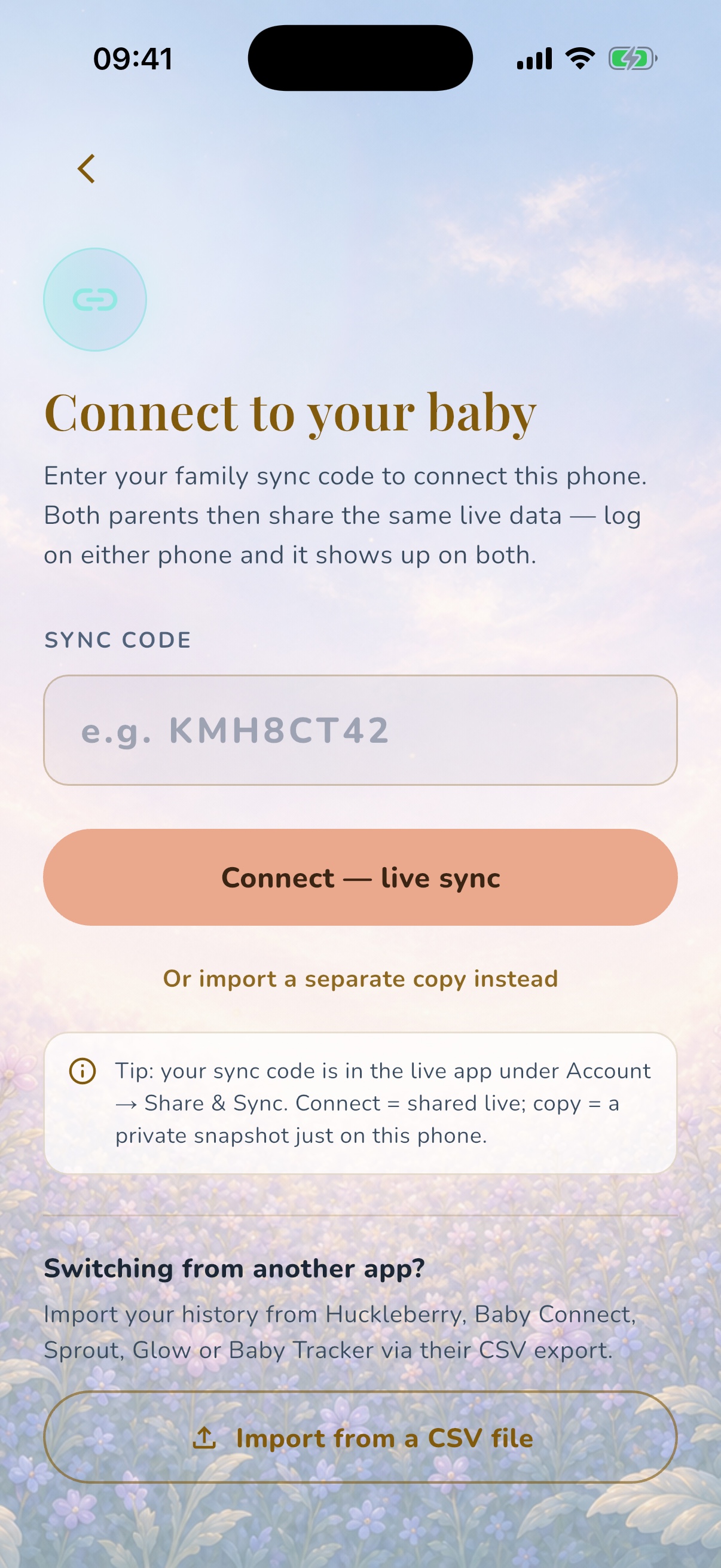
- Open OBubba and choose Connect another device.
- Enter the 6–8-character sync code.
- Choose Connect — live sync.
- Check that the correct baby's name and existing timeline appear before logging.
Then agree one household rule: the adult who feeds, changes, settles or gives medicine records the event. If the other adult is catching up later, they check the shared timeline first.
Live sync or a separate copy?
OBubba's connection screen offers two different outcomes. Choose deliberately.
| Option | What happens | Use it for | |---|---|---| | Connect — live sync | Both phones read and write the same baby's changing timeline | Partners, co-parents and regular shared care | | Import a separate copy instead | A new independent baby record is created on this phone | Private analysis, an offline snapshot or a deliberate fork |
A separate copy is not family sharing. A feed logged into that copy will not appear on the original phone, and later changes on the original will not flow into the copy.
If the goal is “we both need to know what happened today”, choose live sync.
What a connected carer can see and do
The current OBubba Family sharing card is per child. A person who joins Oliver's code can see and add logs for Oliver only. They do not automatically gain access to another child on the owner's account.
That matters for blended families, co-parents with children in different households and relatives who help with one baby but not another.
The shared record can include the baby's ordinary OBubba data, such as:
- feeds and feed timers
- naps, bedtime and wakes
- nappies, pumping, solids and activities
- medicine, temperature and notes
- growth, teeth and milestone updates
- dated day plans and other child fields stored in the shared record
Not every child-scoped control is cloud-backed. The current weekly weaning plan, its shopping and tried ticks, manual allergen marks, Today type labels and some guided-plan progress remain local to one installation. See exactly what syncs in the weaning planner.
The owner can see joined people under People with access, including a join date when it is available. The card changes from Only you right now to Sharing enabled when another participant is visible.
Sharing one child does not make every person an account administrator. It gives them access to that child's shared care record so the household can work from one timeline.
If the owner has active Premium for that shared baby, the invited carer can use Premium features while that baby is selected. It does not upgrade the carer's whole account or unlock Premium for their own unpaid babies. Core live sharing does not require both people to buy separate subscriptions.
The five rules that prevent duplicate baby logs
1. The person doing the care logs it
If one parent gives the bottle, that parent logs the bottle. If the other parent changes the nappy ten minutes later, they log the nappy.
This is easier than deciding who is “on tracking duty”, and it works when care swaps several times in one night.
2. A handover is a check—not a second entry
At a shift change, open the timeline together for 20 seconds:
- last feed and amount
- last nappy
- whether a sleep or feed timer is still running
- medicine already given
- anything unusual that is not obvious from the numbers
Do not re-enter those events as part of the handover. Add only the missing detail or note.
3. Check before backfilling
If you remember a 2am feed at breakfast, first look at 2am. The other carer may already have logged it from their phone.
OBubba gives separately created entries separate IDs. Its merge layer can recognise the same synced entry across devices and prevent it multiplying during recovery, but it cannot know that two independently created “120ml at 2am” records describe one physical bottle rather than twins, a top-up or two real feeds.
Human meaning still matters. Check, then backfill.
4. Agree what “finished” means
For a bottle, log when the feed actually happened and use one household convention for the time—start or finish. For breastfeeding, agree whether you care about side, duration or both. For sleep, decide whether the timer begins when the baby falls asleep rather than when settling starts.
Consistency makes tomorrow's pattern easier to read and reduces the temptation to “correct” a partner's perfectly valid entry into a second one.
5. Use notes for uncertainty
If you are not sure whether the baby took 80ml or 100ml, do not create two candidate feeds. Record the best factual information you have and add a short note such as “roughly 80–100ml” if that context is genuinely useful.
For medicine, uncertainty is different: confirm the actual product, amount and time before saving. Never use a shared log to calculate a dose. See how to prevent double-dosing between carers.
What happens when both phones log at once?
Simultaneous care is normal: one parent may stop a nap while the other logs a nappy.
OBubba's sync path merges entries additively by their stable IDs. A phone working from an older snapshot should not erase a newer entry that exists only on the other phone. If both copies contain the same entry and one has a newer edit timestamp, the newer version can update that entry without replacing the whole day.
The same principle protects more than basic logs:
- day plans and routine anchors are combined rather than replaced wholesale
- milestone and tooth changes use deletion markers so an old device does not resurrect something deliberately removed
- an entry moved across midnight is collapsed to one current copy rather than kept in both days
- deleting a visible day does not remove a new partner entry that arrived after the screen loaded
These safeguards protect against technical conflicts. They cannot resolve a factual disagreement such as two carers independently logging the same unlabelled event. That is why the five household rules above still matter.
Will a nap timer started on one phone appear on the other?
The shared child record carries an open sleep entry. OBubba's timer reconciler looks for the latest valid open nap or bedtime, including a genuine overnight sleep that began on the previous date.
That means another connected phone can catch up to a timer started elsewhere instead of assuming the baby is awake. It also checks for later wakes, stale timers and active settling pauses so yesterday's forgotten nap does not become an eternal timer.
There can still be a short network delay. If a timer or entry has not appeared immediately:
- check both phones have a connection
- wait for the current write to finish
- refresh the timeline before adding a replacement
- look for any sync warning in OBubba
Do not repeatedly tap Save because the other phone has not updated in one second. A delayed write and a second manual entry can become two real records.
Sync code versus recovery code
OBubba uses two code types for different jobs.
| Code | Typical shape | Purpose | |---|---|---| | Baby sync code | 6–8 letters or numbers | Let another carer join this baby's live record | | Family recovery code | Begins BK and is 12 characters | Restore the account owner's family data on a new or recovered device |
Send a partner the baby's sync code from Family sharing. Do not send your family recovery code as a casual invitation. Recovery credentials deserve the same care as an account password because they are designed to restore a broader family record.
OBubba's connection screen recognises the format and routes the codes differently, but the safest habit is to copy the code from the correct Family sharing panel rather than from an old screenshot or support message.
Share the invitation privately
The sync code is intentionally easy to type. That also means anyone holding an active code can try to join that baby's logs.
Use a private message to the intended carer. Avoid:
- posting the code in a public parenting group
- leaving it visible in a social-media screenshot
- reusing an old invitation after access should have ended
- sending the recovery code instead
- storing the code in a shared note that many unrelated people can open
After the person joins, check People with access. If the name or state is not what you expect, pause before adding more sensitive notes.
How to remove access
The current OBubba control is explicit: Replace code & disconnect everyone.
Use it when the old code was exposed, a temporary care arrangement has ended or you no longer trust everyone connected through that invitation. Replacing the code retires the old shared document, disconnects devices on that code and gives the owner a fresh code.
This is not an ordinary “share again” button. It removes everyone using the old code, so:
- tell any trusted co-parent who should retain access
- replace the code
- send the new code privately only to the people who should rejoin
- confirm their names reappear under People with access
OBubba deliberately places this control away from the ordinary invite action and asks for confirmation because rotating a code is disruptive.
What if we each already have a baby in OBubba?
You can still connect to the shared baby. Open Account → Share with family, choose Connect another device and enter the other parent's code.
The joined baby is added to the local baby switcher rather than forcing you to erase the profile already on your phone. Before logging, glance at the name in the Track header—especially when siblings have similar routines or both children woke overnight.
Each baby's sharing remains separate. Joining one code does not silently join every child in the other household.
Live sharing or a carer briefing?
Not every babysitter needs permanent access to a live family record.
Use Family sharing when somebody regularly needs to see and add ongoing logs: a partner, co-parent or consistent shared carer.
Use a baby care handover when a grandparent, nursery or babysitter mainly needs today's essentials: last feed, next sleep, allergies, soothing, recent medicine and emergency contacts.
The distinction is access versus context. A briefing can be copied or shared for one care period. Live sync continues until the code is replaced or the shared record is otherwise disconnected.
A practical two-parent night routine
Try this tonight:
- Before bed, both phones open the same baby's timeline.
- Agree who takes the first care block and who takes the next.
- The active carer logs each event they perform.
- At handover, review the last feed, nappy, sleep state and any medicine.
- Say one sentence about anything the log cannot show: “settled better upright” or “only took half the usual bottle”.
- In the morning, correct obvious mistakes—do not recreate the night from memory.
The objective is not perfect data. It is a reliable shared memory that reduces repeated questions and lets the off-duty parent genuinely switch off.
Try OBubba free → — connect both phones to one live baby timeline, then make feeds, naps and nappies a shared record rather than a shared guessing game.
Quick answers
Can two parents use OBubba at the same time?
Yes. Use the baby's sync code and choose Connect — live sync on the second phone. Both devices then use the same changing child record.
Will OBubba automatically remove a duplicate feed?
It de-duplicates copies of the same synced entry by ID. It cannot safely assume that two separately created feeds with similar times and amounts are one event, so check the timeline before backfilling.
Can my partner see my other children?
Not from one baby's code. Family sharing is per child; a person joining that code sees and adds logs for that baby only.
Does my partner need a second Premium subscription?
Not for Premium features on a shared baby whose owner has active Premium. That entitlement follows the paid shared baby, not the invited person's whole account, so their own unpaid babies remain on their existing plan.
Should I use the recovery code to connect my partner?
No. Use the 6–8-character baby sync code from Share with family. The 12-character BK recovery code is for restoring broader family data.
Can I remove only one person?
The current control replaces the code and disconnects everyone on the old code. Re-invite only the trusted people who should keep access.
What if we want separate diaries?
Choose Import a separate copy instead. That copy will not remain live with the original, so use it only when separation is intentional.
Who should log during a handover?
The person who performed the care should log it. The receiving carer reviews the timeline and adds only information that is genuinely missing.
Related guides
- Baby medicine log: prevent double-dosing between carers
- Baby care handover template for grandparents and nursery
- Track feeds and nappies hands-free at 3am
- Baby tracker widgets: log without opening the app
- What to track when your baby wakes at night
- How to switch baby tracker apps without losing your history
Ready to try OBubba?
Use OBubba to track feeds, sleep, naps, nappies, growth, milestones and family handovers in one calm baby tracker app.