It is 3:17am. One arm is supporting the baby, the other is holding a bottle, and the idea of unlocking a phone, finding the right form and typing three separate entries feels absurd.
You still want tomorrow-you to know what happened. You just do not want tracking to become a second night shift.
Hands-free baby tracking should let you say a short, factual sentence, check what the app understood and save the useful parts together. It should reduce tapping—not remove your chance to catch a wrong time, amount or medicine name.
In OBubba, that workflow is called Quick log. You can talk or type in plain English, see structured previews under OBUBBA HEARD, then choose whether to log them. Nothing is saved merely because speech appeared on screen.
The 20-second version
For a straightforward night, try:
> “Fed 120 millilitres at 2:15am, wet and dirty nappy at 3am.”
Then:
- read the transcript
- read each preview—especially numbers and times
- correct anything that is wrong
- tap Log 2 entries
If talking would wake somebody, type or paste the same sentence. If a detail will not help with care, sleep, feeding or handover later, leave it out.
What is actually worth logging at night?
A useful night log answers practical questions in the morning. It does not need to recreate every minute.
Feeds
Record the actual feed time and type. Add bottle volume only when it is known; for breastfeeding, note the side or duration if that information is helpful to you. A timer or duration is not proof of how much milk a baby transferred at the breast.
Nappies
“Wet”, “dirty” or “wet and dirty” is usually enough. Nappy patterns can add context to feeding, illness or a handover without requiring a description of every change.
Sleep and wakes
Log bedtime, a completed nap range or a meaningful wake when you want to understand the night later. You do not need an entry for every rustle or brief resettle.
Temperature and medicine
Record a measured temperature with its time. If medicine has already been given, record the exact product name, strength or formulation where relevant, measured amount and actual time—then check the preview carefully.
The NHS advises checking the label for the correct dose and asking a pharmacist, health visitor or GP when unsure. A family log can support memory, but it does not calculate or approve a dose. See our guide to logging baby medicine without double dosing.
Speakable baby-log examples
Short clauses and explicit units give speech recognition less room to guess.
| You want to record | Try saying | |---|---| | Bottle feed | “Fed 120 millilitres at 2:15am.” | | Breastfeed | “Breastfed left 12 minutes, right 8 minutes.” | | Nappy | “Wet and dirty nappy at 3am.” | | Completed nap | “Napped 1pm to 2:30pm.” | | Bedtime | “Bedtime at 7:45pm.” | | Night wake | “Woke at 3:20am.” | | Temperature | “Temperature 38 point 5 at 11am.” | | Medicine already given | “Gave medicine [exact medicine name], [measured amount], at 11:10am.” | | Several events | “Fed 120 millilitres at 2:15am, then wet and dirty nappy at 3am.” |
Names, accents and background noise can change the transcript. Treat these as sentence templates, not magic commands.
Five habits that make voice logs more accurate
1. Say the unit
“One twenty” is more ambiguous than “120 millilitres”. Use ml, ounces, minutes or degrees aloud when the unit matters.
2. Say am or pm
“Fed at two” forces the app to infer. “Fed at 2am” is clearer. British clock phrases such as “half seven” may work, but a precise digital-style time is easier to review when you are tired.
3. Keep one fact in each clause
Use a short sequence: “Fed 90ml at 1am, then dirty nappy at 1:20am.” A long story with corrections, guesses and background conversation is harder for any speech service to transcribe faithfully.
4. Repeat critical numbers slowly
Volumes, temperatures and medicine amounts deserve a deliberate pause. If you hear yourself hesitate, stop and type the number instead.
5. Read both layers
First check the words in the text box. Then check the structured entries below. A transcript can look plausible while a time has been interpreted differently.
Why preview-before-save matters
Voice interfaces are fast because they translate uncertain sound into likely words. That uncertainty is exactly why a baby tracker should not silently turn a transcript into a permanent record.
A safer interaction has four separate states:
- You speak: the device listens only after you ask it to.
- The transcript appears: you can see the recognised words.
- The app interprets: feed, nappy, sleep and other entries are previewed.
- You confirm: the final button states how many entries will be logged.
This small pause preserves the advantage of hands-free input without pretending speech recognition is infallible.
It also helps with negation. “No dirty nappy” should not become a dirty-nappy entry. “No nap, so I fed him 90ml” should keep the real feed without inventing a nap. OBubba's parser explicitly tests those kinds of sentences, but the visible preview remains the final safety check.
How Quick Log works in the actual OBubba app
Open Track, find Log details, then tap Quick log.
The sheet says: “Type or tap to talk in plain English, OBubba sorts it into entries.” Tap Tap to talk, speak, then stop. Partial speech results appear in the text field while OBubba rechecks the sentence.
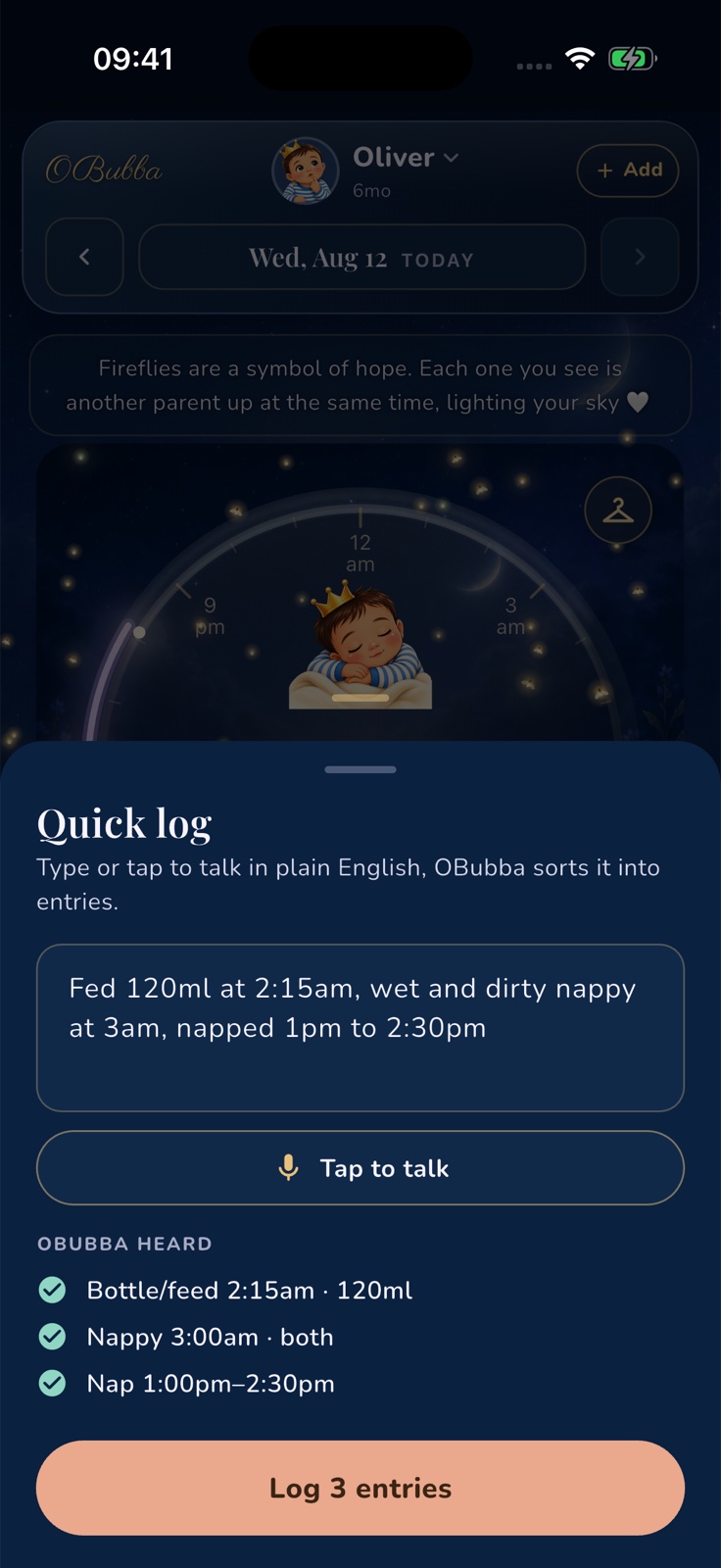
The real parser can recognise one or several entries for:
- bottle feeds, including ml or oz
- breastfeeding side and duration
- naps and sleep ranges
- bedtime and wake events
- wet, dirty or combined nappies
- pumping, solids and ordinary activities
- medicine and measured temperature
It understands common British time phrases such as “half past seven”, “half seven”, “quarter to eight”, noon and midnight. It also handles spoken-number times and decimal commas. Those conveniences are helpful, but “7:30pm” remains less ambiguous than “half seven”.
When OBUBBA HEARD shows several valid events, the button changes to Log 2 entries, Log 3 entries and so on. You can still edit the sentence before confirming.
A useful midnight detail
Baby nights cross calendar dates; app databases do not understand that automatically. The save path uses the same early-hours and catch-up rules as OBubba's manual forms. A dictated bedtime or night wake after midnight is filed with the relevant night rather than being detached simply because the date changed.
That sounds technical, but the parent-facing benefit is simple: tomorrow's night view is less likely to split one real night into two misleading pieces.
Timers are deliberately separate
“Napped 1pm to 2:30pm” describes a completed event and can be logged. “Starting a nap now” is a live timer request. Quick Log does not silently start a timer from an ambiguous historical sentence; it tells you to use the clock. Add a completed time range when you are catching up later.
Saving is honest about failures
Quick Log attempts each valid entry and reports how many actually saved. If connectivity prevents every write, the app does not claim success. For several events, it can say that only part of the group logged so you know to check.
Try OBubba free → — log a whole middle-of-the-night sequence in one sentence, then inspect every entry before it joins the family timeline.
What Quick Log cannot know
Voice input can reduce friction. It cannot create certainty that was not present.
It cannot:
- measure how much milk a baby transferred at the breast
- decide whether a feed, wake or temperature is medically concerning
- know whether “two” meant 2am, 2pm, two minutes or two ounces without context
- verify a medicine name, strength or dose
- distinguish every background voice from the person logging
- diagnose low milk supply, reflux, illness or a sleep problem
If the recognised words are wrong, correct them or use the ordinary form. Accuracy matters more than saving five seconds.
Medicine and temperature need a stricter check
Never ask a voice log to work out what medicine to give. Decide that from the product label and current advice from an appropriate health professional, then record what actually happened.
Before saving a medicine entry, check:
- exact medicine name
- formulation or strength if there is more than one version
- measured amount and unit
- time actually given—not the planned time
- which child received it in a multi-child household
Use an oral syringe or the supplied measuring device rather than a kitchen teaspoon; NHS guidance notes that kitchen teaspoons vary in size. If you are uncertain about the dose, ask a pharmacist, health visitor or GP rather than relying on an old log.
A measured temperature also needs context. The NHS defines a high temperature in babies and children as 38°C or more and advises urgent GP or NHS 111 help for a baby under 3 months with a temperature of 38°C or higher. A correctly transcribed number is not a medical assessment—follow current guidance and the baby's symptoms.
Microphone permission and privacy
OBubba initialises speech input only when you tap the microphone. Your phone's operating system then handles microphone and speech-recognition permission. If access is unavailable or denied, Quick Log tells you to enable it in Settings or type instead.
How speech is processed can vary by device, platform, language and settings. For example, Google says advanced voice typing on supported Pixel devices keeps spoken text on the device except for certain editing features, while Apple provides separate controls for sharing Siri and Dictation samples. Do not assume every phone processes dictation identically.
If you do not want to dictate, the text field is a complete fallback: type or paste the same plain-English sentence without turning on Quick Log's microphone.
A calmer 3am workflow
Try this sequence for one week:
- Before bed, agree which details both carers genuinely need.
- At night, speak one short factual sentence after the event.
- Check numbers, am/pm and event type.
- Confirm the entries together.
- In the morning, look at the pattern—not one difficult moment.
The aim is not a perfect diary. It is a trustworthy handover with less screen time and fewer forgotten details.
If two carers share nights, agree on wording such as “bottle”, “breastfeed”, “wet”, “dirty” and “bedtime”. Consistency makes both the voice preview and the morning conversation easier. Our baby care handover template can help you decide what belongs in that shared record.
Quick answers
Can I log more than one baby event in a sentence?
Yes. Separate short events with a comma, “then” or “and then”, and check the numbered confirmation button before saving.
Does voice logging save automatically?
No. OBubba shows the transcript and structured previews first. You choose Log it or Log N entries.
Can I type instead of speaking?
Yes. Typed and pasted sentences use the same parser, so microphone access is optional.
Can I start a nap timer by voice?
Quick Log records completed, time-based entries. Start a live nap or sleep timer from the clock. If you are logging later, say the completed range—for example, “napped 1pm to 2:30pm”.
What if OBubba gets a time or volume wrong?
Edit the sentence until the preview is correct, or use the normal logging form. Never confirm a guessed medicine amount or a number you have not checked.
Is it worth logging every night wake?
Usually not. Log the wakes that help answer a question about feeding, sleep, illness or settling. See what to track when your baby wakes at night for a lighter approach.
Related guides
- A simple newborn feeding and nappy log
- How to log baby medicine and prevent double dosing
- What to track when your baby wakes at night
- Share baby tracking with your partner without keeping score
- Baby care handover template for grandparents and nursery
- What to take to a health visitor appointment
Sources and further reading
- NHS: Medicines for babies and children
- NHS: High temperature in children
- Google: Advanced voice typing and on-device processing
- Apple: Improve Siri & Dictation controls
OBubba supports parent-entered tracking and family handovers. It does not measure intake, diagnose illness or sleep problems, calculate medicine doses or replace a health visitor, pharmacist, GP, paediatric team, NHS 111 or emergency service. Always check voice-derived numbers and times before saving.
Ready to try OBubba?
Use OBubba to track feeds, sleep, naps, nappies, growth, milestones and family handovers in one calm baby tracker app.