One parent opens OBubba in the supermarket and ticks avocado and lentils into the basket. At home, the other parent opens the same baby and still sees Plan this week.
Is sync delayed—or are those two phones holding different kinds of data?
In the current app, the weekly weaning plan does not sync between phones. The six recipes, tried checks and shopping-basket ticks are saved in local device preferences. Real solids logs belong to the shared child record, so connected carers can see those after sync and both phones can use that history for the journal, allergen memory and future recommendations.
That is a precise but important boundary. OBubba’s Family sharing screen says both parents share the same live data, and an older blog guide broadly listed “plans” among shared child data. We traced the present `weaning_plan.dart`, feed log sheet and `ChildSyncRepository` rather than relying on that promise. The honest answer today is: the care record is shared; this particular planning layer is not yet.
The 30-second answer
| Weaning information | Current behavior on connected phones | |---|---| | A saved solids meal | shared through the live child record | | Food name, date and response | shared as part of that solids entry | | Recognised allergens on a logged meal | shared and retained in lifetime child history | | A logged allergen reaction | shared and used to filter future suggestions | | Food journal and progress summaries | recalculated on each phone from shared history | | Six-meal weekly plan | local to the phone that generated it | | “Tried” checks in that plan | local to that phone | | Shopping-list “in the basket” checks | local to that phone | | Manual Mark as introduced allergen tick | local to that phone | | Copy list | copies text to that phone’s clipboard; it does not update another device |
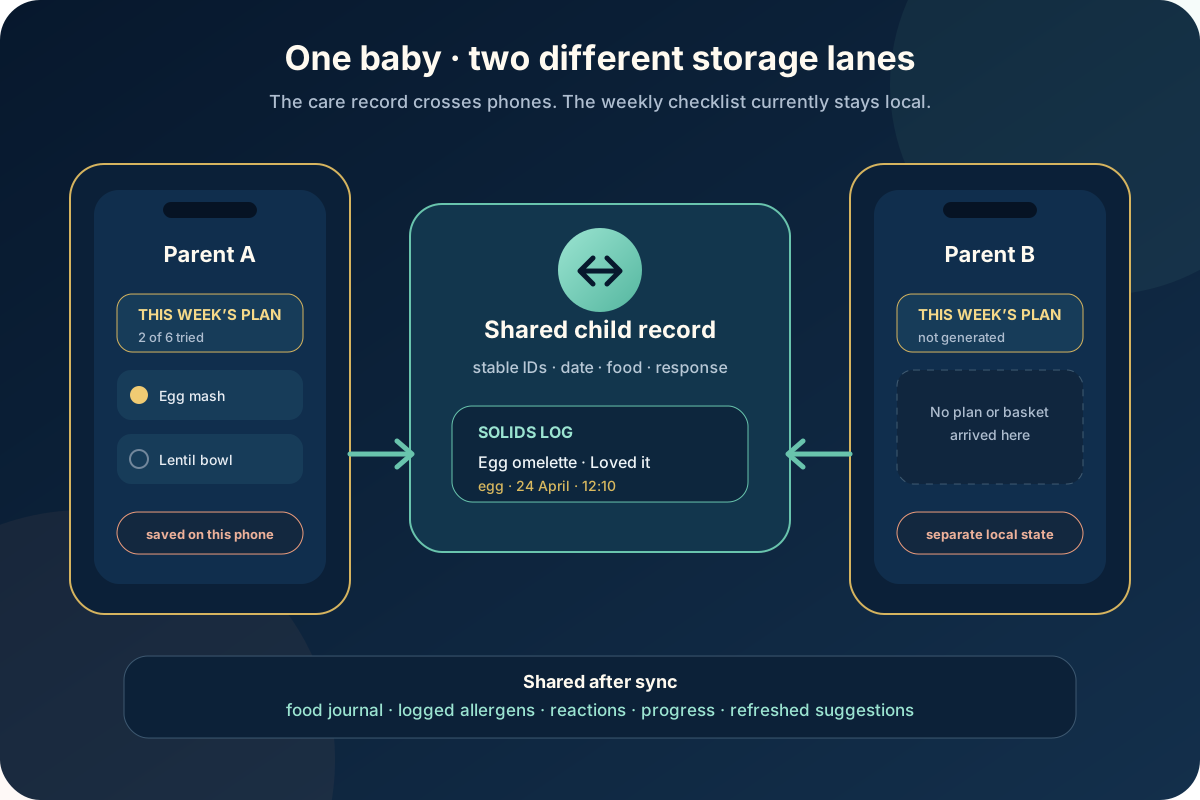
The useful household rule is:
> Treat food logs as the shared truth. Treat the weekly plan as a checklist belonging to the phone that created it.
Why the meal plan stays on one phone
The planner saves one JSON object under a SharedPreferences key beginning `ob_wean_week`. The active child’s sync code is appended to the key, so plans for twins or siblings remain separate on the same installation.
That saved object contains:
- the Monday that starts the week
- six planned recipes
- each recipe’s emoji, detected allergens and iron-rich flag
- whether each recipe was marked tried
- the derived shopping items
- whether each item was marked in the basket
The provider reads and writes that object directly through `sharedPreferencesProvider`. It never calls `ChildSyncRepository`, never places the plan in the shared child blob and never writes a Firestore plan document.
Child-scoped is therefore not the same as family-synced. The child code prevents Oliver’s plan appearing under Maya on one phone; it does not move Oliver’s plan to another phone that joined the same code.
What Family sharing genuinely shares
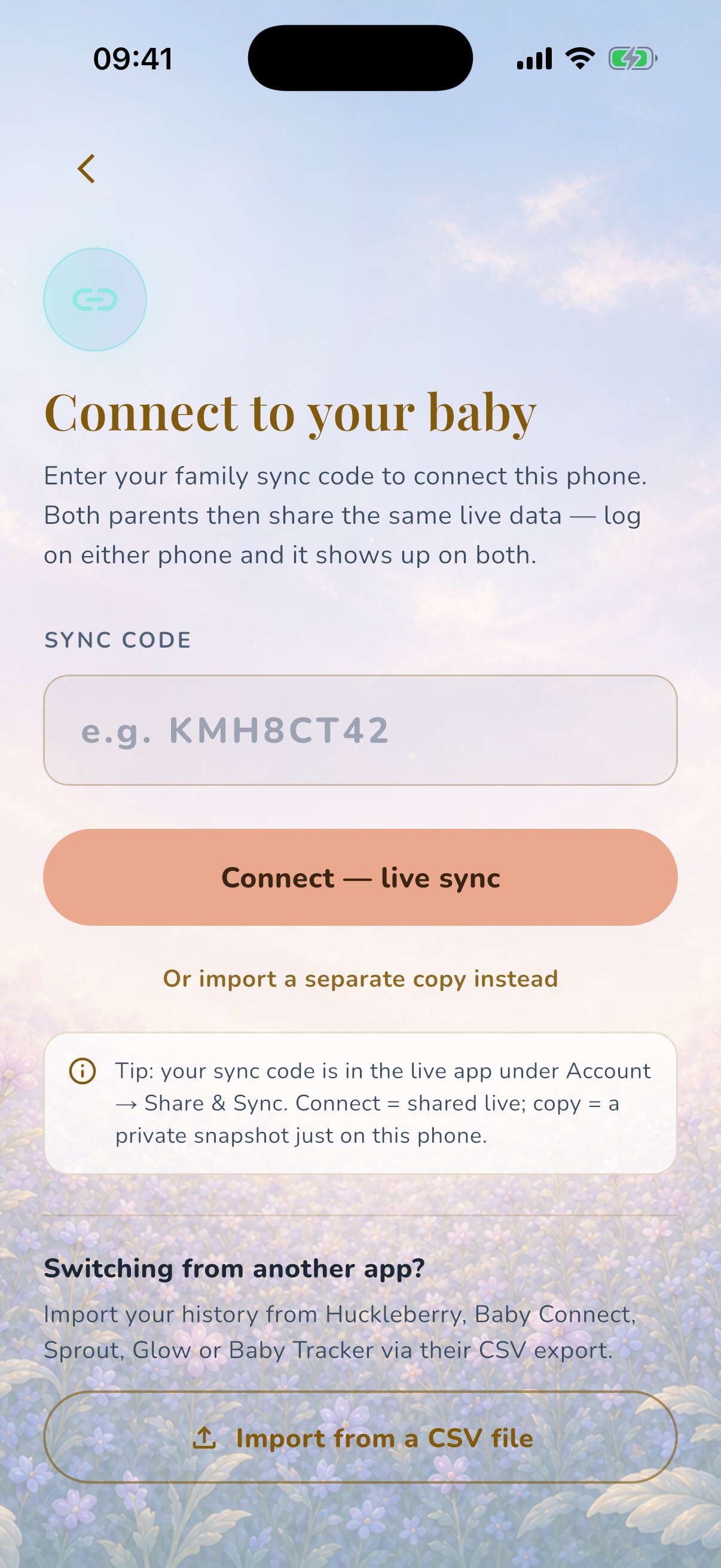
The Family sharing flow connects another installation to the child’s live sync code. A normal solids save goes through the same repository as feeds, naps, nappies and other dated events.
The repository stamps the entry with:
- a stable ID
- local date and time
- a modified timestamp
- its source
- the food and any detected allergens
- the optional Loved, Unsure or Reaction value
It then mutates the current shared child record rather than a private plan preference. Another connected phone watches that record and can receive the entry after the write completes.
This is the information worth sharing because it describes what actually happened. A plan can be abandoned, swapped or adapted. A dated record can tell both carers that egg was offered yesterday, the baby seemed unsure and the next meal should not be treated as the first known exposure.
The journal syncs; the screen is rebuilt locally
It helps to distinguish shared raw facts from local presentation.
OBubba does not need to store a screenshot of the Weaning progress card in the cloud. Each phone can rebuild that card from the shared child history. The current screen scans solids entries and derives:
- recent food journal rows
- lifetime introduced and reacted allergens from real logs
- number of unique food descriptions
- keyword-matched iron-rich meals
- days since solids began
- texture summaries from food wording
- recipe rankings based on what is already tried or reacted to
So a new meal logged by one parent can eventually change the other phone’s journal and suggestions even though the saved weekly checklist itself never travelled.
There can be a short network delay. A summary appearing after the food row is ordinary sync timing; it is different from a plan that never had a cloud write to begin with.
Why two phones may generate similar plans—and still disagree
Suppose both parents press Plan this week after their phones have received the same food history. The recipe engine uses the same broad inputs:
- corrected-age stage
- logged food names
- introduced allergens
- lifetime reacted allergens
- iron-rich labels
- recipe catalogue order and scores
The two generated lists may therefore look identical or very similar. That can create the impression that the plan synced.
But they are independent copies. If one parent:
- marks Egg & Avocado Mash tried
- checks broccoli into the basket
- regenerates the plan
- remains offline while the other logs a meal
the other phone’s plan does not inherit those actions. Each device also checks the local calendar to decide which Monday-based week is current.
A saved plan does not automatically rerank every time a new food arrives. It remains a stable shortlist until the parent regenerates it or a new local week makes it stale. That stability is good for shopping; it also means independently generated plans can drift as the shared history changes.
The current plan screen
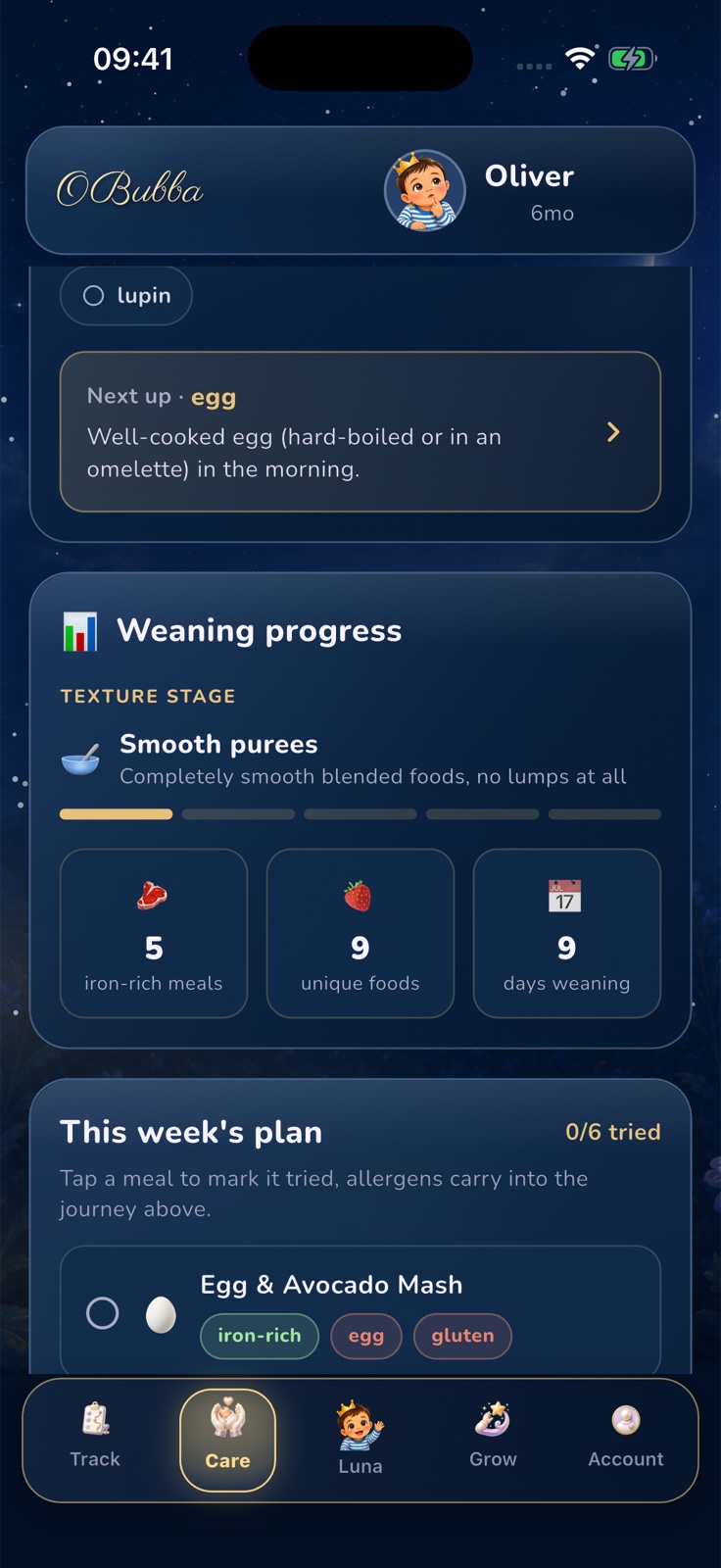
The screen itself does not label the plan On this phone or Shared. It says the plan saves so ticks stick all week, which is true on that device. Beside the shopping list, Copy list puts every ingredient into the local clipboard.
Copy is the best built-in workaround today:
- Generate the plan on the phone the household will treat as primary.
- Open Shopping list and tap Copy list.
- Paste it into the family’s normal private message or shared list.
- Use real OBubba solids logs after meals so the lasting history reaches both phones.
The copied text contains the ingredient bullets, not a live link. Subsequent basket checks or plan regeneration do not update the pasted copy.
Manual allergen ticks have the same local limit
The Allergen journey can be updated in two ways:
- Log a solids meal. Detected or explicitly saved allergens become part of the shared child history.
- Mark an allergen introduced manually. The app stores that correction in a child-scoped SharedPreferences list.
The second path is useful when a baby tried a food before the family installed OBubba. But the manual tick currently stays on that device. Another connected phone may still show the allergen as not introduced unless it can also find a real logged meal or the carer manually marks it there.
This is more consequential than a missing shopping check. Introduced-allergen state influences “next up” prompts and whether a recipe is labelled as carrying a new allergen.
For a fact that needs to survive across carers, a dated food entry with clear ingredients is the stronger record. Do not invent a meal that never happened, but do not assume one manual chip updated the family account either.
Reaction history is different—and rightly so
When a solids entry is marked Reaction and carries a recognised allergen, that information enters the child’s lifetime reacted set. The recipe engine unions recent reaction rows with the lifetime record, including older exposures that have moved out of the active-day window.
That shared memory is used to exclude recipes containing the reacted-to allergen, including allergens detected in recipe methods and serving suggestions rather than only headline labels.
No app can diagnose allergy or tell a family to retry a suspected trigger. The NHS advises introducing foods that may cause allergy one at a time and in small amounts from around six months, so a reaction is easier to identify. Once a food is introduced and tolerated, keep offering it as part of the usual diet. A diagnosed allergy, eczema, previous reaction or clinician-led plan needs individual guidance.
Call 999 for a possible severe allergic reaction, including breathing difficulty, marked swelling, collapse or unusual floppiness. Shared data is useful after everybody is safe; it is never the emergency response.
What happens if the primary phone changes?
The plan is not part of OBubba’s account-backed child archive. Signing in or joining the baby on a new phone can restore the shared child history, but the app does not fetch this week’s local `ob_wean_week` preference from the old installation.
An operating-system phone migration might independently transfer application preferences, but that is outside OBubba’s own live-sharing contract and should not be relied upon.
On the new phone:
- wait for the child history to load
- check that recent solids and reaction records appear
- generate a fresh plan from that recovered history
- copy any unfinished shopping notes from the old phone if needed
If the child’s sharing code is replaced, the local plan key also changes with the active code. The old preference can remain on the installation under the retired key while the app looks for a plan under the new one. A shared plan model should be anchored to a stable child ID rather than an invitation code that can rotate.
This also corrects an older OBubba sharing claim
The existing Family sharing guide says the shared record can include “plans, routines and other child-specific settings.” That sentence is too broad for the current product.
Some plan-like data does live inside the shared child model—for example dated day plans. Other controls deliberately remain local, including Today type labels, guidance snoozes, night-weaning progress and this weekly weaning checklist.
The product should describe features individually:
- Shared event: visible to connected carers after sync
- Shared child setting: one family value used on every phone
- Local preference: applies only on this installation
- Derived view: recalculated locally from shared evidence
Those labels would build more trust than a blanket “everything syncs” promise.
How OBubba can make the shared plan best-in-class
The current separation is understandable engineering, but a shopping list is one of the places families most expect collaboration. A robust shared version should not simply move the existing JSON into one last-write-wins cloud field.
It needs a small collaboration model:
- Stable plan identity. Key the week to a stable child ID and Monday, not a rotatable invitation code.
- Stable item IDs. Each meal and ingredient needs an ID so two simultaneous ticks merge instead of replacing the whole list.
- Revision receipts. Show who generated or regenerated the plan and when.
- Intentional regeneration. Warn all connected carers before replacing a plan that already has progress.
- Offline-safe changes. Queue individual checks and reconcile them when connectivity returns.
- Separate planned, offered and logged. A basket check is not a meal; a plan completion is not an allergen exposure.
- One-tap food handoff. Log this meal should prefill a reviewable solids entry and then mark the shared plan item complete.
- Shared manual history with provenance. A manual allergen mark should record who added it and when, while remaining editable.
- Clear sync badges. Say Shared with family, Saved on this phone or Waiting to sync beside the control that needs the distinction.
This would turn OBubba from a tracker that both parents can open into a genuine shared decision surface: one current plan, one basket and one factual food history, without confusing any of them.
A calm two-parent weaning workflow today
Until that shared plan ships:
- Choose one phone as the owner of this week’s plan and basket.
- Copy the ingredient list into the household’s shared channel before shopping.
- Let either connected carer log the actual solids meal they served.
- Use specific food names and check recognised allergen tags.
- Reserve Reaction for a possible physical response, not dislike or refusal.
- Before introducing a new allergen, check the shared food journal—not only one phone’s manual journey chips.
- Regenerate the primary plan after important new history if the existing list is no longer suitable.
That is not as seamless as it should be, but it preserves the part that matters most: both carers can work from one evidence-based record of what the baby actually had.
Keep your baby’s real feeding history shared with OBubba → — connect both carers to one child timeline for solids, milk, sleep, nappies and reactions, with clear limits on what still belongs to one phone.
Frequently asked questions
Will my partner see the same six weaning recipes?
Not because the plan synced. If both phones have the same child history and independently generate a plan, the recipes may look similar. The two saved plans and their ticks remain separate.
Will my partner see a food I log?
Yes, when both phones are connected to the same live child record and sync completes. A solids entry is part of the shared timeline.
Do shopping-list checks sync?
No. The `got` status is stored inside the local weekly plan JSON.
Does Copy list create a shared OBubba list?
No. It copies plain text to the current phone’s clipboard. Paste it into a private shared destination yourself.
Do manual allergen ticks sync?
Not currently. Manual introduced marks are child-scoped local preferences. Allergens attached to a real synced solids entry belong to the shared child history.
Are reaction safeguards shared?
Yes, when the reaction is recorded on a synced solids entry with the relevant allergen. The lifetime reacted set then informs recipe filtering on connected phones after they receive the history.
Will my plan return after signing in on a new phone?
The shared food history can return, but the local weekly-plan preference is not restored by OBubba’s family archive. Generate a fresh plan after the history loads.
Should both parents log the same meal?
No. The carer who served it should create one factual entry. The other phone will receive that shared record; independently logging the same physical meal creates a real duplicate.
Sources and further reading
- NHS Best Start in Life: How to start weaning your baby
- NHS Best Start in Life: Introducing foods that could trigger an allergic reaction
- OBubba: Share a baby tracker without duplicate logs
- OBubba: Does ticking Tried log a baby meal?
This article describes the current OBubba implementation reviewed on 25 April 2027. It provides general information, not individual medical or dietetic advice. Follow your child’s clinical plan where relevant and seek urgent help for a severe reaction or choking.
Ready to try OBubba?
Use OBubba to track feeds, sleep, naps, nappies, growth, milestones and family handovers in one calm baby tracker app.