The room is dim. You did the little wind-down. Your baby is still staring at you as if naps were somebody else’s idea.
Then OBubba shows Nap not happening? with four choices:
- Try again in 15 min
- Rescue nap (walk or drive)
- Rest time (cot, no pressure)
- Skip & bring bedtime earlier
Which one does the app actually think fits—and what happens after you tap it?
The current app highlights one option using a small on-device decision engine. It looks at how overdue the predicted nap is, whether significant sleep debt is present, whether this is the final planned nap, how far bedtime is away and the maximum wake window for the baby’s age context. The AI coach is not making this choice.
All four options remain tappable. The highlight is a suggestion, not an instruction, and the engine cannot see sleepy cues, illness, a childcare nap that was never logged or whether a travel sleep would be safe.
When the card appears
The card does not appear the instant a prediction reaches zero. In the current Track screen it needs all of these conditions:
- you are viewing today with live app time;
- the baby is not currently logged as asleep;
- the normal next-nap predictor has returned a nap midpoint;
- now is more than 10 minutes after that midpoint; and
- it is not already within 30 minutes of the predicted bedtime.
The copy says the nap window “opened around” the predicted midpoint, then explicitly says No pressure—pick what fits.
This is important: a predicted midpoint is not a deadline. The card is an escape route from battling a prediction, not proof that the baby has missed a biologically exact moment.
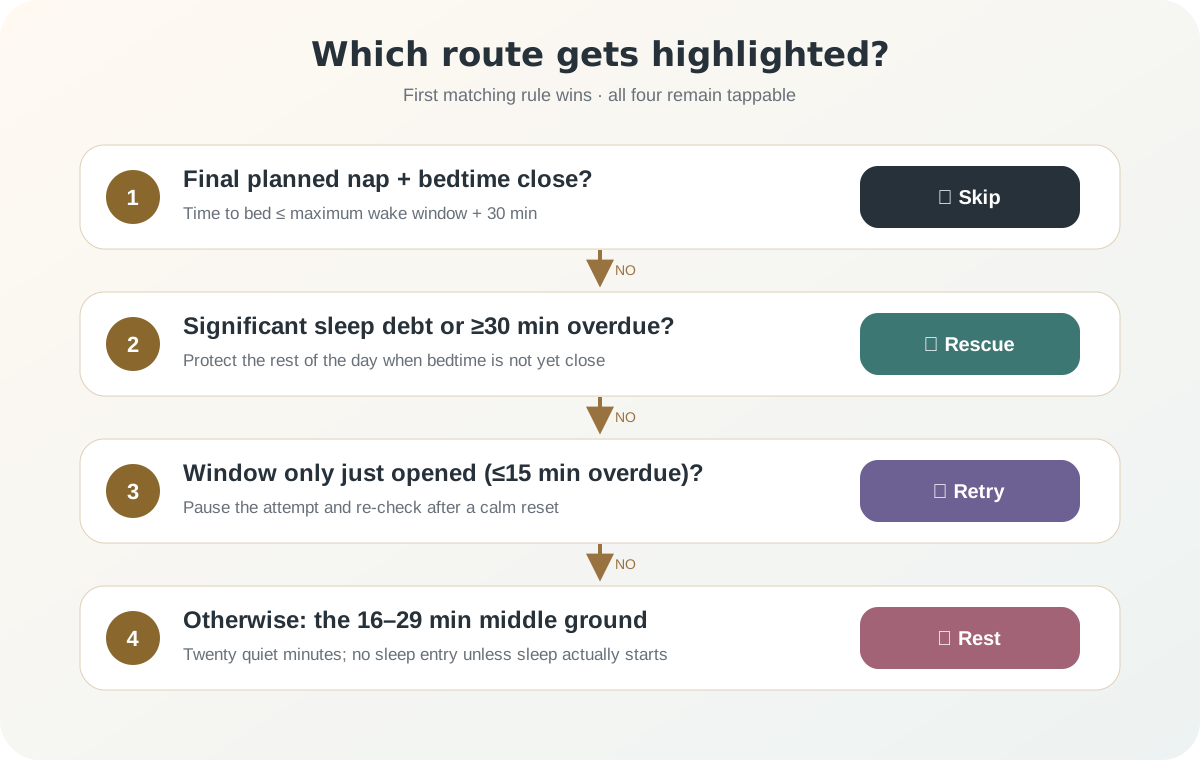
The recommendation order in plain English
The current function evaluates the four routes in a fixed order.
| Priority | Software condition | Highlighted route | |---:|---|---| | 1 | Final planned nap and bedtime is no more than one maximum wake window plus 30 minutes away | Skip & bring bedtime earlier | | 2 | Significant sleep debt or nap is at least 30 minutes overdue | Rescue nap | | 3 | Nap is no more than 15 minutes overdue | Try again in 15 min | | 4 | Nap is 16–29 minutes overdue, without the higher-priority conditions | Rest time |
This priority explains an apparent contradiction. A baby can be 60 minutes overdue and carrying sleep debt, yet the app may still highlight Skip if this is the final nap and bedtime is close enough. The bedtime-protection check runs before the overtired rescue check.
If the app does not know the intended nap count for today, it deliberately treats the pending nap as not proven to be the last nap. It will not recommend skipping on missing schedule context.
Worked examples
Assume the contextual maximum wake window is three hours.
Example 1: only eight minutes overdue
- overdue: 8 minutes
- bedtime: five hours away
- sleep debt: not significant
- not the final nap
The app highlights Try again in 15 min. The nap window has only just opened in its model, so a short calm reset is the least disruptive path.
Example 2: 22 minutes overdue
- overdue: 22 minutes
- bedtime: five hours away
- sleep debt: not significant
- not the final nap
The app highlights Rest time. This is the engine’s middle ground: too late for its “just opened” branch, but not late enough to trigger its 30-minute rescue branch.
Example 3: 45 minutes overdue
- overdue: 45 minutes
- bedtime: four hours away
- sleep debt: not significant
- not the final nap
The app highlights Rescue nap because 45 is at least 30.
Example 4: final nap, bedtime two hours away
- overdue: 20 minutes
- bedtime: 120 minutes away
- final planned nap: yes
- maximum wake window: 180 minutes
The skip threshold is 180 + 30 = 210 minutes. Bedtime is only 120 minutes away, so Skip & bring bedtime earlier wins—even if another branch might otherwise recommend rest.
What each tap changes
The options are not four different articles. Each one changes a small piece of today’s live state.
1. Try again in 15 min
OBubba saves today’s choice and a retry time 15 minutes after the tap. The large option card collapses into a note such as Trying again around 2:45pm.
Until that time, the note suggests a calm interval. Once the retry time arrives, the full choices can appear again. You can undo the choice before then.
This tap does not log a nap. It does not claim the baby slept or shift bedtime by itself.
A useful reset can be simple: leave the dim room, change the scene, cuddle, feed if genuinely due, or have a few minutes of low-key floor time. “Try again” should not mean repeating the same escalating attempt for 15 more minutes.
2. Rescue nap (walk or drive)
Tapping this route saves rescue for today and immediately calls the same start-nap action used by the Track timer.
That means the current app treats the tap as the beginning of a nap timer. If the baby does not actually fall asleep for another 12 minutes, correct the start time later; otherwise the record will include awake travel or settling as sleep.
The app does not store “walk”, “drive”, pram, carrier or contact as the location from this tap. The wording describes possible motion; the saved timer alone does not prove which happened or whether it was appropriate.
Most importantly, a highlighted motion nap is not a safety endorsement. Do not make a non-essential drive solely because an app card says “drive”. A car seat is for safe travel, not a routine sleep space. The NHS says it is fine for a baby to fall asleep in a car seat while travelling, but they should be taken out when you arrive rather than left there for a long sleep.
For a pram or carrier, follow the product instructions, keep the airway visible and position appropriate, and continue active supervision. For a contact nap, the adult must remain awake. Never let a rescue plan become accidental sleep with a baby on a sofa or armchair.
3. Rest time (cot, no pressure)
This starts a 20-minute countdown. The card changes to a live Rest time view. If the baby falls asleep, the parent can start the nap; if not, the countdown can be ended without creating a sleep entry.
That is the cleanest distinction in the feature: quiet rest is allowed to remain quiet rest. It does not have to become a successful nap to count as a useful pause.
Keep the cot safe even when sleep is not expected. Put a baby down on their back in a clear cot or Moses basket with a firm, flat mattress and no pillows, nests, bumpers or loose objects. If they can roll independently, follow current safer-sleep guidance rather than using restraints or positioners.
Twenty minutes is a product choice, not a medical limit. If the baby becomes distressed, needs feeding or clearly wants connection, respond. “No pressure” should apply to the parent too.
4. Skip & bring bedtime earlier
This is the only route that feeds directly into the bedtime prediction.
The choice is saved for this child and local calendar day. The Track clock stops presenting that nap as overdue and pivots towards bedtime. The bedtime engine first calculates the ordinary no-skip result, then tries to move it roughly 30 minutes earlier.
Several guardrails can change the outcome:
- bedtime is never moved into the past;
- the result is clamped to the app’s age-based bedtime bounds;
- a manually fixed bedtime remains authoritative;
- a formal plan bedtime remains authoritative; and
- the confirmation only says OBubba pulled bedtime forward if the prediction actually became earlier.
If the age floor or a parent-set schedule prevents a change, the note uses softer “heading to bedtime” wording instead of falsely claiming that a time moved.
The current tests include a real-shape eight-month scenario where tapping Skip makes bedtime strictly earlier than the no-skip calculation. The same resolved bedtime also moves the wind-down reminder earlier, so the clock and notification do not disagree.
The real app context
The decision card sits below OBubba’s live Track clock. That clock is already deciding whether to count down to a future nap, show how overdue the next nap is or pivot towards bedtime.
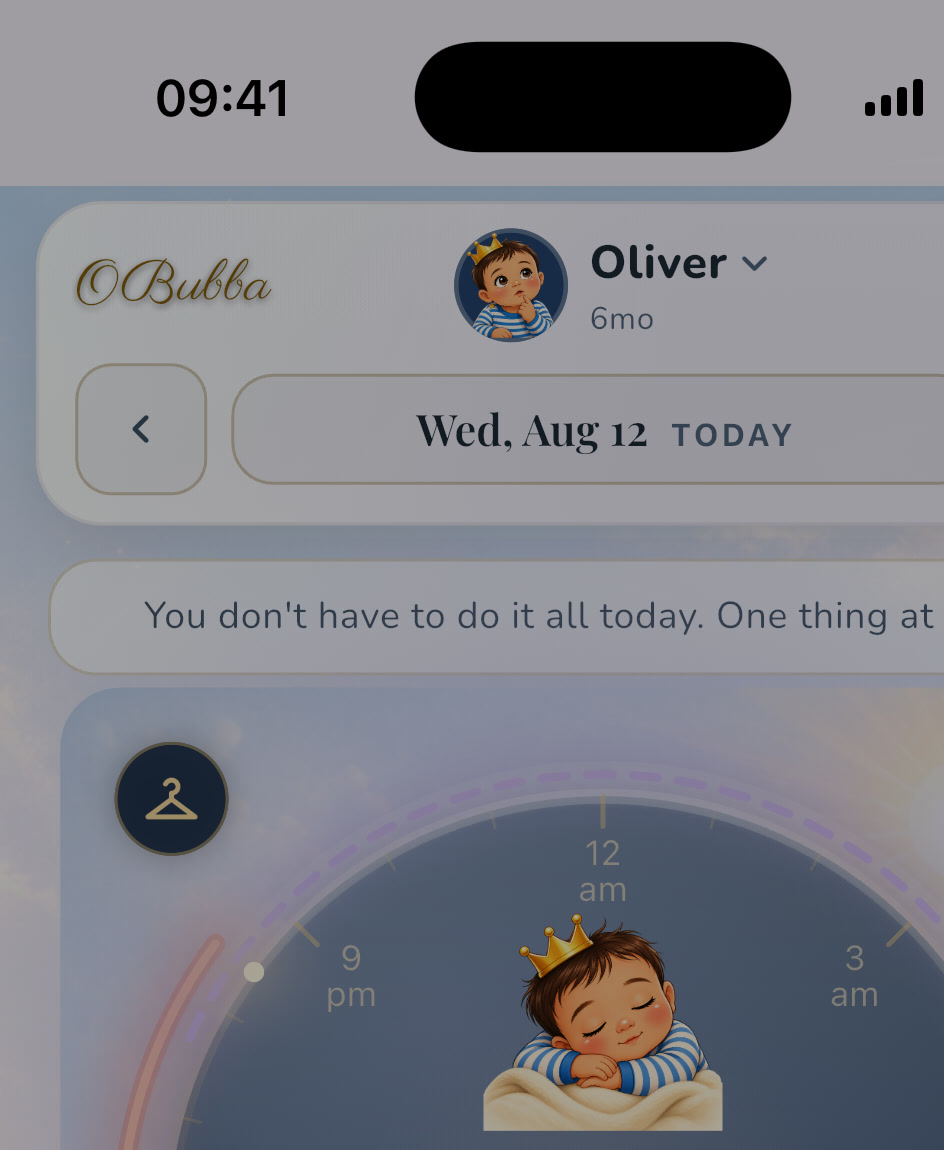
Once Skip is active, the nap is no longer treated as pending. This prevents the absurd combination of Nap overdue on the main clock and Heading to an earlier bedtime below it.
The choice survives navigation and an app restart because it is stored locally, scoped to the active child and date. It resets naturally on a different calendar day. Switching children reads a separately scoped choice, so one child’s missed nap should not pull another child’s bedtime.
What the recommendation does not know
The function is deterministic and inspectable, but its inputs are narrow.
It does not know:
- whether your baby is yawning, smiling, crying or bright-eyed;
- whether a five-minute car doze occurred but was not logged;
- whether nursery recorded a nap that has not synced;
- hunger, pain, fever, reflux or breathing difficulty in the moment;
- whether the parent is too tired to safely supervise a contact or carrier nap;
- whether travel is necessary;
- whether a clinician has given an individual sleep or feeding plan; or
- whether the predicted nap itself is wrong.
It also turns “overtired” on when the nap is 30 minutes overdue, even without significant rolling sleep debt. That is a software proxy, not a diagnosis of the baby’s nervous system.
Use the highlight as a structured question: Which compromise best fits the actual child and family right now?
A practical decision check before tapping
Baby looks calm and not quite ready
Choose a reset. Bring back normal light, stop trying to perform sleep and retry once after a genuinely calm interval.
Baby is exhausted and bedtime is still a long way off
A short supported nap may protect the rest of the day. Choose a safe sleep arrangement you can supervise. If motion is involved, the safety rules of that equipment matter more than the app’s timing suggestion.
Baby is calm but everyone needs a pause
Quiet cot time may be useful when the baby is content. Stay responsive; this is not controlled crying, sleep training or a requirement to leave the room.
This is clearly the last nap and bedtime is realistically close
Move into a calmer evening and consider a modestly earlier bedtime. Do not stretch a young or distressed baby for hours simply to protect a clock time.
Baby seems unwell or unusually hard to rouse
Stop troubleshooting the schedule. Check the child, seek appropriate medical advice and use emergency services when needed. An app prediction is irrelevant when health or breathing is the concern.
Safer sleep applies to every route
The NHS safer-sleep guide says the safest place for a baby’s first six months is in a cot, on their back, in the same room as a parent. The surface should be firm and flat, and the sleep space should be clear.
The NHS SIDS guidance also says never to sleep with a baby on a sofa or armchair and not to leave a baby in a car seat for too long; take them out once the journey ends.
Those principles do not disappear because the nap is short, late or labelled a rescue.
Where the current UX is especially good
- It keeps all four routes available rather than hiding alternatives.
- It labels the choice recommended, not required.
- It uses local, deterministic rules rather than an opaque AI answer.
- It avoids recommending Skip when the app does not know this is the final nap.
- Retry and rest can end without fabricating sleep.
- Skip changes the clock as well as the reminder.
- The confirmation wording checks whether bedtime truly moved.
- Every persisted route can be undone.
This is the kind of app intelligence parents can trust: small, explainable and reversible.
What OBubba should improve next
The weak point is the motion-nap route, not the decision tree.
- Rename it Short supported nap rather than “walk or drive”.
- Never imply that a parent should drive purely to make sleep happen.
- Ask Has sleep actually started? before starting the timer.
- Offer location choices only after the parent chooses a real arrangement.
- Put a one-line safer-sleep reminder beside carrier, pram, car and contact options.
- Show the exact recommendation evidence: “22 min overdue · no sleep debt · bedtime 4h away”.
- Explain why another option was not highlighted.
- Let the parent mark an unlogged micro-nap before deciding.
- Distinguish “prediction overdue” from “baby overtired”.
- Recalculate immediately when nursery or partner data arrives.
- Show the ordinary bedtime beside the proposed earlier bedtime before confirming Skip.
- Let parents disable the card without disabling nap predictions.
The feature should help a parent stop fighting a nap. It should never create a new task—walking, driving or extending cot time—that feels compulsory.
The honest verdict
When Nap not happening? appears, OBubba is not announcing failure. It is recognising that the predicted nap has been overdue for more than 10 minutes and offering four reversible ways forward.
Its recommendation follows a clear priority:
close final nap → earlier bedtime; significant deficit or 30+ minutes overdue → rescue; 15 minutes or less → retry; otherwise → quiet rest
The parent still decides. Watch the baby in front of you, count sleep that actually happened and keep every nap safe. A useful sleep app does not force its prediction to come true; it helps the family recover when it does not.
Try OBubba free → — get personalised nap and bedtime predictions, one live family timeline and calm fallbacks when the day refuses to follow the plan.
Frequently asked questions
Why did OBubba recommend a rescue nap?
The current engine highlights rescue when significant sleep debt is present or the predicted nap is at least 30 minutes overdue—unless the higher-priority final-nap/close-bedtime rule recommends Skip first.
Why did it recommend rest at 22 minutes overdue?
Sixteen to 29 minutes is the middle branch when no higher-priority condition applies. The app starts a 20-minute no-pressure rest countdown rather than a nap timer.
Does tapping Rescue mean the baby is already asleep?
The current tap immediately starts the nap action. If sleep starts later, correct the entry so settling or travel time is not counted as sleep.
How much earlier does Skip make bedtime?
The engine tries to move the ordinary result about 30 minutes earlier, then applies age bounds, a five-minute future minimum and any authoritative parent-set or plan bedtime. The actual change can be smaller or zero.
Can I undo a choice?
Yes. Retry, rest and skip states present an undo/clear route. The choice is stored for the active child and current date only.
Is quiet cot rest a form of sleep training?
Not by itself. The card describes 20 minutes with no pressure. Stay responsive and end it if the baby is distressed or needs you. It is not permission to ignore crying.
Should I drive so my baby sleeps?
Do not make a non-essential journey solely because the app labels Drive as an option. Car seats are for safe travel. If a baby sleeps during a necessary journey, remove them when you arrive and follow current NHS guidance.
OBubba is a tracking and education tool, not a medical device or safer-sleep monitor. Follow current NHS guidance and your child’s individual clinical plan. Seek urgent help for breathing difficulty, unusual unresponsiveness or another emergency.
Ready to try OBubba?
Use OBubba to track feeds, sleep, naps, nappies, growth, milestones and family handovers in one calm baby tracker app.