Timer everywhere
A running nap shows on the iPhone lock screen and Dynamic Island, and as an ongoing notification on Android.
Start a nap timer in one tap, from the app or Siri, then see naps, wake windows and night sleep together. Nap logging is free, and you can turn on reminders so OBubba nudges you when it is time to wind down for a nap.
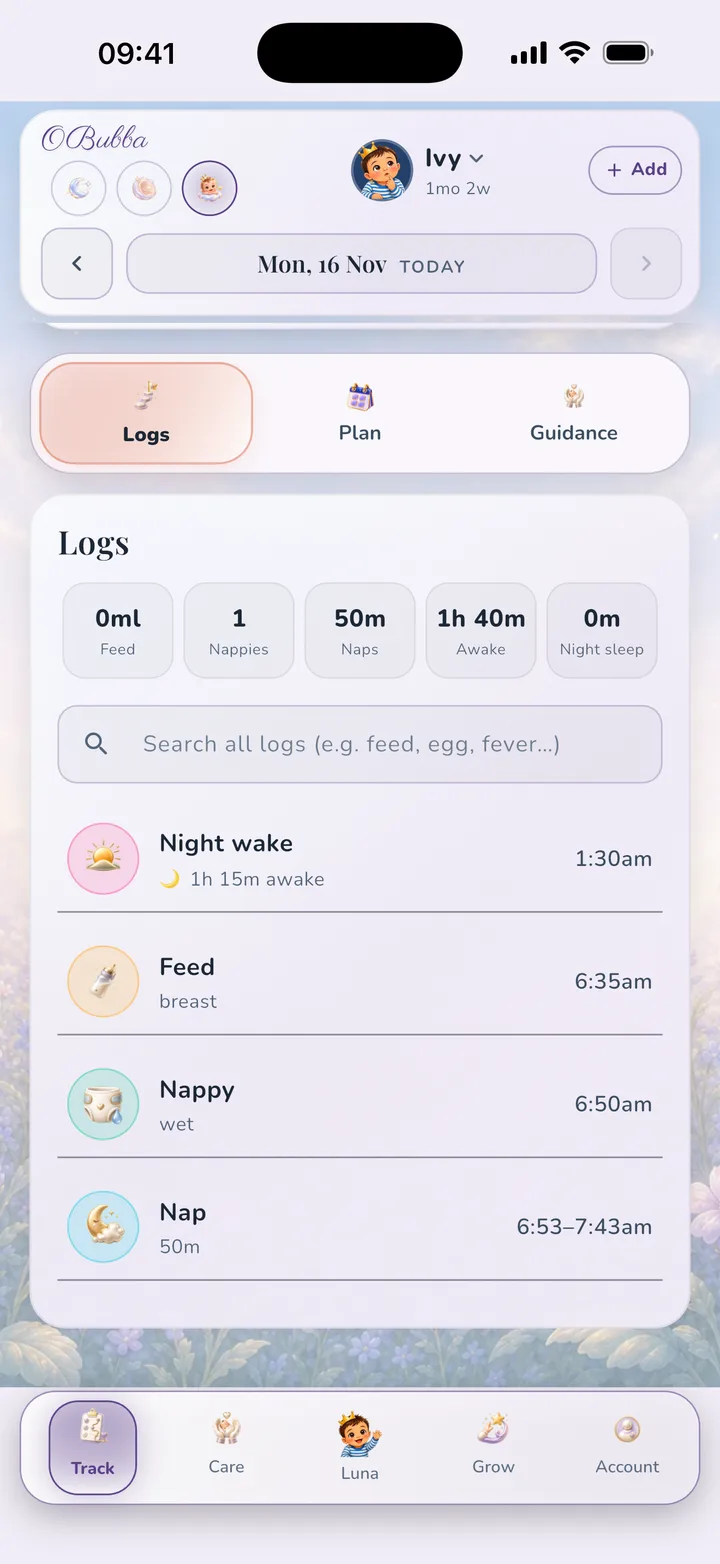
OBubba is a baby nap tracker for iPhone and Android. Parents start a live nap timer from the centre of the Track clock or with Siri on iPhone, pause it for a brief stir without ending the nap, and tap Wake now when the baby is up. Every nap sits in Logs with its start, end and length, beside feeds, nappies and night sleep. Nap logging is free. Turn on nap reminders and OBubba nudges you when it is time to start winding down for a nap, and if the nap window passes, a “Nap not happening?” card offers options. Premium shows the next nap time in advance with a countdown.
A nap tracker has to work one-handed, half asleep, while you are rocking a baby. OBubba's timer starts from the clock or your voice, keeps running if you leave the app and shows on your lock screen. Naps then sit beside the feeds and wake-ups around them, so you can see whether short naps follow long wakes or late feeds.
A running nap shows on the iPhone lock screen and Dynamic Island, and as an ongoing notification on Android.
A mid-nap stir is its own entry, so it never resets the awake time or inflates the night wake count.
Turn on nap reminders and OBubba nudges you when it is time to start winding down for a nap. If the nap window passes, a “Nap not happening?” card offers options: try again in 15 minutes, a rescue nap, quiet rest, or skip the nap and bring bedtime earlier.
Feeds, nappies, night sleep and night wakes sit on the same timeline, so you can see what came before a short nap.
Premium shows the next nap time in advance, a countdown on the clock, today’s plan of predicted naps and bedtime, and the home-screen widget.
Start the timer when your baby falls asleep. If you forget, add the nap afterwards with the real times.
On Track, tap "start timer" in the centre of the clock and choose Nap. On iPhone you can also say "Hey Siri, start a nap in OBubba".
If your baby stirs and resettles, tap the centre pill ("pause nap") and then Resume. The stir is logged without ending the nap or counting as a night wake.
Tap Wake now on the Nap card under the clock. Optionally add how they settled, where they napped and how it went.
Track > Log details > Sleep > Nap. Set the start and end, then tap Log nap. Leave the end blank to start it live instead.
Track > Logs shows every nap with its times and length, plus total nap time and awake time for the day.
Account > Preferences > REMINDERS > Nap windows turns the nap nudge on. It is off until you turn it on. Quiet hours stop anything overnight.

Use Partner Sync when another parent will use OBubba and contribute to the same live baby record. Use Bubba Care when the OBubba parent wants to create a private browser handover for a trusted carer.
Look for one-tap timing that works half asleep, a way to log a stir without ending the nap, and naps shown beside feeds. OBubba does all three, and nap logging is free.
On iPhone, a running nap shows on the lock screen and in the Dynamic Island. On Android it shows as an ongoing notification.
Go to Track > Log details > Sleep > Nap, set the real start and end times, and tap Log nap.
Turn on nap reminders and OBubba nudges you when it is time to wind down for a nap. Premium shows the next nap time in advance with a countdown, free to try for 14 days with no card.
A "Nap not happening?" card offers to try again in 15 minutes, start a rescue nap in the pram or car, give quiet rest time, or skip the nap and bring bedtime earlier.
OBubba brings baby sleep, feeds, naps, routines, milestones, carer handovers and family reports into one app.