One tap to start, one to stop
Tap Start when a contraction begins and Stop when it eases. A running clock shows how long the one you are having has lasted.
A free contraction timer: tap Start and Stop and see how far apart and how long contractions are. Call your midwife or maternity unit if worried.
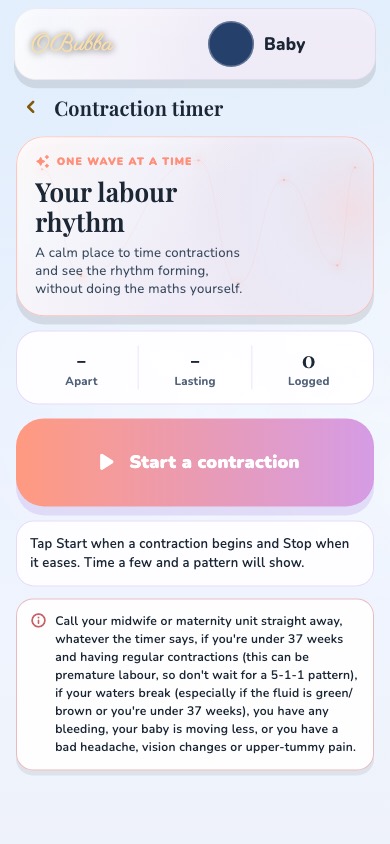
OBubba has a free contraction timer in its pregnancy mode, on iPhone and Android, with no ads and no paywall. Tap Start when a contraction begins and Stop when it eases; OBubba shows how far apart your contractions are, how long they last and how many you have timed, so you do not have to do the maths. Call your midwife or maternity unit when you think labour has started or whenever you are worried, whatever the timer says. Your maternity unit’s advice comes first. OBubba is not a medical device.
When you think labour has started, or you are worried about anything, call your midwife or maternity unit, whatever the timer says. The timer is there to help you describe what is happening when you call.
Tap Start when a contraction begins and Stop when it eases. A running clock shows how long the one you are having has lasted.
OBubba works out the average time between your contractions and their average length, and counts how many you have timed.
The timer keeps the app’s safety note in view: call your midwife or maternity unit straight away, whatever the timer says, if you are under 37 weeks and having regular contractions, if your waters break, if you have any bleeding, if your baby is moving less, or if you have a bad headache, vision changes or upper-tummy pain.
Finish when you are ready and review the session, so you can read the pattern out to your midwife or maternity unit.
The same “Kicks and contractions” tools let you note your baby’s movements. If your baby is moving less than usual, call your midwife or maternity unit straight away; do not wait until the next day.
Pregnancy mode is free in OBubba, week by week from week 4 to 42, then follows your baby after the birth.

Weekly baby size and changes, appointments, the birth plan and hospital bag, kick counting and the contraction timer, with no subscription pop-ups. After the birth, the same app follows your baby’s feeds, sleep and nappies.
Yes. The contraction timer is part of OBubba’s pregnancy mode, which is free, with no ads.
Time from the start of one contraction to the start of the next to see how far apart they are, and from start to finish to see how long each lasts. In OBubba, tap Start when a contraction begins and Stop when it eases, and it works this out for you.
When you think labour has started, or whenever you are worried, whatever the timer says. Call straight away if you are under 37 weeks with regular contractions, if your waters break, if you have any bleeding, if your baby is moving less, or if you have a bad headache, vision changes or upper-tummy pain. Your maternity unit will tell you when to come in.
It is a rule of thumb used in some places, especially the US: contractions about 5 minutes apart, lasting about 1 minute, for about 1 hour. In the UK, maternity units give their own advice, and you never need to wait for a pattern before calling. Follow your own unit’s guidance.
The timer runs on the phone you use. Your birth partner can hold the phone and tap Start and Stop for you.
No. OBubba helps you keep track and describe what is happening when you call. It does not diagnose labour.
OBubba has a free contraction timer in its pregnancy mode, on iPhone and Android, with no ads and no paywall. Tap Start when a contraction begins and Stop when it eases; OBubba shows how far apart your contractions are, how long they last and how many you have timed, so you do not have to do the maths. Call your midwife or maternity unit when you think labour has started or whenever you are worried, whatever the timer says. Your maternity unit’s advice comes first. OBubba is not a medical device.
Download OBubba, choose “I’m expecting”, and open Kicks and contractions. Free, with no ads.