Free in the first two months
Every part of OBubba, Premium included, is free in pregnancy and the baby's first two months, with no card.
Log feeds, breastfeeding sides, wet and dirty nappies and sleep in a tap, share one record with your partner, and get the whole app free in pregnancy and your baby's first two months.
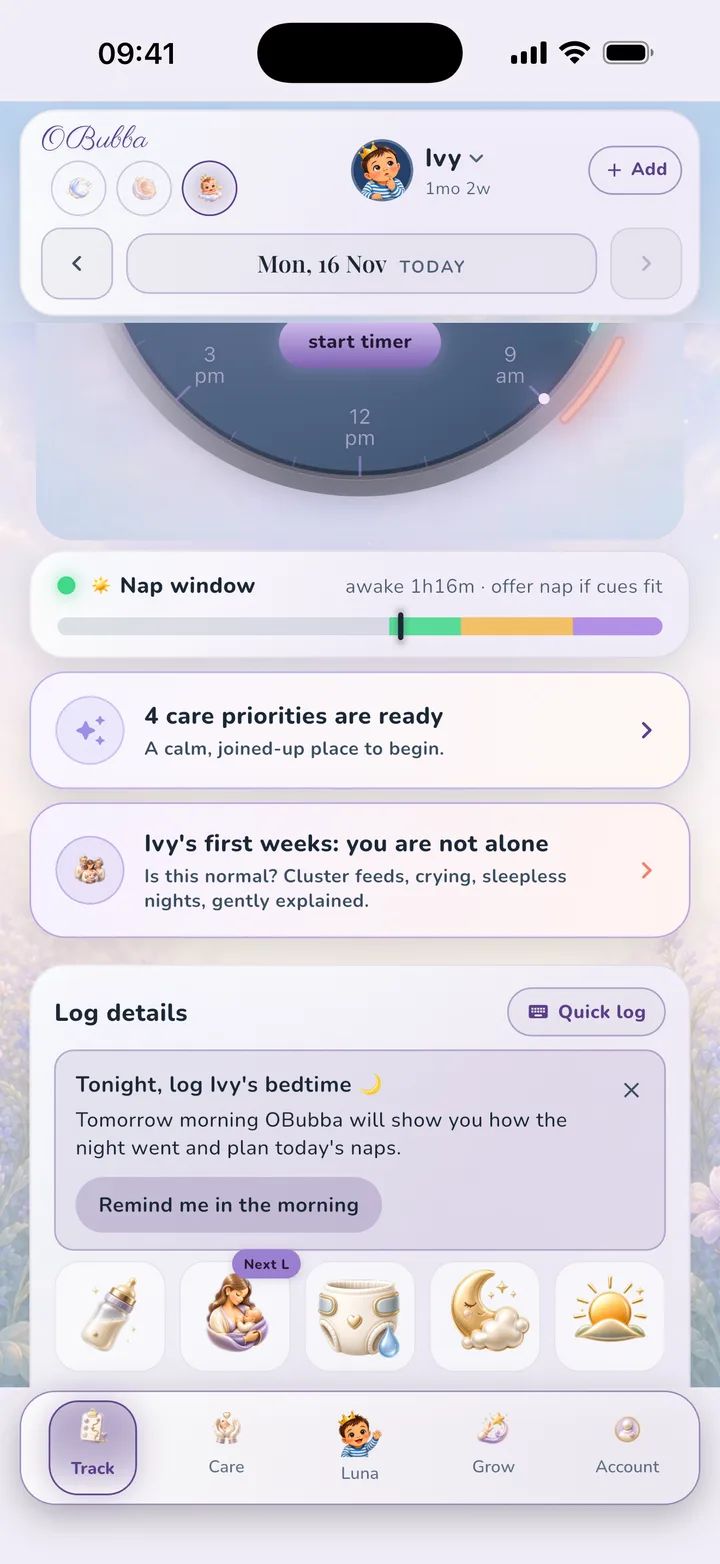
OBubba is a newborn tracker for iPhone and Android. Parents log bottle feeds, breastfeeds with a live timer and side hint, wet and dirty nappies, sleep and night wakes from the Track tab, and see the day in one timeline they can share with a partner. The whole app, including Premium, is free during pregnancy and the baby's first two months. After that, core tracking stays free. OBubba also answers common newborn worries in "Is this normal?". It is not a medical device.
Health visitors ask how many wet nappies, which side, how long since the last feed, all in the weeks when you are least able to remember. OBubba is built for one-handed logging at 3am: a tap for a wet nappy, a timer that remembers which breast is next, and a timeline both parents can see. The early weeks are on us, so you can use every part of the app while it matters most.
Every part of OBubba, Premium included, is free in pregnancy and the baby's first two months, with no card.
One-tap wet nappies and colour chips for poos make it easy to answer the health visitor's questions.
Lock-screen timer on iPhone, voice Quick log ("fed 120ml at 2 and a wet nappy") and logging that keeps working offline.
Care > Crying Helper, Sounds with white noise and shush, Safe Sleep, and a Parent room with check-ins and baby blues and PND support.
Use OBubba through pregnancy, tap "My baby has arrived", and your account and settings carry straight over.
Start with feeds and nappies. Add sleep when you can. Nothing has to be perfect.
On Track, tap the Breast tile. A live timer starts on the side OBubba suggests from the last feed. Switch side or pause, then tap Stop & log feed.
Tap Feed > Bottle, enter the amount in ml or oz and tap Log feed. A feed during a night sleep is marked as a night feed automatically.
Tap Nappy. For a wet nappy, tap A little, Normal or Soaked. For a poo, tap Poo or Dirty and add colour and texture if you want.
Tap "start timer" for sleep. At night, tap the centre pill when your baby wakes, then Resume and say how they settled.
Account > Family & sharing > Share with family > Send invite. You both log to the same live record.
Grow > "Is this normal?" covers newborn noises, poos, sleep and crying peaks, with the PURPLE crying explainer and when to get help.

Use Partner Sync when another parent will use OBubba and contribute to the same live baby record. Use Bubba Care when the OBubba parent wants to create a private browser handover for a trusted carer.
Look for one-tap logging, a breastfeeding timer that remembers the side, and one record both parents can see. OBubba does all of this, and every part of it is free for your baby's first two months.
Tap Nappy on the Track tab, then A little, Normal or Soaked. The day's nappy count shows at the top of Logs.
Yes. The Breast tile starts a live timer on the side OBubba suggests from your last feed, and you can switch sides as you go.
Yes. Send an invite from Account > Family & sharing, and your partner joins the same live record on their own phone. Family sharing is free.
Yes. The whole app is free during pregnancy and your baby's first two months. After that, every log, reports, growth and family sharing stay free, and Premium is optional.
OBubba brings baby sleep, feeds, naps, routines, milestones, carer handovers and family reports into one app.