You type “yellow breakfast” into the solids log. OBubba does not show an egg badge. Or you type the name of a baby-food pouch and the app asks you to check the pack instead of confidently naming its allergens.
That is not the app being difficult. It is the boundary between recognising words and knowing ingredients.
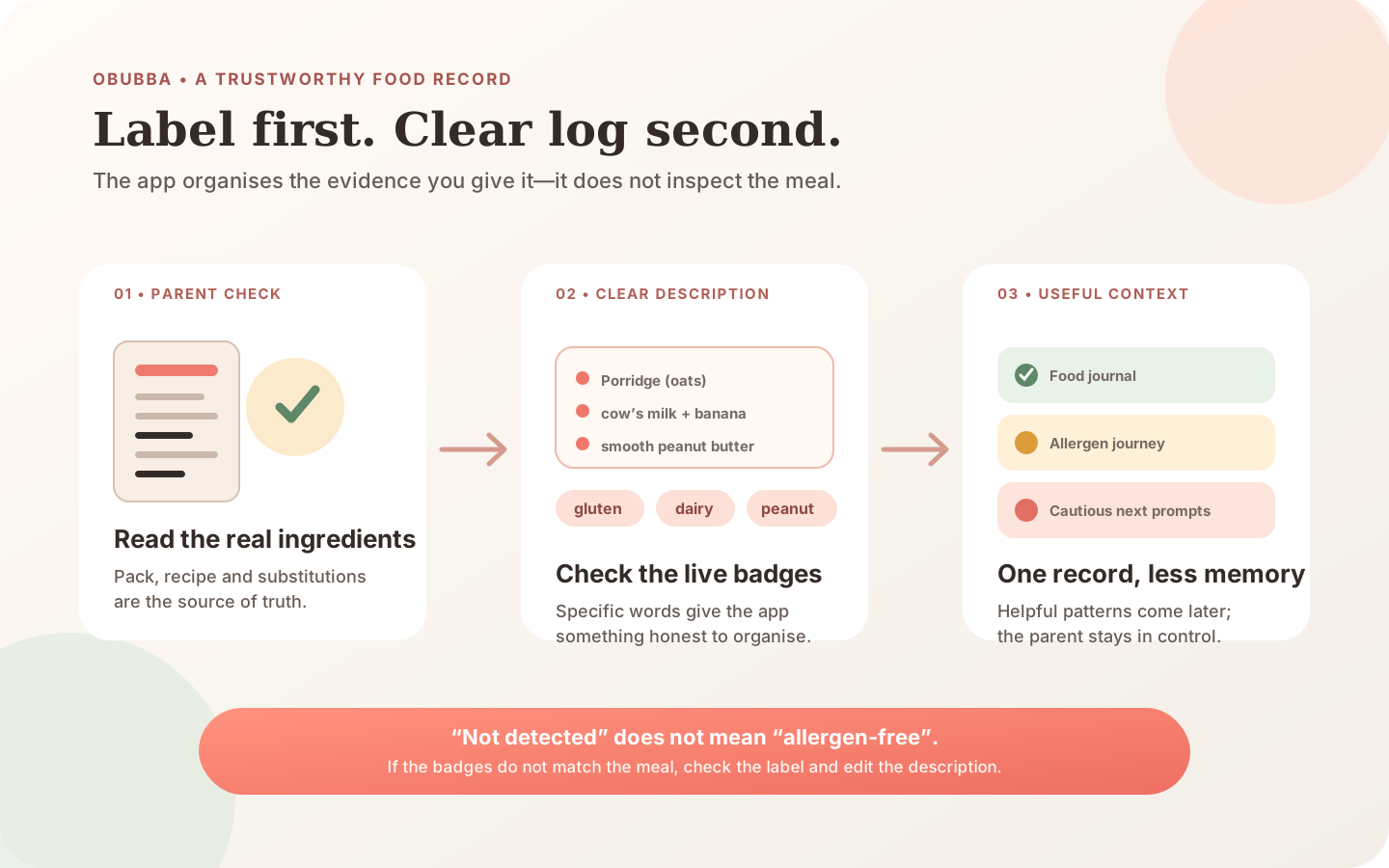
OBubba can spot familiar dishes and ingredient words in the meal description you type. It cannot see the bowl, scan the packet or know a family nickname. If the detected badges do not match the food, read the real ingredient list and make the meal description more specific before saving. For a meal such as scrambled egg on buttered toast, naming the ingredients gives the journal far more useful evidence than “breakfast”.
This guide explains exactly what the current app does, where its recognition deliberately stops and how to create a food record that helps later without turning every meal into paperwork.
The 20-second answer
Use this order:
- Read the food or packet yourself. The label—not an app guess—is the source of truth for a packaged product.
- Type the meaningful ingredients. “Porridge with cow’s milk and peanut butter” is more useful than “porridge”.
- Check the live badges. They should reflect the actual recipe.
- Choose the real response. Loved it, Unsure or Reaction.
- Correct a mismatch. Edit the meal wording; do not keep a tidy but inaccurate badge.
If a possible reaction has occurred, stop the suspected food and seek appropriate medical advice. Call 999 for severe symptoms such as breathing difficulty, swelling affecting the mouth or throat, sudden floppiness or collapse. Do not spend an urgent moment repairing the app record.
What OBubba is actually reading
In Track → Feed → Solids, the current app reads the free-text answer to “What did they eat?” while you type. It checks that text in two ways.
First, it recognises a small set of common dishes. Examples in the production code include fish pie, macaroni cheese, lasagne, pancakes, porridge, eggy bread, hummus, yoghurt and several other ordinary family foods. A recognised dish can imply more than one allergen: a standard pancake, for example, is treated as potentially containing gluten, egg and dairy.
Second, it looks for ingredient words such as:
- milk, cheese, butter or yoghurt → dairy
- bread, toast, pasta, oats, naan or chapati → gluten
- egg or mayonnaise → egg
- peanut → peanut
- almond, cashew or another named tree nut → tree nuts
- salmon, cod or tuna → fish
- tahini or sesame → sesame
- soya, tofu or edamame → soya
Those are examples, not the whole matching table. The recogniser uses word boundaries and normalises labels so variants such as milk and dairy, wheat and gluten, or soy and soya can feed one consistent journey.
The app then displays the groups it found before the entry is saved. If one or more groups are present, it shows allergen chips and explains that they will be logged. If it recognises a simple staple such as banana, carrot, rice or chicken without finding one of the tracked groups, it can say that no major allergens were detected. If it does not know the wording, it admits that the food is not in its list.
That last state is important. “Not detected” does not mean “allergen-free”. It means the text did not give this recogniser enough evidence.
Why “yellow breakfast” cannot become egg
A nickname carries family context that the phone does not have. “Yellow breakfast” might mean scrambled egg, banana porridge, mango yoghurt or something entirely different.
The same problem appears with descriptions such as:
| Too vague | More useful for the record | |---|---| | breakfast | scrambled egg, buttered toast | | pouch | chicken pouch — contains milk and celery | | pasta | wheat pasta with tomato and grated cheese | | curry | lentil curry with coconut milk and chapati | | yoghurt bowl | soya yoghurt, banana and smooth peanut butter | | fish dinner | salmon, mash made with cow’s milk and peas |
You do not need perfect punctuation or a formal recipe. Include the ingredients that change the meaning of the record—especially a newly introduced allergen, a packaged-food allergen, the serving form when texture matters and anything connected with a possible reaction.
For a homemade meal, a short comma-separated description is enough. For a packet, check the current ingredients each time. Recipes and manufacturing information can change, and the app does not inspect the pack in your hand.
Why a familiar baby-food brand may trigger “check the pack”
The recogniser knows several common baby-food brands and generic words such as pouch. But one range can contain many recipes: one pouch may be fruit only, another may contain yoghurt, wheat, celery or fish.
When the app recognises the brand but cannot identify an allergen from the flavour or ingredient words, it deliberately shows an information prompt rather than making one up. That is the right kind of friction.
For prepacked foods, the Food Standards Agency says the ingredients list must emphasise any of the 14 regulated allergens present. Look for bold, capitals, underlining or another form of emphasis in the ingredients list. Then put the relevant ingredient into the meal description. A front-of-pack flavour name is not a substitute for reading the list.
If your baby has a diagnosed allergy, also follow the specific label-reading and cross-contact advice from their clinician. OBubba’s keyword recognition is not an allergy-safety scanner and does not assess “may contain” statements.
The 14 groups: app language and label language
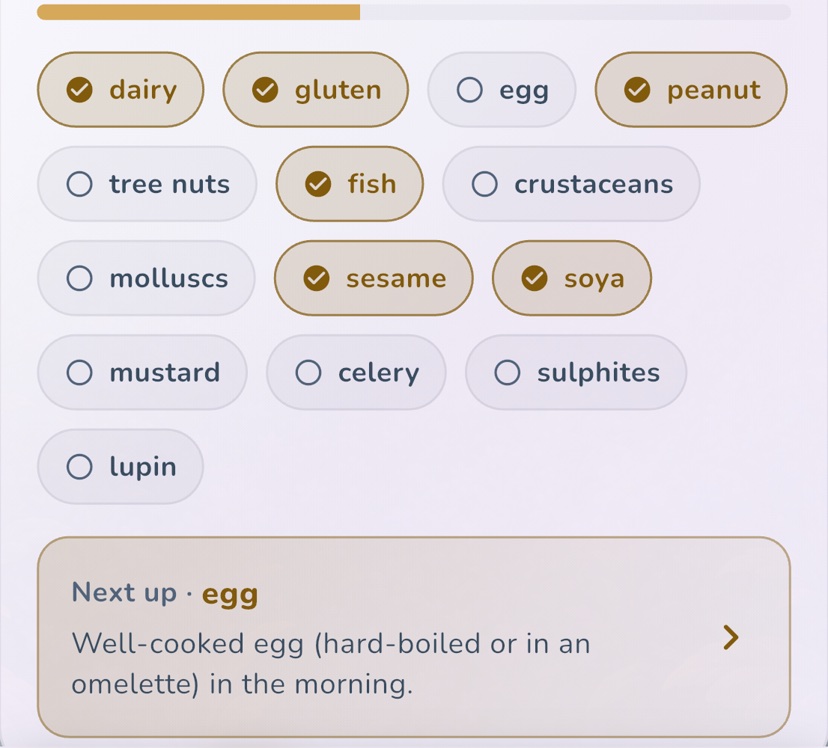
OBubba’s Allergen journey is organised around the UK’s 14 regulated allergen groups:
- dairy
- gluten
- egg
- peanut
- tree nuts
- fish
- crustaceans
- molluscs
- sesame
- soya
- mustard
- celery
- sulphites
- lupin
The app uses friendly shorthand in two places. Its dairy group corresponds to milk in the legal list. Its gluten group corresponds to cereals containing gluten, including wheat, rye, barley and oats. The Food Standards Agency uses the more precise legal names.
People can react to foods outside those 14 groups. Strawberry, kiwi, chickpea and other foods do not become impossible allergens merely because they are not one of the regulated 14. A clean-looking journey is not a medical clearance certificate.
The recogniser avoids some surprisingly easy mistakes
Simple keyword matching can create bad records. The current code includes explicit protections for several traps:
- Peanut butter is not dairy. The word butter should identify peanut, not invent a milk exposure.
- Oat, soya, almond, coconut and rice milks are not dairy. The genuine grain, soya or nut group may still be recognised where relevant.
- Butter beans are not dairy. A bean should not become a butter exposure.
- Vegan pancakes should not become egg or dairy. Gluten can remain if the description still implies a gluten-containing cereal.
- Dairy-free macaroni cheese should not become dairy merely because “cheese” appears inside the dish name.
- Banana should not match a short formula-brand fragment. Dish and brand names are checked as words rather than arbitrary letter sequences.
- Naan, roti, chapati, pitta and other named flatbreads should contribute gluten.
These guards matter because one false tag does more than colour one card. It can make an allergen look previously introduced, alter what the app suggests next and weaken the meaning of a later reaction record.
They also demonstrate why automatic recognition will never be universal. Family recipes, substitutions and brand formulations are too varied for a meal title to be treated as an ingredient database.
What happens after the entry is saved
The saved food text, detected groups and parent-selected response travel together into Care → Weaning → Food journal. The journal shows recent foods, their timing, response and recognised allergens.
The same information can support several bounded app features:
- the Allergen journey can show which of the 14 groups have appeared in the record;
- first-food ideas can avoid presenting a reacted-to recognised group as an ordinary suggestion;
- the recipe engine can rank one genuinely new allergen above a recipe that stacks several;
- repeated calm exposures can support an encouraging keep-it-in-the-rotation prompt;
- several new allergens logged close together can produce a gentle pacing reminder;
- repeated reactions across differently named foods in one recognised group can raise a cautious pattern question.
This is why accurate wording is worth a few extra seconds. The meal description is not decorative copy; it becomes part of the evidence used downstream.
OBubba also keeps lifetime introduced and reacted groups when older day-by-day records move out of the recent active window. That prevents an old egg introduction or reaction being forgotten simply because months have passed.
Logging a mixed meal without creating false certainty
Suppose the bowl contains porridge made with cow’s milk, banana and smooth peanut butter.
A useful entry is:
> Porridge (oats) with cow’s milk, banana and smooth peanut butter
Before saving, check for gluten, dairy and peanut badges. Then choose the response that matches what happened.
That does not mean the meal was a good way to introduce all three groups for the first time. The NHS advises introducing foods that can trigger allergy one at a time and in very small amounts from around six months, so a reaction is easier to spot. Once a food is introduced and tolerated, it should remain part of the baby’s usual diet.
Mixed meals become much easier to interpret when only one component is genuinely new. Familiar oats and milk plus new peanut creates a clearer record than three unseen allergens in one bowl. Follow individual professional advice if your baby has eczema, a known food allergy, a previous reaction or a clinician-led introduction plan.
Read our mixed-meal allergen logging guide for a worked example, or the one-new-allergen guide for planning first exposures.
What if the badge is wrong?
A real allergen is missing
Check the actual ingredients. Edit the food description to name the missing ingredient clearly. “Toast with tahini” is more informative than “snack”; “pouch — contains milk and celery” is more informative than the brand alone.
The solids logger does not currently provide a separate set of 14 manual checkboxes on each meal. The reliable correction for that event is the truthful food description.
An allergen is shown but was not present
Make the substitution explicit. “Soya yoghurt” or “vegan pancakes” gives the detector context that a generic dish name lacks. If the badges still disagree with the food, preserve the package or recipe details in the note and treat the automatic result as incomplete.
The food was introduced before you used OBubba
Open Care → Weaning → Allergen journey, choose the group and use Mark as introduced. That updates the baby’s remembered journey without inventing a meal that never happened in the app.
Manual introduced status is still only a parent record. It does not prove the amount eaten, ongoing tolerance or absence of allergy.
A reaction was attached to an ambiguous meal
Keep the original factual record, including ingredients, time, response and symptoms in the note. Seek medical advice rather than editing the entry until one suspect looks certain. Do not re-offer foods at home simply to identify the cause unless an appropriately qualified professional has given you a plan.
Our food-reaction logging guide explains what to record and when to get urgent help.
A trustworthy log in one line
Use this compact pattern:
> food + important ingredients + texture if useful + response
Examples:
- fork-mashed lentils and tomato — loved it
- omelette strip with grated cheese — unsure
- soya yoghurt with banana — loved it
- cod fishcake containing wheat and milk — reaction; see note
- chicken pouch containing celery — tasted two spoons, no immediate reaction observed
“No immediate reaction observed” is a factual observation, not a declaration that the food is safe forever. Some reactions can be delayed, and an app cannot assess symptoms.
What OBubba can and cannot claim
| OBubba can | OBubba cannot | |---|---| | recognise listed dishes and ingredient words | inspect a bowl or read a packet | | show the groups it found before saving | guarantee that no other allergen is present | | keep food, timing, response and groups together | know how much was swallowed | | remember introduced and reacted groups for that baby | diagnose allergy or confirm tolerance | | use the record to shape cautious prompts and ideas | replace labels, supervision or medical advice |
That boundary is a feature, not a disclaimer pasted on afterwards. The best parenting technology does not turn a guess into certainty because certainty looks reassuring on a card.
The habit that makes the whole app smarter
The aim is not to log every crumb. It is to make the entries that matter legible to your future self, your partner and the app.
When a meal contains a new allergen, a packaged recipe, a meaningful texture change or a possible reaction, take ten seconds to name it properly. For a familiar banana or repeated family meal, keep it brief. The record should reduce mental load, not become another performance.
Try OBubba free → — keep real foods, allergen groups, reactions, milk, nappies, sleep and shared care in one per-baby history, with suggestions that explain what they noticed and admit what they cannot know.
Sources
- NHS: Baby food allergies
- Food Standards Agency: allergen guidance and the regulated 14
- Food Standards Agency: labelling for prepacked-for-direct-sale foods
Quick questions
Does “no allergens detected” mean the meal is allergen-free?
No. It means the words you typed did not produce one of OBubba’s recognised groups. Read the recipe or pack yourself.
Why does the app call milk “dairy” and wheat “gluten”?
Those are its friendly journey labels. The legal UK list uses milk and cereals containing gluten. The app normalises common ingredient and recipe terms into its consistent display groups.
Can I add a missed allergen manually to one solids entry?
The current solids sheet derives meal-level allergen groups from the food description. Edit that description to name the real ingredient. The separate Allergen journey lets you mark a group introduced when it happened before logging.
Can one meal tick several groups?
Yes. A mixed meal can contain several recognised groups. For a planned first introduction, however, NHS guidance is to introduce allergy-triggering foods one at a time in small amounts so a reaction is easier to identify.
Does a tick mean my baby is not allergic?
No. It means the group was recorded as introduced. It is not a test, diagnosis or guarantee of future tolerance.
Ready to try OBubba?
Use OBubba to track feeds, sleep, naps, nappies, growth, milestones and family handovers in one calm baby tracker app.