Most baby trackers begin with a feed.
But perhaps your baby is not here yet. You have an estimated due date, a private bump nickname and a head full of questions—but no bottles, nappies or naps to log. Opening a newborn dashboard now would feel like walking into the wrong chapter.
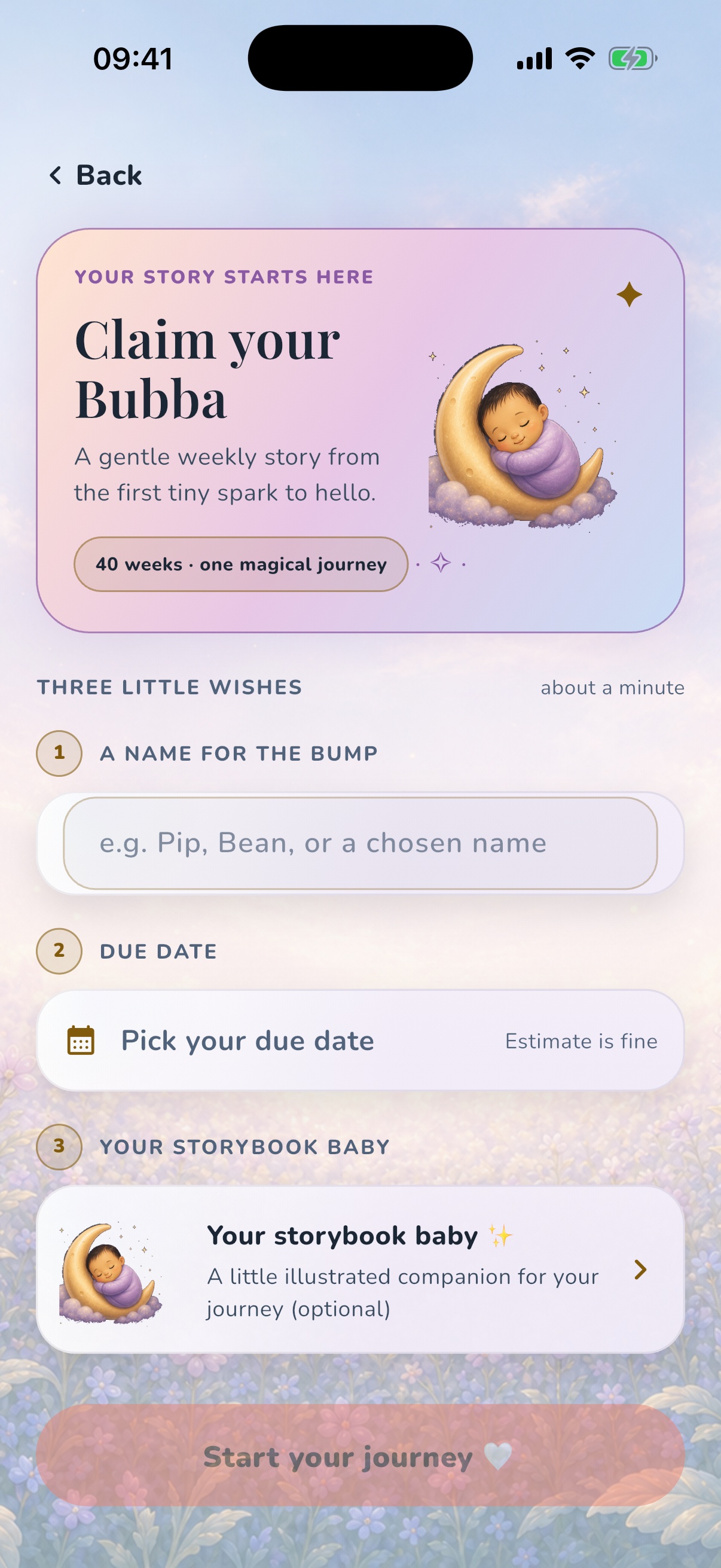
OBubba can begin during pregnancy. On the welcome screen, tap I'm expecting. The current app opens a short setup called Claim your Bubba. It asks for only:
- a name for the bump
- an estimated due date
- a storybook companion, if you want to choose a different one from the default
The first two are required. The illustrated companion is a gentle creative choice that can be changed later. Press Start your journey and OBubba creates one pregnancy profile rather than pretending a newborn already exists.
That same profile can become the live feed, nappy and sleep tracker after birth. The useful idea is continuity: start with the story, then add the practical record when your baby arrives.
The short answer: tap “I'm expecting”
New users see two clear paths on OBubba's welcome screen:
- start tracking when the baby is already here
- tap I'm expecting to enter pregnancy mode
There is also a recovery route if someone begins the baby-onboarding flow by mistake. The first onboarding screen offers Set up your pregnancy, which replaces that route with the pregnancy setup instead of making the parent back out and restart.
This matters more than it sounds. A pregnancy experience should not ask for a birth date that does not exist. A newborn tracker should not calculate a fictional age from a due date. The data model keeps those states separate: an expecting profile is marked as unborn and has an expected date, but no date of birth.
While that pregnancy flag is active, baby-age calculations and newborn insights are deliberately withheld. OBubba shows the pregnancy journey rather than fabricating feeds, wake windows or a seven-month-old development card for a baby who has not been born.
Why the setup is deliberately small
Pregnancy apps often ask for a long intake before showing any value: last menstrual period, cycle length, symptoms, health history, notification choices and marketing preferences.
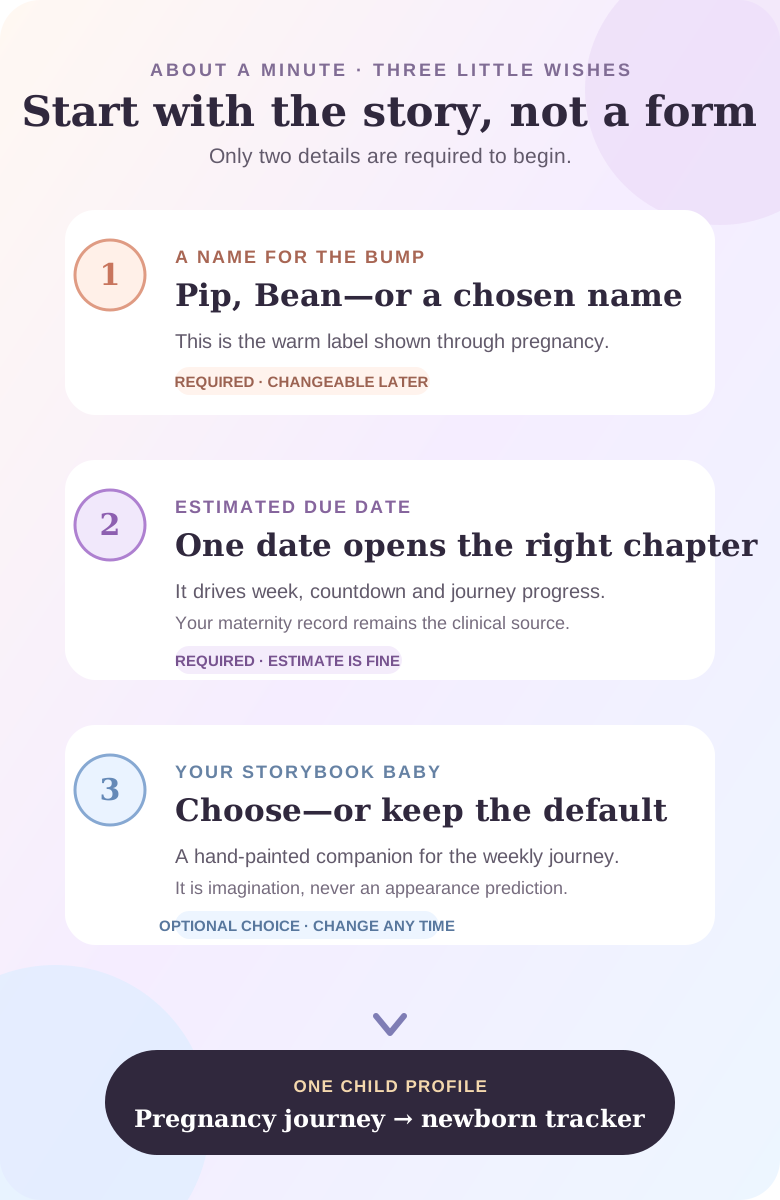
The Claim your Bubba screen does not do that. It labels its setup Three little wishes and estimates “about a minute”. In code, the screen was deliberately designed as a tiny on-ramp for an expecting parent who should not face a six-step intake.
The required information is just enough to answer two product questions:
- What should this pregnancy story call the baby for now?
- Which week and countdown should the app display?
The illustration adds warmth without claiming knowledge it does not have.
Step 1: choose a bump name
The first field says A name for the bump and suggests “Pip, Bean, or a chosen name”.
This can be:
- a nickname you already use
- “Baby” plus a surname or initial
- a chosen first name
- something deliberately neutral while you decide
It is not a legal name and does not have to be final. In the record, the entry is saved both as the current child label and as the bump name used by pregnancy screens. It can be updated later.
The practical benefit is small but lovely: a weekly card that says “Pip” feels less like generic pregnancy content than one addressed to “Fetus 1”. It also gives the profile a recognisable identity when appointments, preparation items and keepsakes begin to accumulate.
If the pregnancy is private, use a label you are comfortable seeing on your phone screen. A nickname is enough.
Step 2: add the estimated due date
The due-date row says Estimate is fine. That phrase is important.
OBubba uses one expected date to calculate:
- the current gestational week shown in the pregnancy journey
- days remaining until the estimated due date
- progress around the 40-week story arc
- the weekly chapter and stage artwork to display
The app stores the date without a time of day. That keeps the pregnancy week stable across ordinary clock changes and avoids a countdown moving because of an arbitrary hour.
The date is a content anchor, not a clinical measurement. The NHS describes the EDD as an estimated due date and notes that pregnancy commonly lasts from 37 to 42 weeks from the first day of the last period. The dating scan can give a better estimate and may adjust the original date.
Use the due date from your current maternity information when you have it. If your maternity team changes the EDD after a scan, update the app so the weekly story matches the record you are actually using.
OBubba does not infer conception, read a scan or decide whether the pregnancy is progressing normally. Your maternity notes and care team remain the clinical source.
Step 3: meet a storybook companion
The third row shows a hand-painted baby resting in a moonlit storybook scene. You can open the picker and choose among six complete illustrations, or simply keep the default.
The picker states the boundary plainly: these are gentle storybook friends, not predictions. They do not predict skin tone, hair, sex, health or what an ultrasound will show. The illustration is closer to choosing a character in a keepsake book than customising a biological model.
The choice can be changed later from the pregnancy experience. It travels through the weekly journey so the visual story feels consistent without pretending to represent the baby literally.
That distinction makes the feature more emotionally useful. Imagination is welcome; false precision is not.
What happens when you tap “Start your journey”
The button becomes active when a bump name and due date are present. The flow then:
- creates the child profile in pregnancy mode
- stores the bump name and expected date
- stores the chosen or default storybook companion
- makes that profile the active child
- adds it to the family's saved child roster
- opens the pregnancy home
The button has a re-entry guard so a rapid double-tap cannot create two bumps. If profile creation succeeds but a later setup step fails, the screen remembers the profile code and resumes instead of creating another one on retry.
If the connection or backend write fails, OBubba does not leave a dead button. It shows a calm “check your connection” message and lets the parent try again.
These details are invisible when everything works—and that is exactly the point. An emotional starting moment should not produce duplicate profiles because of a slow network or an enthusiastic thumb.
What opens after setup
Pregnancy mode is more than a due-date counter. The current experience connects the same expecting profile to:
- a week-by-week story from weeks 4 to 40
- a browsable pregnancy journey, including future-stage previews
- preparation checklists
- appointments and reminders
- a kick counter and contraction timer
- perineal-massage and “Good to know” guidance
- mood and parent-support tools
- letters and keepsakes for the future
Not every tool is appropriate at every stage. A contraction timer is not useful at six weeks, and a kick counter should never become a target that overrides concern about reduced movements. The pregnancy home groups tools into a journey rather than suggesting everything must be used immediately.
Our week-by-week pregnancy guide explains how OBubba turns the EDD into a story without presenting its artwork as a scan. For practical maternity timing, use the guidance and contact numbers in your maternity notes.
The due date is not the baby's future birthday
An expecting profile holds an expected date, not a date of birth. Those fields serve different jobs.
When the baby arrives, OBubba asks for the actual birth date. Pregnancy mode is then cleared and the expected-date carrier is removed. For a baby born at term, ordinary age begins from the birth date.
If the baby was born early, the handoff asks for the original due date so corrected-age calculations can continue where appropriate. The code deliberately keeps that preterm due date distinct from the pregnancy countdown date after birth.
This prevents two common errors:
- treating the EDD as though it were the baby's birthday
- losing corrected-age context for a premature baby
Our guide to OBubba's pregnancy-to-newborn transition shows the full birth handoff and what carries forward.
What stays with the profile after birth
The app does not throw the pregnancy record away and ask the parent to create “Baby 2” while recovering from birth.
The same child profile moves into live tracking. The bump name can remain until the family is ready to use the baby's name. Preparation items and pregnancy letters remain attached to that child's story. The new live record begins with the actual date of birth and can then hold feeds, nappies, sleep, growth, medicines, milestones and weaning.
OBubba also adds a best-effort “is here” note to begin the newborn chapter. If that decorative note fails, it does not undo a successful birth transition.
The continuity is useful because pregnancy and newborn care are not two unrelated products. The car seat prepared last week, the appointment remembered yesterday and the feed logged tonight all belong to one family story—even though they require very different screens.
What OBubba's pregnancy setup does not do
It does not:
- confirm a pregnancy
- calculate clinical gestation from an ultrasound
- replace self-referral to maternity services
- store or replace your maternity record
- assess the baby's growth, heartbeat or wellbeing
- predict labour from a countdown
- predict the baby's appearance
- guarantee arrival on the estimated due date
The NHS says that when you know you are pregnant, you need to tell maternity services to begin antenatal care. Maternity notes contain appointments, test results and important contact numbers, and should remain available as advised by your care team.
An app can make the waiting feel connected. It cannot provide antenatal care.
A calmer way to begin tonight
If you have just found out you are pregnant, the app does not need to become another task list.
Try this:
- Open OBubba and tap I'm expecting.
- Enter the nickname that already makes you smile—or simply “Baby”.
- Use your current best estimated due date.
- Keep the default storybook companion unless choosing one feels enjoyable.
- Open the current week's story, then close the app.
You can return for practical tools when they become relevant. There is no prize for completing pregnancy digitally.
Frequently asked questions
Can I download OBubba before I have had a dating scan?
Yes. The setup accepts an estimated due date. When your maternity information gives you a revised EDD, update the app so the weekly chapter aligns with it. The app date is not a substitute for clinical dating.
Do I need to know my baby's name?
No. A bump nickname, “Baby” or any comfortable temporary label works. It can be changed later.
Is the storybook baby supposed to look like my baby?
No. The picker explicitly calls the six illustrations storybook friends, not predictions. Choose one for warmth, keep the default or change it later.
Does OBubba ask for my symptoms or medical history during setup?
Not on the Claim your Bubba screen. That entry flow asks only for a bump name, due date and creative companion choice.
Will pregnancy mode show newborn sleep predictions?
No. The data model returns no baby age while the profile is unborn, and newborn prediction providers short-circuit. Pregnancy has its own experience.
What happens if I tap the button twice?
The current screen blocks re-entry while creation is running, preventing a double-tap from creating duplicate profiles.
Will I need a new profile after birth?
No. Marking the baby as arrived converts the existing profile into the live tracker and records the actual birth date. Premature-birth handling can preserve the original due date for corrected-age use.
Is OBubba an NHS maternity-record app?
No. Keep your official maternity notes and use maternity-service contact routes for care, test results and concerns.
Begin before the first feed
The first useful entry in a family tracker does not have to be a bottle amount or a nap time.
It can be a name whispered to a bump. A date pencilled into a calendar. A small illustrated companion chosen because it makes the waiting feel real.
Then, when the baby arrives, the same profile is ready for the practical night: the first feed, the first wet nappy, the first attempt to remember when anyone last slept.
Try OBubba free → — tap I'm expecting, begin with two simple details and let one family story grow from pregnancy into newborn life.
Sources and further reading
- NHS: Pregnancy due date calculator
- NHS: Your antenatal care and appointments
- NHS: Ultrasound scans in pregnancy
OBubba is a tracking and education tool, not maternity care or medical advice. Contact maternity services whenever you are worried about your health or your baby's health; you do not need to wait for the next appointment.
Ready to try OBubba?
Use OBubba to track feeds, sleep, naps, nappies, growth, milestones and family handovers in one calm baby tracker app.