You prepared under one bump name. You saved a letter for the future, ticked off the car-seat check and added an appointment. Then your baby arrived—and suddenly another app asks you to create a new profile before you can record the last feed.
You do not need to start again in OBubba.
When you tap Baby has arrived, the current app updates the same child record from pregnancy mode to newborn mode. You confirm the real date of birth and, if your baby came early, the original due date. The pregnancy experience gives way to the live feed, nappy and sleep tracker without making you invent a second child.
That sounds simple. The useful detail is knowing exactly what “continuity” means—and what it does not mean.
The short answer
After your baby is born, OBubba:
- keeps the same child profile rather than copying it into a new one
- keeps cloud-backed preparation history and time-capsule letters with that child
- replaces the expected-date state with the actual date of birth
- can retain the original due date separately when a baby was born early, so corrected-age context can be used where appropriate
- opens the live tracker for feeds, nappies, sleep and everyday care
- starts learning from the logs you add; it does not invent an instant newborn schedule
Some information has a deliberately different boundary. Maternal mood check-ins remain private on the phone where they were entered. Appointments remain on the same installation. Your NHS Personal Child Health Record—the Red Book or eRedbook—remains a separate clinical record.
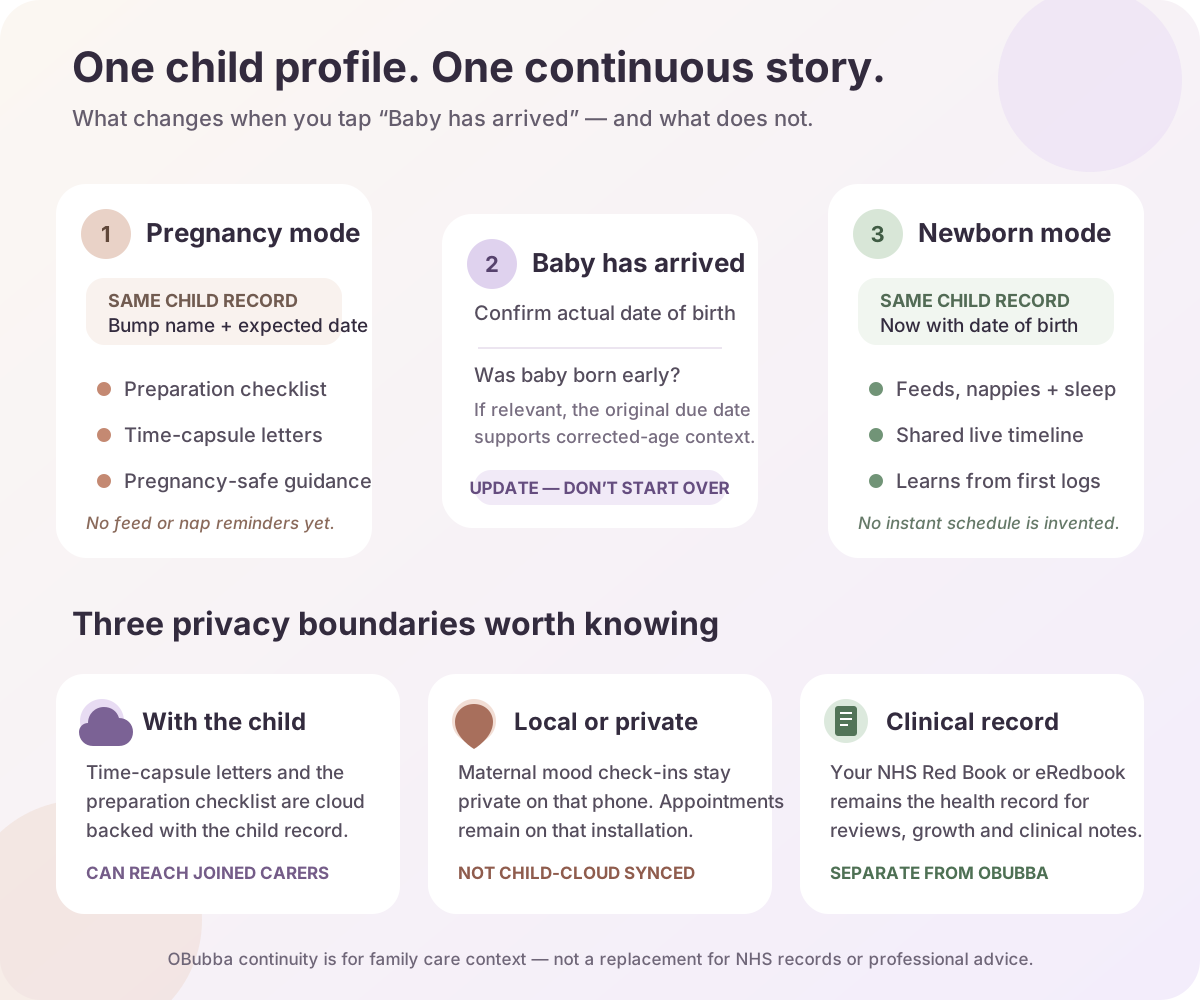
What actually happens when you say baby has arrived
The app does not infer a birth from the calendar. You choose the transition.
- OBubba explains the switch. A confirmation says pregnancy mode will become the live sleep and feeding tracker. You can adjust the birth date later.
- You enter the actual date of birth. The app allows for a birth being recorded later, so a parent returning after a difficult or busy start is not locked out by an artificial same-day rule.
- You answer whether baby arrived early. If yes, the expected due date already on the profile is offered as the starting point. You can correct it before saving.
- The same child record is updated. Pregnancy status is removed, date of birth is added and the app opens the standard baby tracker.
- OBubba welcomes the baby. It also attempts to add a small birth-day note. That note is a keepsake convenience, not the mechanism that protects the rest of the data.
If the underlying update fails, the app surfaces the failure. It does not quietly pretend the transition worked and drop you into an empty tracker.
What carries forward
The child identity
The profile you made for the bump becomes the profile you use for the baby. The technical model changes from unborn with an expected date to born with a date of birth. It is an update, not an export-and-import exercise.
That matters in family life. A co-parent joining the same child should not have to decide whether “Bean” and “Amira” are two profiles for one person. The care story has one centre.
Preparation history
The pregnancy preparation checklist is stored with the child’s cloud-backed record. Items you completed before birth therefore remain part of that child’s story instead of being trapped inside a pregnancy-only screen.
This is useful context, not a clinical certificate. Ticking “hospital bag” or “safe sleep space” records your preparation; it does not verify that an item is suitable or that advice has not changed.
Time-capsule letters
Letters written during pregnancy stay attached to the same child record. In the current app they are append-only and cloud backed, so the emotional record does not expire when the practical tracker begins.
That is the kind of continuity a parenting app should protect: not only the next feed time, but the things you wrote before you had met.
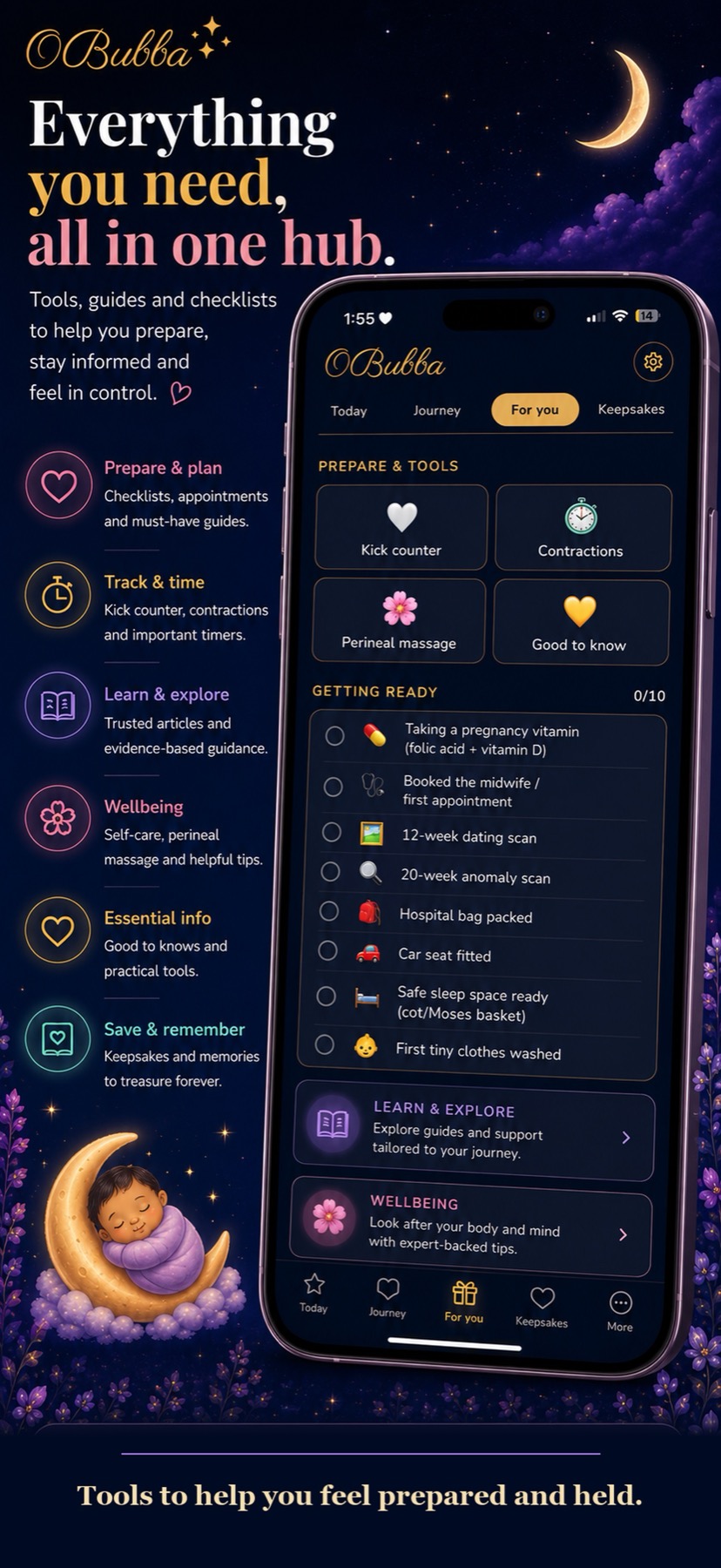
What changes
The expected date becomes an actual date of birth
For a term birth, the pregnancy expected date is no longer the child’s active age anchor. The actual birth date is.
If you confirm that your baby was born early, OBubba can preserve the original expected date in a separate due-date field. That supports corrected-age context rather than treating chronological and developmental age as interchangeable. The app only applies its corrected-age calculation when the birth was at least three weeks early, and it tapers that adjustment as the child approaches two years corrected age.
This is context, not a developmental verdict. Your neonatal, paediatric or health-visiting team remains the right source for individual feeding, growth and development advice.
Pregnancy mode becomes live tracking
Before birth, OBubba deliberately does not issue feed or nap reminders, and it does not calculate infant age guidance for an unborn profile. After the birth switch, the standard tracker becomes available for:
- breast and bottle feeds
- wet, dirty and mixed nappies
- naps, bedtime and night wakes
- medicines and temperature records
- notes, care moments and later solids
That change is not an invitation to document every minute. It simply puts the right tools in reach when the baby exists outside the bump.
Personalisation begins with real newborn data
OBubba does not turn an expected date into a fictional sleep schedule. The live timeline begins from the events your family actually records.
In the first days, that might be just enough to answer:
- When did feeding begin or finish?
- Which side was offered last?
- How much expressed milk or formula was taken?
- When was the last wet or dirty nappy?
- What did the other carer do while I slept?
The app can become more helpful as the timeline grows, but care comes before capture. If a midwife or neonatal team has given you a feeding plan, follow that plan. If you are in hospital or special care, ask what the team wants recorded and avoid duplicating work that adds stress without helping a decision.
What stays private or local
“One profile” should never be translated into “every personal thing is shared”. The current app uses different storage boundaries for different jobs.
| Information | After birth | Sharing boundary | |---|---|---| | Child profile and date of birth | Same child record is updated | Child cloud record | | Pregnancy preparation checklist | Remains with the child | Child cloud record | | Time-capsule letters | Remain with the child | Child cloud record; visible within the joined family context | | Maternal mood check-ins | Continue to support the parent on that phone | Private local storage; not placed in child sync | | Appointments | Remain on the same installation | Local device-wide storage; do not assume another phone has them | | NHS Red Book or eRedbook | Continues separately | NHS/clinical record, not imported into OBubba |
The distinction is especially important for maternal wellbeing. A check-in about mood is not automatically family data merely because it happened during pregnancy. Keeping it out of the child’s shared sync is a privacy choice.
It also means continuity has practical limits. Reinstalling the app or moving phones should not be assumed to restore local mood entries or local appointments. Cloud-backed child information and device-local information are not the same promise.
OBubba is not the Red Book
In England, the Personal Child Health Record records information such as immunisations, growth and reviews. The NHS advises parents to take it to appointments with the GP, baby clinic or hospital. Some areas offer an eRedbook.
OBubba does not replace it.
Think of the two records as doing different work:
- Red Book or eRedbook: the recognised child health record for clinical information and professional reviews
- OBubba: the family’s day-to-day care context—feeds, nappies, sleep, handovers, observations and questions to raise
A concise OBubba timeline may help you remember what has happened before a health-visitor appointment. The professional decides what belongs in the clinical record and how it should be interpreted. Our health-visitor appointment checklist shows how to turn a busy timeline into useful questions without presenting app patterns as a diagnosis.
A calm first-day setup
You do not need to configure the perfect system from a postnatal bed. Use the smallest setup that reduces mental load.
1. Make the birth switch when you are ready
Confirm the date of birth. If your baby arrived early, check the due date carefully. A partner can do this if you are recovering and you are comfortable with them managing the profile.
2. Check the name, but do not let it hold you up
The bump name can carry the profile until you are ready to use the baby’s name. The important thing is avoiding a duplicate profile made in a rush.
3. Log only what helps today’s care
For many newborn families, feeds and nappies are the useful minimum, particularly while feeding is being established. The NHS notes that in the early days feeding frequency and wet and dirty nappies help show how feeding is going; individual circumstances still matter.
Sleep can remain wonderfully irregular. The NHS describes newborn sleep as varying widely, with frequent waking for feeds. A tracker should describe that reality—not shame a baby for lacking a routine.
4. Invite a co-parent for a purpose
Shared tracking is most valuable when it removes a repeated question. Agree on a small rule such as: the person doing the feed or change logs it before the handover. Our newborn night-shift guide gives a low-friction handover pattern.
5. Keep local items visible
If appointments matter to both carers, do not assume adding one on your phone makes it appear on theirs. Put critical clinical appointments in the shared calendar system your family already trusts as well.
When tracking should take a back seat
The first newborn examination is normally offered within 72 hours, and the midwife-to-health-visitor handover happens in the early days. Professional observations and instructions outrank an app pattern.
Get medical advice if you are worried about feeding, nappies, jaundice, temperature, breathing, alertness or anything else about your baby. Do not wait for the timeline to become conclusive. A tracker records what a carer entered; it does not examine the baby or know that an event was missed.
Safe sleep also comes before a complete log. The NHS advises placing a baby on their back in their own clear, flat sleep space, in the same room as a parent or carer for the first six months. Never stay on a sofa or armchair with a baby if you might fall asleep. Record the nap later—or leave it unrecorded.
For a reassuring guide to common but surprising newborn behaviour, read Is this normal? 15 newborn things. It also explains when “common” still deserves professional help.
Why one continuous app is worth keeping
Pregnancy apps often end at the moment family logistics become hardest. Newborn trackers often begin as if nothing happened before the first bottle.
OBubba’s better promise is continuity with boundaries:
- preparation can become care without rebuilding the child
- keepsakes can sit beside practical history without becoming clinical claims
- a partner can see the child timeline without automatically receiving private maternal check-ins
- corrected-age context can respect an early birth without predicting development
- newborn logging can grow into sleep, growth, weaning and shared care as those needs genuinely arrive
You should not need five disconnected apps to remember one child. You should also never have to surrender privacy or mistake app data for medical evidence merely to get a joined-up experience.
The aim is not a perfect record from pregnancy to preschool. It is a calmer thread through changing seasons: enough context for the next carer, the next question and the next stage—without asking a tired family to start from zero each time.
Try OBubba free → — begin in pregnancy, switch the same child into newborn tracking when baby arrives, and keep the care story together through feeds, sleep, growth and weaning.
Sources
- NHS: Your baby's first hours and days
- NHS: Baby health and development reviews
- NHS: Helping your baby to sleep
- NHS: How to tell your baby is getting enough milk
- Evelina London: Your eRedbook
Quick questions
Will I lose my pregnancy letters when I mark baby as born?
No. The current app updates the same child record, and the cloud-backed time-capsule letters remain attached to it.
Does OBubba automatically know my baby was born?
No. You choose Baby has arrived, confirm the birth date and say whether your baby came early. The app does not infer a birth from the due date.
Does every pregnancy item sync to my partner?
No. Child-linked time-capsule letters and preparation history are cloud backed. Maternal mood check-ins are deliberately private and local to the phone. Appointments are local to the installation.
What if my baby was premature?
Enter the actual birth date and confirm the original expected due date when asked. OBubba can use corrected-age context where its rules apply, but your neonatal or paediatric team should guide feeding, growth and development decisions.
Should I track every newborn sleep?
Not necessarily. Log what helps care, a feeding assessment or a handover. Newborn sleep is naturally fragmented and variable. Care, professional instructions and safe sleep come first. Later, you can use our guide to decide when detailed feed, nappy and sleep tracking can ease off.
Is OBubba a replacement for the Red Book?
No. Keep using the Red Book or eRedbook as your child health record and take it to relevant appointments. OBubba is a family care tracker, not an NHS clinical record.
Ready to try OBubba?
Use OBubba to track feeds, sleep, naps, nappies, growth, milestones and family handovers in one calm baby tracker app.