One pregnancy app says 12 weeks. Your maternity letter says 11 weeks and 5 days. A friend asks whether that means you are “in week 12” or “12 weeks pregnant”, and suddenly a small calendar question feels like an exam.
OBubba’s answer is deliberately simple: it uses the estimated due date saved on the bump profile to calculate completed gestational weeks, then opens the matching weekly story.
That story can make the wait feel warmer. It cannot date a pregnancy, measure a baby, replace a scan or predict what your baby will look like.
We traced the current implementation—from the due-date calculation to all 37 week entries and the six storybook baby choices—to explain exactly what the screen knows, what it estimates and why your clinical dates always win.
The short answer
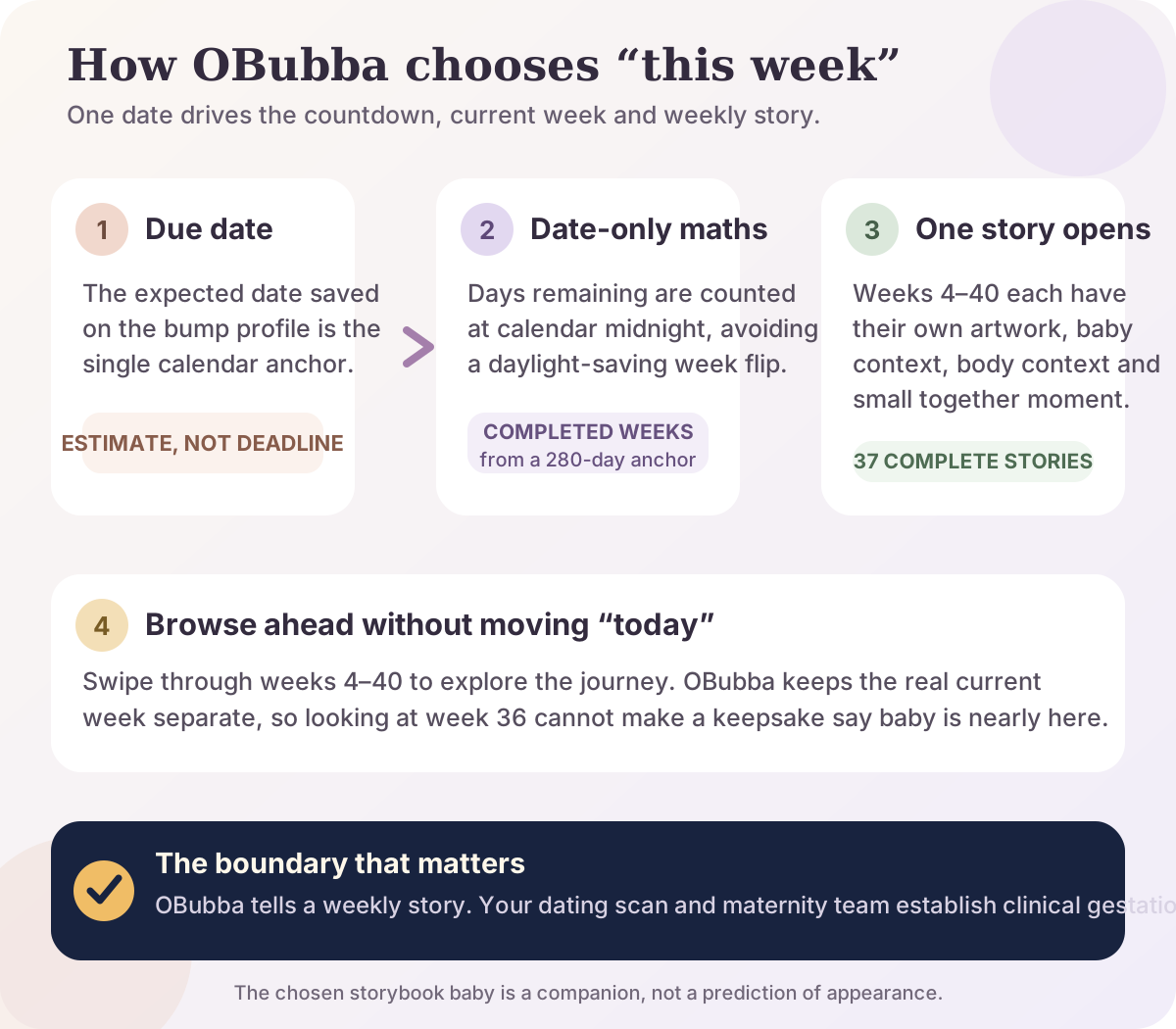
OBubba calculates the pregnancy week like this:
- It reads the estimated due date entered when the bump profile was created.
- It treats that due date as the 40-week, 280-day point.
- It counts calendar days between today and that date.
- It converts elapsed days into completed weeks.
- It opens one of 37 pregnancy stories covering weeks 4 through 40.
You can swipe forward or backwards through the whole journey. Browsing week 36 does not change the real “today” week or make keepsakes behave as though birth is near.
The NHS explains that a due date based on the first day of the last period is an estimate and may be adjusted using measurements at the dating scan. If OBubba and your maternity record disagree, use the date and gestation given by your maternity team for appointments, screening and health decisions.
Why pregnancy weeks sound one week apart
Gestational age is usually spoken in completed weeks plus days. If your maternity notes say 11+5, that means 11 completed weeks and 5 days—not 12 completed weeks.
In ordinary conversation, someone may call that “the twelfth week” because you are five days into the next seven-day block. Both phrases can describe the same point, but they answer slightly different questions.
OBubba’s model uses completed weeks. It divides the elapsed days by seven and rounds down. So 11 weeks and 6 days still opens the week 11 story; the week 12 story opens at 12+0.
That is also why a weekly app can appear one number behind an article that uses “in your twelfth week” language. The difference may be wording rather than a changed pregnancy.
How OBubba works out the number
The app does not attempt to infer conception or read health data. One date drives the pregnancy numbers.
1. Your bump profile stores an expected date
When you create a pregnancy profile, OBubba asks for the due date and stores it as the child’s expected date. The same date feeds the days-remaining count, progress ring and current gestational week, so those surfaces are less likely to contradict one another.
If no usable due date is available, the model has an explicit empty state rather than converting missing data into “due today”.
2. The due date is treated as day 280
The calculation works backwards from the familiar 40-week pregnancy anchor:
> completed gestational weeks = (280 − days remaining) ÷ 7, rounded down
The NHS notes that pregnancy normally lasts from 37 to 42 weeks from the first day of the last period. The estimated due date is therefore a reference point, not a guarantee that labour will begin on that date.
3. Calendar days—not elapsed hours—are compared
OBubba normalises both dates to calendar midnight before counting the difference. That small implementation detail prevents the one-hour clock change in spring or autumn from shaving a day off the calculation and moving the displayed week too early.
Parents should never need to think about that. A pregnancy tracker should simply remain predictable when the clocks change.
4. The weekly story is safely bounded
The calculation itself can defensively represent 0–42 weeks, including an overdue state. The visual journey contains stories for weeks 4–40, so requests outside that range are clamped to the nearest available story rather than causing a blank screen or invalid lookup.
At the due date, the countdown reads any day now rather than pretending “0 days” is a deadline.
What you get each week
The current app has a complete entry for every week from 4 through 40—no filler weeks and no repeated block labelled “more development”. Each weekly contract contains:
- a short theme or “wonder”
- an everyday size comparison and approximate measure
- a gentle description of what may be developing
- context for changes the pregnant parent may notice
- one relatable pregnancy quirk with an explanation
- one small “together” moment, such as a breath, sentence or ritual
Those parts appear within a wider pregnancy home with four areas:
- Today: the current week and its immediate story
- Journey: a browsable path across pregnancy
- For you: practical tools and support for the pregnant parent
- Keepsakes: letters and memories linked to the true current stage
The weekly return is therefore more than a fruit comparison. It connects information, preparation, wellbeing and memory without presenting any of them as a diagnosis.
Is the picture what my baby looks like?
No. It is storybook artwork.
OBubba’s pregnancy journey uses a distinct celestial stage illustration for every week, and the family can also choose one of six hand-painted baby companions. The appearance picker says this directly: the choices are “gentle storybook friends, not predictions”, and the choice can be changed.
That distinction matters for several reasons:
- a phone illustration cannot show an individual fetus
- bodies develop with natural variation
- a size comparison is not a measurement
- skin tone, hair and facial features cannot be predicted from an app character
- an illustration cannot show whether development is healthy
An ultrasound uses sound waves to build an image and is interpreted within maternity care. The NHS says the dating scan estimates the due date using measurements and the mid-pregnancy scan checks for specified physical conditions. A decorative orb on a tracker has none of those functions.
Choose the companion that makes the space feel welcoming. Do not read its details as information about the baby.
What happens when you browse ahead?
Curiosity is allowed. In the current app, the Journey tab can move from week 4 to week 40 and back again.
The important safeguard is that selected browsing week and true current week are separate values.
If you look ahead from week 14 to week 30:
- the journey artwork and story can preview week 30
- the app can offer a route back to this week
- the saved current gestation does not become week 30
- the Keepsakes tab still receives the true week
- looking ahead cannot make late-pregnancy copy appear as current fact elsewhere
The screen even rebuilds on a real week rollover, so if a profile moves into a new gestational week while still viewing “today”, the weekly hero can follow it instead of remaining stuck on last week’s illustration.
That is thoughtful personalization: freedom to explore without corrupting the source of truth.
Why could OBubba differ from my midwife or scan?
The saved due date may be an early estimate
An initial due date is often calculated from the first day of the last menstrual period. The NHS says the dating scan, usually offered around 10–14 weeks, can give a better estimate and may adjust the due date using the baby’s measurements.
OBubba only knows the expected date stored on the profile. It does not receive scan measurements or maternity notes.
The app shows completed weeks
As described above, 19+6 remains 19 completed weeks. Another source may describe the same day as being “in week 20”.
The date on one record may have changed
Your appointment letter, maternity notes and an app profile can hold dates entered at different times. Use the maternity team’s current estimated due date for clinical timing. A tracker is not the place to resolve a dating discrepancy.
Time zones should not change the calendar week—but the stored date still matters
The app’s date-only calculation protects against daylight-saving drift. It cannot protect against an incorrect due date entered at setup.
If the discrepancy affects screening dates, appointments or a concern about movement, symptoms or labour, contact the maternity team rather than waiting for an app screen to line up.
A useful five-minute weekly ritual
The best pregnancy app habit should leave you calmer, not make you monitor the pregnancy all day.
Once a week:
- Notice the week and countdown. Treat both as orientation, not a deadline.
- Read the baby and body context. Remember the language describes what may be typical, not what must be happening today.
- Choose one useful action. That might be checking the next appointment, writing down a question or reading an NHS page relevant to the stage.
- Keep one small memory. Add a sentence to a letter or note one moment from the week.
- Leave the app. Pregnancy does not need constant digital observation.
If a weekly story increases anxiety, skip it. Use the practical tools only, speak to someone you trust or read our guide to pregnancy anxiety and when worry needs support.
What the weekly story should never delay
A warm illustration is not reassurance about a symptom.
Contact your midwife, maternity unit or the service named in your notes when you are concerned. Follow the personalised advice you have been given. In an emergency, call 999.
In particular, do not use a normal-looking weekly card to explain away bleeding, severe pain, feeling very unwell, possible labour or a change in your baby’s movements. The app cannot observe you or the baby. Our baby movements guide explains why contacting maternity services promptly matters more than completing a kick-count target.
Keep your maternity notes available as advised by the NHS. They—not a pregnancy app—contain the clinical record professionals need.
Why this belongs in the same app as newborn tracking
Weekly pregnancy content is often designed to maximise curiosity and then disappear at birth. OBubba’s stronger idea is that the story has somewhere useful to go.
The same child profile can hold the bump name, expected date, chosen companion, preparation checklist and time-capsule letters. When baby arrives, that profile can become the live feed, nappy and sleep tracker rather than asking a recovering family to create a stranger called “Baby 2”. Our guide to OBubba’s pregnancy-to-newborn transition shows exactly what carries forward and what stays private.
That continuity is the reason to return each week: not to collect increasingly urgent notifications, but to build one calm thread from anticipation into real care.
OBubba is not claiming to know your pregnancy from a date. It uses one date to open the right chapter, labels the artwork as imagination and leaves medical dating where it belongs.
Try OBubba free → — follow all 37 weekly pregnancy stories, choose a storybook companion and carry the same child profile into newborn feeds, nappies and sleep when baby arrives.
Sources
- NHS: Week-by-week guide to pregnancy
- NHS: Pregnancy due date calculator
- NHS: Ultrasound scans in pregnancy
- NHS: 12-week dating scan
- NHS: Your antenatal care and appointments
Quick questions
Does OBubba calculate pregnancy from the last period?
Not directly. The current app calculates backwards from the expected due date stored on the bump profile. That due date may originally have been estimated from the last period or later refined through maternity care.
Why does the app show 19 weeks when I feel 20 weeks pregnant?
OBubba displays completed weeks. At 19 weeks and 6 days, 19 full weeks have passed and you are in the twentieth week. Check whether the other source uses “in week 20” language before assuming the dates conflict.
Can the app tell whether my baby is the stated size?
No. The size line is a general weekly comparison, not an individual measurement. Only appropriate clinical assessment can provide information about your pregnancy and baby.
Can I look at future weeks without changing my pregnancy stage?
Yes. The Journey tab lets you browse weeks 4–40 while the current week remains separate for the countdown and keepsakes.
Does the chosen storybook baby predict skin tone or hair?
No. It is one of six changeable hand-painted companions. The picker explicitly describes the characters as storybook friends, not predictions.
Which date should I trust if OBubba and my scan disagree?
Use the estimated due date and gestation given by your maternity team for clinical care, screening and appointments. OBubba only reflects the expected date held on its profile.
Ready to try OBubba?
Use OBubba to track feeds, sleep, naps, nappies, growth, milestones and family handovers in one calm baby tracker app.