Your current phone holds a year that nobody else can see: the first 3am feed, the week sleep finally stretched, every new food, the medicine log from a frightening night, a growth curve and the note you wrote when your baby first waved.
Then the phone breaks—or it is simply time to upgrade.
If you use OBubba without protecting the family archive, do not assume a different phone can reconstruct everything. The current app has a dedicated Protect your memories flow that adopts every baby currently on the device into one restorable family record. On a new phone, you can sign in with the username and PIN or use the separate 12-character recovery code.
The protection is designed to preserve existing history, not replace it with an empty account. But it still depends on completing the protection while the old data is accessible and keeping at least one recovery route safe.
The five-minute step to take before changing phones
On the phone that currently contains the family history:
- Open Account.
- Open the Memory Garden / backup area and choose Protect your data.
- Choose a private username and four-digit PIN.
- Add a recovery email if you want an additional route; it is optional.
- Finish the flow and save the BK recovery code somewhere you can reach without that phone.
The current screen describes the journey simply: This phone → Protected → New phone.
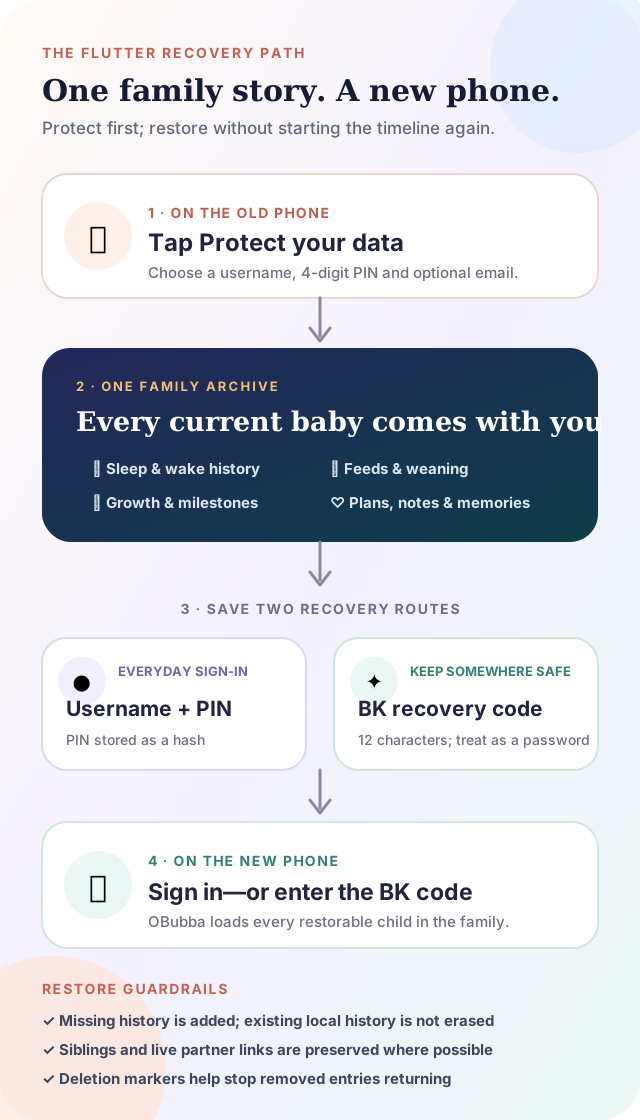
Do this before trading the phone in, deleting the app or wiping the device. A recovery plan created after the only accessible copy is gone is not a recovery plan.
What “every baby” means in the app
The protection screen does not read only the currently selected child.
It walks through the whole local child roster and builds one family archive containing every readable baby record. If two children happen to carry the same internal family identifier after an import or duplication, the create path disambiguates them instead of allowing one to overwrite the other.
That distinction matters for twins, siblings and parents who started tracking a second child without creating a new account. Switching the active baby before tapping Protect should not decide which child survives.
The archive can carry much more than the headline sleep timeline:
- sleep, wakes, naps and the context saved with them
- milk feeds, pumping and solids history
- allergens, reactions and weaning progress
- growth measurements and milestones
- routines, plans and learned preferences
- teething, medicines and care notes
- memories and time-capsule content
It is a family continuity system, not merely a screenshot of this week's dashboard.
Does creating an account reset the baby?
No. The current flow is explicitly an adoption of the babies already on the phone.
If the family record already exists—for example, another device or partner holds events that this phone has not loaded—the merge is additive. The tested merge preserves the cloud-only entry and the local-only entry instead of replacing one side with the other.
For example:
| Before protection | After the family merge | |---|---| | Partner's 6am feed exists in the family archive | 6am feed remains | | This phone has an 8am feed the archive lacks | 8am feed is added | | A second child exists only in the family archive | That sibling remains | | An entry has a recorded deletion marker | The deleted entry stays excluded |
That is stronger than “last write wins”. A backup operation should not punish the family member whose phone happened to be a few minutes behind.
Username and PIN: the normal sign-in route
The protection form asks for a username and four numbers. Email is not required.
The repository does not store the PIN itself in the account document. It derives a salted PBKDF2-HMAC-SHA256 hash using 120,000 iterations and verifies future sign-ins against that hash. Older account hashes can be accepted and upgraded.
This is a meaningful safeguard, but a four-digit PIN still has only 10,000 possible combinations. Choose one that is not the baby's birthday, `0000`, `1234` or a number shared with your phone unlock. Do not send it in a family group chat.
If you add a recovery email, the current path normalises it and stores a recovery lookup and verification hash rather than the plain address in the account record. Adding the email is best-effort: a temporary failure must not undo an account that has already been created. That is another reason to save the separate recovery code even when an email was supplied.
The BK recovery code is not a partner invitation
After successful protection, OBubba shows a code beginning BK followed by ten characters. The alphabet avoids easily confused characters such as I, O, 0 and 1.
Treat this code like an account password. Anyone who obtains a working family recovery credential may be able to restore a broad family record.
It has a different job from the baby sync code:
| Code | Current shape | Purpose | |---|---|---| | Family recovery code | `BK` + 10 characters; 12 total | Restore the account owner's family archive on another phone | | Baby sync code | 6–8 characters | Connect another carer to one baby's live shared record |
An eight-character sync code can coincidentally begin with “BK”. The validator does not misclassify it as a recovery code unless it has the full 12-character recovery shape.
For partner setup, use the child's Family sharing invitation. For your own new phone or emergency recovery, use the account sign-in or family BK code. The full shared-care distinction is explained in how to share a baby tracker without duplicate logs.
What happens on the new phone
There are two practical routes.
Sign in with username and PIN
Use the returning-account sign-in. A successful account load retrieves the family roster and then restores or rejoins each child.
Enter the BK code
From the welcome/connect path, enter the 12-character family recovery code. The code classifier sends it to the family-archive restore rather than the one-baby partner join.
The loader handles each child separately. A temporary failure restoring one sibling should not discard the siblings that loaded correctly; the failed child remains eligible to retry on a later sign-in.
An internet connection is required to reach the family archive. If the phone is offline or the backend cannot be reached, a failed attempt does not prove the archive is empty. Restore again when the connection is stable.
How shared care survives the phone move
A naïve restore could create a new copy of the baby and leave the partner logging into the old one. Both phones would look healthy while the family history quietly split in two.
OBubba's current account archive stores a per-child link to the live partner-sync record. During restore it first tries to rejoin that existing record. If the saved sync code is permanently inactive, it can create a newly anchored record and update the account mapping. If joining fails only temporarily—because the phone is offline, for example—the loader avoids creating a competing fork and lets a later login retry.
That is why the article promise is preserves shared care where the recovery evidence allows, not “a backup file is copied somewhere”. The aim is to bring the parent back into the same living timeline.
Recovery adds missing history instead of erasing local history
The additive recovery path answers an awkward real-life case: you install OBubba on a new phone, enter a few events, then remember the old family recovery code.
When a matching child already exists, OBubba can pull in items held by the archive without deleting the new phone's local additions. Tested merge coverage includes whole missing days, individual entries, growth fields, pregnancy-preparation ticks, teething records, plan/profile fields and time-capsule content.
The same recovery system also reads deletion markers. That prevents an old archive copy of a removed feed, day or growth measurement from reappearing as live data merely because the restore is additive.
No merge engine can infer every human intention. After a major restore, spot-check:
- the child roster
- one early historical day
- the latest sleep and feed entries
- growth and milestone records
- the partner's ability to see a new test entry
Do not create a fake medicine dose or allergen exposure as the test. Use a harmless note and delete it after both phones agree.
The genuine Account surface
The current Account screen makes the backup state visible beside the family rather than burying it in a technical settings list.
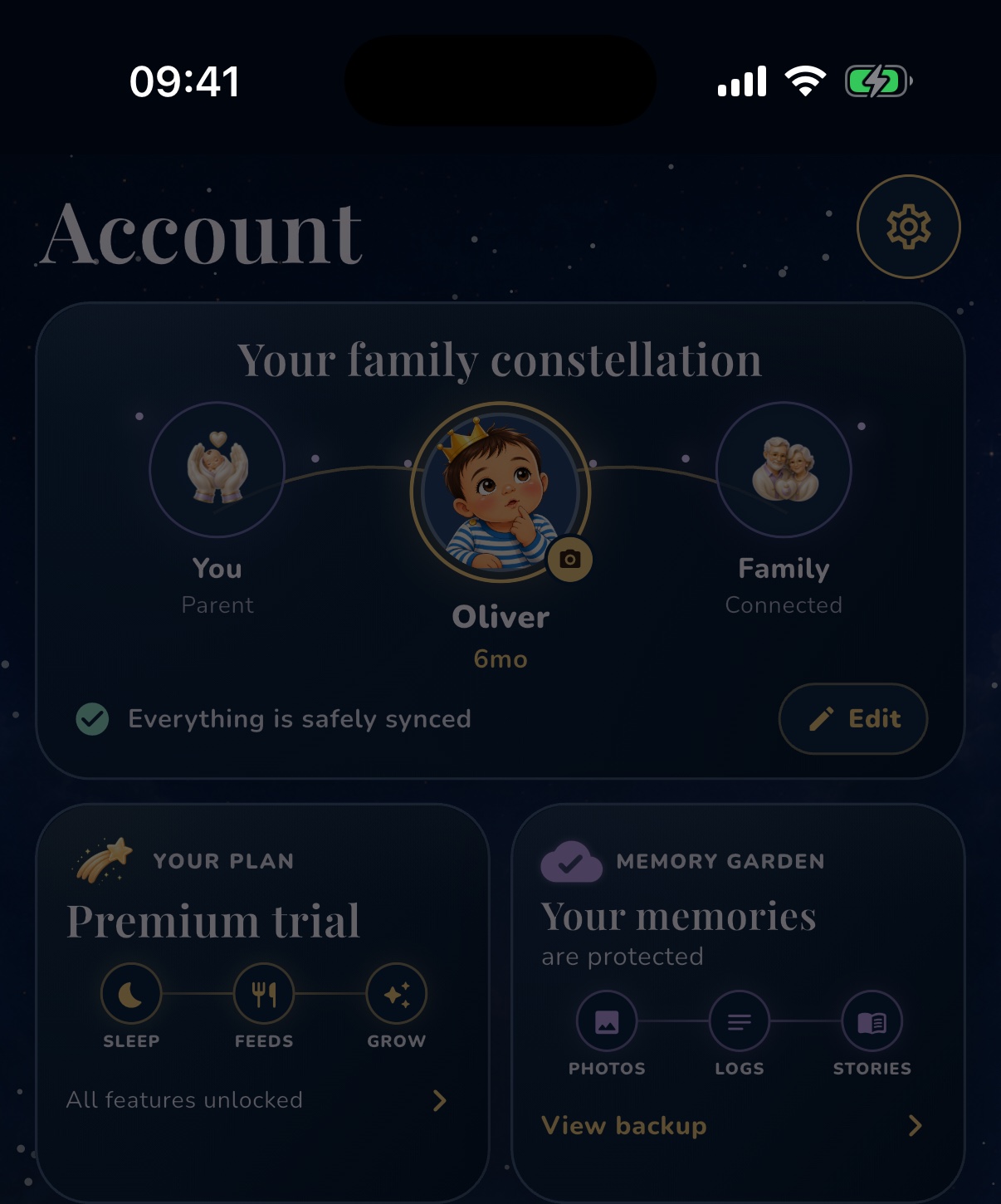
The Memory Garden card says whether memories are protected and provides the route to view the recovery information. That visibility matters because backup is not useful if a parent only discovers it after losing the phone.
What protection does not promise
OBubba should not imply that any digital archive is magic.
Protecting your memories does not mean:
- an unprotected, already-lost local-only phone can definitely be recovered
- a restore can run with no internet access
- every interrupted network operation completed successfully
- the recovery code is safe to post or share casually
- signing out is the same as deleting the family archive
- backup replaces a CSV export you may want for your own independent records
If a complete independent archive matters to you, also export your data periodically and store it somewhere private. The guide to switching baby tracker apps without losing history explains the separate CSV path.
A calm phone-change checklist
Before wiping the old phone
- confirm Account says the memories are protected
- save the username somewhere private
- confirm you know the four-digit PIN
- copy the BK recovery code to a password manager or another secure place
- check that every baby appears in the family roster
- allow current logs time to sync on a stable connection
- make an independent export if you want one
On the new phone
- sign in rather than creating a second family
- use the BK code only for family recovery, not partner invitation
- wait for every child to appear
- compare one old day and the latest day
- test live sharing with a harmless note
- keep the old phone intact until the check is complete
The final step is the quietest and most valuable: do not erase the known-good phone until the new one has shown you the history.
Try OBubba free → — keep sleep, feeds, weaning, growth and little family memories in one restorable story instead of starting again every time the hardware changes.
Quick answers
Will OBubba automatically back up a local-only family?
Do not rely on that. Open Account and complete Protect your data while the current phone and history are accessible.
Does protection include all my children?
The current create path walks every readable child in the roster, not only the active baby.
Will creating an account erase my existing logs?
It is designed to adopt and merge the existing children. Tests protect local-only entries, family-only entries and siblings from overwrite.
Can I restore using only the BK code?
Yes. The welcome/connect flow recognises a 12-character BK recovery code and loads the family archive, including multiple children where present.
Can I give the BK code to my partner?
Do not use it as a casual invitation. Send the baby's 6–8-character Family Sharing sync code instead. The BK code restores broader family data.
Does restore preserve partner live sync?
The loader tries to rejoin each child's stored live record and avoids creating a fork on a merely temporary join failure. Check both phones after recovery.
Is my four-digit PIN stored as plain text?
The current account repository stores a salted PBKDF2 hash, not the PIN itself. Still choose a unique PIN and protect the recovery code.
What if I already lost the phone without protecting the data?
Try any username, recovery email or BK code you previously saved and contact OBubba support with the details you still have. Recovery cannot be guaranteed when the only accessible copy was local and no recovery route was created.
Ready to try OBubba?
Use OBubba to track feeds, sleep, naps, nappies, growth, milestones and family handovers in one calm baby tracker app.