The appointment is in the family calendar. The address is in a text from three weeks ago. The question you wanted to ask is in your Notes app. The instruction to bring the Red Book is living only in your head—and the reminder to pack milk will arrive, if it arrives at all, while you are trying to leave.
This is why baby admin feels heavier than the number of appointments suggests. One event creates several different jobs.
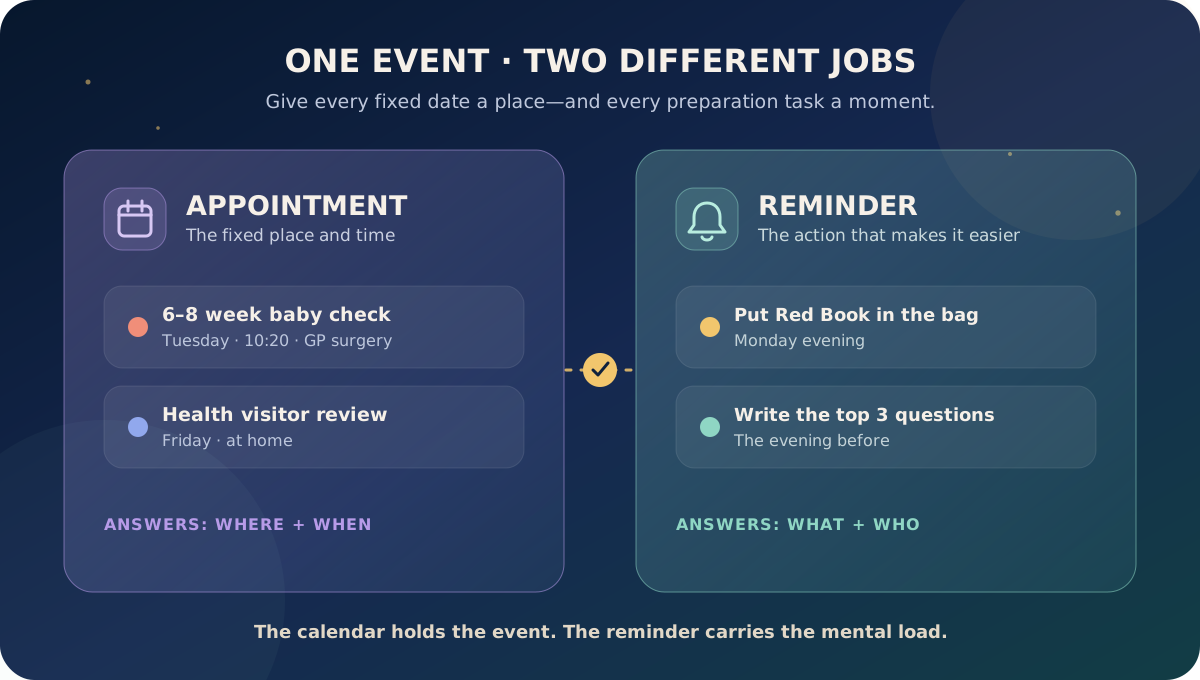
Use two lanes: appointments for places you must be, and reminders for actions you must take. Put the confirmed date, time and location in the appointment. Then add one or two timed prompts for the preparation that cannot wait until the event starts. Keep the clinical invitation or official record as the source of truth.
The two-lane baby calendar
| Put it in Appointments | Put it in Reminders | |---|---| | “6–8 week baby check, Tuesday at 10:20” | “Put Red Book and question list in changing bag, Monday evening” | | “Vaccination appointment, 14:00” | “Pack comfort item and feeding supplies, 13:00” | | “Hearing follow-up, clinic, 09:30” | “Leave home by 08:45” | | “Health visitor review, home, Friday” | “Complete questionnaire, Wednesday after dinner” | | “Weaning allergy review, video call” | “Photograph ingredient labels and write the reaction timeline” |
An appointment answers where and when. A reminder answers what needs doing. If you squeeze both into a single calendar event, the useful action is often hidden until the moment the appointment begins.
Why one event creates so much mental load
“Baby clinic at 11” sounds like one task. In practice, somebody may need to:
- find the invitation and confirm the location
- check whether the appointment is at home, a GP surgery or a clinic
- keep the Red Book easy to find
- note medicine names, symptoms or feeding changes
- complete a questionnaire
- pack nappies, a feed and a change of clothes
- plan travel around a nap without treating the nap plan as a safety rule
- tell a partner or carer what is happening
- remember the questions that matter once the conversation starts
That work usually sits with the person who first saw the message. A family calendar can show the event to everybody and still leave one person carrying all the preparation.
The fix is not a longer event description. It is assigning each job a moment.
A five-minute setup that actually helps
1. Save the confirmed appointment first
Record the title, date, time and location exactly as supplied. Add the year if the appointment is far ahead. Copy any clinic phone number or booking reference into the note.
Avoid guessing a future date from a general age schedule. Invitations, local arrangements and individual clinical plans vary. If the official message changes, update the event rather than keeping two competing versions.
2. Choose the alert for leaving, not merely remembering
An alert that says “appointment now” is too late if the clinic is 25 minutes away. Work backwards from the real departure time and allow for getting the baby dressed, feeding if needed and finding parking or the correct entrance.
For a routine local visit, one alert might be enough. For an unfamiliar hospital or an appointment that needs preparation, use an earlier reminder as well.
3. Add one preparation reminder
Put this at the point when the action can realistically happen:
- the evening before: place the Red Book and paperwork in the bag
- two days before: complete an Ages and Stages Questionnaire if one was sent
- the morning of: pack feeding supplies or a comfort item
- after the event: collect a prescription or book a follow-up, if instructed
“Prepare for appointment” is vague. “Put Red Book and three questions in changing bag” is finishable.
4. Give the event one owner
A shared event is not the same as shared responsibility. Put a name or initials beside the action when it is not obvious:
- Sam: drive and parking
- Jo: Red Book and question list
- both: attend if possible
The NHS says it can be helpful, where possible, for both parents to attend health and development reviews so both have a chance to ask questions and raise concerns. If only one person can go, agree on the questions before they leave.
5. Close the loop afterwards
Before the day dissolves, record only what needs to survive:
- the next appointment date
- an agreed follow-up action
- a medicine instruction exactly as given by the clinician
- something the family should monitor
- where the written plan has been stored
Do not rely on a paraphrased family-calendar note as a medical record. Keep official letters, the Red Book and professional instructions in their proper place.
Which baby dates belong on the calendar?
Start with dates you have actually been offered or booked. For families in England, early care can include newborn screening, a new-baby review, a 6–8 week physical examination, vaccinations and later health and development reviews. The exact route and location can differ.
The NHS says the newborn blood spot test is normally done when a baby is 5 days old. The newborn physical examination is normally offered within 72 hours and again at 6–8 weeks. A hearing test may happen before discharge or in the first few weeks. Health visitor reviews are usually offered at 10–14 days, 6–8 weeks, 9–12 months and 2–2½ years, with local variation.
The vaccination schedule can change. The UK routine childhood immunisation schedule changed from January 2026, including a new 18-month appointment for eligible children and the use of MMRV in the routine programme. Use the current NHS or UKHSA schedule and the invitation from your GP surgery—not an old screenshot, a previous child's dates or a static list copied months ago.
Useful calendar categories include:
- newborn screening or follow-up appointments
- health visitor and development reviews
- GP or paediatric appointments
- vaccinations
- feeding, allergy or dietetic reviews
- hearing, vision, physiotherapy or other specialist appointments
- dental visits once relevant
- nursery settling sessions
- a booked sleep-consultant session
- parent postnatal appointments that affect the family's care plan
That last category matters. Baby admin should not erase the parent receiving care.
What should stay out of a generic reminder?
A reminder is a memory aid, not a clinical decision engine.
Do not use a generic alert to invent:
- a medicine dose
- a minimum gap between doses
- a feeding target
- a date for introducing an allergen after a reaction
- a deadline for a baby to reach a milestone
- a reason to wait when a baby seems unwell
If a clinician has given an individual instruction, keep the exact wording and source with the relevant record. A reminder can prompt the agreed action; it should not reinterpret it.
For medicines, record the name, strength, dose and time exactly as instructed, and use the medicine's label and professional advice as the authority. An alarm saying “medicine” without the correct context can be worse than unhelpful, especially when more than one adult is caring for the baby.
Use preparation reminders, not anxiety reminders
Good reminders reduce future work. Poor reminders simply move worry to a new time.
Compare:
| Anxiety reminder | Action reminder | |---|---| | “Don't forget baby appointment” | “Put Red Book in changing bag” | | “Ask about feeding” | “Write when shorter feeds began + bring three-day summary” | | “Vaccines tomorrow!!!” | “Check invitation, pack comfort item, leave at 13:20” | | “Weaning concern” | “Save ingredient photo and reaction timeline for clinician” | | “Baby not sleeping” | “Bring seven-day sleep summary; circle the two questions” |
The action version tells a tired brain how to finish the job.
How OBubba's actual app handles this
Open Care → Reminders & appointments. The current app deliberately separates Reminder and Appointment rather than placing every baby task in one undifferentiated list.
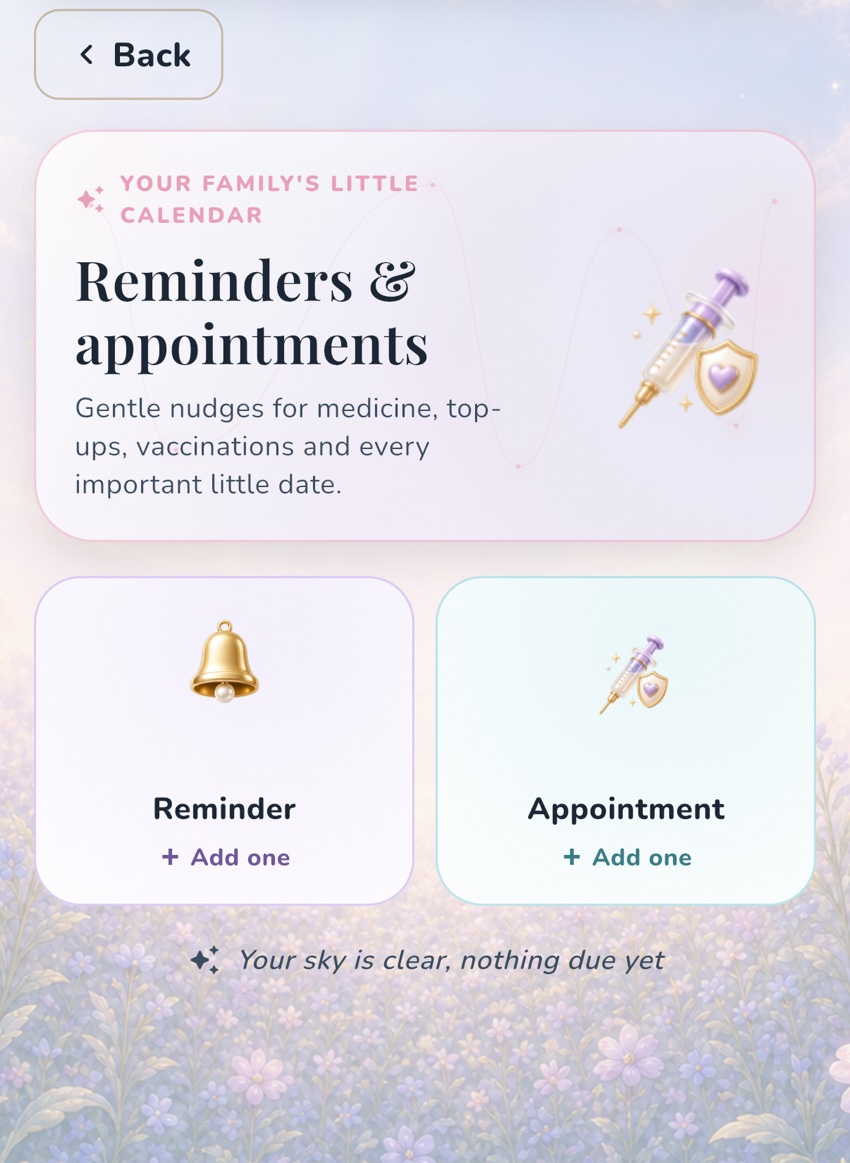
Both types take a title, date, time, optional note and a chosen alert. The available alert choices run from At the time through 15 minutes, 30 minutes, 1 hour, 2 hours and 1 day beforehand. A new reminder defaults to the near future; a new appointment defaults to the following day, helping avoid accidentally creating a notification in the past.
For booked appointments, OBubba can open the phone's native add-event screen. It creates a 30-minute calendar block and carries over the alert lead the parent chose. If native calendar access is unavailable, the app falls back to sharing an `.ics` calendar event. Families can also share all saved appointments as one `.ics` calendar.
That detail matters: an exported appointment should not lose the “1 day before” alert that made it useful. The app's iCalendar output includes that selected alarm, including an alert set for the event start.
The date picker supports booking up to 730 days ahead, so a future 18-month review can show its year rather than looking identical to an already-passed date.
The current implementation stores this appointments list on the device. Treat calendar export as a practical way to place booked events in the family calendar people already share. Do not assume that saving an appointment in one parent's app automatically assigns the job to another person.
This feature is separate from OBubba's adaptive sleep and logging nudges in Preferences. A booked vaccination is a family-created appointment. A reminder to complete a one-off task is a family-created reminder. A predictive bedtime or logging nudge is an app preference. Keeping those concepts separate makes it easier to turn off general nudges without deleting genuinely important dates.
Try OBubba free → — keep baby appointments, preparation prompts, tracking and care handovers together without turning family life into a spreadsheet.
A calm setup for common situations
The 6–8 week check
Create the booked appointment from the actual invitation. Add a reminder the evening before to put the Red Book in the bag and write the top three questions. If feeding or nappies have changed, bring a short factual summary rather than printing every log.
Vaccination day
Save the confirmed appointment and travel time. Add a leaving alert early enough for feeding and travel. Bring the Red Book if requested. After the appointment, follow the advice you were given and record any follow-up date immediately.
Do not copy the dates from an older sibling's calendar. The UK schedule changed in 2026, and eligibility can depend on date of birth and individual circumstances.
A weaning or allergy appointment
Keep the event note concise. Use a separate preparation reminder to gather the food name, ingredient label, amount offered, timing, symptoms and any photos. If a baby has breathing difficulty, becomes floppy or has another severe reaction, seek emergency help; do not wait for a calendar event.
A sleep consultation
Save the session as the fixed appointment. Three to seven days beforehand, prompt yourself to keep logging normally. The night before, export or review the useful summary and choose the two problems you want help solving. Do not begin changing bedtime, naps and feeds all at once merely to create “better” data.
Nursery settling
Use an appointment for each confirmed settling session. Use one reminder for what the nursery specifically asked you to bring. Keep allergy, medicine, feeding and safe-sleep instructions in the nursery's official process, not only inside a general calendar note.
The minimum system for an exhausted week
If even this feels like too much, use three rules:
- Save every confirmed baby appointment in one family calendar.
- Add one preparation reminder only when something must happen before you leave.
- After the appointment, capture the next date and one agreed action.
That is enough. You do not need a colour code for every category or a perfect archive of every phone call.
Quick answers
Should I add routine dates before I receive an invitation?
You can add a tentative planning note, but label it clearly and replace it with the confirmed appointment. Local timing and individual plans vary, and national schedules can change.
Is the Red Book still needed if everything is in an app?
Yes. The NHS advises taking the Personal Child Health Record, usually called the Red Book, to baby clinic and GP visits. It holds professionally recorded growth, vaccinations and other important information. An app can support preparation; it does not replace that record.
Should both parents receive every reminder?
Only if both need it. Share the appointment broadly, then direct the preparation task to the person doing it. Too many duplicate alerts teach everybody to ignore them.
What if I miss an appointment?
Contact the service using the details on the invitation or official message. Do not guess whether it can wait or create a replacement clinical date yourself.
Can OBubba tell me which vaccinations my baby needs?
OBubba can help store a booked appointment and alert, but the current NHS/UKHSA schedule, your GP surgery and your baby's clinical team determine what is offered. Eligibility may depend on age, date of birth, health and previous vaccinations.
Is a reminder enough for medicine?
No. It can prompt an already-agreed action, but the label, prescribed directions and professional advice remain authoritative. Use a proper medicine log when more than one carer is involved.
Related guides
- What to take to a health visitor appointment
- Baby vaccination appointment checklist
- How to plan baby naps around an appointment
- How to prevent double-dosing between carers
- Baby care handover template
Sources and further reading
- NHS: Your baby's health and development reviews
- NHS: Newborn screening
- NHS: Newborn blood spot test
- NHS: Newborn physical examination
- UKHSA: Routine childhood immunisation schedule
- UKHSA: Complete routine immunisation schedule from 1 January 2026
This UK-oriented article is general organisation guidance, not medical advice. Appointment arrangements differ across the UK and by individual clinical plan. Use official invitations, the Red Book and advice from your midwife, health visitor, GP, pharmacist or specialist team. Seek urgent or emergency help when your baby is unwell rather than waiting for a reminder or routine appointment.
Ready to try OBubba?
Use OBubba to track feeds, sleep, naps, nappies, growth, milestones and family handovers in one calm baby tracker app.