Nursery pickup is at 3pm. The school run does not move. A medical appointment cannot wait for the perfect wake window. Sometimes a family needs the nap clock to fit real life—and sometimes the wisest plan is to leave room for the baby to surprise everyone.
OBubba’s current app offers both ideas in Track → Plan → Schedule → Adjust. Choose a nap count, set each start time, then pick:
- Follow exactly
- Use as a target
That sounds simple. The implementation is more nuanced, and one part of the wording currently promises more than the code delivers.
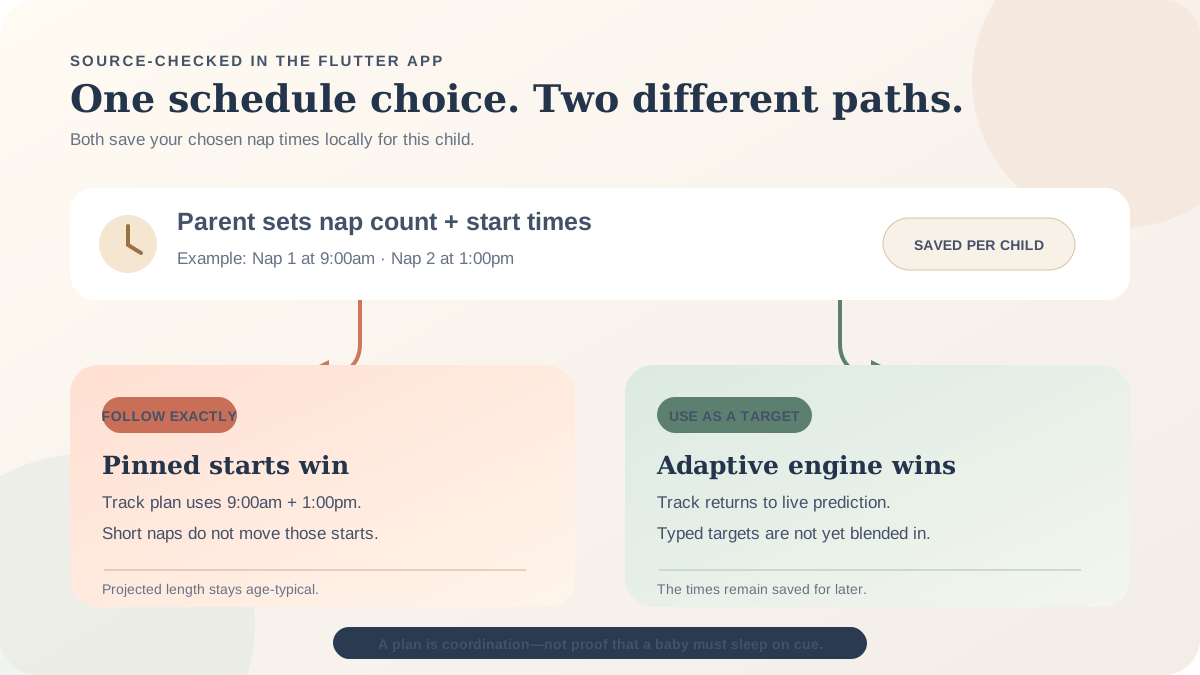
“Follow exactly” genuinely pins the projected nap starts in the Track clock and day plan. “Use as a target” currently saves the times but does not directly pull the predictor towards them; it leaves OBubba’s adaptive engine in control.
That distinction matters if you are deciding whether the app can organise a fixed childcare day, support a flexible home day, or replace your judgement. Here is the source-checked version.
> Use exact mode when the family needs the app’s displayed plan to follow chosen start times. Use target mode when you want the adaptive prediction—but do not yet assume the times you typed are actively steering it.
The 30-second answer
| Question | Current behaviour | |---|---| | Can I choose exact nap starts? | Yes. Select 1–6 naps, set a time for each and choose Follow exactly. | | What changes on screen? | The remaining predicted naps in the Track plan use those starts; the clock and readiness fallback use the same projected schedule. | | How long is each exact nap? | OBubba uses the midpoint of its age-typical nap-length range, not a duration chosen by the parent. | | Does it move a nap because the previous one was short? | Not in exact mode. The pinned start wins. | | What does target mode do? | It falls back to the adaptive predictor. The entered targets are persisted, but the current predictor does not read them as an explicit pull. | | Do the times expire tomorrow? | No. Pinned nap times and nap count carry forward until reset, including when Just today was selected. | | Is the schedule shared to a partner’s phone? | Not currently. It is stored locally in phone preferences, scoped to the selected child. | | Does this set every reminder and widget? | The reviewed code proves the Track clock, day plan and readiness fallback. It does not prove the same pinned times drive every notification or external widget. |
Where to find the controls
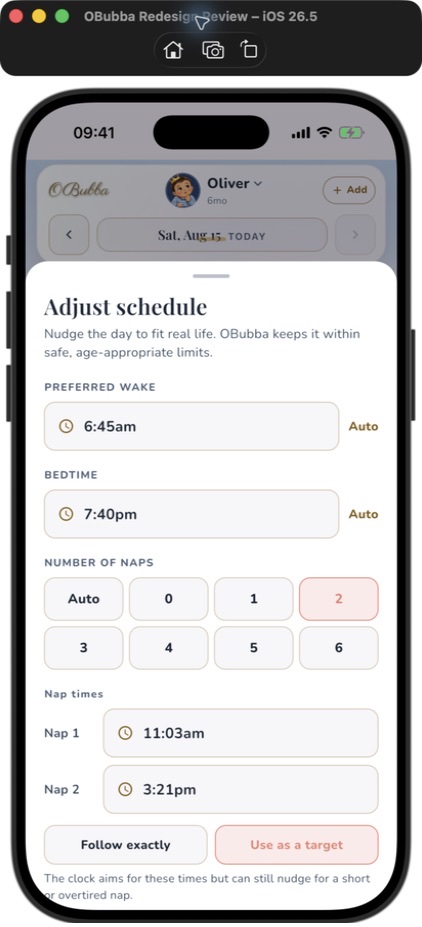
Open Track, switch the chapter selector to Plan, then find the Schedule block and tap Adjust.
The sheet begins with preferred wake and bedtime, then offers nap counts from Auto and 0 through 6. Choosing one or more naps reveals a time row for each position. OBubba seeds those rows by spacing them evenly between the current wake and bedtime, so the controls do not open as blank boxes. You can then change every time.
The nap pickers accept starts from 5:30am to 7:30pm. If a chosen time falls outside that range, the app clamps it and shows an explanatory note. The final list is sorted before saving, which means an earlier time becomes Nap 1 even if it was edited from the Nap 2 row.
What “Follow exactly” means in the code
When exact mode is on and saved nap times exist, OBubba’s Track screen bypasses its normal nap-start calculation for the projected schedule. It returns the parent’s times verbatim.
Suppose the saved starts are:
- Nap 1 — 9:00am
- Nap 2 — 1:00pm
Before any nap is logged, the projected schedule contains both. After one nap has been logged, it takes the next position and shows the 1:00pm nap. It does not search for the next clock time after “now”; it advances by the number of naps already taken.
That produces two useful behaviours:
- a fixed schedule remains fixed after a short first nap;
- a missed unlogged nap can become overdue rather than silently disappearing.
It also creates a limit. If the family skips Nap 1 but forgets to record that decision, the app still treats the first pinned position as pending. The schedule knows the log, not the unrecorded intention.
Exact start does not mean exact finish
The parent currently chooses start times only. For each projected exact nap, OBubba adds the midpoint of the age profile’s usual nap-duration range.
That is a display estimate, not an instruction to wake the baby at the calculated end. The actual log replaces the projection as the day happens. There is no custom duration picker in this sheet.
Exact mode does not rewrite the past
The sheet counts a logged morning wake and completed naps. If Just today is selected after those events, it warns that earlier events cannot be undone and only what remains can be steered.
That is a thoughtful guardrail. Editing a plan should not pretend a completed nap occurred at a different time.
What “Use as a target” currently means
The sheet says:
“The clock aims for these times but can still nudge for a short or overtired nap.”
The storage layer saves the chosen times and an `exact = false` flag. But in the reviewed Track scheduling path, the times are only read when exact mode is true. With target mode selected, the code falls through to the existing adaptive predictor.
That predictor can still be valuable. It considers the current day, age-based wake-window context and the baby’s learned rhythm where the relevant entitlement and history exist. It simulates each projected nap, then predicts the next one from the resulting day. Completed logs replace projections.
What it does not currently do is calculate something like:
`70% live prediction + 30% parent target`
Nor does it enforce a tolerance around the target. A typed 1:00pm target is stored, but this path does not directly use 1:00pm to move a 12:35pm prediction.
So the honest reading is:
- Follow exactly: use the entered nap starts in the Track projection.
- Use as a target: keep the entered schedule saved, but let the adaptive engine set today’s projection.
Families whose logged routine already resembles the chosen targets may see the predictor hover nearby. That alignment comes from the observed routine, not necessarily from the newly typed target.
Which mode fits which kind of day?
Choose Follow exactly when structure is the point
Exact mode can be useful when:
- nursery has fixed rest periods;
- a sibling’s school run constrains the middle of the day;
- a car journey or appointment has one workable nap opportunity;
- two carers need one clear proposed plan;
- the family is testing a consistent schedule with professional guidance.
The benefit is coordination. Everybody sees the same proposed starts in the Track plan instead of reverse-engineering an adaptive window.
The cost is that the projected starts do not automatically respond to a 22-minute catnap, an unusually early wake or a visibly exhausted baby. Exact mode is a parent instruction to the app, not evidence that the time is biologically right.
Choose Use as a target when the baby’s day needs room
Target mode is the better current choice when:
- wake time varies;
- nap lengths are unpredictable;
- the baby is teething, unwell, travelling or in a transition;
- the parent wants OBubba’s live predictor to retain control;
- the entered schedule is more aspiration than commitment.
However, because the current target values do not explicitly bias this path, target mode should be labelled more plainly—perhaps “Keep predicting adaptively”—until the blend exists.
The NHS guide to baby sleep patterns notes that every baby is different and sleep patterns change as babies grow. Its baby sleep guidance also says growth spurts, teething and illness can affect sleep. A planning tool can reduce mental load; it cannot make a changing day hold still.
The persistence surprise: “Just today” is not just today for naps
OBubba offers three rollout choices:
- Just today — a one-off tweak
- Gradually — ease wake and bedtime over three days
- Every day — make the new normal
That wording accurately describes wake and bedtime. Nap count and custom nap times deliberately behave differently.
The source treats both as structural choices: “this baby is on two naps” or “we nap at 9:30 and 1:30”. They carry forward from the day they are set until the parent taps Reset schedule, even when Just today was selected.
There is a product rationale: silently returning to an age-default nap count tomorrow would make the app feel broken. But the interface does not make the exception clear enough. A parent who chose “one-off tweak for today only” can reasonably expect every field to lapse tomorrow.
Until the copy changes, remember:
> Just today applies to wake and bedtime timing. The custom nap count and nap starts persist until reset.
What is saved—and where
The schedule is serialized to local shared preferences under a key scoped with the active child code. That gives the same phone separate settings for separate children.
It also means the schedule is not part of the shared child record in the reviewed implementation. A partner, grandparent or nursery device can receive shared care logs through other OBubba features without automatically receiving this local custom schedule.
That is an important boundary for handovers. If Dad pins 9:30am and 1:30pm on his phone, Mum should not assume her phone’s plan has changed. Share the intended times directly until schedule syncing is added.
Changing phones can also leave the local override behind even when the underlying child logs are restored. The saved schedule is a preference, not a synced care event.
What the custom schedule controls—and what it does not
The code reviewed for this article proves that exact nap times feed:
- the projected naps in Today’s plan;
- the Track clock’s fallback when the live predictor has no next nap;
- the readiness meter’s equivalent fallback, keeping those Track surfaces aligned.
The implementation does not put pinned nap times into the shared `ScheduleSignals` object used by every scheduling consumer. Therefore this article does not promise that exact starts rewrite all notifications, home widgets, consultation plans or every screen outside Track.
That scope should be visible in the product. A label such as “Controls today’s Track plan” would prevent parents assuming a global calendar rule.
It also does not:
- assess whether a fixed schedule is appropriate for a particular baby;
- detect hunger, illness, pain or breathing problems;
- change safer-sleep guidance;
- guarantee sleep at the selected minute;
- share the override with another phone;
- choose a custom nap duration;
- automatically record a planned nap as actual sleep.
A practical way to use exact times without becoming ruled by them
Try a simple three-layer check:
- Constraint: Is there a real family reason this nap needs a fixed place?
- Evidence: What happened after similar wakes and naps in the recent log?
- Baby: Are feeding needs, illness, comfort or obvious tiredness telling you today is different?
If all three support the plan, exact mode can make a busy day easier to coordinate. If the constraint is soft and the baby’s day is shifting, return to target/adaptive mode or reset the schedule.
Do not delay a needed feed, comfort or appropriate sleep merely to make the timeline look tidy. For persistent sleep difficulties or concerns about your baby’s health, ask a health visitor, GP or appropriate clinician.
What OBubba should improve next
This feature solves a real parental problem: algorithms need an override. To become a reason families choose OBubba over a generic tracker, the next iteration should make the contract exact:
- blend target times into the predictor with a visible, tested tolerance;
- show “Target influenced by ±18 min today” so the effect is inspectable;
- separate “today only” nap times from a persistent weekly schedule;
- let parents choose days of the week for nursery versus home;
- sync the schedule across authorised family devices;
- show where the override applies: Track, reminders, widget and consultation plan;
- allow “Nap 1 skipped” without forcing an artificial completed nap;
- offer a custom expected duration while keeping actual sleep independent;
- warn when a pinned start is already past and no earlier nap was logged;
- include a one-tap Pause exact schedule today action;
- localise the new nap-time and mode strings, which are currently hard-coded in English;
- change target-mode copy until the target actually affects the calculation.
The best version would not make parents choose between control and intelligence. It would let them say, “Nursery aims for 1pm; adapt within 25 minutes unless I lock it.”
The honest verdict
OBubba now has something many baby trackers lack: a clear parent override for the algorithm. Exact mode is real, not decorative. It changes the projected nap starts in the Track experience and keeps the plan, clock and readiness fallback working from the same schedule.
The product is strongest when it admits who is in charge. The engine can suggest; the parent can pin.
Target mode is not yet equally complete. The chosen times survive in storage, but the current scheduling branch simply returns to adaptive prediction rather than actively aiming at those targets. The “Just today” wording also hides that nap settings persist, and the local-only storage means a shared-care family can see different plans on different phones.
Those are fixable gaps around a sound idea. Used with the boundaries understood, the feature can reduce negotiation and mental arithmetic without pretending a baby is a train timetable.
Build a calmer day around real sleep logs → — track what actually happened, see the next likely sleep window, and take control of the plan when family life needs a firmer anchor.
Frequently asked questions
Can I set exact nap times in OBubba?
Yes. In Track → Plan → Schedule → Adjust, choose a nap count from 1 to 6, set each time and select Follow exactly.
Will OBubba still adjust after a short nap in exact mode?
The exact projected starts remain pinned. The app uses an age-typical projected duration, while actual logs replace predictions as the day unfolds.
Does Use as a target move predictions towards my chosen times?
Not explicitly in the reviewed Track path. The chosen times are saved, but target mode falls through to the adaptive predictor rather than blending the typed target into the calculation.
Why did my custom nap schedule remain the next day?
Nap count and nap times are treated as structural settings and carry forward until reset—even if Just today was chosen for the overall adjustment.
Can I choose no naps?
Yes. The sheet includes 0, which prevents the age-default engine from continuing to propose a nap for a child who has dropped daytime sleep.
Can I set more than four naps?
Yes. The current picker supports up to six, matching the app’s younger-age profiles.
Can I set a custom nap length?
Not in this sheet. Exact mode pins the start; OBubba projects the end using an age-typical length until a real log replaces it.
Does my partner see the same custom schedule?
Not automatically in the reviewed implementation. The override is stored locally per child on the device.
Do exact nap times change notifications?
This review confirms their use in the Track schedule path. It does not establish that every reminder or widget consumes the pinned times.
How do I return to automatic predictions?
Open Adjust schedule and tap Reset schedule, or set nap count back to Auto and apply the schedule.
Related OBubba guides
- Why did my baby’s next nap time change?
- Are OBubba’s wake windows wrong?
- Does my baby need the same bedtime every night?
- What does my baby’s typical day look like?
Sources and further reading
This article describes the current OBubba implementation reviewed on 29 April 2027. It is product information, not medical advice or a sleep-safety assessment. Custom times cannot determine when an individual baby needs feeding, comfort or sleep.
Ready to try OBubba?
Use OBubba to track feeds, sleep, naps, nappies, growth, milestones and family handovers in one calm baby tracker app.