One parent wants Español. The other wants English. Grandma is most comfortable reading বাংলা. Everyone still needs to know when the baby last slept, fed or had a nappy change.
Do they have to choose one household language?
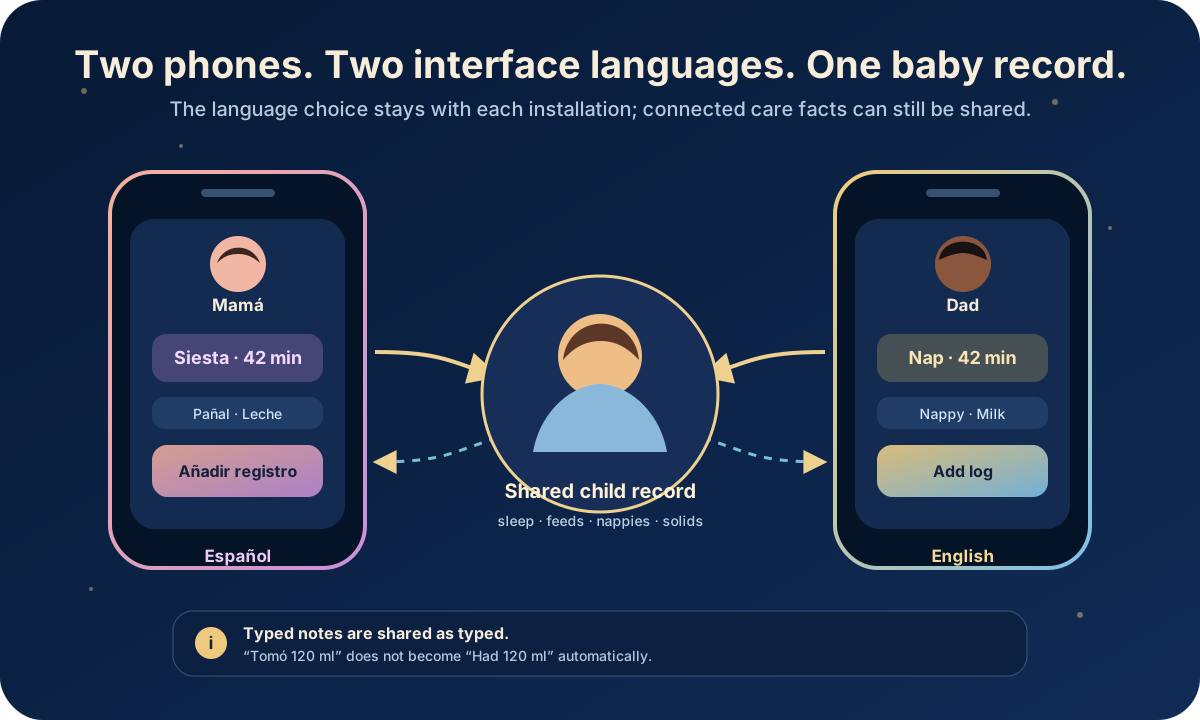
No. In the current OBubba app, the interface-language choice is saved on each phone, not inside the shared baby record. Two connected parents can therefore open the same child while one phone shows OBubba in Spanish and the other shows it in English. Changing the language on one installation does not rewrite the other parent’s setting.
There is an important limit: built-in interface labels can change language; text a person types does not get automatically translated. If Dad logs a note in English, Mum’s Spanish interface receives that same English note. OBubba does not silently guess a translation for family-written care information.
> Same baby facts. Each carer’s own interface. Original notes preserved.
The 30-second answer
| Question | Current OBubba behavior | |---|---| | Can two connected parents choose different app languages? | Yes. The preference is local to each installation. | | Do both phones still use the same connected baby record? | Yes. Language selection and child sharing are separate systems. | | Does changing my language change my partner’s phone? | No. Their saved preference is not overwritten. | | Do built-in buttons and headings translate? | Yes, where that string has a translation; untranslated material can fall back to English. | | Are my typed notes translated for another carer? | No. They remain exactly as entered. | | Are baby names or custom food names translated? | No. They are family-entered data, not interface copy. | | Can the app follow the phone’s language automatically? | Yes. Automatic (device language) is the default option. | | Can language and region be chosen separately? | Yes. Language controls interface copy; region controls local terms, health wording and emergency-number context. |
Which languages can you choose?
The current registry contains 15 selectable locale entries across 12 language families:
- English
- Spanish for Spain
- Spanish for Mexico
- Spanish for Latin America
- Simplified Chinese
- Traditional Chinese
- Japanese
- Korean
- Portuguese (Brazil)
- German
- French
- Italian
- Dutch
- Indonesian
- Bengali
There is also Automatic (device language). If the phone reports a supported locale, OBubba resolves to the closest registered option. If it does not, the app falls back safely rather than presenting an unregistered language.
Chinese handling is more deliberate than a single generic `zh` switch. The resolver prefers the exact script and maps devices from Taiwan, Hong Kong and Macau to Traditional Chinese even when Android supplies a regional locale without an explicit script tag. Mainland China and a bare Chinese locale resolve to Simplified Chinese.
The Spanish choices share a translated foundation while allowing regional wording to differ. That is why the picker distinguishes Spain, Mexico and Latin America instead of treating every Spanish-speaking household as linguistically identical.
What the real picker looks like
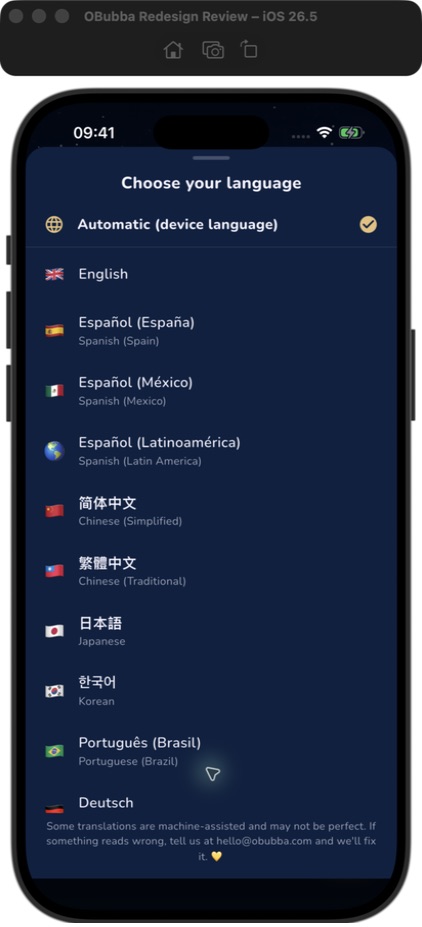
The picker is available from Account → Help & settings → Preferences → Language. It also appears on the welcome screen, so a new user can choose a readable interface before completing the rest of setup.
Each row leads with the language’s native name: Español, 简体中文, 日本語, 한국어, Bahasa Indonesia or বাংলা. An English description sits beneath it when that helps distinguish a region or script. This matters because a language menu written only in the app’s current language can be difficult to escape from after an accidental choice.
Tap a row and the whole app rebuilds into the chosen locale immediately. Choosing Automatic removes the explicit override and lets resolve the device language again.
Why connected parents do not need matching settings
OBubba stores its app preferences as a local JSON value in `SharedPreferences`. That value includes the chosen language alongside controls such as theme, 12- or 24-hour clock, haptics and quiet hours.
The shared baby record uses a different path. Connected carers join the same child and exchange dated care entries through that record: sleep, wakes, feeds, nappies, solids and other logged events.
The separation looks like this:
- Mum’s phone saves `es-MX` in its own preferences.
- Dad’s phone saves `en` in its own preferences.
- Mum logs a 42-minute nap to the connected child.
- Dad receives that same nap entry after sync.
- Mum’s screen can label it in Spanish; Dad’s can label it in English.
The duration is not translated because it is data. The word around it is interface presentation. One shared fact can therefore be rendered differently without creating two competing baby histories.
That design also means a grandparent can use larger familiarity cues on their own phone without asking the whole household to switch. It reduces friction at exactly the point family apps often fail: several carers need one source of truth, but they do not necessarily share one language, time format or phone setup.
What actually changes language?
The strongest answer is: OBubba-owned copy, where a translation exists. That includes interface elements such as:
- welcome-screen actions
- navigation and common buttons
- tracker labels
- preference names
- many sleep, feeding, growth and development headings
- date, decimal and am/pm presentation in locale-aware formatters
- built-in explanations and prompts covered by the locale catalogue
The app also keeps a resolved locale mirror for content engines that do not have direct access to the current screen context. That lets some generated guidance select locale-specific text rather than leaving every engine sentence in English.
But coverage is not identical across every language and every part of a large app. OBubba’s source explicitly allows missing strings to fall back to English, and the picker says:
> Some translations are machine-assisted and may not be perfect. If something reads wrong, tell us at hello@obubba.com and we’ll fix it.
That disclosure is not hidden in legal copy. It appears where the language is chosen.
What does not get translated?
OBubba does not automatically translate family-entered information. That includes:
- a baby’s name
- quick notes
- custom food descriptions
- medicine names and instructions entered by the family
- carer handoff notes
- custom routine wording
- names, relationships and other personal labels
Suppose one parent writes:
> Tomó 120 ml y volvió a dormir rápido.
The other phone receives that sentence as written. Its surrounding controls may say Feed, Sleep and Edit, but the note remains Spanish.
This is a safer product boundary than silently translating medicine, allergy or symptom wording and presenting the result as though the original carer wrote it. Automatic translation can be useful, but care records need provenance: who entered what, in which words, and when.
For a multilingual household, choose one of three practical note habits:
- Use short shared terms everyone understands: “120 ml”, “wet nappy”, “egg—no reaction”.
- Put both languages in the note when the distinction matters.
- Keep urgent medicine, allergy and clinical instructions in the exact agreed wording from the relevant professional; do not rely on app translation.
The app should eventually make the boundary more visible with an Original note label and an optional, clearly marked on-demand translation—not an invisible rewrite.
Language is not the same as region
The settings keep Language and Region as separate values.
Language answers:
> Which translation should the interface show?
Region answers:
> Which local terms, health-professional names, wording variants and emergency-number context should the app use?
A Spanish-speaking family living in the UK may reasonably want Spanish interface copy with UK regional safety context. A British parent living in Mexico may prefer English interface copy while expecting local emergency information. One selection should not silently overwrite the other.
That separation is especially important in a family app. Language is a readability preference; location-sensitive safety information is a different decision. OBubba’s model treats them as orthogonal rather than guessing region from the language row.
Always verify urgent numbers and clinical instructions for where the baby is physically located. An app preference is not a substitute for knowing the local emergency route.
Will 12- or 24-hour time match between phones?
Not necessarily—and that is useful.
Clock format sits in the same local settings object as language. One parent can use 19:30 while another sees 7:30pm. The underlying event still represents the same logged time.
Locale-aware formatting also changes details such as decimal separators and the placement of am/pm markers. The tests specifically check Spanish decimal commas and the natural placement of Japanese, Chinese and Korean day-period markers.
This is another example of separating fact from presentation:
- shared fact: the feed happened at a particular time
- Mum’s display: `19:30`
- Dad’s display: `7:30pm`
- Japanese display: a locale-appropriate form such as `午後7:30`
Nobody has edited the record merely by changing how their phone reads it.
What happens on a new phone?
The language selection belongs to the installation’s local preferences. Joining or restoring the shared child can bring back the baby record, but it should not be treated as proof that every display preference will arrive from the old device.
On a new phone:
- connect or restore the correct child
- confirm that recent shared entries have loaded
- open Preferences
- choose Language or Automatic
- separately confirm Region and clock format
This is preferable to a family-level language value, but OBubba could make the distinction clearer by labelling it Language on this device.
A calm setup for a multilingual family
Use this five-minute handoff once, before a tired overnight carer needs it:
- Connect each parent to the same baby rather than creating a duplicate child.
- On each phone, choose the interface language that person reads fastest.
- Check Region independently on both phones.
- Log one harmless test note, then confirm it appears on the other phone.
- Agree a tiny shared vocabulary for bottles, reactions, medicine and handoffs.
- Keep quantities and times explicit: `120 ml`, `02:10`, `5 ml as prescribed`.
- For anything safety-critical, read back the original instruction together.
The goal is not to force everyone into identical phrasing. It is to make the record understandable enough that the next carer can act without guessing.
What would make this genuinely best-in-class?
The current local-language architecture is the right foundation. A standout multilingual family experience would add:
- a clear On this device badge beside Language and clock format
- visible translation-coverage status for each language
- professional and clinical review status separated from machine-assisted draft status
- an Original text view for every translated content block
- optional note translation that never replaces the stored original
- a per-note language label and “translated for me” marker
- a shared household glossary for names, medicines, foods and settling phrases
- accessibility labels tested in every supported language
- screenshots and store listings for the strongest locale markets
- one-tap reporting of a mistranslation from the exact screen where it appears
The trust principle should remain simple: translate the interface generously; preserve family evidence faithfully.
The honest verdict
OBubba already solves the important structural problem. Connected carers do not have to sacrifice a comfortable interface language to keep one baby record. The preference lives locally, the child history can remain shared, regional safety context is separate, and free text is not invisibly rewritten.
It is not the same as promising that every sentence in all 15 locale choices has had professional review. The app itself acknowledges machine assistance and English fallback. That candour should stay visible as coverage improves.
For a multilingual family, the value is immediate: one parent can read “Siesta”, another can read “Nap”, and both can still be looking at the same 42 minutes.
Keep one baby record across two phones with OBubba → — share sleep, feeds, nappies and weaning facts while each carer keeps the interface settings that work for them.
Frequently asked questions
Can my partner use Spanish while I use English?
Yes. Choose Spanish on one installation and English on the other. The language preference is stored locally and does not replace the partner’s choice.
Does the baby’s shared data change language?
Built-in labels can render in each phone’s selected language. The underlying times, quantities, categories and child record remain the same.
Will OBubba translate a note my partner typed?
No. Free-text notes remain in the language entered. That preserves the original wording but means families should agree how to write important handoffs.
Why do I still see an English sentence?
Translation coverage varies. The app is designed to fall back to English when a string is not available rather than showing a blank or breaking the screen.
Are the translations human reviewed?
Do not assume that for every string and language. The current picker explicitly says some translations are machine-assisted and invites corrections.
Does language change my emergency number?
Language and Region are separate settings. Check Region for the country context and verify urgent help routes for your physical location.
Can the app follow my device automatically?
Yes. Select Automatic (device language). OBubba resolves supported device locales and otherwise falls back safely.
Will my language preference restore on a replacement phone?
Treat it as a device preference and check it after setup. Restoring or joining the child record is a separate process from choosing the interface language.
Related OBubba guides
- Share a baby tracker with your partner without duplicate logs
- Will OBubba’s weaning plan sync with my partner’s phone?
- How to split newborn night shifts without both parents running on empty
This article describes the current OBubba implementation reviewed on 27 April 2027. It is product guidance, not medical advice. Translation can contain errors; preserve and verify original wording for medicine, allergy, emergency and clinical instructions.
Ready to try OBubba?
Use OBubba to track feeds, sleep, naps, nappies, growth, milestones and family handovers in one calm baby tracker app.