You logged bedtime at 7:30pm, a wake at 11:15pm and another at 2:05am. In the morning, the 2:05 wake appears under a different date—or the Track screen still seems to be showing yesterday. Nothing has vanished. The calendar changed halfway through one physical night.
OBubba offers two ways to display the log: Calendar day puts every event under the date on the clock, while Wake to wake keeps bedtime and the whole night with the day that began at the previous morning wake. Whichever display you choose, OBubba's sleep analysis reconstructs the full night across midnight.
That distinction matters: storage, display and analysis are three different jobs.
The answer in one picture
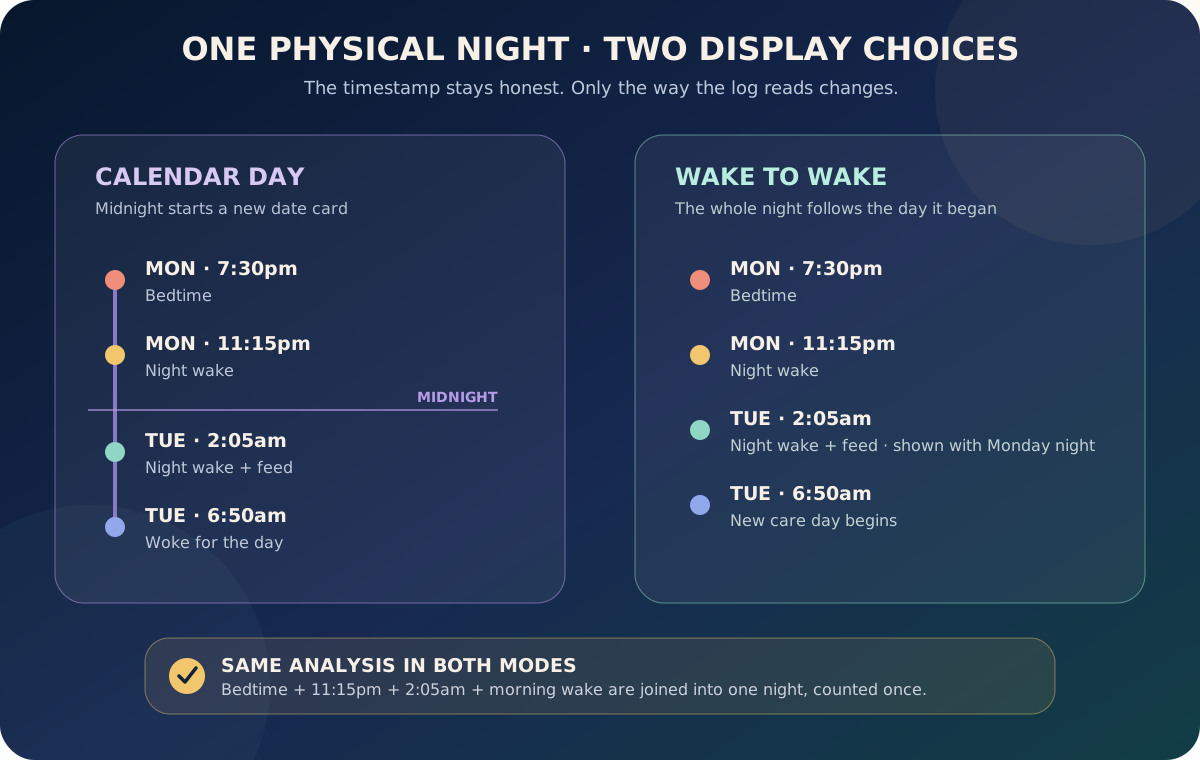
Imagine a night that begins on Monday:
- Monday 7:30pm — bedtime
- Monday 11:15pm — night wake
- Tuesday 2:05am — night wake and feed
- Tuesday 6:50am — morning wake
In Calendar day, Tuesday's 2:05am event appears on Tuesday because that is its wall-clock date.
In Wake to wake, the 2:05am event appears after Monday's bedtime because the family's care day runs from one morning wake to the next.
The event remains 2:05am on Tuesday underneath. Changing the display does not rewrite its timestamp.
Why baby nights and calendars disagree
A calendar day has a hard boundary at midnight. A baby's night does not.
Parents usually tell the story as “Monday night”, even though part of that night happened on Tuesday's date. Clinicians and sleep professionals may also review the complete bedtime-to-morning period rather than treating 11:59pm and 12:01am as different sleep episodes.
Neither display is universally correct:
| Choose Calendar day when… | Choose Wake to wake when… | |---|---| | you expect the log to match the date shown on the phone | you think of the whole night as belonging to the evening it began | | you share timestamps with another calendar-based record | you want bedtime, night wakes and night feeds in one continuous list | | “2am Tuesday” should visibly mean Tuesday | you prefer the way a sleep consultant reads a bedtime-to-morning night | | seeing yesterday after midnight feels confusing | seeing the night split across two date cards feels confusing |
The best setting is the one your exhausted brain can predict.
The three layers OBubba keeps separate
1. Storage: the event keeps its real local date
The app stores a live 2:05am event under Tuesday's local calendar key. It does not pretend that the clock still says Monday. Local dates are used deliberately so the family does not inherit confusing UTC date shifts.
This makes edits, exports and chronology honest. A 2am wake happened after midnight, even when the family describes it as part of Monday night.
2. Display: you choose how the log reads
Go to Account → Preferences → Your day → Day grouping and choose:
- Calendar day — every event shows under its clock date
- Wake to wake — the day runs from the baby's morning wake to the next morning wake
Calendar day is the safe default on a fresh installation. The app will not silently switch an older family into Wake to wake merely because an old settings file contained a legacy value. An explicit choice is saved and can be changed later.
The first time a parent logs a night wake, OBubba can show a one-time explanation of these two choices. Importantly, the wake is saved before that sheet appears, so a settings question never blocks the urgent 2am tap.
3. Analysis: one physical night is always joined
The night engine ignores the visual preference. It combines:
- the evening bedtime and pre-midnight night events from the bedtime date
- the after-midnight night wakes, night feeds and morning wake from the next date
That combined set powers night-wake count, night feeds, longest stretch, actual night sleep and the guidance that reads the night.
This means switching to Calendar day does not make the Sleep Consultant forget the 2am wake. Switching to Wake to wake does not duplicate it. The reports and sleep analysis read the same physical night in both modes.
What Wake to wake changes on the Track screen
Wake-to-wake mode changes the day-navigation anchor and the order of visible log rows.
Before 11am, the app may keep “today” anchored to yesterday when all of these are true:
- no morning wake has been logged yet
- no ordinary activity has been logged on the new date
- a plausible bedtime exists from the previous evening
- no more than about 13 hours have passed since bedtime
This prevents the screen jumping to an empty Tuesday at midnight while the baby is still in Monday night's sleep.
Once the morning wake is logged, the family starts ordinary daytime activity, the night has become implausibly long or the morning cutoff passes, the navigation moves to the new calendar date. That guard prevents a Track screen becoming “stuck on yesterday”.
For the list itself, the app:
- leaves Monday's daytime events and bedtime in Monday
- keeps Monday's pre-midnight night wake after bedtime
- pulls only Tuesday's early-hours night-tagged point events into the end of that list
- leaves Tuesday's morning wake, breakfast feed and daytime activity on Tuesday
The pulled 2am entries are displayed after the 11:15pm wake, even though 2:05 is numerically smaller than 23:15. The result reads like one night rather than a badly sorted calendar.
What the app deliberately does not move
Wake-to-wake grouping is narrow. It does not pull every early event backwards.
A 5:30am day feed stays on the new day
If a parent records a 5:30am feed as an ordinary morning feed rather than a night feed, Wake to wake does not “steal” it into the previous night merely because it happened early.
The parent's classification matters. That is why the question “Does a 5am feed count as night or morning?” has no universal clock-only answer.
Sleep and nap arcs are not shuffled between lists
An overnight sleep timer already belongs to the date on which the arc began. The display helper moves night-wake and night-feed moments, not complete sleep or nap arcs. This avoids copying or duplicating a block that already spans midnight correctly.
The next morning's wake stays with the new day
The 6:50am “woke for the day” entry is the boundary, not another tail event to pull backwards. The next care day begins there.
How the current screen represents the night
The Track clock is designed as a continuous 24-hour dial, so a running bedtime can cross 12am without being visually chopped into two sleeps.
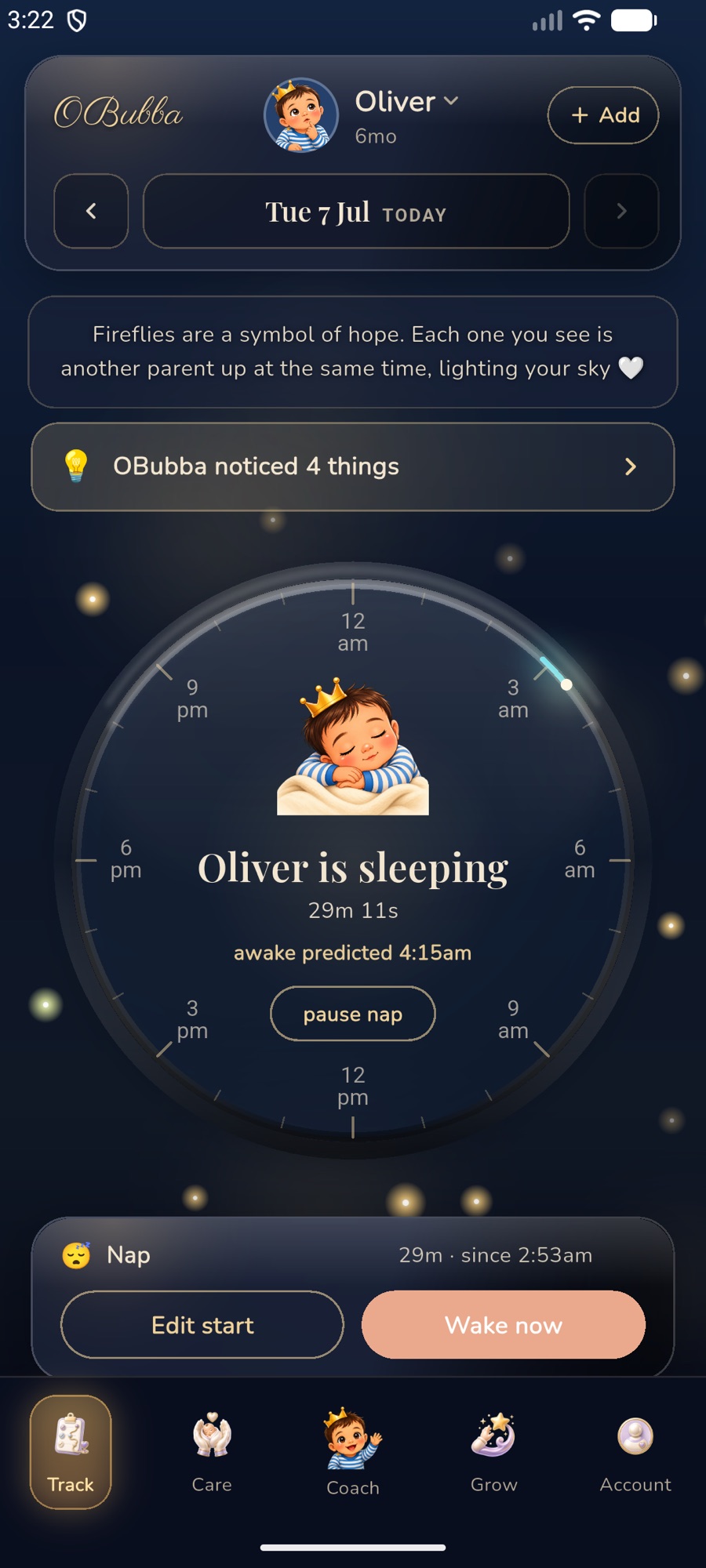
In the screenshot, the phone clock reads 3:22am while the Track header still shows the evening-side date. That is the Wake-to-wake idea in practice: the family is still inside the night that began after that date's daytime care.
The same night remains analytically complete in Calendar day mode. Only the visible date grouping changes.
Try OBubba free → — log one night naturally, choose the date view that makes sense to your family, and let the app do the midnight stitching underneath.
“My 2am wake is missing”—check these five things
1. Look at the adjacent date
In Calendar day mode, an after-midnight wake belongs to the new date. Use the date pill or back arrow and check both the bedtime date and the morning date.
In Wake-to-wake mode, open the day on which bedtime began. Its night tail should follow the evening events.
2. Check the Day grouping preference
Open Account → Preferences → Your day → Day grouping. If the app's behavior feels backwards, change the setting. It is safe and reversible because the underlying logs are stored the same way.
3. Check whether the event was saved as a night wake
An ordinary non-night wake or feed is intentionally treated as daytime activity. The app should not infer that every 4am, 5am or 6am event belongs to the previous night.
4. Separate a stir from a wake you meant to count
Not every grunt needs an entry. Log a proper wake when the baby is clearly awake or needs a response. If you paused the sleep and later resumed it, the app can preserve the awake interval when the timing is plausible rather than inventing a duration after a very late tap.
5. Review the full night summary, not only one date card
A date list answers “where is the row?” The night summary answers “what happened from bedtime to morning?” If the row is visible on Tuesday but Monday night's wake count includes it once, the system is working.
What happens when you add a forgotten 2am wake later?
Back-filling is where date confusion can become a real data bug.
Suppose it is Tuesday morning and you open Monday to add the wake you forgot. A naive app might store “2:00am” on Monday because Monday is the selected screen. The night reader would then see an early-hours event on the wrong side of the bedtime boundary and could attach it to Sunday night—or drop it from Monday night entirely.
OBubba's current repository corrects that. When a parent adds an early-hours night wake or night feed while reviewing a past evening, the app rolls the event forward to the morning-after calendar bucket. The timestamp still says 2am, and the Monday-night analysis then finds it where it physically belongs.
The code also handles edits differently from new entries. An early-hours event already stored on Tuesday must not roll forward to Wednesday merely because the parent opens and saves it unchanged. Tests protect that no-op edit from moving the event twice.
Date stepping uses calendar arithmetic rather than adding or subtracting a fixed 24 hours, so spring and autumn clock changes do not push the event onto the wrong day.
Why the morning cutoff is 11am
The night reconstruction needs a practical line between an after-midnight tail and the next evening. The current app uses 11:00am as its fixed morning cutoff when assembling a night.
That does not mean an 11:01am sleep is automatically a nap or that every baby must be up by 11. It is an internal partition that stops Tuesday evening's bedtime being pulled into Monday night and prevents one early-hours feed being counted in two different nights.
The app combines the cutoff with event type, the night flag and bedtime-to-morning structure. A clock time alone does not decide the meaning of every entry.
Which setting should you use?
Choose Calendar day if you want:
- exact agreement with phone dates
- less surprise after midnight
- easier comparison with paper notes or another calendar-based system
Choose Wake to wake if you want:
- the whole night listed after the day that led into it
- bedtime, pre-midnight wakes and 2am feeds in one narrative
- the Track screen to stay on the bedtime-side day while the baby is still asleep
There is no analytics advantage to either display. The underlying night engine uses wake-to-wake reconstruction in both.
Log safely, not perfectly
A correct date is not more important than responding to your baby or staying awake safely.
The NHS suggests keeping lights low, voices quiet and nighttime interaction calm. It also advises that the safest place for a baby to sleep for the first six months is in a cot, on their back, in the same room as the parent. The Lullaby Trust warns against falling asleep with a baby on a sofa or armchair.
If picking up the phone adds risk or stimulation, care for the baby first and add the event later. OBubba's catch-up logic exists because real parents forget 2am taps.
Quick answers
Did OBubba change the date of my wake?
A live wake keeps the local calendar date on which it happened. Wake-to-wake mode can display an early-hours night event with the previous evening's care day, but it does not rewrite the timestamp.
Does switching modes change my totals?
No. It changes date navigation and log grouping. Night analysis, reports and stored events are mode-independent.
Why is “Today” still yesterday at 3am?
In Wake-to-wake mode, the app can keep the Track screen on the day the night began until the morning wake or new-day activity establishes the next care day.
Why did my 5:30am feed stay on today?
If it was saved as an ordinary day feed, the app respects that. Only early-hours, night-tagged point events are pulled into the previous evening's log in Wake-to-wake mode.
Can I change my choice later?
Yes. Go to Account → Preferences → Your day → Day grouping. The first-night-wake explanation appears only once, but the preference remains editable.
What if the night count is still wrong?
Check that bedtime, the morning wake and each meaningful night wake were saved once and with the intended night/day classification. Review adjacent dates, then edit the incorrect event rather than creating duplicates.
Related guides
- Does a 5am feed count as night or morning?
- How much did my baby actually sleep last night?
- What to track when your baby wakes at night
- Forgot to stop the baby sleep timer?
- How does OBubba decide a sleep pattern is real?
Sources and further reading
- NHS: Helping your baby to sleep
- NHS Best Start in Life: Safer sleep advice for babies
- The Lullaby Trust: Co-sleeping and avoiding sofa or armchair sleep
OBubba supports parent-entered tracking, organisation and pattern review. It cannot observe your baby, determine why they woke, decide whether a feed is needed or replace safer-sleep guidance and individual advice from your midwife, health visitor, GP, feeding team or paediatric service.
Ready to try OBubba?
Use OBubba to track feeds, sleep, naps, nappies, growth, milestones and family handovers in one calm baby tracker app.